UPS Reference Sledování
*AfterShip provides package tracking services only. For inquiries about order details, please contact your retailer.
Pokročilé funkce
How to track my UPS packages?
Track with UPS
UPS Reference Number (on UPS Website)
If you have the need to track your UPS packages by reference number, it is also required to enter the UPS official page and find the "Track by Reference Number" choice to proceed.
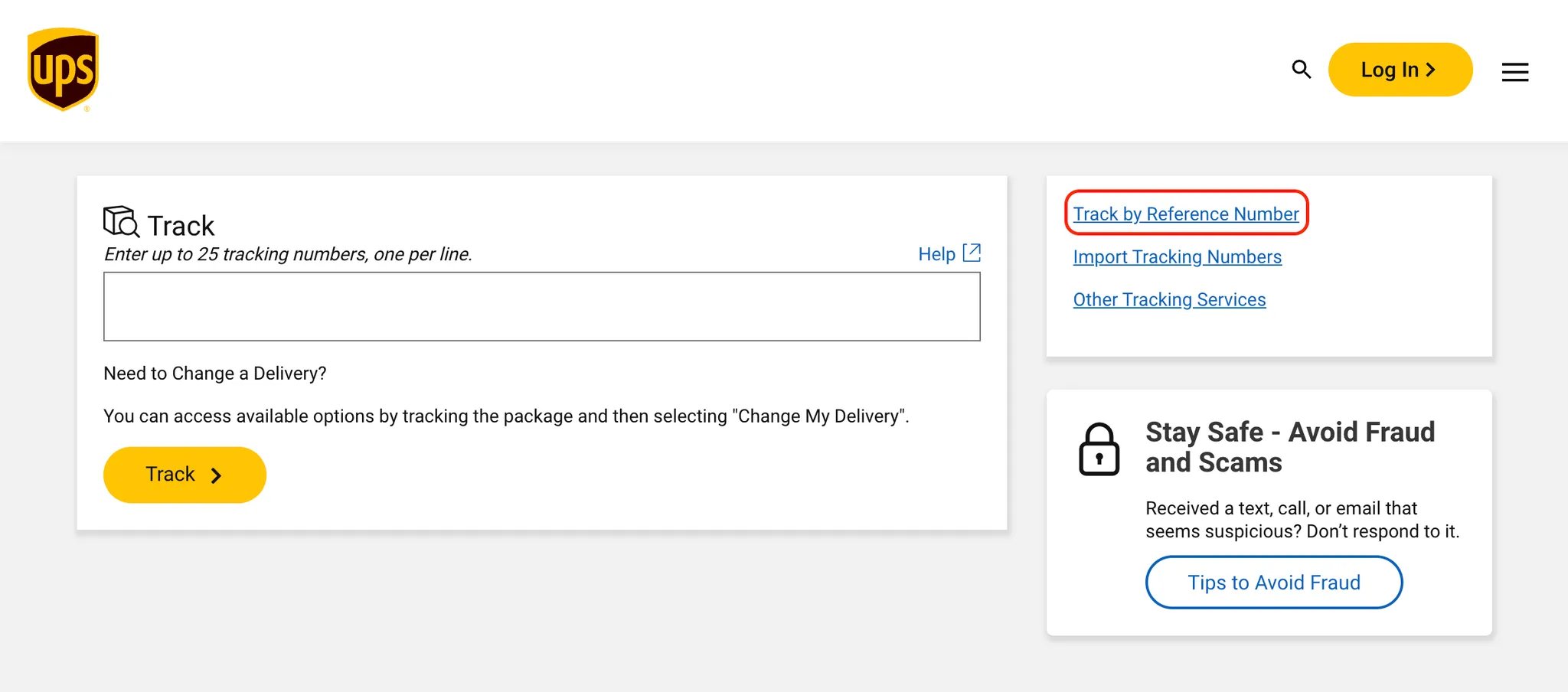
You may see an input field like this:
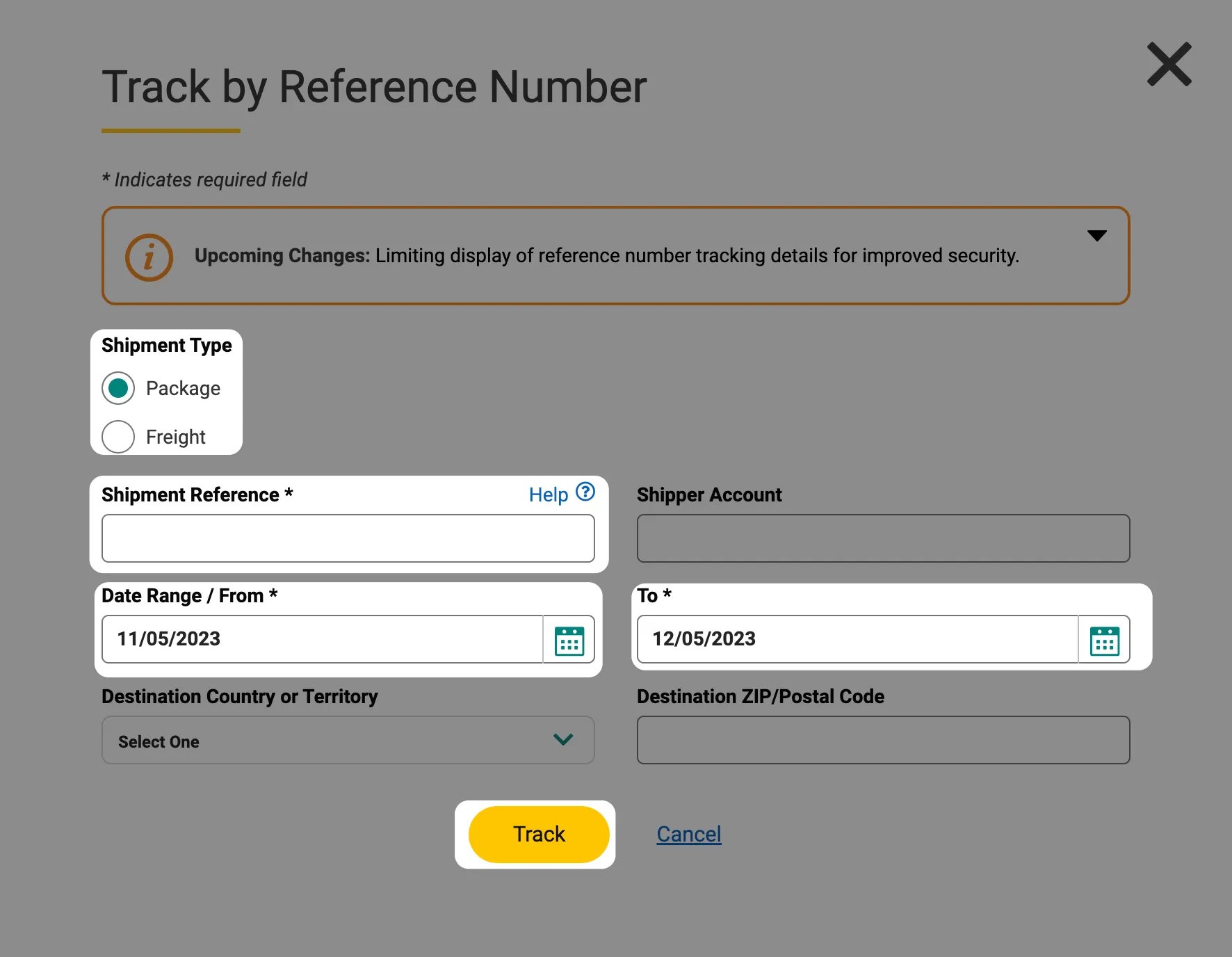
That's where you should enter to get your shipment information:
- Your shipment type (package/freight)
- Shipment reference
- Shipment date range
- Destination country/territory and ZIP/postal code (optional but helpful)
UPS Mobile App
UPS offers a convenient way to track packages anytime, anywhere. You can follow these steps to start tracking with the UPS Mobile App.
- Just like before, you need to get your reference number.
- Download the UPS Mobile App - available on iOS (App Store) and Android (Google Play).
- Log in or sign up your UPS account.
- Tap the "Track" button at the bottom menu on the home screen.
- Enter your UPS tracking number and view tracking details.
You can also enable push notifications on the UPS Mobile App by going to Settings > Notifications and turning on tracking updates.
UPS SMS
UPS also offers SMS updates and you can check your deliveries without visiting a website or downloading an app. Here's how to track your UPS package via SMS:
- Just like before, you need to get your reference number.
- Visit UPS My Choice® to log in or sign up for SMS delivery alerts.
- Send your UPS reference number to 69877 (for U.S. customers) via SMS.
- Receive tracking updates responded by UPS.
You can also reply with additional commands for more information (e.g., "Help" for more customer support or "Stop" to unsubscribe).
UPS Phone
UPS also offers package tracking by phone. This method is ideal for quickly checking status or connecting with a live representative. In the U.S., dial 1-800-742-5877 (1-800-PICK-UPS). For international numbers, you can visit the UPS Contact Page.
UPS Email
UPS allows you to get shipment updates directly in your inbox by simply sending an email. Here's how to use email to track your UPS package:
- Just like before, you need to get your reference number.
- Open your email client and compose a new email for [email protected].
- Enter your UPS tracking number in the email body (not the subject line).
- After you've sent the email, UPS will reply with an email containing the latest tracking status for each shipment.
UPS My Choice Account
- Sign up for and log into your UPS My Choice account to access proactive delivery alerts, delivery rescheduling, and a dashboard showing all incoming shipments—without needing each individual tracking number.
UPS Store Locations
- Find your nearest UPS Store or Access Point via the UPS Locator.
- Bring your tracking number and shipment details for faster service.
- Provide your tracking or reference number to a staff member, who can look up and print your shipment status.
Track with AfterShip
AfterShip Package Tracking Page
AfterShip helps you track your packages with multiple carriers including UPS and supports any shipments including UPS Reference Tracking. Following these steps, you can effortlessly get updated information about your packages:
- Find your UPS Reference tracking number first.
- Go to the AfterShip Package Tracking Page for the search this time.
- In the designed input box, enter up to 50 tracking numbers, each per line.
- Click on the "Track" button and start processing.
A few seconds later, you can review all updated information about your packages! Here's a simple diagram to guide you:

-
The AfterShip Mobile App also helps you track packages from UPS Mail Innovations and over 1,200+ global carriers. Here's how to track your UPS package using the AfterShip Mobile App:
- Just like before, you need to get your reference number.
- Download AfterShip Mobile App - available on iOS (App Store) and Android (Google Play).
- Log in or sign up your AfterShip account.
- Tap the "Add Tracking" button and input the tracking number.
- AfterShip will automatically detect UPS as the carrier.
- Once the tracking number and carrier are added, AfterShip will display detailed status updates for your package.
To stay updated, you can enable push notifications for tracking updates on the AfterShip Mobile App. This means you'll receive alerts when the status of your package changes.
Where and how to find my UPS Reference tracking number?
Shipping Confirmation or Invoice Emails
The reference number is typically included in the shipment confirmation or invoice emails sent by the retailer or logistics provider. It may appear alongside your order or invoice details. Look for terms like:
- "Reference number"
- "Shipment ID"
- "Order reference"
*This is one of the most common sources for recipients to find the reference number.
UPS Shipping Labels
If you have access to the physical package or a scan of the shipping label, the reference number may appear under a field labeled:
- "Shipment Reference"
- "Reference"
- "Customer Reference"
*Visible near the barcode or address block on UPS labels, especially if printed using UPS systems like WorldShip or UPS CampusShip.
UPS CampusShip or WorldShip (for Shippers)
Senders using UPS's business tools—such as:
- UPS CampusShip
- UPS WorldShip can assign and later retrieve reference numbers. If you're the recipient, ask the sender to provide the reference number from their UPS system.
Business Order Management Systems
If the shipment is related to a business or eCommerce platform (e.g., B2B supplier, ERP), the reference number may also be stored in:
- Order confirmation dashboards
- ERP/inventory systems
- Customer account portals
What does my UPS Reference tracking number look like?
A UPS Reference Tracking number is not a standard UPS tracking code (e.g., starting with "1Z"). Instead, it is a custom identifier assigned by the shipper, which can include up to 22 alphanumeric characters (letters and/or numbers, without spaces or special characters).
This reference number can be tied to a variety of internal shipment identifiers, such as:
- Purchase order numbers
- Invoice IDs
- Customer account numbers
- Sales order or contract numbers
Because the reference number's format is defined by the shipper's internal system, it may vary in length and composition. It is used alongside additional details—like shipment type, pickup or destination postal code, and date range—to enable effective lookup via UPS's "Track by Reference Number" feature on the UPS tracking page.
What does UPS Reference tracking status mean?
For detailed information about UPS tracking statuses, please refer to our comprehensive UPS Tracking Guide.
Get real-time tracking notifications with AfterShip
With an AfterShip subscription or the AfterShip Mobile App, you can stay informed at every stage of your package with real-time tracking notifications. Whether you're waiting on a personal delivery or managing business shipments, AfterShip ensures you never miss an update.
About UPS Reference Tracking
UPS Reference Tracking is a feature that allows users to track shipments using a reference number instead of a traditional tracking number. This is particularly useful for businesses or individuals who want to organize and monitor shipments based on internal data—such as purchase order numbers, customer account numbers, invoice numbers, or other identifiers—in place of (or alongside) the standard UPS tracking number.
At the time of shipping, the sender enters this reference number during the label creation process using UPS tools like WorldShip. After dispatch, anyone—whether the recipient or shipper—can use that reference number, combined with optional filters such as date range and destination postal code, to track shipment via UPS's tracking interface.
Reference tracking is supported for most domestic and international UPS services—including Ground, Air, Freight, and Mail Innovations—assuming a reference number was assigned during shipment setup. This tool offers a convenient alternative for users who prefer tracking by internal identifiers rather than typical tracking numbers.
What are the differences between AfterShip and UPS Reference tracking?
While UPS Reference Tracking is a useful tool for tracking UPS shipments by internal reference numbers, AfterShip Package Tracking Page and Mobile App are the better solution for:
Multi-carrier tracking with 1,200+ carriers supported
Efficiently track shipments from 1,200+ global carriers, not limited to UPS and USPS, including FedEx, DHL, GLS, Royal Mail, and more, eliminating the need to visit multiple carrier websites and simplifying multi-carrier shipment monitoring.
Integration with eCommerce platforms
Integrate seamlessly with major eCommerce and marketplace platforms like Shopify, Salesforce Commerce Cloud (SFCC), WooCommerce, Magento, BigCommerce, Amazon Seller Central, and more, enabling automated tracking updates and improving the post-purchase experience.
Scalability for both individual and business needs
Suitable for both individual shoppers and sellers who frequently handle large volumes of packages from various sources, offering scalable solutions for diverse shipping needs that are not limited by carrier restrictions.
- For individuals: Track all packages—regardless of the carrier or online store—in one place using AfterShip Package Tracking Page or Mobile App. AfterShip makes it easy to read and understand tracking details and receive real-time package status update notifications.
- For sellers: AfterShip supports multi-channel retailers, marketplaces, and logistics teams. With powerful tracking API and webhook, sellers can deliver a seamless post-purchase experience and scale operations effortlessly.
Why track and integrate UPS packages with AfterShip?
✅ Support for any shipment worldwide with full coverage
Easily track any shipments from parcel, trucking, freight, postal, express, and 3PL carriers worldwide, ensuring comprehensive coverage whether you're monitoring a single delivery or orders from multiple logistics providers.
✅ Carrier auto-detection by tracking number
The package tracking page automatically detects the shipping carrier through seamless integrations, ensuring accurate identification based on tracking number format to avoid manually selecting the courier and eliminate any guesswork.
✅ Detailed package status notifications for complete tracking visibility
Stay updated with every step of your package's delivery journey, including info received, in transit, out for delivery, available for pickup, failed attempt, delivered, pending, expired, and exception, all clearly displayed to provide complete visibility into the delivery process.
✅ AI-powered estimated delivery dates with high precision
View AI-powered estimated delivery dates, calculated from carrier reliability, route analysis, and delivery performance with up to 95% prediction accuracy so you can better plan for your package's arrival and reduce uncertainty around delivery timelines.
✅ Email alerts on status change for constant updates
Receive automatic email notifications whenever your package status changes, helping you stay informed without constantly checking the page or manually refreshing for new updates.
✅ Bulk tracking capability for efficient package management
Efficiently track up to 50 packages at once by entering multiple tracking numbers, giving you a convenient way to monitor all your shipments together in one place.
✅ Access to 1,200+ global carriers for comprehensive tracking
Seamlessly access tracking updates from 1,200+ international carriers including FedEx, UPS, DHL, USPS, and many more, enabling you to follow virtually any package worldwide with confidence.
✅ Multilingual tracking support for global communication
The tracking interface is available in 30+ languages, including English, Spanish, French, German, Japanese, and Italian, making it easy to track packages in your preferred language.
Často kladené otázky
Is a reference number the same as a tracking number?
No. A tracking number (e.g., starting with “1Z”) is automatically generated by UPS and is unique to a specific package. A reference number is manually assigned by the shipper and used as a secondary identifier.
Can I track multiple shipments with the same reference number?
Yes, if multiple packages were shipped using the same reference within your specified filters, all will appear in the search results.
What should I do if UPS Reference Tracking returns no results?
• Confirm your reference number is accurate and matches exactly as entered in the sender’s system.
• Ensure you’ve selected the correct shipment type, date range, and postal code (if used).
• Verify that a reference was indeed assigned during the shipment creation process. If problems persist, contact the sender or UPS Customer Service for assistance.
Can I use a reference number with the UPS mobile app?
As of now, UPS Reference Tracking is best used through the UPS website. The mobile app focuses on standard tracking numbers. You may still attempt to use the reference number if you access the full website via your mobile browser.
Is reference tracking available internationally?
Yes. Ships created with a reference number can be tracked domestically or internationally via the UPS tracking portal, provided the reference was entered during shipment setup.
Vylepšete celý zážitek po nákupu s AfterShip










Integrujte UPS Reference a Multi-Carrier Tracking API
Snadno integrujte sledování zásilek do svého systému nebo webu pro bezproblémové sledování. Rozhraní API pro sledování AfterShip vám umožňuje nabízet viditelnost zásilek napříč více kontaktními body, aniž byste museli napínat vaše vývojové zdroje.- Globální pokrytí: 1 100+ integrací operátorů a 52+ jazyků
- Přesnost: Normalizovaná data a standardizovaných 7 hlavních stavů a 33 vedlejších stavů
- Integrita dat: AI pomáhá rozpoznat nové vzory sledovacích čísel
- Uptime & Spolehlivost: 99,99 %+ provozuschopnost, ISO 27001, SOC2 a soulad s GDPR

Zákazníci uznávaní za výjimečné služby