Integration with AfterShip Personalization
Data Reporting
Merchants who are using AfterShip Personalization API for product recommendations often require data to analyze the sales strategy of the widget. Instead of building a complex tracking system from scratch, AfterShip offers a simple and fast solution. Most stores can integrate the required reporting events and begin receiving data in just one hour. The following key metrics are included in the reports:
Users are primarily identified by customerId. If the user lacks a customerId, a random string generated and stored in the LocalStorage by AfterShip Pixel will serve as the session ID.
- Unique Visitors: Number of unique visitors who viewed the widget.
- Click Rate: The percentage of unique visitors who clicked on the widget. Multiple clicks by the same user count as a single click.
- Formula:
Click rate = unique clicks / unique visitors
- Formula:
- Conversion Rate: The percentage of visitors who purchased a product featured in the widget.
- Formula:
Conversion rate = converted visitors / unique visitors
- Formula:
- Revenue: The total revenue generated from the widget's product recommendations.
- Definition: Revenue is attributed if a user interacts with a product in the recommendation widget and makes a purchase of that product within 24 hours.
Requirements
For accurate revenue reporting, AfterShip links the Order ID from the events.purchaseCompleted event to the final prices of the items. Depending on your setup, the requirements may differ:
- For Shopify Headless Stores: Simply install the AfterShip Personalization app.
- For Commence API Users: Ensure that order data synced through the Commence API includes clear line item pricing.
Key Events for Reporting
To capture the necessary data, you need to report at least three events on your website: events.promotionViewed, events.promotionEngaged, and events.purchaseCompleted. These events follow a user’s journey through the store.
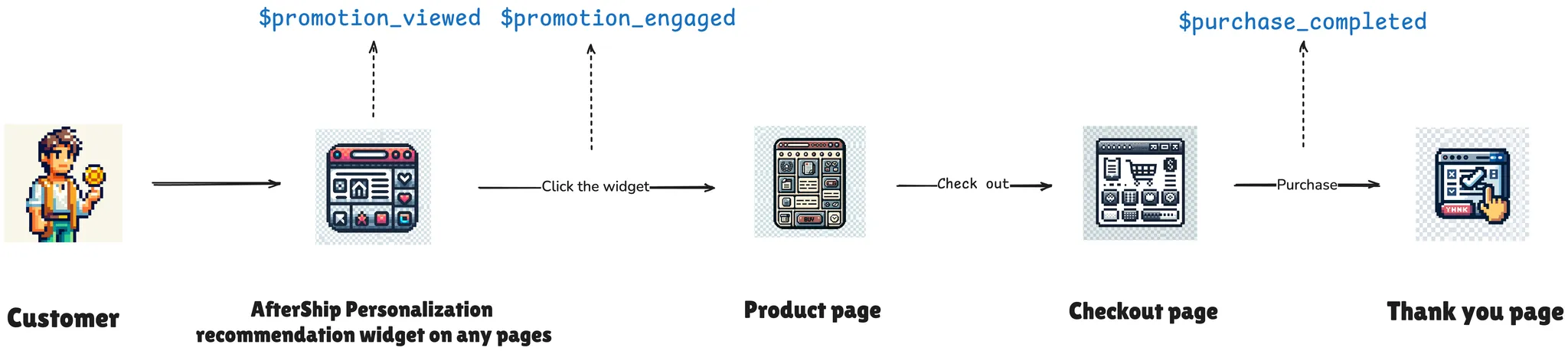
1. Upsell Offer View Event
Triggered when an upsell offer is displayed.
Event: events.promotionViewed
Parameters:
- promotionProperty: The property group of promotion.
PromotionProperty Parameters:
- promotionId: The ID of the promotion associated with the event.
- appName: Specifies the source application generating the event, which, in this case, is AfterShip Personalization. It helps differentiate events originating from various applications or modules within the AfterShip ecosystem.
- promotionsSceneName: Identifies the specific business context or page type on an eCommerce platform where the promotion is shown. Common examples include HomePage, ProductPage, CartPage, CheckoutPage, ThankYouPage, and OrderStatusPage.
- promotionAssetName: Uniquely identifies the specific widget or component on a page that displays the promotion. It is especially useful when multiple recommendation modules (widgets) exist on a single page, enabling detailed performance analysis for each widget.
Example Payload
preparing...
2. Click Product Event
Triggered when a user clicks on any part of a recommended product within the upsell widget (e.g., product image, title, variant, or the **Add to Cart **button).
Event: events.promotionEngaged
Parameters:
- promotionProperty: The property group of promotion.
- engageMethod: string
PromotionProperty Parameters:
-
appName: Specifies the source application that triggered the event, in this case, AfterShip Personalization. This helps differentiate events originating from various applications or modules within the AfterShip ecosystem.
-
promotionsSceneName: Identifies the specific business context or page type where the promotion is displayed on an eCommerce platform. Common examples include: HomePage, ProductPage, CartPage, CheckoutPage, ThankYouPage, and OrderStatusPage.
-
promotionAssetName: Uniquely identifies the specific widget or component displaying the promotion. This is especially useful when multiple recommendation modules (widgets) are present on a single page, allowing for detailed performance analysis of each widget.
-
promotionId: The ID of the promotion associated with the event.
Example Payload
preparing...
3. Purchase Event
Triggered after a user completes a purchase. It can be sent from either your website's frontend or backend, depending on the capabilities of your eCommerce platform.
Event: events.purchaseCompleted
Parameters:
-
orderId: A unique identifier for the order.
-
currency: The currency used for the order payment.
-
totalAmount: The total payment amount for the order.
-
items: An array of objects containing details about each product in the order (e.g., item ID, product ID, price, etc.). Refer to the Item resource page for details.
Example Payload
preparing...