Authentication
Learn how to authenticate your API requests in a few easy steps. There are 3 different types of API authentication methods.
How to get your API Key?
- Log in to your AfterShip account. (If you don’t have it, click Create account at the bottom of the login page to create one for FREE.)
- Visit API keys.
- Click Create an API key and follow the given instructions to generate your API key.
1. API Key
The API Key method is a more straightforward authentication method that only verifies whether the API Key value is correct or not.
Required Headers
| Header Name | Description | Example |
|---|---|---|
| as-api-key | The API key retrieved from the developer portal | 6e759c509d174859be1fb856c4ab646e |
2. AES
Required Headers
| Header Name | Description | Example |
|---|---|---|
| as-api-key | The API key retrieved from the developer portal | 6e759c509d174859be1fb856c4ab646e |
| as-signature-hmac-sha256 | Computed signature | bcfba53d95454ada96b9658c4f178764 |
| date | UTC time in RFC 1123 format. Kindly note that the calculated signature is only valid for 3 minutes before or after the datetime indicated in this key. | Sun, 06 Nov 1994 08:49:37 GMT |
| content-type | Content type string. If the request body is empty, set content_type to an empty string | application/json |
Calculating the signature
Calculate the signature using the flow given below:
- Construct SignString.
- Get the required API secret from the API key generation page.
- Calculate the hash of
SignStringwithhmac-sha256algorithm. - Encode the result in base64 format; the output will be the required signature.
3. RSA
Required Headers
| Header Name | Description | Example |
|---|---|---|
| as-api-key | The API key retrieved from the developer portal | 6e759c509d174859be1fb856c4ab646e |
| as-signature-rsa-sha256 | Computed signature | bcfba53d95454ada96b9658c4f178764 |
| date | UTC time in RFC 1123 format. Kindly note that the calculated signature is only valid for 3 minutes before or after the datetime indicated in this key. | Sun, 06 Nov 1994 08:49:37 GMT |
| content-type | Content type string. If the request body is empty, set content_type to an empty string | application/json |
Public API secret
An RSA key pair (public and private) is required for generating this API key.
Follow these steps to generate an RSA key pair:
-
If using Mac or Linux, open Terminal. For Windows, use Git Bash or WSL2.
-
Run:
ssh-keygen -t rsa -m PEM -f keyLeave the passphrase blank.
-
This creates RSA key pair files (key and key.pub)
-
Generate the public key:
ssh-keygen -e -f key.pub -m PEM > key.pemThis create
key.pem -
View
key.pemcontent by typingcat key.pem. Copy it, and paste it into the Enter the public API secret box in the AfterShip Organization portal.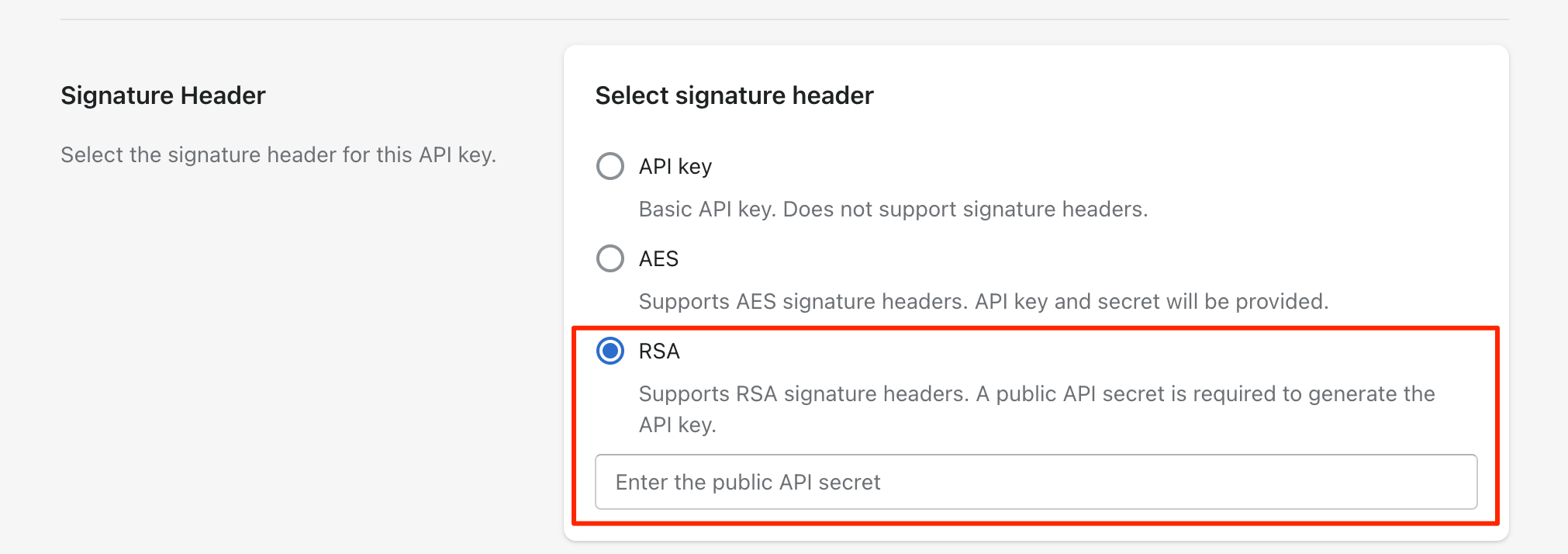
Calculating the signature
Follow this flow:
- Construct SignString.
- Get the private key (the pair of the public key configured in the AfterShip Organization portal).
- Calculate the digest of SignString with the
RSA_SIGN_PSS_2048_SHA256algorithm using the previously generated private key. Refer to RFC 8017 forRSASSA-PSSsignature details. - Encode the result in base64 format; this gives you the required signature.