埃斯蒂斯追踪

*AfterShip provides package tracking services only. For inquiries about order details, please contact your retailer.
高级功能
埃斯蒂斯追踪
基本上有三种方法可用于跟踪 Estes 发货。用户可以选择使用第三方追踪平台或按照官方网站推荐的方法进行追踪。要有效跟踪您的 Estes 包裹,您可以使用以下工具:
这些选项提供了监控和追踪 Estes 货运进度的便捷方式。
使用 [AfterShip] 追踪 Estes 包裹(https://www.aftership.com/track)
AfterShip 为众多邮政服务提供可靠且全面的包裹跟踪解决方案。如果您正在寻找一个方便的第三方平台来监控您的 Estes 包裹,AfterShip 跟踪页面将是一个很好的选择。
查找您的跟踪号码:检查您的电子邮件或下订单时收到的任何确认消息。追踪号码通常由运输公司或在线零售商提供。
访问 AfterShip 追踪页面:点击此链接:https://www.aftership.com/track 即可访问 AfterShip,这是一个支持各运输公司追踪的便捷平台。
输入您的跟踪号码:找到提供的搜索栏或输入字段。输入您的 Estes 包裹追踪号码,然后单击“追踪”按钮继续。
查看跟踪信息:给网站一些时间来处理请求。不久之后,您将看到一个更新的页面,其中显示包裹的最新状态。
在官方网站上追踪 Estes 包裹
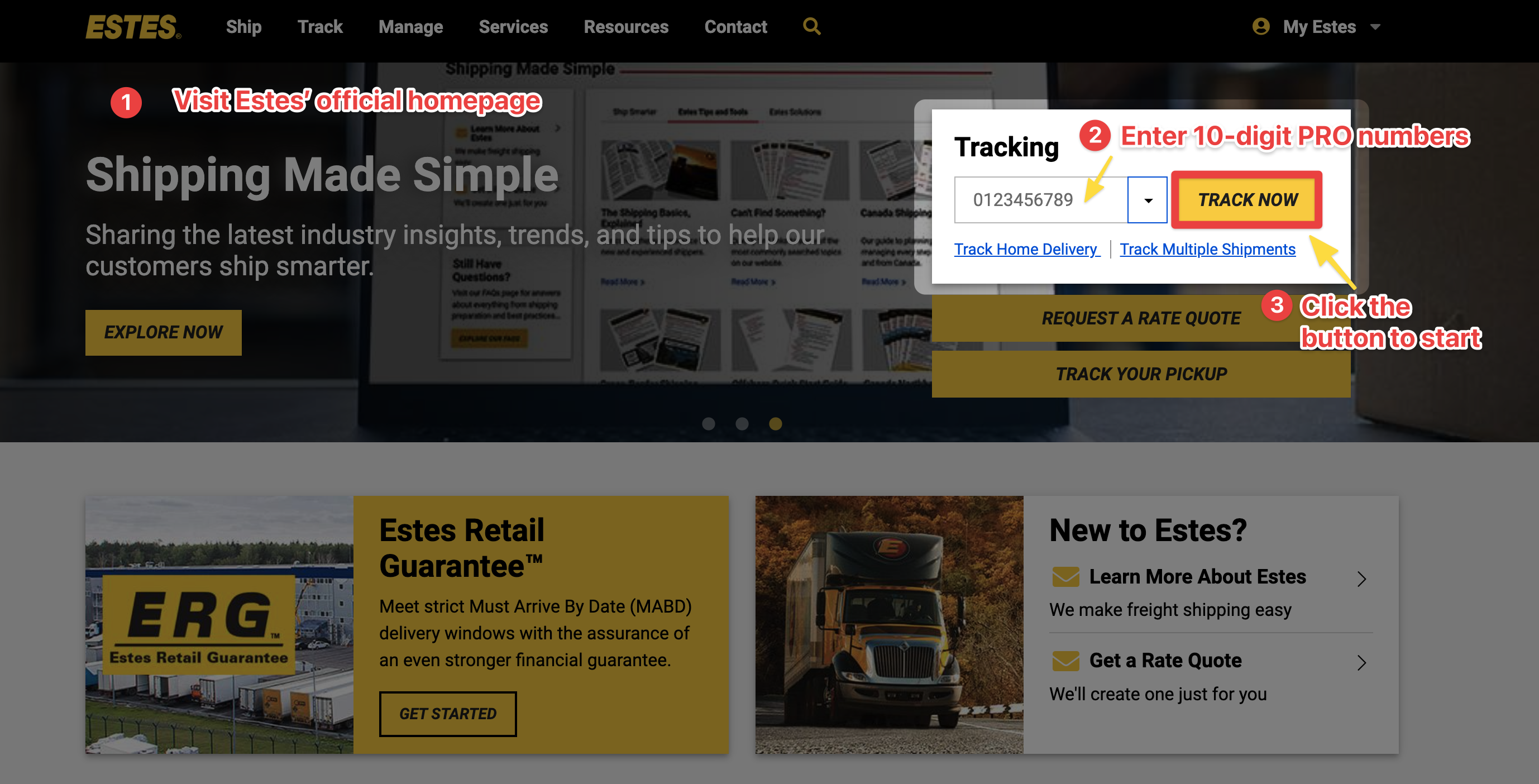
访问官方网站:访问 Estes Express 主页 https://www.estes-express.com/ 并找到 Tracking 部分在页面上。
输入 PRO 编号:在指定字段中输入您唯一的 PRO 编号,这是分配给每批货件用于跟踪目的的 10 位货运单编号。
获取实时更新:输入PRO号码后,点击“立即追踪”。您将很快检索到您的货件的详细实时状态更新。
为了增强您的理解,下面提供了一个直观的说明,以方便您的理解。
使用追踪应用程序追踪 Estes 包裹
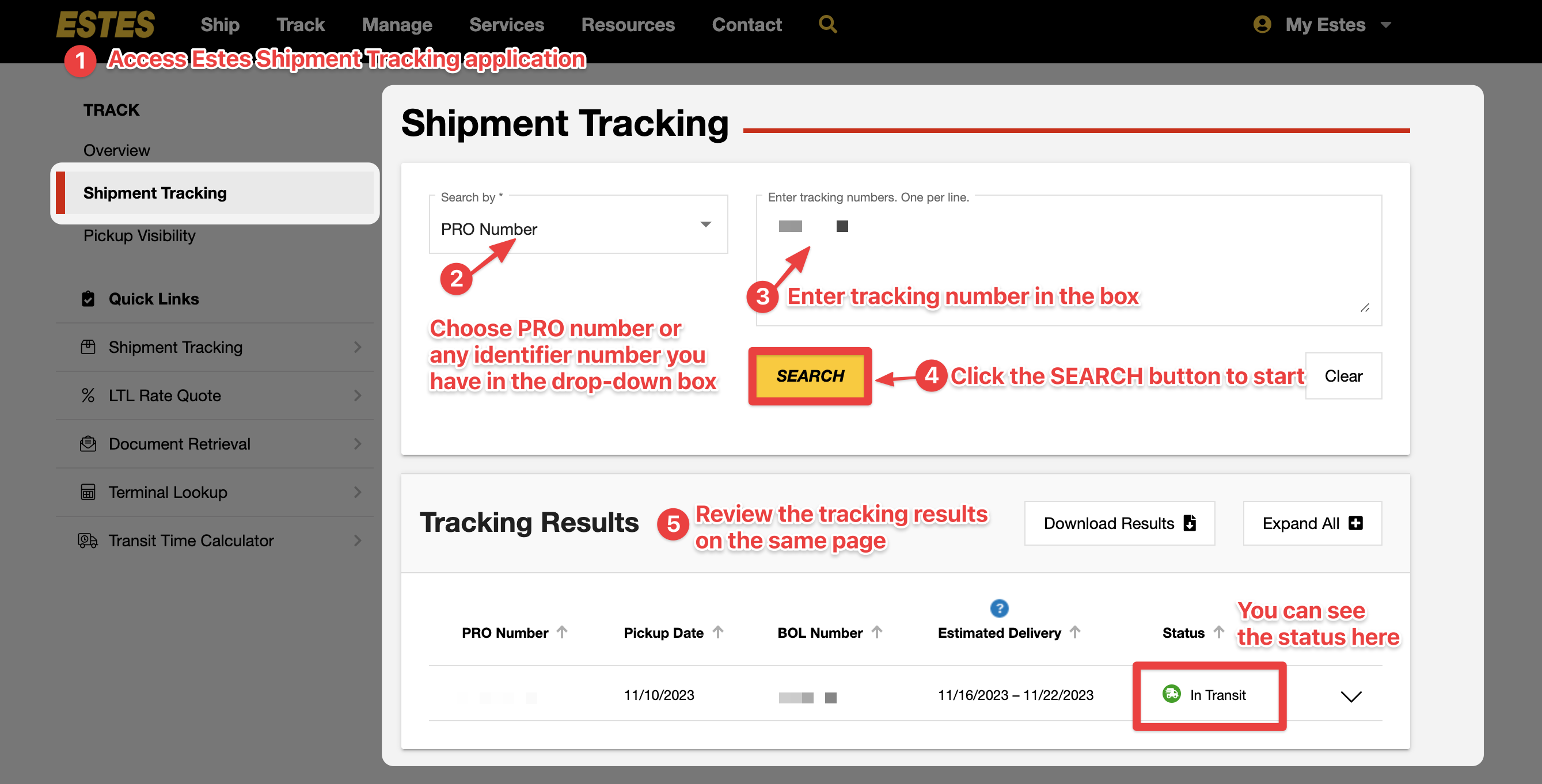
1.访问应用程序: 要跟踪您的 Estes 包裹,只需访问 Estes Express 在线货件跟踪应用程序。该应用程序可在计算机、智能手机和平板电脑等各种设备上访问。
2.选择您的跟踪标识符: 进入跟踪应用程序页面后,单击下拉框以选择要用于跟踪的标识符类型。
3.输入您的 Estes 追踪号码: 将您的追踪号码输入到页面上提供的指定框中。
4.启动跟踪过程: 单击下面的“搜索”按钮开始跟踪过程。
5.获取更新的物流信息: 此步骤无需登录您的 My Estes 帐户。点击“搜索”按钮后,您将能够查看有关您的包裹的全面信息。
使用我的 Estes 帐户跟踪 Estes 包裹
**1.登录或登录您的 Estes 帐户:**点击位于 Estes 官网右上角的“我的 Estes”按钮。然后,单击“登录”或“创建帐户”并填写表格。
2.输入您的追踪号码并启动追踪: 导航至“货件追踪”功能。在指定字段中输入您的跟踪号码,然后单击“搜索”按钮。
**3.接收实时更新:**现在您将看到“跟踪结果”部分,您可以在其中查看必要的物流信息。
皮卡可见性
除了上述方法外,Estes 还提供了一项名为“取件可见性”的功能,可让您看到预定取件的车辆。
为了利用取件可见性,只需向 Estes 提供您的追踪号码以及预定取件的日期和时间即可。完成此操作后,Estes 将为您提供一个交互式地图的链接,其中显示分配处理您的货物的卡车的实时位置。
Pickup Visibility 是跟踪包裹并保证及时取件的绝佳工具。此外,它还可以方便地监控卡车的接近程度,让您为卡车的到来做好相应的准备。
Estes 追踪号码
类型: Estes 为不同目的提供各种类型的追踪号码。参考货件时,您可以从以下选项中进行选择:PRO(财产收据订单)、提货单、提货请求、Interline PRO、装载订单或采购订单。
格式和示例: 一般来说,Estes 追踪号码遵循由 10 位数字组成的一致格式。例如,系列 3910944401 被识别为可能的 Estes 追踪号码。
关于埃斯蒂斯
Estes Express Lines 位于弗吉尼亚州里士满,是一家专门从事综合货运服务的著名公司。作为业内值得信赖的领导者,他们提供广泛的运输解决方案来满足各种需求。这些解决方案包括零担运输 (LTL)、时间关键型、批量和卡车运输,以及全球和定制运输选项。
常见问题
Estes 可以国际运送吗?
Estes provides comprehensive international freight shipping options, including exports, imports, consolidated and direct shipments, standard and expedited delivery, as well as value-added services.
Estes 是货运代理吗?
Estes is the leading privately owned freight transportation company in North America. It provides a wide range of freight shipping services to ensure your shipments reach their destination at the required time.
当我追踪 Estes 货件时,我可以看到哪些信息?
You will have access to the shipment detail including the ability to view document images, financial information associated with the shipment, and consignee details.
我可以设置提醒来接收有关 Estes 货件的通知吗?
Yes, you can set up alerts to be notified via email or text message when your shipment has been picked up/out for delivery/delivered.
通过 AfterShip 提升整个售后体验











集成 Estes 和多承运商追踪 API
轻松将运单跟踪集成到您的系统或网站中,AfterShip 提供 API 以及预对接多个平台,允许您全触点提供运单状态可见性,而无需占用开发资源。- 全球化:1,100 多家物流商,支持多大 52 种语言
- 标准化:提供 7 个主状态和 33 个子状态
- 准确性:利用 AI 来准确识别运单号
- 可靠性:稳定运行时间超过 99.99%,符合 ISO 27001、SOC2 和 GDPR 合规性

因卓越的服务而获得客户认可