Shipping is your largest, growing variable cost. Manual rate-checking leaves money on the table. In 2026, the best brands ship smarter.
If you run operations at a growing DTC brand, you already feel this. Your CFO points at the shipping line on the P&L and asks you to cut it 10 to 15 percent this quarter. Meanwhile your team is still opening FedEx, UPS, and USPS in separate tabs, checking rates batch by batch, and picking a carrier by gut.
That manual habit is the problem this playbook solves. Comparing ecommerce shipping rates in real time is not a feature you bolt on. It is a strategic lever, and one of the few that lowers cost without touching your prices or your product.
Before we get tactical, it helps to recognize the common shipping problems and solutions that shape this decision.
This guide walks through how to think about real-time rate shopping, then how to put it in place. The software is the enabler. The strategy is yours.
Why Manual Rate Shopping Is Costing You More Than Just Time
The obvious cost of manual rate comparison is the hours your team burns. The expensive cost is everything that slips through while they do it.
Four hidden costs add up fast:
- You overpay for speed you do not need. Without a side-by-side view, orders default to a familiar carrier and a faster service than the delivery promise actually requires.
- You miss carrier and regional discounts. Rates vary by lane, weight, and zone. Checking one or two carriers by hand means you rarely land on the cheapest qualifying option.
- Manual entry creates costly errors. A wrong service or a mistyped weight becomes a wrong label, and wrong labels mean refunds, reships, and chargebacks.
- It does not scale at peak. The batch-checking routine that limps through a normal Tuesday collapses during a holiday surge, exactly when volume and cost are highest.
Put together, these leaks make shipping one of the heaviest line items on a DTC balance sheet, and most of it is controllable. There are proven ways to reduce your shipping costs, and real-time rate shopping is the one with the biggest payoff.
DTC apparel brands spend roughly 12-18% of revenue on shipping. Across verticals the range runs even wider, from about 1.9% to 22.6%, depending on package weight, average order value, and channel mix.
Source: Eightx (2026). McKinsey put e-commerce fulfillment costs at 12-20% of revenue back in 2021, so this is structural cost pressure, not a new problem.
The takeaway is simple. Every order shipped without a real-time rate comparison is a small, repeatable overspend, and small repeatable overspends are what quietly erode margin.
The 3 Pillars of an Automated Rate Shopping Strategy
A durable rate-shopping strategy rests on three pillars. Get these right and the tooling almost configures itself.
Pillar 1: Connected Carriers. Bring your own carrier accounts and AfterShip's discounted rates into one place. When every option lives in a single view, real-time comparison becomes possible instead of theoretical.
Pillar 2: Intelligent Rules. Encode your business logic so the system routes each order automatically. Your judgment about weight, value, and destination stops living in someone's head and starts running on every order, the same way every time.
Pillar 3: Review and Refine. Treat rate shopping as a loop, not a one-time setup. You review what each order actually shipped on and what it cost, then tighten the rules. This is a feedback habit, not a separate analytics product.
Hold these three pillars in mind. The next section turns them into a concrete, step-by-step setup you can run this week.

A Step-by-Step Guide to Implementing Real-Time Rate Comparison
This is where the three pillars become a workflow. Each step maps to one: connect your carriers, build your rules, then review and refine. The setup is a one-time, front-loaded task that replaces a recurring manual one, so the hours you invest now keep paying back on every order.
Step 1: Consolidate Your Carrier Accounts
Start by bringing every carrier into one place. AfterShip Shipping connects 130+ carriers (the figure on its product page; the Essentials tier covers 100+), anchored by USPS, UPS, FedEx, and DHL. Coverage is strongest across North America, with cross-border shipping handled through the global carriers.
You are not locked into AfterShip's rates, either. On any plan, you can connect your own carrier accounts and keep the rates you have already negotiated, then rate-shop them side by side with AfterShip's discounted rates and take whichever is cheaper per order. That single point matters to anyone who has fought to win a UPS or FedEx contract: you keep the contract and gain the comparison.
Connect your store in the same place. On Shopify the integration is a one-click app, and once it is live, order attributes like destination, value, weight, and item count sync automatically. That sync is what lets the later steps run on real order data instead of manual entry.
The job this does is foundational. When all your options live in a single view, comparing ecommerce shipping rates in real time goes from theoretical to operational.
Step 2: Build Your Automation Rules
This is the most important step. Rules turn your shipping judgment into logic that runs on every order without anyone thinking about it.
A rule pairs conditions with actions. Conditions include the ship-to address (city, country or region, postal code), the store and the requested service type (both available for Shopify), number of items, order item SKU, order total, package weight, whether shipping was paid, and custom fields on Enterprise. Actions include setting the carrier and service, setting the package or its size and weight, adding extra package weight, setting the ship-from location, and setting a service option. You can run up to 10 rules on non-Enterprise plans, and Enterprise removes that cap.
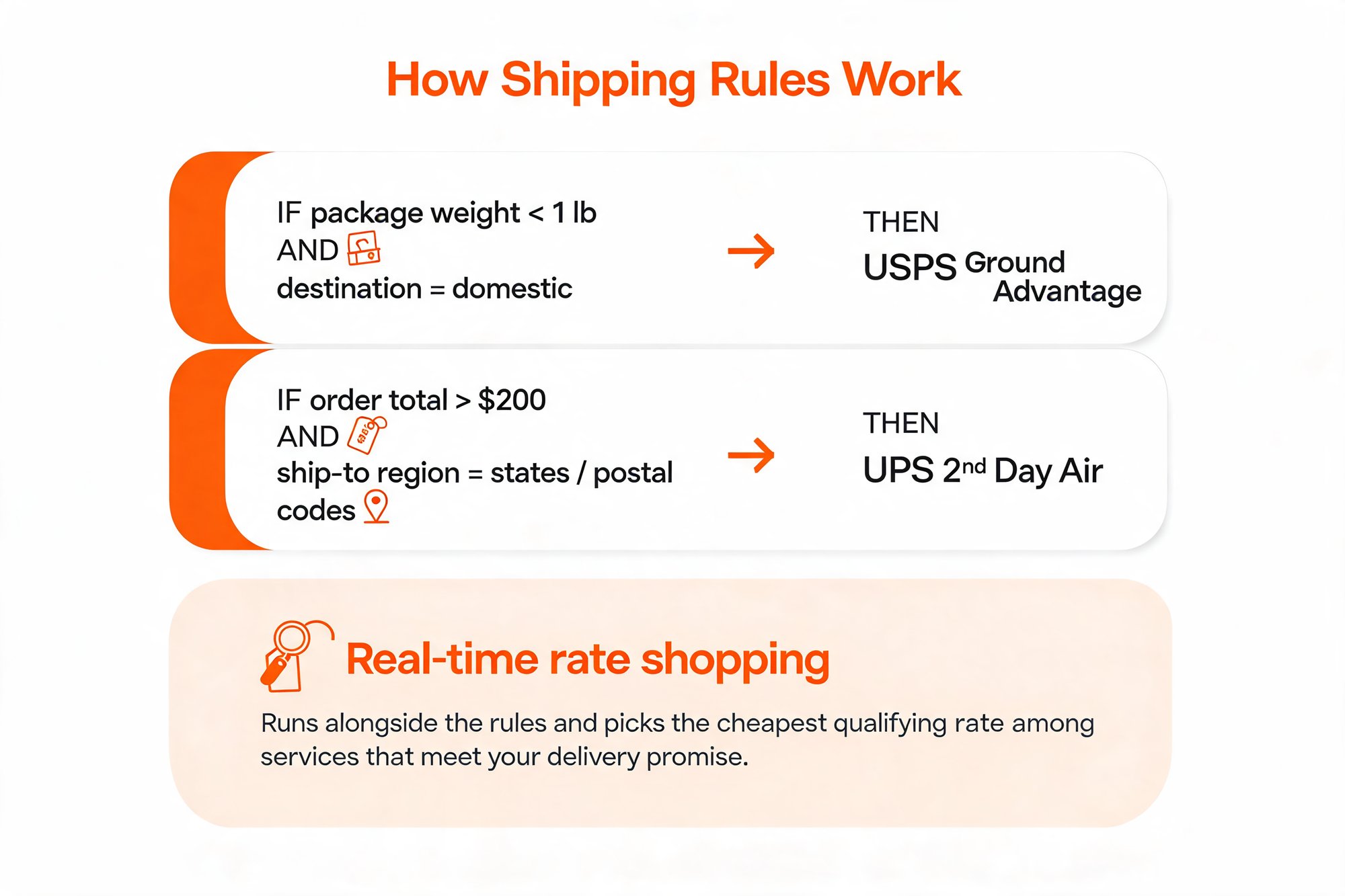
One detail matters more than any other here. A rule sets a specific carrier and service. There is no "cheapest" or "fastest" switch inside a rule. The cheapest qualifying rate comes from real-time rate shopping, which works alongside your rules: the engine queries carrier APIs at label time so you choose the lowest rate among the services that still meet your delivery promise. Think of it as a division of labor. Rules route each order by weight, value, and destination; real-time comparison surfaces the cheapest option that qualifies.
In practice, your rules read like plain business logic. For example:
- If a package weighs under 1 lb and is going to a domestic address, then route it to USPS Ground Advantage.
- If an order totals over $200 and ships to a specific set of regions or postal codes, then use UPS 2nd Day Air.
Start with a handful of rules that cover your highest-volume lanes. Most brands find that a small set handles the large majority of orders, and add more as you spot where money leaks.
Step 3: Process Orders and Print Labels in Bulk
With carriers connected and rules in place, fulfillment becomes a batch operation. AfterShip Shipping lets you bulk create shipping labels and bulk update order information from the Essentials plan up, and the Pro plan adds a Labels and shipping rates API plus end-of-day forms for carrier handoff.
The saving here is mechanical, not magic. Bulk processing removes two manual tasks from every order: the rate check and the carrier pick. Multiply that across a day of orders and the time your team spends on shipping admin drops sharply, with fewer chances to fat-finger a service or a weight along the way.
For an outside benchmark, the shipping platform Shippo reports that teams automating their fulfillment become roughly 50% faster and eliminate about 75% of shipping errors. Treat those as industry context from Shippo rather than AfterShip figures, but they show the direction automation pushes both speed and error rates.
To see the full rate-shop and label flow end to end, a short walkthrough makes the workflow concrete.
Step 4: Analyze Your Shipping Spend
The loop closes here. In the Order management dashboard, available from Essentials up, you can review which carriers and services your orders actually shipped on and what each one cost.
Use that per-order view to find where rules are sending orders to pricier services than the delivery promise requires, then go back to Step 2 and tighten them. This is a hands-on cost review that feeds rule refinement, not a pre-built savings report or a separate analytics product. It is the same dashboard your team already uses to manage orders, read with a cost lens. A short weekly pass is usually enough to keep the rules honest.
Run this loop a few times and real-time rate comparison stops being a chore and becomes a system. That system is what turns shipping from an uncontrolled line item into a cost you actively manage, order by order.
What to Look For in a Multi-Carrier Shipping Platform in 2026
You now have a strategy. The last decision is the tool that runs it. Use these six criteria to score any platform you are considering, and notice where each one maps to a real capability rather than a marketing line.
- Carrier integrations. More carriers mean more rates to compare and more leverage on every lane. AfterShip Shipping connects 130+ carriers (100+ on the Essentials tier), anchored by USPS, UPS, FedEx, and DHL.
- Automation-rule granularity. The finer the conditions, the more precisely you route orders. Look for rules that key off weight, order value, destination, item count, and SKU, not just a single field.
- Batch-label speed. At peak, creating labels one order at a time is a bottleneck. Bulk label creation and bulk order updates keep throughput high exactly when volume spikes.
- API access. If you run custom systems, you need programmatic control. A labels-and-rates API lets you wire rate shopping directly into your own stack.
- Bring-your-own-rate support. Your negotiated carrier contracts are an asset. The platform should let you keep them and rate-shop them next to its discounted rates, on any plan.
- eCommerce-platform integration. Your store is where order data lives. Check for native support across Shopify, Shopify Plus, BigCommerce, WooCommerce, and TikTok Shop, so order attributes sync automatically.
Score your shortlist against all six and the right multi-carrier shipping software usually picks itself.
Simplify shipping and order fulfillment across Shopify, TikTok Shop, and your carrier network.
Book a demoFrequently Asked Questions (FAQ)
A few questions come up on almost every rate-shopping rollout. Here are the short answers.
How does real-time rate comparison work?
AfterShip queries your connected carrier APIs at label time to pull live rates and delivery times side by side, so you choose the lowest rate among the services that still meet your delivery promise.
Can I use my own negotiated carrier rates?
Yes. You can connect your own carrier accounts on any plan, keep your negotiated rates, and rate-shop them alongside AfterShip's discounted partner rates to take whichever is cheaper per order. The Pro plan also adds a Carrier accounts API for programmatic management.
How much can I save with rate shopping?
There is no single number, because it depends on your lanes and your current habits. The structural point is that for a brand spending a meaningful share of revenue on shipping, systematically choosing the cheapest qualifying service is one of the few margin levers that does not touch price or product. AfterShip's partner network advertises up to 90% off USPS retail, which is an up-to ceiling rather than a guaranteed per-label saving, and industry automation savings tend to cluster around 15 to 30%.
Will this slow down my fulfillment team?
No. It speeds them up. A one-time setup, connecting carriers and building rules, replaces a recurring per-order manual task. The often-quoted thirty minutes to get started is the time to your first label during onboarding, not a service-level guarantee, and rule-building is a short, front-loaded investment that pays back on every order afterward.
Start Shipping Smarter, Not Harder
Real-time rate comparison is not a switch you flip. It is a discipline: connect your carriers, encode your logic, and review what each order actually cost so the rules sharpen over time.
Done consistently, it is one of the few levers that lowers shipping cost without touching price or product. If you are ready to put the playbook to work, start a free trial of AfterShip Shipping or book a demo to see the rate-shop and rules engine run on your own orders.
As you evaluate, it also helps to compare other multi-carrier parcel management solutions so you can judge the fit for yourself.