top banner main image
Start for free. Then get your first month for just $1 on select plans.
Start for free

MailAmericas 定制追踪页面

已集成
Automatic tracking software built for your carrierGet a free demo
top store banner desktop main image
1.

*AfterShip provides package tracking services only. For inquiries about order details, please contact your retailer.

高级功能

关于MailAmericas

MailAmericas是一家专注于印刷材料分发和航空运输服务的物流提供商。该公司因提供高效的跨境B2C解决方案而备受认可,帮助国际商家通过简化的物流操作与客户建立联系。

如何追踪MailAmericas包裹?

在官方网站上追踪MailAmericas包裹

  1. 访问MailAmericas官方网站https://mailamericas.com/
  2. 在其主平台上找到追踪查询框。
  3. 输入您的追踪号码并提交以查看MailAmericas包裹的最新状态。

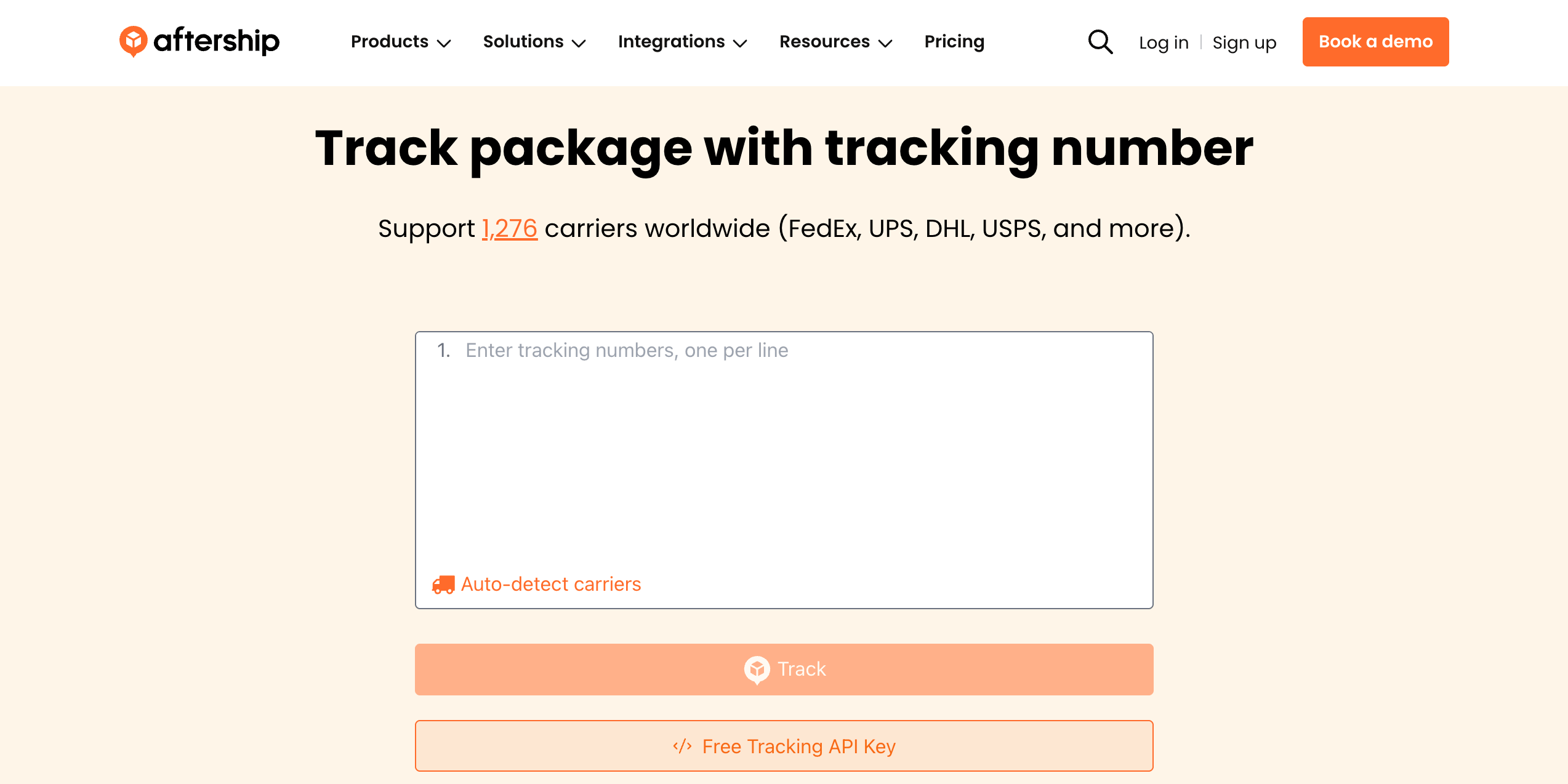
使用AfterShip追踪页面追踪MailAmericas包裹/订单

  1. 前往AfterShip追踪页面
  2. 在搜索栏中输入您的MailAmericas追踪号码
  3. 点击“追踪”以查看实时运输状态和更新

为了在1200多个承运商中获得统一的追踪体验,请使用AfterShip在一个地方追踪所有货物。
AfterShip包裹追踪

为什么要通过AfterShip跟踪和集成MailAmericas?

✅ 支持全球任何货件,全面覆盖
✅ 通过追踪号码自动检测承运商
✅ 详细的包裹状态通知,确保追踪的全面可见性
✅ AI驱动的高精度预计送达时间
✅ 状态变化的电子邮件提醒,确保持续更新
✅ 批量追踪功能,提高包裹管理效率
✅ 访问1200多个全球承运商,实现全面追踪
✅ 多语言追踪支持,支持全球沟通

通过 AfterShip 提升整个售后体验

Google Drive
Google Drive
Google Drive
Google Drive
Google Drive
AfterShip
Google Drive
Google Drive
Google Drive
Google Drive
Google Drive

集成 MailAmericas 和多承运商追踪 API

轻松将运单跟踪集成到您的系统或网站中,AfterShip 提供 API 以及预对接多个平台,允许您全触点提供运单状态可见性,而无需占用开发资源。
  • 全球化:1,100 多家物流商,支持多大 52 种语言
  • 标准化:提供 7 个主状态和 33 个子状态
  • 准确性:利用 AI 来准确识别运单号
  • 可靠性:稳定运行时间超过 99.99%,符合 ISO 27001、SOC2 和 GDPR 合规性
了解更多关于 MailAmericas 的集成 >
Stars

因卓越的服务而获得客户认可

G2 BadgeG2 BadgeG2 BadgeG2 BadgeG2 BadgeG2 BadgeG2 BadgeG2 BadgeG2 Badge
Customer
Customer
Customer
Customer
Customer
Customer
Customer
Customer
Customer
Customer
Customer
Customer
Customer
Customer
Customer
Customer
Customer
Customer
Customer
Customer
Customer
Customer
Customer
Customer
Customer
Customer
Customer
Customer
Customer
Customer
Customer
Customer
Customer
Customer
Customer
Customer
Customer
Customer
Customer
Customer
Customer
Customer
Customer
Customer
Customer
Customer
Customer
Customer
Customer
Customer
Customer
Customer
Customer
Customer
Customer
Customer
Customer
Customer
Customer
Customer
Customer
Customer
Customer
Customer
Customer
Customer
Customer
Customer
Customer
Customer
Customer
Customer
Customer
Customer
Customer
Customer
Customer
Customer
Customer
Customer
Customer
Customer
Customer
Customer
Customer
Customer
Customer
Customer
Customer
Customer