Your customers demand a better tracking experience, your support team is drowning, and your growth plans are being limited by a tool designed for a single carrier. That is usually when a WorldShip vs AfterShip comparison lands on your desk. The two tools do different jobs. WorldShip can keep printing your UPS labels; AfterShip Tracking adds the branded tracking page, the notifications and the cross-carrier delivery data on top, wherever the next carrier comes from.
When Your Go-To Tool Becomes a Roadblock
At 5,000 to 50,000 orders a month, the strain rarely shows at the label printer. It shows in the support queue as WISMO (where is my order) tickets, and in the cheaper carrier quote you hesitate to act on because your tracking lives with one carrier.
UPS WorldShip is a single-carrier platform for generating UPS labels. It is UPS's Windows shipping software for UPS small-package and freight services, and at this volume it usually stays the label engine. The limits a growing operation feels sit after the label prints:
- Brand: Shoppers track on UPS's page, under UPS's brand. UPS's own branding option is a separately authorized service, and it covers UPS shipments only.
- Carriers: WorldShip ships UPS services only, so a second carrier means a second set of tools.
- Notifications and data: UPS's notifications and dashboards cover UPS shipments only, by email and under UPS's brand, with no view across a second carrier.
- Returns and engagement: WorldShip prints UPS return labels. A returns portal where shoppers start their own return is not part of it.
Each limit follows from scope: UPS's tools are built around UPS shipments. For the post-purchase layer, the decision is a dedicated post-purchase platform versus a built-in carrier tool, and only the first follows your shipments across the carriers you add.

AfterShip vs. WorldShip: A Head-to-Head Capability Review for 2026
AfterShip Tracking is a post-purchase layer across the carriers you ship with; WorldShip is a shipping utility for UPS. AfterShip provides a branded, multi-carrier tracking experience that WorldShip lacks. The UPS integration page holds a detailed breakdown of capabilities.
| Criteria | UPS WorldShip | AfterShip Tracking |
|---|---|---|
| Multi-Carrier Support | UPS small-package and freight services only | Tracks UPS alongside the other carriers in the mix, normalized into one view, one branded page and one analytics layer |
| Branded Tracking Experience | Shoppers track on UPS's page, under UPS's brand; UPS Branded Tracking is a separately authorized service covering UPS shipments only | Branded tracking page on every plan; custom domain and removal of AfterShip branding on Premium and Enterprise; product recommendations from Essentials (AI-powered from Premium) |
| Proactive Customer Notifications | Quantum View Notify emails to up to five recipients on ship, exception and delivery events; UPS shipments only, under UPS's brand | Email and SMS under your brand from Essentials, on status, sub-status and delivery-estimate changes (Out for delivery, Exception, Failed attempt); WhatsApp on Enterprise with a WhatsApp service subscription |
| Analytics & SLA Reporting | WorldShip reports; UPS My Choice for Business and Quantum View (aimed above 1,400 packages a day) cover UPS shipments only | Volume, on-time and exception dashboards from Essentials; on-time performance by carrier and by lane on Premium and Enterprise Advanced; AfterShip Agent suggests next steps from Essentials |
| Total Cost of Ownership (TCO) | UPS publishes no software fee for WorldShip; runs as Windows desktop installs; versions over a year old stop receiving UPS's quarterly rate updates | aftership.com, annual billing: Essentials from $29 and Premium from $59 a month at 6,000 shipments a year; $199 and $479 a month at 60,000; Contact sales from 84,000; overage $0.08 and $0.12 |
| Returns Management (Value-Add) | Prints UPS return labels; a returns portal where shoppers start their own return is not part of it | AfterShip Returns, part of the shipping, tracking, returns, and warranty suite, adds a branded returns page where shoppers start their own return |
| API & Integration Depth | Imports orders and exports shipment details through ODBC and XML | Tracking API and webhooks (Premium and above); prebuilt integrations with Shopify, BigCommerce, Magento 2, Salesforce Commerce Cloud and NetSuite; tracking inside Gorgias and Zendesk tickets (Premium and above) |
Mous, which ships with 10 carriers, used to send customers to each carrier's tracking portal. After moving tracking onto AfterShip, its WISMO contact rate fell from 12.9% to 5.9%, according to AfterShip's Mous customer story.
Beyond Tracking Dots: 3 Ways AfterShip Drives Growth Across Your Carriers
Growth at your volume usually means a second carrier or a new region. Each move adds shipments that sit outside UPS's own tools, which is where AfterShip Tracking earns its place.
1. Own the Customer Journey with One Branded Page Across Carriers
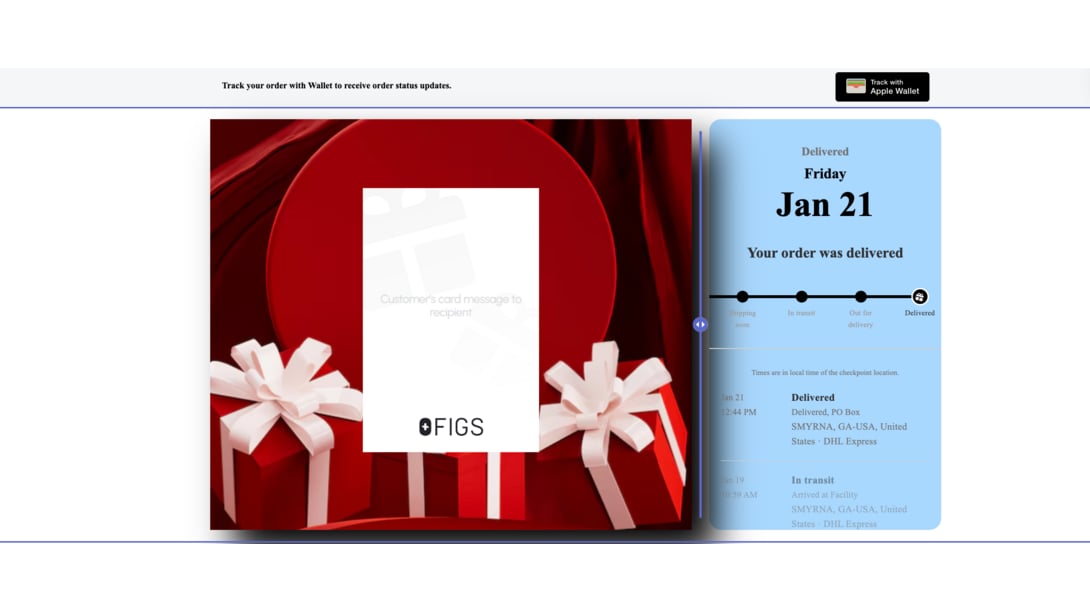
Every AfterShip Tracking plan includes a branded tracking page, so shoppers follow a UPS parcel and a regional carrier's parcel on your page instead of each carrier's. Premium and Enterprise add a custom domain and remove AfterShip branding. Product recommendations on the page are manual from Essentials and AI-powered from Premium.
Inspire Uplift recorded a 75% reduction in WISMO tickets and grew repeat sales by 30% with product recommendations in its tracking emails, according to AfterShip's Inspire Uplift customer story.
2. Achieve True Carrier Diversification
AfterShip Tracking reads tracking data from 2,000+ carriers, per AfterShip's carrier directory, October 2026. The value sits in one normalized source of delivery data: the same statuses, the same page and the same reports, whichever carrier moved the parcel.
Mous used that view to compare performance and cost across carriers in one dashboard, then switched its Canadian carrier. Lead times there fell from two weeks to 2.5 days.
If you are also weighing AfterShip against other enterprise solutions like Narvar, carrier coverage and normalized delivery data are the first criteria to test.
3. Turn Delivery Data into Business Intelligence
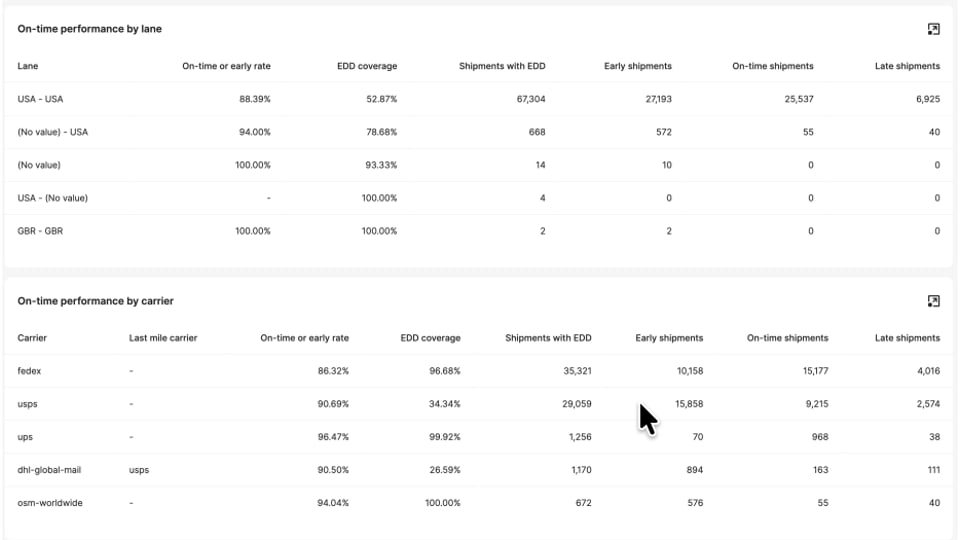
AfterShip turns logistics data into actionable business intelligence and performance analytics. Essentials includes dashboards for shipment volume, on-time performance and exception rates. Premium and Enterprise Advanced compare on-time performance by carrier and by lane, in tables the help center describes as a way to decide "whether they require escalation or SLA review."
A side-by-side comparison of carriers is not possible inside UPS's own tools, because they see UPS shipments only.
AfterShip Agent, built into AfterShip Tracking from Essentials and above, analyzes shipment performance and suggests next steps; your team decides what changes.
The Real Cost of a UPS-Only Post-Purchase Stack
What does each option cost to run at 5,000 to 50,000 orders a month? Start with the shared ground: neither tool charges your shoppers. AfterShip Tracking is a merchant subscription, priced by shipment volume, with plans published up to 60,000 shipments a year and quoted from 84,000.
UPS publishes no software fee for WorldShip. UPS account holders download it and authenticate with their account number and latest invoice. The fuller measure is cost of ownership, and three lines in it are yours to fill in:
- Support time on WISMO contacts. Count the tracking questions your team answers each month and price them with the benchmark below.
- Retention. Shoppers who track on a carrier's standard page see the carrier's brand, while your own page can carry offers and recommendations, as the Inspire Uplift result above shows.
- Carrier-mix flexibility. One tracking view across carriers keeps a cheaper or faster carrier within reach. Count it as option value; the savings depend on your own lanes and rates.
What an assisted contact costs: Gartner's 2024 customer service cost benchmarks put an assisted contact at more than seven times the cost of a self-service one. Each tracking question a shopper settles on your branded page moves a contact to the cheaper side of that ratio.
How AfterShip Fits Into a High-Volume Tech Stack
For teams comparing UPS WorldShip vs third-party platforms, the first technical question is how shipment data moves. AfterShip Tracking does not connect to WorldShip directly. Tracking numbers arrive from your connected store, OMS or ERP, from a scheduled CSV auto-fetch on any plan, or through the Tracking API and webhooks on Premium and above.
On the AfterShip versus WorldShip API question, the bridge is your order system: WorldShip already exports shipment details back to business systems through ODBC and XML, and AfterShip Tracking picks up the tracking numbers from there. AfterShip's UPS integration asks for an active AfterShip Tracking account and an active UPS account.
Prebuilt integrations cover Shopify (including Plus), BigCommerce, Magento 2, Salesforce Commerce Cloud and NetSuite. On Premium and above, Gorgias and Zendesk show tracking inside support tickets. Elad D., an operations manager at a mid-market company, rated AfterShip 5/5 on G2 in May 2024, citing "the integration that works flawlessly with Shopify".
AfterShip's suite of shipping, tracking, returns, and warranty prints labels too. Some merchants feel the label side most: one Shopify Community merchant wrote in January 2025, "we have to use WorldShip to make our labels, which is too inefficient." Teams that also want to retire WorldShip's label printing, and are weighing the best alternatives to UPS WorldShip or multi-carrier shipping management software, look at AfterShip Shipping.
The Verdict: When to Add AfterShip Tracking Alongside WorldShip
The decision is whether your post-purchase layer stays inside UPS's tools or moves to a platform that follows your shipments across carriers.
Add AfterShip Tracking if:
- You ship, or plan to ship, with a second or third carrier and need one tracking view across all of them.
- You want shoppers to track on your own branded page and receive notifications under your brand.
- You need on-time performance and transit times compared by carrier and by lane, to check each carrier against your delivery SLA.
- You want to weigh each carrier's cost against the support load it creates, on your own delivery data.
Keep WorldShip on its own if:
- You ship UPS exclusively and plan to stay that way.
- Post-purchase customer experience is not your team's responsibility, for example a 3PL shipping for clients who mandate UPS.
Set it up before peak: on-time and transit data build up from the day AfterShip starts tracking your shipments, so setting it up before peak season is what lets you compare carriers during it.
WorldShip keeps printing your UPS labels; AfterShip Tracking gives your brand the tracking experience and carrier data to grow past one carrier.
Branded tracking and delivery data across UPS and the carriers you add, alongside the label tool you already use.
Get startedFrequently Asked Questions
What are WorldShip's limitations for post-purchase tracking?
WorldShip is UPS's shipping software, so its post-purchase tools are scoped to UPS. Shoppers track on UPS's page, under UPS's brand, and UPS's notifications and dashboards cover UPS shipments only. WorldShip prints UPS return labels, but a returns portal where shoppers start their own return is not part of it.
Can I keep WorldShip and add AfterShip Tracking?
Yes. WorldShip keeps printing UPS labels and running End of Day. AfterShip Tracking picks up the tracking numbers from your connected store, OMS or ERP, a scheduled CSV auto-fetch, or the Tracking API on Premium and above, then adds the branded tracking page, notifications and delivery analytics across your carriers.
Does AfterShip integrate directly with WorldShip?
No, there is no direct connection between the two. WorldShip exports shipment details to your business systems through ODBC and XML, and AfterShip Tracking reads the tracking numbers from there: the store, OMS or ERP, a CSV auto-fetch, or the API on Premium and above. Only tracking numbers are required, because AfterShip detects the carrier.
What does AfterShip Tracking cost, and what does it take to run WorldShip?
AfterShip Tracking is priced by shipment volume, with plans published up to 60,000 shipments a year and quoted from 84,000; the comparison table above lists the figures. Running WorldShip means Windows desktop installs and regular upgrades, because versions more than a year old stop receiving UPS's quarterly rate updates. AfterShip Tracking's plans scale with your shipment volume, and the same branded page and analytics follow your shipments as you add carriers.