You're staring at your Shippo dashboard, looking at a list of shipments. You know the real story, the 'why' behind your rising shipping costs and delayed deliveries, is somewhere in that data. Shippo's reporting covers the label, the spend, and the carrier scan; what happens after the scan, from notification engagement to support-ticket volume to on-time performance against the date you promised the shopper, is where you hit the reporting ceiling. AfterShip Tracking analytics are built for that part. A Shippo alternative for better reporting has to answer the questions that start there.
You've Hit the Reporting Ceiling: Reports Show What Happened, Analytics Show Why
Reporting tells you what happened. Analytics tell you why, and what to change so it happens less often. Most teams have plenty of the first and little of the second.
A report is a log of events, and it lands after the fact, without the context that would let you attribute the outcome. It leaves the strategic questions open. Analytics close that distance: they diagnose cause and give you something to act on before the next order ships.
Leaving the distance open has a measurable cost. Veho's State of Delivery 2026 survey of 1,954 US online shoppers found that "40% have stopped buying from a retailer after a package never arrived, and 33% have done so after a late delivery". Peak season is where that pressure concentrates: AfterShip's BFCM 2024 Recap examined peak-season order volume across 90,000+ North American retailers.
5 Strategic Questions Your Shipping Software Should Answer
Use these five questions as a litmus test. The line is this: Shippo's reporting covers the label, the spend, and the carrier scan; AfterShip Tracking's analytics carry on after the scan: notification engagement, support-ticket volume, and on-time performance measured against the delivery date you promised the shopper. Three Shippo reporting limitations are documented on Shippo's own pages: the help centre restricts Shippo Intelligence to Pro and Premier API customers, the product page labels it "free in beta", and the Spend dashboard covers only labels billed through Shippo, so a merchant on their own negotiated carrier contracts sees no spend analytics there.
- Q1: Which carrier is actually delivering the best performance for my key shipping lanes? The Shippo Shipments Dashboard covers carrier performance by lane. AfterShip Tracking measures on-time rate against the date promised to the shopper (Answer #1).
- Q2: What's the root cause of my delivery exceptions, and how can I prevent them? The Shippo Intelligence guide documents failed deliveries by reason, with anomaly detection listed as coming soon. AfterShip Tracking traces exception events and reasons by carrier and region, with threshold alerts (Answer #2).
- Q3: How is my on-time delivery performance trending, and how does it impact customer satisfaction? The Shippo dashboards trend transit times and delivery outcomes. AfterShip Tracking splits order-to-delivery time into processing, pickup and transit, then judges on-time performance against the date the shopper was promised (Answer #3).
- Q4: Are my proactive delivery notifications actually reducing WISMO tickets? The Shippo Pro plan includes branded tracking pages and notification emails; its pricing, Intelligence and help pages publish no notification-engagement or support-ticket reporting. AfterShip Tracking reports notification delivery, open and click rates, and measures your support-ticket volume against your pre-AfterShip baseline, so both halves of the question get a number (Answer #4).
- Q5: What is my true, all-in cost-to-deliver per order, and where are the opportunities to save? The Shippo Spend Dashboard compares quoted with billed costs, with surcharges by carrier, service level and reason. AfterShip prevents the cost of failed deliveries and mis-routing before it is incurred (Answer #5).

How AfterShip Tracking Delivers the Answers
AfterShip Tracking analytics, powered by AfterShip Intelligence, answer these five questions on AfterShip's own tracking data. Analytics depth scales with plan, and the deepest diagnostics sit on Enterprise. That is a real limit, and it is a legible one: you can see exactly which plan answers which question before you commit.
Answer #1: Benchmark Carrier Performance on Speed and Reliability
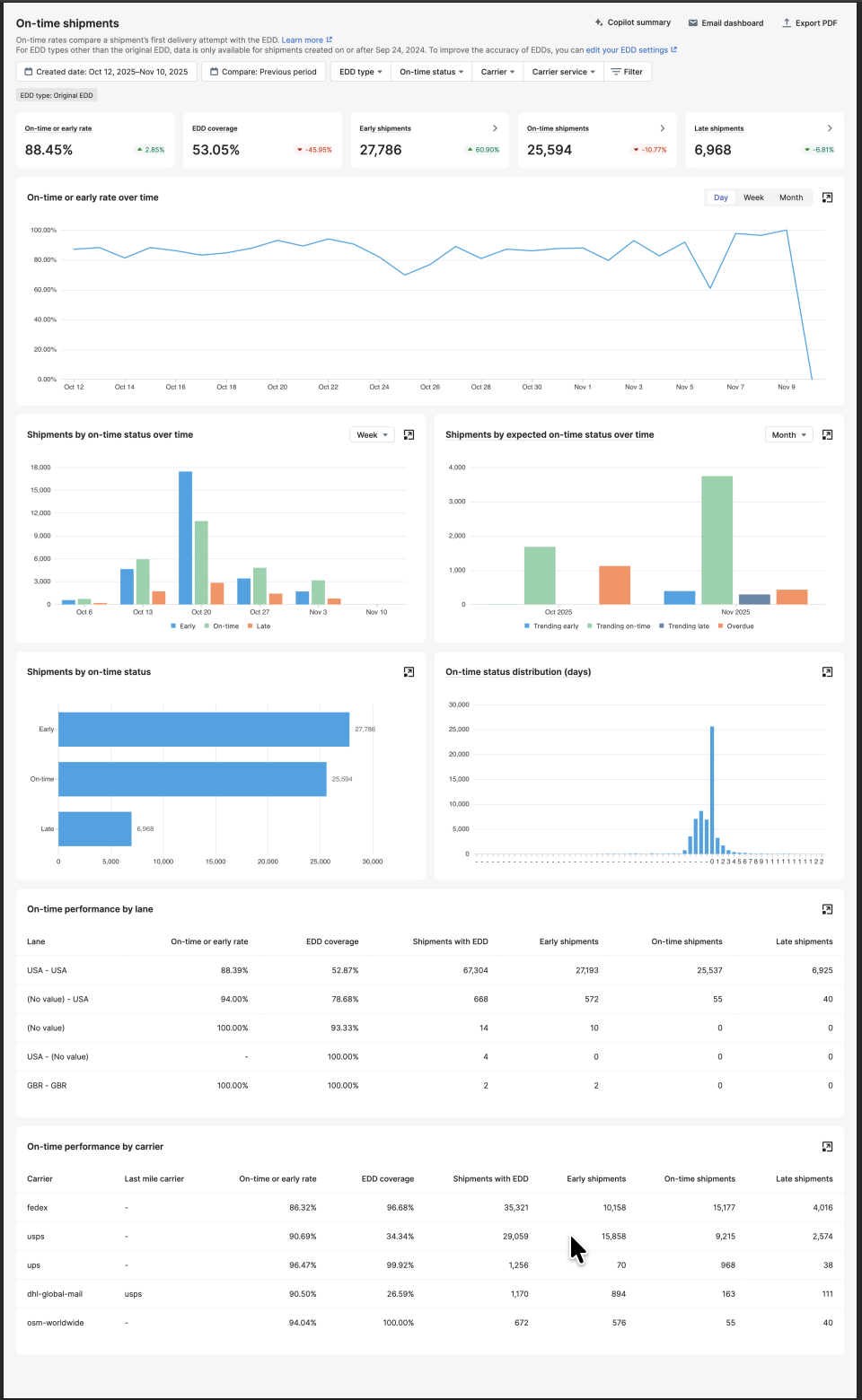
On-time Shipment Analytics (Premium and Enterprise) filters by carrier and by lane, so you can compare two carriers on a New York to California lane. It identifies which carriers, lanes or time periods show performance drops, and it sets transit time beside on-time rate, so a quick carrier that still misses promised dates has nowhere to hide. That is performance benchmarking you can defend, and the Benchmarks Report (Enterprise) compares your average transit time with industry peers. The Shippo product page lists anomaly detection as coming soon. Shipment Alerts (Enterprise) already fire on a threshold you set, for example "Trigger an alert if the average transit time for Carrier X is greater than 5 days in the last 7 days".
Answer #2: Diagnose Delivery Exceptions with Root Cause Analysis
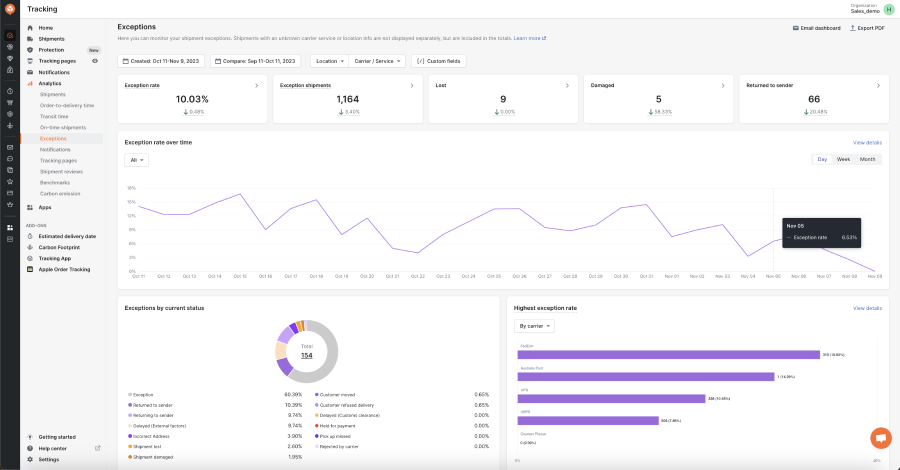
Shipment Events Analytics (Enterprise) is where root cause analysis happens. It highlights critical events such as delays, customs holds and rerouted shipments, generates the events and their reasons from shipment checkpoint messages, and shows which carriers and regions are involved, so an ops lead can fix the underlying issue instead of reshipping one parcel at a time. AfterShip's analytics identify the root cause of delivery exceptions. On an exception, AfterShip Agent (limited general availability for eligible Enterprise and Premium customers) drafts the carrier investigation or claim and the recommended resolution for your team to review and approve. On AfterShip's AI page, Dr. Squatch reports "58% faster exception resolution".
Answer #3: Where the Time Actually Goes (Processing, Pickup and Transit)
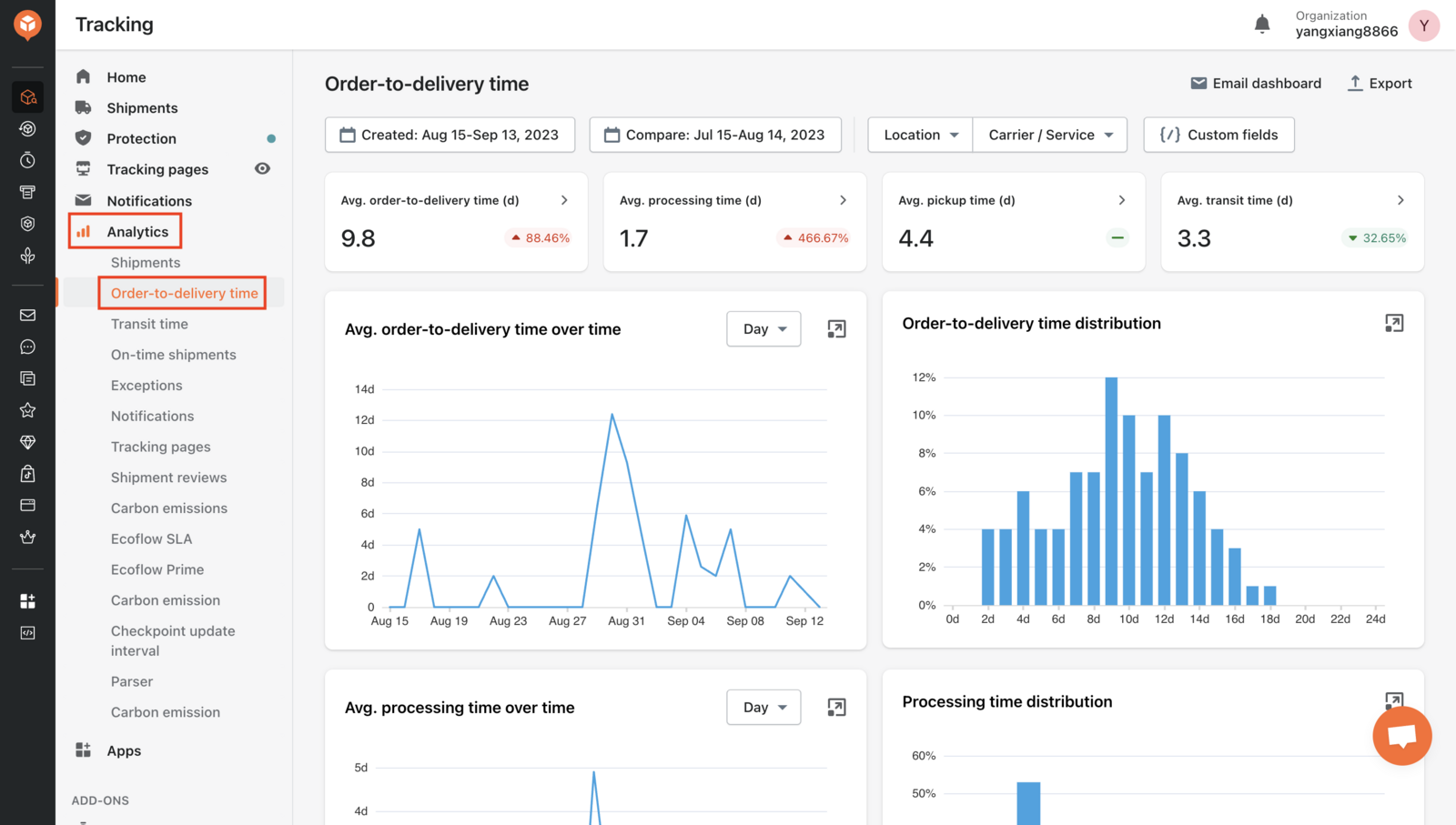
Order-to-Delivery Time Analytics (Trial, Premium and Enterprise Advanced) splits the clock into processing time, pickup time and transit time. That split ends an argument no carrier report can settle, because a delay inside your own warehouse stops being charged to the carrier, and it surfaces the regions and carriers that underperform consistently rather than once. Pair it with On-time Shipment Analytics (Premium and Enterprise) and the question changes shape: AfterShip Tracking benchmarks carrier on-time performance against the delivery date promised to shoppers. That is the date the shopper judges you by, and the one your support queue reflects.
Answer #4: Measure Notification Engagement and WISMO Reduction
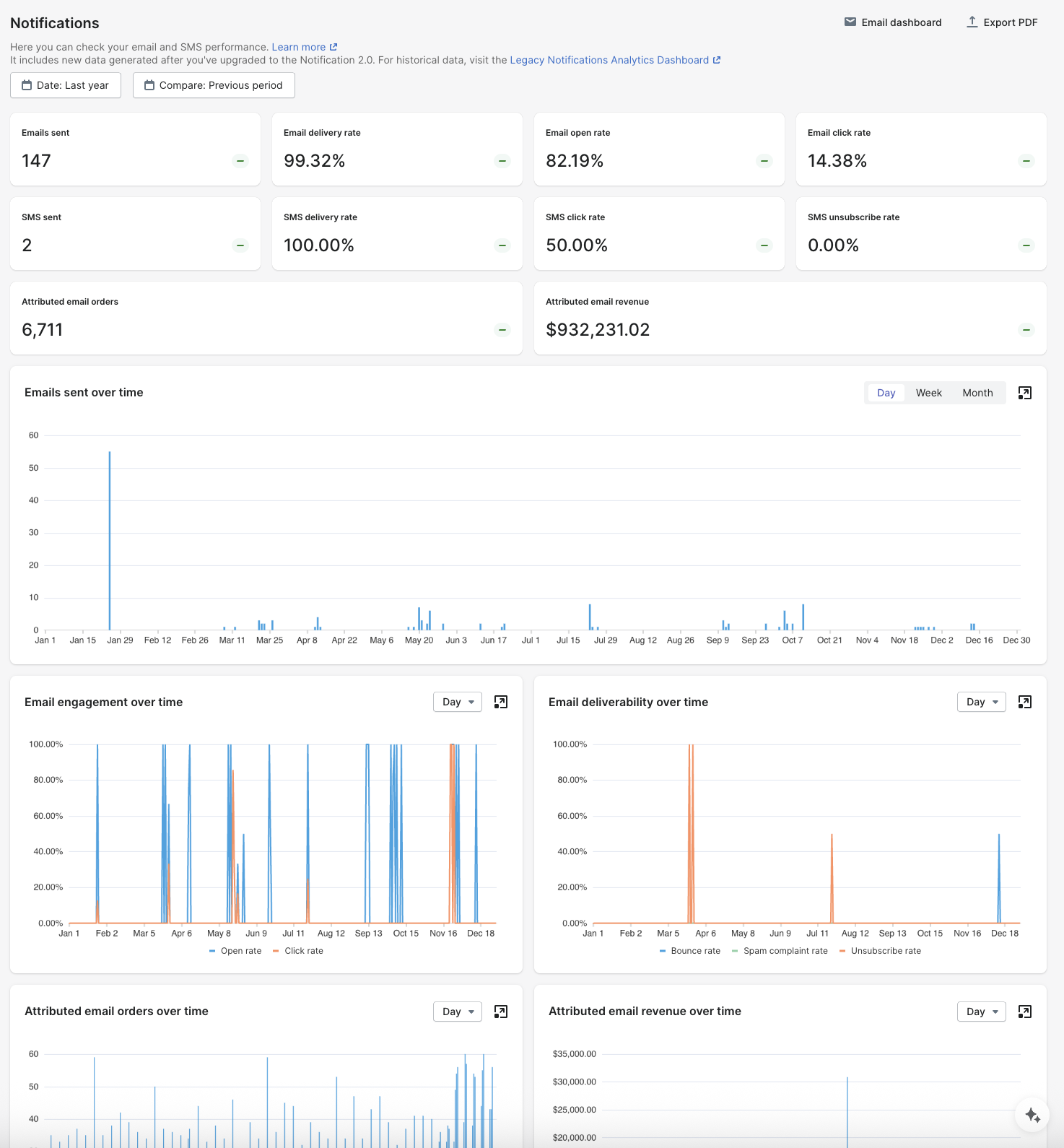
Notifications Analytics (Premium and Enterprise) reports delivery, open and click rates for your email notifications, and SMS delivery and click rates. That covers engagement. Support Tickets Insights covers the effect: currently for Gorgias-connected accounts, it compares your support-ticket rate against the 30 days before you started using AfterShip Tracking, and converts the difference into an estimated saving at the cost-per-ticket you set. The actionable insights sit in that trend, which moves as you change what you send and when. For the plan, talk to AfterShip sales. StackCommerce, an AfterShip Tracking customer, reports a "71% reduction in WISMO tickets".
Answer #5: Stop Paying for Failed Deliveries
Smart Carrier Recommendation (AfterShip Shipping, all plans) excludes carrier services with a high exception rate for the shipment's origin and destination, using AfterShip tracking data, and re-evaluates every shipment. Its limits are documented: off by default until you turn it on, and it selects the carrier service without buying the label. AfterShip Shipping is a separate product from AfterShip Tracking, billed separately. Before you move volume, compare real-time shipping rates against the services your own data says deliver. The second lever is the processing, pickup and transit split above: telling a warehouse delay from a carrier delay stops you paying for the wrong fix. For line-item spend and surcharge auditing on Shippo-billed labels, the Shippo Spend dashboard is the more direct tool. AfterShip's strength is preventing the failed-delivery and mis-routing costs before they are incurred.
Head-to-Head (2026): AfterShip Analytics vs. Shippo Reporting
Six criteria decide a Shippo alternatives comparison for an analytics-driven operator. On Shippo vs AfterShip analytics the division is this: Shippo reports on labels and spend; AfterShip Tracking also reports on post-delivery outcomes. The rest of the platform is covered in a broader AfterShip vs. Shippo comparison.
| Criteria | AfterShip Tracking analytics | Shippo reporting and Shippo Intelligence |
|---|---|---|
| Carrier Performance Benchmarking | On-time Shipment Analytics by carrier and lane (Premium and Enterprise); Benchmarks Report against industry peers (Enterprise) | Shipments Dashboard: carrier performance and delays by state, region or lane |
| Transit Time & On-Time Analysis | Order-to-Delivery Time Analytics separates processing, pickup and transit time, so a warehouse delay is not blamed on a carrier (Trial, Premium and Enterprise Advanced) | Transit times, and the on-time, late and delayed share of in-transit shipments, with daily data updates |
| On-Time Performance Against the Delivery Date Promised to the Shopper | On-time rate by carrier and lane, measured against the date promised to the shopper as well as the carrier's own estimate (Premium and Enterprise) | On-time share of in-transit shipments; no comparison against a shopper-promised date published |
| Delivery Exception Root Cause Analysis | Shipment Events Analytics: events and reasons by carrier and region (Enterprise Advanced tier); threshold Shipment Alerts (Enterprise) | Failed deliveries by reason; anomaly detection listed as coming soon |
| Report export | Analytics reports export from the dashboard (all plans); custom-format exports and scheduled email reports with CSV or PDF (Premium and Enterprise) | CSV export from every Shippo Intelligence dashboard |
| Notification Performance Tracking | Email delivery, open and click rates; SMS delivery and clicks (Premium and Enterprise); Support Tickets Insights for Gorgias-connected accounts | Branded tracking pages and notification emails on Pro; no engagement reporting published |
Note: Shippo Intelligence is available to Pro and Premier API customers.
AfterShip Tracking Premium, which includes the full analytics suite, starts at $59 a month billed annually at 6,000 shipments a year, and pricing scales with shipment volume. The deepest diagnostics are on Enterprise.
Mous, an AfterShip Tracking customer, compared carrier performance on its own tracking data, switched carriers, and "reduced lead times within Canada by an enormous 82%", "from 2 weeks down to 2.5 days".

“AfterShip allowed us to set up KPI dashboards to see how well everything is going and troubleshoot before it becomes a problem.”
Rosie Jennings, Head of Logistics
Read their story →The Verdict: When to Choose AfterShip Over Shippo
Choosing the best shipping analytics software comes down to which questions you actually need answered. For a brand scaling past 1,000 orders a month, where delivery performance and customer friction both show up in the numbers, AfterShip Tracking analytics are the clear and necessary upgrade.
Choose Shippo if:
- You ship at low volume and your reporting needs end at the label and the spend.
- Your team already buys labels through the Shippo API and wants its reporting in the same portal.
That changes once the questions move past the carrier scan to notifications, WISMO tickets and the delivery date you promised the shopper.
Choose AfterShip if:
- You need to know whether proactive notifications cut WISMO tickets: Notifications Analytics (Premium and Enterprise) plus Support Tickets Insights for Gorgias-connected accounts.
- You judge carriers against the delivery date you promised the shopper, not only the carrier's own estimate (Premium and Enterprise).
- You want exceptions traced to their events and reasons, with alerts that fire on a threshold before anyone reads a report (Enterprise).
- You want carrier selection that avoids services with a high exception rate on each lane, using AfterShip tracking data (AfterShip Shipping, all plans).
AfterShip is the specialist choice when those things matter.
Your Next Move: From Basic Reports to Strategic Intelligence
The shift is from reading yesterday's reports to acting before a delay reaches the customer. Once you can see which carrier is slipping on which lane, which exceptions repeat and whether your notifications are landing, the work changes from chasing parcels to preventing them from going wrong. As your post-purchase stack grows, the same reasoning leads you to embrace a unified commerce experience across shipping, tracking, returns, and warranty. Ready to see what's really happening with your shipments? Talk to one of our post-purchase specialists.
Proactive shipment tracking that delights your customers, reduces WISMO tickets, and improves your delivery performance.
Book a demoFrequently Asked Questions
Which carrier actually performs best on my key lanes?
Shippo's Shipments Dashboard covers carrier performance and delays by state, region or lane. On-time Shipment Analytics (Premium and Enterprise) adds on-time rate measured against the date you promised the shopper, and the Benchmarks Report (Enterprise) compares your average transit time with industry peers.
Can I see why my delivery exceptions keep happening?
The Shippo Intelligence guide documents failed deliveries by reason, and its product page lists anomaly detection as coming soon. Shipment Events Analytics (Enterprise) generates exception events and their reasons from shipment checkpoint messages and shows which carriers and regions are involved, and Shipment Alerts (Enterprise) fire on a threshold you set.
Where is the time actually going between order and delivery?
Shippo publishes transit-time and delivery-outcome trends with daily data updates. Order-to-Delivery Time Analytics (Trial, Premium and Enterprise Advanced) splits the same journey into processing, pickup and transit time, so a warehouse delay is not charged to a carrier.
Do proactive notifications actually reduce WISMO tickets?
Branded tracking pages and notification emails come with the Shippo Pro plan, and no notification-engagement or support-ticket reporting is published alongside them. Notifications Analytics (Premium and Enterprise) reports email delivery, open and click rates plus SMS delivery and clicks, and Support Tickets Insights compares your ticket rate against your pre-AfterShip baseline for Gorgias-connected accounts.
How do I stop paying for failed deliveries?
Shippo's Spend Dashboard compares quoted and billed shipping costs on labels it bills. Smart Carrier Recommendation (AfterShip Shipping, all plans) works earlier, excluding carrier services with a high exception rate for each origin and destination using AfterShip tracking data, so the cost never lands in the first place.