Search for AfterShip vs 17track vs Parcel Monitor and you end up with three tabs that look like the same product. All three will show you where a parcel is. All three cost nothing to start. None of them tells you the thing you actually need to know first, which is whether these three are competing for your business at all.
One of them is not sold to you at all. It has no merchant product, no plan you can buy, and no way to put it in front of your own customers. The other two compete hard for exactly this budget, so you have been comparing across a category line without noticing. Nobody has told you which comparison you are actually making, so you are pricing a decision you have not defined yet.
At 50 to 1,000 orders a month you do not have time for a full vendor evaluation, and you should not need one. Most of this decision is settled by sorting the options before you compare them.
Here is the shape of it before the detail.
| Capability | Parcel Monitor | 17track | AfterShip |
|---|---|---|---|
| What it is | A free consumer tracking site, plus a logistics data community selling data access, industry events and directory listings | A merchant platform sold as "AI-Powered Branded Order Tracking for DTC" | A merchant tracking platform built around a branded page, proactive notifications and your own domain |
| Who it is sold to | Shoppers. No merchant plans, no pricing, no sign-up, no app | DTC merchants, on a four-tier paid ladder above a free tier | DTC merchants, on one ladder that runs from a free tier upward as volume grows |
| Tracking page on the free tier | None. There is no merchant page to brand | Yes. "Customize tracking page" | Yes. "Branded tracking page" |
| What it takes to remove the vendor's mark | Not applicable | Pro. Or by manual request on Trial, Free and Basic. The mark can be removed, but not replaced with your logo | Premium strips the AfterShip logo and footer link. Your own logo and colours arrive earlier at Essentials, but the AfterShip mark stays until Premium |
| What happens when the delivery date moves | Nothing. There is no merchant notification to configure | Emails fire on main logistics status change. Premium conditional flows trigger on statuses and durations | The customer is told when the date itself is revised, from Essentials. Premium adds a predicted date |
| Bottom line | A good consumer tracking site and a serious data business, with nothing to install | A capable, cheap merchant platform that will put a tracking page with your name on it in front of your customers | Removes the vendor's mark entirely, puts the page on your own domain, and tells your customer when the date you promised changes |
If your shortlist runs wider than these three, you can compare AfterShip against other tracking platforms.
Read down the last column and the pattern holds: the gap is never whether a feature exists, it is where each product stops.
Three Products, Two Categories: What You Are Actually Comparing
Parcel Monitor is a Parcel Perform property. It runs a free consumer tracking site, and around it a logistics data community that sells data access, runs industry events, and lists companies in a directory. That is a real business, and the tracking site is genuinely good at what it does.
What it does not have is a merchant product. There are no plans, no pricing, no merchant sign-up, and no app to install. Parcel Perform's own Shopify listing reads "This app is not currently available on the Shopify App Store".
So there is nothing to shortlist here, and that is the whole of it. For larger US retailers weighing the two directly, we have a head-to-head comparison with Parcel Monitor.

17track sits in a different category entirely. It sells a merchant platform, described on its own listing as "AI-Powered Branded Order Tracking for DTC", and its free tier includes a tracking page you can put your own name and colours on. Paid tiers unlock removing its branding, estimated delivery dates, product recommendations and analytics.
That is a real product with a real ladder, and treating it as a consumer utility will lead you to the wrong conclusion. If your requirement is a tracking page carrying your brand, 17track can meet it.
Which leaves two products in the actual comparison, not three.
AfterShip belongs in the same category as 17track: a merchant platform you install, configure and pay for as your volume grows. Both ship a branded tracking page on their free tier, so presence of features will not separate them.
This is where most comparisons of this kind go wrong. They line up feature checklists, find both boxes ticked, and default to whichever number is smaller. That works right up until the month something goes wrong with a delivery, which for a growing brand is most months.
The comparison worth your time starts above that shared floor. What does each tier actually let you do with the page, and who tells your customer when the delivery date you promised them moves? Those two questions decide this, and they are where AfterShip's case is made.
Whose Name Is On Your Tracking Page, and What It Costs to Change That
Start with what the two products have in common, because it is more than most comparisons admit. Both include a tracking page on their free tier at 50 shipments a month. Both put their own name on that page: AfterShip adds a logo and a footer link, 17track adds "Powered by 17TRACK".
17track gives you real control over how the page looks. Its published customisation list covers colours for text, buttons and background, font settings, custom CSS and page language, so a free-tier page can be styled to match your store. That list does not include a logo upload, and AfterShip puts your logo on the page from Essentials.
The shared floor is real. The difference shows up at the ceiling.
Three capabilities separate the two ladders, and each one is a question you should ask before you pick either.
| Capability | 17track | AfterShip |
|---|---|---|
| Tracking page on the free tier | Yes. "Customize tracking page" | Yes. "Branded tracking page" |
| Vendor's mark on the free page | "Powered by 17TRACK" | An AfterShip logo and footer link |
| Your own logo and colours | Colours only, at every tier | Essentials. "Branded tracking page with your logo & colors" |
| Vendor's mark removed | Pro. Or by manual request on Trial, Free and Basic | Premium. "Remove AfterShip branding: Strip the AfterShip logo and footer link from your tracking page" |
| Page ends up carrying your logo and no vendor mark | Not offered. The mark can be removed at Pro, but their published customisation list includes no logo upload, and their help centre states it "can't be changed to Store LOGO" | Premium. Your logo arrives earlier, at Essentials, but the AfterShip mark stays until Premium, so Premium is the tier where both conditions are true at once |
| Your own domain | Not offered | Premium. "Connect custom domain" |
Read the bottom three rows and the ceiling becomes obvious. On 17track, removing the mark arrives at Pro, or by manual request on lower tiers. What no tier offers is putting your own logo in its place.
A custom domain is the second gap, and 17track does not offer one at any tier, so the page your customer opens stays on a 17track address no matter how much you spend. AfterShip connects a custom domain at Premium, which means the tracking link in your shipping confirmation carries your store's name.
At your volume the address bar does quiet work. A customer who clicks the tracking link in a shipping confirmation decides at a glance whether they are still shopping with you or have been handed to a logistics vendor. Both vendors' free tiers make that decision for you, and both charge to take it back.
That distinction is worth more than it looks on a feature grid. Vivino, a business shipping at a scale far above this reader's, attributes 30% of its repeat sales to its AfterShip branded tracking page. The mechanism transfers even when the volume does not: a page that reads as yours is a page a customer will come back through.
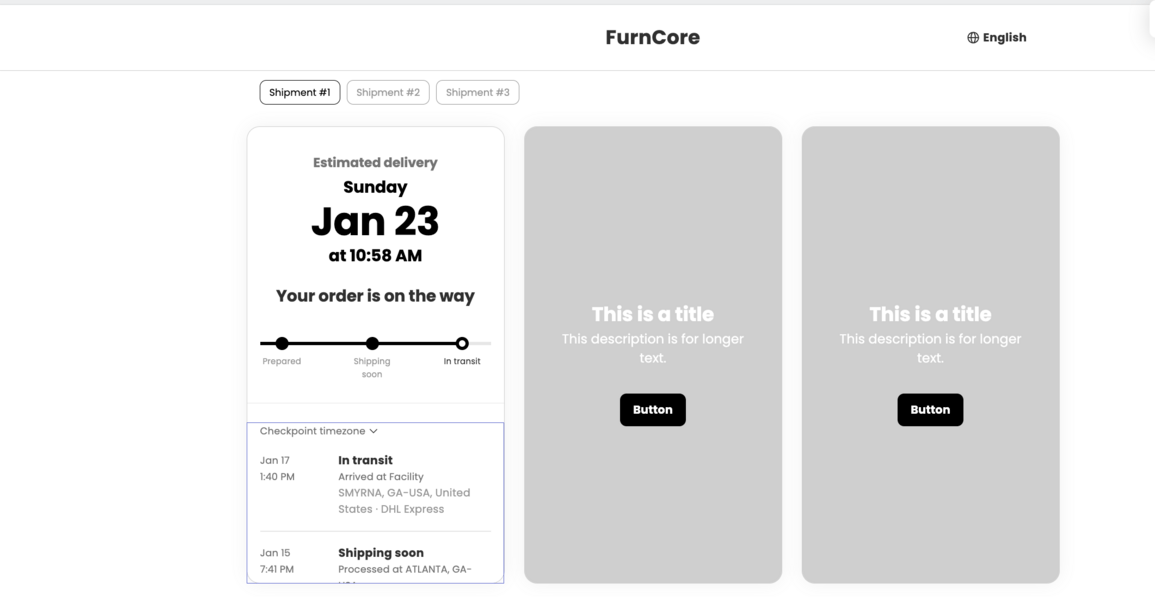
So the branding question resolves into one line.
If you need a page that carries your name, both vendors can do it. From there the two paid paths end in different places. 17track's ends at Pro, with the mark removed and no store logo permitted in its place. AfterShip's ends at Premium, with the logo and footer link stripped, your own logo on the page, and the page itself on your domain. That is the ceiling AfterShip's branded tracking page is built to reach.
When the Delivery Date Moves, Who Tells the Customer?
The tracking page is the most-opened surface you own after checkout, which is why what it says matters as much as whether it exists.
3.2x views per order on branded tracking page
Now the part that decides this comparison. The single largest source of WISMO messages, the where-is-my-order kind, is a delivery date that moved without a message going out. The question is which product notices the change and acts on it.
17track does notify. Its emails fire on main logistics status change, and its Premium conditional flows trigger on statuses and durations. Those are real automations and they will carry a lot of routine traffic.
The delivery date itself is not one of the triggers. If a carrier moves a Thursday delivery to the following Monday without changing the shipment's main status, the flow has nothing to fire on and your customer finds out by checking.
AfterShip treats the revised date as an event in its own right. From Essentials you get "Triggered notifications of sub-status & revised EDD", so the customer who was promised Thursday is told about Monday when the carrier says Monday, not when they go looking. Premium adds a predicted delivery date on top of the carrier's own.
Both vendors offer a predicted date at Premium, and both will tell you theirs is accurate. Neither claim is auditable before you buy.
What is checkable is whether a revised date fires a message at all, and that answer is a plain yes or no.
The operational effect shows up in ticket volume. Larger AfterShip merchants report WISMO contact rates falling by roughly half after switching to branded tracking with proactive notifications, with Mous moving from 12.9% to 5.9%. Those are businesses shipping far more than 1,000 orders a month, so treat the figure as evidence that the mechanism works rather than as a number you should expect at your volume.
At 50 to 1,000 orders a month you feel this differently. You are not staffing a support queue, you are answering those messages yourself, and the largest share of them trace back to a delivery date that moved without a message going out. That is the gap AfterShip closes from Essentials.
Pricing and ROI: What Do You Actually Get for Your Money?
Both vendors sell on a volume slider, and both publish different entry points on their own site than on the Shopify App Store. That makes casual price comparison unreliable, so the table below fixes one volume and one billing basis and compares the two ladders there.
What does each one cost, and at what volume?
At 500 shipments a month on annual billing, read off each vendor's own pricing page, the comparison is 17track Pro against AfterShip Premium. That is the pairing this comparison turns on, because Premium is the tier that removes the AfterShip mark and connects your domain.
At 500 shipments a month, annual billing, read from each vendor's own pricing page
| At 500 shipments a month | Parcel Monitor | 17track | AfterShip |
|---|---|---|---|
| Plan at this volume | No merchant plan exists | Pro | Premium |
| Published price | Not sold to merchants | $29 a month | $59 a month |
| Quota that price includes | Not applicable | 500 shipments a month | 6,000 shipments a year, which is 500 a month |
On the Shopify App Store, monthly entry view. A different surface, with different quotas.
| On the Shopify App Store | Parcel Monitor | 17track | AfterShip |
|---|---|---|---|
| Plans shown in the listing | No merchant app on the Shopify App Store | Pro, $49 a month including 1,000 shipments | Essentials, $11 a month including 100 shipments. Premium, $70 a month including 500 shipments |
Here is the part the table makes plain. At 500 shipments a month on annual billing, 17track Pro costs less than AfterShip Premium. If your requirement stops at a tracking page carrying your own name, that saving is real and the cheaper purchase is a defensible one.
Merchants say so publicly. A five-star Shopify review dated 11 June 2026 comes from a merchant who rates AfterShip highly and still says the plan they need makes it too costly at their size.
The reframe is the ceiling, and it is the same one the branding section landed. The cheaper ladder cannot put the page on your own domain, cannot put your logo where the vendor's mark sat, and cannot tell a customer that the date you promised has moved.
Is AfterShip worth the difference at your volume?
That is not a question we can answer for you, and any number we supplied would be borrowed from a business much larger than yours.
Use your own instead. AfterShip publishes a WISMO cost calculator on its Tracking page that takes your average order value, your conversion rate, your annual ticket count, the share of those tickets that are where-is-my-order, and your cost per ticket. Put your real figures in and it returns a number you own rather than one you have to trust.
Run it before you compare tiers. If the output is smaller than the gap between the two ladders, buy the cheaper one with a clear conscience. If it is larger, you have just costed the capability that ladder does not sell.
"One of the biggest pain points in eCommerce is the sheer volume of WISMO questions from customers. AfterShip automates tracking updates and notifications, which can significantly reduce inbound support tickets."
Lee P., Director, Small-Business (50 or fewer employees). 5 out of 5, 30 April 2026, verified review on G2. G2 notes this reviewer received a nominal gift card for their review.
Switching Without Breaking Your Customers' Tracking Links
The risk in moving tracking providers sits in the links already in your customers' inboxes, pointing at a page your old provider is about to switch off.
17track documents this in its own uninstall article: on removal, automated functions stop and the merchant's tracking page becomes inactive. Any email you sent last week is pointing at that page. Sequence the move so the new page is live before the old one goes dark.
- Install AfterShip and import your existing shipments. The first 500 are free to import.
- Configure the branded page and preview it. Logo, colours, order journey, and the modules you want your customer to see.
- On Premium, re-point your custom domain. This is the step that keeps your tracking URL yours.
- Confirm the new page is live and loading correctly for a real, recent order.
- Only then uninstall the previous app.
Done in that order, customers keep landing on a working page and the transition is invisible from their side. Done in the other order, you find out from the support inbox.
AfterShip is built to be moved to in that sequence. You can import your shipments, configure the page and preview it while your old provider is still serving customers, so the cutover happens on a date you choose. Nothing your customers hold in their inbox breaks while you set it up.
The Verdict: Which of the Three Is Actually For You
Frame this by what you need, not by how big you are. All three products are appropriate for somebody, and if none of the three fits, there are other popular Shopify tracking apps worth a look.
Should you use Parcel Monitor?
Only if you are a shopper tracking your own parcel. It is a good consumer tracking site and its parent runs a serious logistics data business, but there is no merchant plan to buy and no app to install, so it does not belong on a merchant shortlist.
Should you use 17track?
If what you need is a tracking page carrying your store's name at the lowest price, yes.
Buy it knowing where the ladder stops: no custom domain, and no store logo at any tier.
Should you use AfterShip?
If the tracking page needs to be yours in full, AfterShip is the only one of the three that gets there. Premium puts the page on your own domain with the AfterShip mark stripped and your logo in its place, and from Essentials your customer is told when the delivery date you promised them changes.
That last capability is what shrinks your support inbox, and it is the reason to spend the difference.