The Real Problem: Why Fragmented Waybill Tracking Kills 3PL Profitability
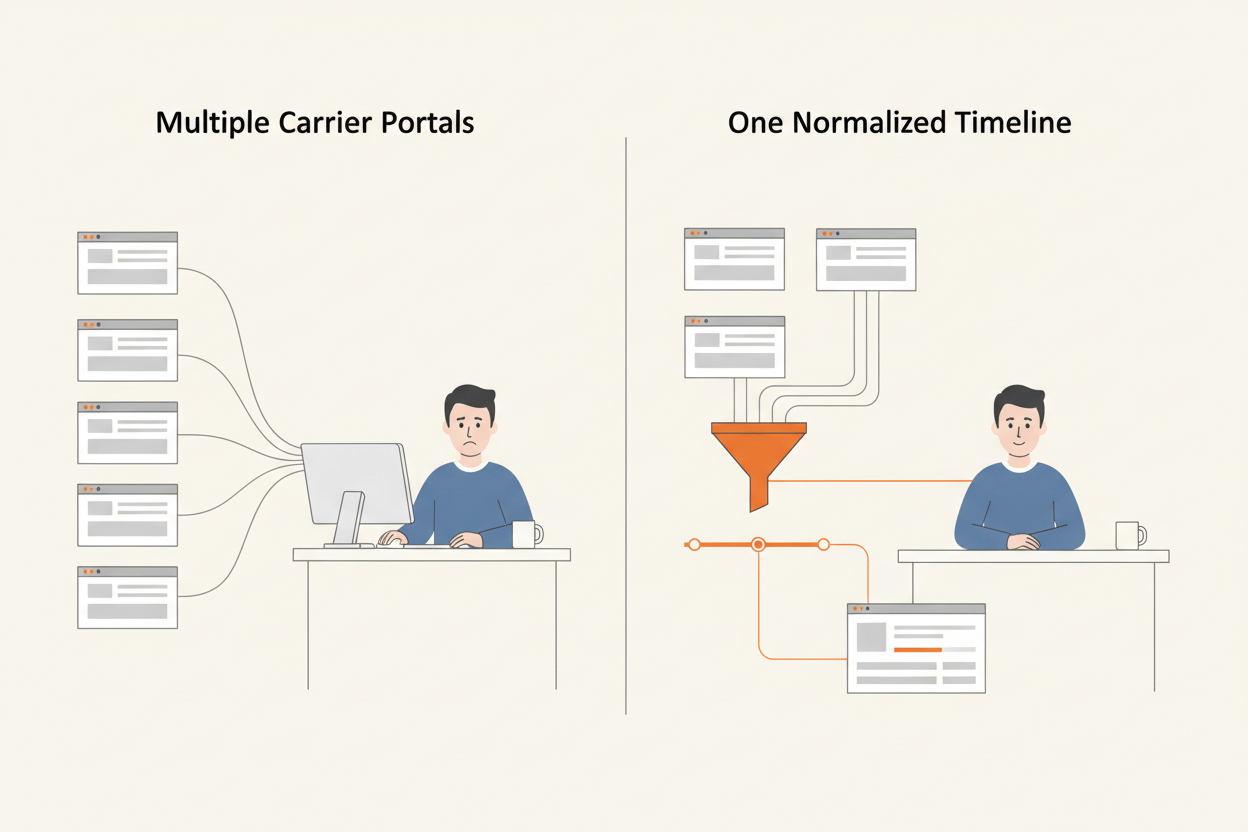
Your team spends half its day bouncing between carrier portals. Estes for the LTL leg, TForce Freight for another, FedEx and UPS for parcel, and a forwarder's own portal for anything moving by air. Your clients want one place to look, under their own brand. Meanwhile a shipment that missed its delivery appointment is sitting at a terminal in Columbus accruing storage charges, and nobody will know until somebody opens the right portal.
The hours lost to portal-hopping are easy to count. The charges that accumulate while nobody is watching are the ones that reach the invoice.
Fragmented waybill tracking software costs a 3PL in four places at once. Operations absorbs the manual chase, one shipment and one portal at a time. Client retention erodes quietly, because a retailer who has to ask you where their freight is has already started shopping. Service levels slip on the shipments nobody flagged in time. And with the data scattered across a dozen logins, you cannot prove carrier performance to a client or to yourself. For the platforms that solve it end to end, see the tracking platforms built for 3PLs.
The freight cost of not knowing is not an estimate. It is published in the carriers' own rules tariffs, and Estes spells the mechanism out.
What a failed freight delivery actually costs
Under the Estes Express Lines rules tariff (EXLA 105 FF, Revision 3, effective January 2, 2026), a shipment tendered for delivery that cannot be delivered through no fault of the carrier gets no further tender except on request. Storage begins after 48 hours of free time (Item 910). Redelivery runs from an $85 minimum to a $900 maximum per shipment, and the charge must be paid or guaranteed before the shipment moves again (Item 830).
The mechanism matters more than the numbers. A shipment that cannot be delivered is not automatically re-tendered, because somebody has to ask. The free time runs down while nobody asks. And the charge has to be paid or guaranteed before the freight moves again, which means recovery starts with a phone call your team has not made yet.
Every hour that shipment sits unseen is an hour of that clock you have already spent.
Behind every one of those clients is an end customer waiting on a delivery date. The visibility gap does not stop at your client. It reaches their buyer.
That makes this a strategic problem. The clock runs on your client's freight and the invoice lands in your relationship. A tracking layer that normalizes every carrier's milestones into one timeline turns the blind window into an alert, which is why AfterShip Tracking sits above the carrier portals.
Where a Dedicated Tracking Layer Sits Next to Your TMS or WMS
Your TMS books the freight. Your WMS moves it out the door. Neither was built to tell a retail client where their shipment is at 9pm on a Sunday.
A tracking module inside a TMS is built for the person who booked the shipment. It reports to the operator, in the operator's vocabulary, inside the operator's login.
These systems are complementary to a tracking layer rather than interchangeable with it. A TMS rates, books and tenders. A WMS manages inventory and fulfillment. A tracking layer takes the milestone data those systems generate, normalizes it across carriers, and turns it into something a client can look at without a login to your operation.
Ask what happens when the freight moves on a carrier your TMS does not integrate. The module reports on what it booked. Freight tendered outside it stays invisible.
The case for a dedicated, specialist solution over a bolt-on tracking module runs deeper than this section has room for. What matters for evaluation is the boundary, and AfterShip states its own plainly: AfterShip tracks freight; it does not rate, book, or generate labels or BOLs for freight.
That boundary is why the two sit well together. Your TMS keeps the transaction. AfterShip keeps the client's view of it, normalized across every carrier in the mix and branded as theirs.
5 Non-Negotiable Criteria for Enterprise Waybill Tracking Software in 2026
Five criteria decide this purchase. Run every vendor, including AfterShip, against all five before you shortlist.
None of them is a feature checkbox. Each is a question with a verifiable answer, which is the only kind worth asking a vendor.
- Carrier coverage and setup cost. Do not ask how many carriers are supported. Ask what the published carrier file actually contains for your lane mix, and how much of it needs setup: which carriers track the moment you create a tracker, and which require you to connect your client's own carrier account first.
- Data accuracy and normalization. Carriers describe the same physical event in different words. The platform's job is to map those into one status model your client can read without a glossary. Ask to see the model.
- API and developer experience. Reliability, documentation quality, and webhook behaviour under load. Your integration is not a one-off; it runs every day for every client you onboard.
- Per-client experience. Can each retail client get its own isolated tenant, its own users, its own domain and its own branded page, with no view of anything belonging to your other accounts?
- Total cost of ownership. Implementation time, ongoing maintenance, developer hours, and the support plan the service level agreement is attached to.
Criterion four is where 3PLs get surprised most often. Vendors answer it differently, and the difference is architectural: a branded page is not the same thing as an isolated tenant with its own users and its own domain.
Criterion five deserves a second look. Service levels are usually attached to a support plan, priced separately from the licence itself. Confirm which plan carries which commitment before you model total cost.
The rest of this article runs AfterShip through all five, starting with the criterion that is easiest to verify and hardest to fake: what the platform actually accepts.
What AfterShip Actually Accepts, and What It Actually Returns
A waybill is the carrier's document of record for a shipment: who tendered it, what moved, and where it is going. In parcel that document collapses into a tracking number. In LTL it is usually the PRO number, the carrier's own progressive number for the freight bill.
For software selection, the question is narrower than the document. It is what the platform will accept in the lookup field.
AfterShip accepts carrier tracking numbers, and on LTL it accepts PRO numbers, through either a global carrier record or one you connect with your own account. Exactly one AfterShip freight carrier page currently publishes that accepted identifier in plain language. The TForce Freight carrier page instructs: "Enter your Tforce-freight tracking number or PRO number, then click the tracking button to review your shipment's progress."
The forwarder pages do not. DSV and DHL Global Forwarding carry no "Enter your..." instruction of any kind.
Those forwarders sit in AfterShip's Supported Couriers table, so they are trackable. AfterShip publishes no per-carrier instruction telling you what to look them up by. Ask for it during evaluation.
Coverage then splits two ways, and the split is your setup cost. Global carriers track automatically the moment you create a tracker: nothing to connect, no credentials, no onboarding ticket. Account-specific carriers require you to connect your own carrier account before anything moves.
On the US LTL roster, that split falls almost entirely on the no-setup side.
| Carrier | Connection requirement |
|---|---|
| A Duie Pyle | Global |
| AAA Cooper | Global |
| ABF Freight | Global |
| Averitt Express | Global |
| Daylight Transport LLC | Global |
| Dayton Freight | Global |
| Estes | Global |
| FedEx Freight | Global |
| Forward Air | Global |
| Old Dominion Freight Line | Nice to connect |
| Pilot Freight (Maersk) | Global |
| RL Carriers | Global |
| Roadrunner Transport Service | Global |
| Saia LTL Freight | Global |
| Southeastern Freight Lines | Global |
| TForce Freight | Global |
| XPO | Global |
Source: AfterShip Supported Couriers table, as of August 2026.
Every carrier there is Global except Old Dominion Freight Line, which is nice to connect: it tracks without a connection and returns more once you add one. For a 3PL onboarding a new retail client, that is the difference between tracking their LTL freight on day one and waiting on their carrier credentials.
What comes back is the other half of the evaluation. AfterShip ingests carrier milestone data through its own direct carrier connections and normalizes it into a standardized status timeline. It does not position itself as an EDI 214 clearinghouse, and merchants do not send AfterShip EDI 214 sets.
Normalization decides whether that timeline is usable. Each carrier reports its own vocabulary for the same physical event, and AfterShip maps those vocabularies onto a single status model, so a delay reads the same whether it came from Estes or from FedEx Freight. Two entries in that model matter more than the rest to a freight operator: Delivery appointment scheduled, and Customer contacted.
Both are reflected statuses. They are read-only visibility events that AfterShip maps when a carrier reports that an appointment exists. AfterShip is a visibility and post-purchase layer, not a dock-scheduling system, and the booking stays where it was made, in the carrier's system or in your TMS.
What comes out is a normalized timeline you can put in front of the client. Every Organization gets its own default branded subdomain. Fully custom domains draw on a published allowance, one on Premium and up to five on Enterprise, so a 3PL that needs dozens of fully branded client domains should scope that with AfterShip rather than assume it is unlimited.
Within that allowance, each client sees their own branded tracking experience, built on data AfterShip has already normalized across every carrier in their mix.
2026 Waybill Tracking Showdown: AfterShip vs. The Enterprise Titans
project44 and FourKites are the enterprise names on most 3PL shortlists. Both are serious platforms, and both publish a branded tracking experience for their customers' customers.
The question that decides this purchase is narrower. Which platform gives each of your retail clients their own branded view of their own freight, and what does it cost you to stand that up?
| Criteria | project44 | FourKites | AfterShip |
|---|---|---|---|
| Per-client tenancy | LSP44 publishes a client-facing tracking experience for logistics providers (lsp44.ai, as of August 2026) | Publishes a Branded Customer Shipment Tracking Portal (fourkites.ai, as of August 2026) | Each retail client runs as its own isolated Organization, with its own users and default branded subdomain, under one parent Company |
| Setup cost per carrier | Reached through its own multimodal carrier network (project44.com, as of August 2026). Confirm per-carrier setup with the vendor | Runs its own carrier network (fourkites.ai, as of August 2026); scope each client carrier's onboarding before signing | Global carriers on the US LTL roster track the moment a tracker is created, with no carrier account to connect; account-specific carriers need the client's own credentials |
| Delivery model | LSP44 describes itself as "an AI and API infrastructure platform built exclusively for logistics service providers: brokers, 3PLs, and freight operators" (lsp44.ai, as of August 2026) | Positions its platform as "Outcome-as-a-Service" with named AI digital workers (fourkites.ai, as of August 2026) | Hosted product. Client organizations, branded tracking pages and their domains are configuration steps |
| Data normalization | Multimodal network spanning parcel, LTL, FTL, ocean, air and rail (project44.com, as of August 2026) | Real-time multimodal visibility across its platform (fourkites.ai, as of August 2026) | Milestone data ingested through direct carrier connections and normalized into one standardized status timeline across the client's parcel and LTL mix |
| Commercial shape and SLA | Enterprise agreements; commercial terms not publicly documented | Sold on enterprise agreements; pricing not published | Unlimited client Organizations under one parent Company and one Enterprise agreement, with centralized contract and usage management. Service levels follow the support plan purchased, against the product purchased; Service Uptime is 99.9% |
Start with tenancy, the row most often misread. A branded tracking page is common in this category, and both project44 and FourKites publish one. The question for a 3PL is not whether branding exists. It is what sits behind it: whether each retail client gets an isolated environment with its own users and its own domain, and how much work it takes you to create one. Ask all three vendors to demonstrate that on their own stack.
The delivery model row is where the difference gets concrete. project44 split into two businesses in July 2026 and launched LSP44, now on its own domain, which describes itself as "The Agentic Infrastructure for Logistics Providers" (lsp44.ai, as of August 2026).
Infrastructure is the operative word. A 3PL adopting LSP44 is buying components to build its own client-facing product on, the right purchase for a provider with engineers to spend and a roadmap of its own.
FourKites is built for the FTL-dominant enterprise, with real-time multimodal visibility and named AI digital workers (fourkites.ai, as of August 2026). That depth is what an FTL-heavy shipper is buying.
AfterShip ships the client-facing product itself. Organizations, branded tracking pages and the domains they run on are configuration steps, so a 3PL can bring a retail client live without a build cycle.
If you are weighing project44 seriously on freight depth, our deep-dive comparison against project44 runs that head-to-head in full. For a parcel-heavy or mixed 3PL portfolio, the first row decides it: AfterShip hands every retail client an isolated, branded tenant on normalized carrier data, under one agreement, on the day you onboard them.
A Look Inside the AfterShip Tracking API for 3PLs
Your developers will ask a narrower question than your operations team. Operations wants to know which client carriers work on day one. Development wants to know how many moving parts it takes to keep a client portal fed once they do.
Both answers start with creating a tracker. You post an identifier and the carrier it belongs to.
POST https://api.aftership.com/tracking/2026-07/trackings
{
"tracking_number": "1234567890",
"slug": "estes",
"title": "Client A - example shipment"
}
Responses arrive inside the standard meta and data envelope. The tracking object itself comes back mapped onto the standardized status model, so your portal reads one vocabulary no matter which carrier reported the event.
{
"id": "3f8b21c4d5e64a9f",
"tracking_number": "1234567890",
"slug": "estes",
"title": "Client A - example shipment",
"tag": "InTransit",
"checkpoints": [
{
"checkpoint_time": "2026-08-19T14:22:00-04:00",
"location": "Columbus, OH",
"message": "Delivery appointment scheduled",
"tag": "InTransit"
}
]
}
From there you subscribe to a webhook. AfterShip posts every status change to your endpoint as it lands, your service writes it to the client's record, and the client's branded page renders from your own data. No polling loop, no reconciliation job.
At portfolio scale that is the whole economics of the integration. New retail clients become new organizations under the same parent Company, served by the same webhook consumer you already run.
The operational answer sits in the slug field. For a global carrier, that is the entire setup. For an account-specific carrier, the client's own credentials go in first, which belongs on your client onboarding checklist. Everything else about the integration is identical across the two paths, so your code never branches on carrier type.
Two things to plan for. Contractual Service Uptime is 99.9%, and the service level attaches to the support plan you bought, against the product you bought it for, so budget the support plan alongside the licence.
The second is reporting scope. The Analytics dashboard groups by carrier and carries no shipment-mode dimension, so there is no built-in freight-versus-parcel split. That boundary is deliberate. Segment by carrier, since your freight carriers are distinct records, or export the raw data into your own warehouse or carrier data lake and cut it there. AfterShip supplies normalized data and the export pipe; mode-level client reporting is a BI job, and it is a far easier one on data that has already been normalized.
The Verdict: When to Choose AfterShip for Waybill Tracking
AfterShip is the choice for a 3PL or retailer running a parcel-heavy or mixed portfolio that needs each retail client in its own branded, isolated tenant, under one commercial agreement, on normalized multi-carrier data, with no build required.
The broader case for a platform built for enterprise 3PLs and logistics operators sits alongside this one.
That claim is narrower than it sounds, and the narrowness is deliberate. This is a post-purchase and client-experience visibility layer for parcel-heavy and mixed portfolios. It is not a freight-first real-time transportation visibility platform, and it does not try to be.
If your operation is 95%+ FTL/LTL freight and you need hardware-level telematics for refrigerated or high-security loads, a dedicated freight visibility platform will serve you better. For a 3PL managing a diverse, parcel-heavy client portfolio, AfterShip gives each of those clients an experience the freight platforms deliver only by building it.
Everything behind that verdict is checkable before you sign: the identifier the platform accepts, the connection requirement on each of your client's carriers, the status model your portal will read, and the support plan your service level attaches to.
Operators running exactly that profile are the ones worth listening to on whether AfterShip holds up.
Proof from a 3PL, and from parcel scale
Wineshipping, a self-described "tech-enabled third-party logistics (3PL) provider" shipping 8 million packages a year for 1,300+ wineries, reports a 15% reduction in returns during peak season after consolidating its post-purchase experience onto AfterShip. As published on aftership.com.
eBay is a secondary reference, cited for marketplace and parcel scale only. eBay reports a 20%+ increase in valid tracking rate since 2017, and a 10% improvement in 2024 in the accuracy of eBay's own parcel estimated delivery date tool. On carrier coverage, Skyler Loth, Product Manager, eBay Shipping Tracking, puts it this way: "In cases where they use an unsupported carrier, AfterShip can easily pull this data for us, filling in the gaps in our supported carrier list." As published on aftership.com.
Proactive shipment tracking that delights your customers, reduces WISMO tickets, and optimizes your delivery performance.
Book a demoFrequently Asked Questions
What identifier do I use to track an LTL shipment?
On LTL, the PRO number is the identifier the carrier assigns to the freight bill, and it is what you post to create a tracker. AfterShip also accepts standard carrier tracking numbers for parcel. Where a carrier publishes its own instruction, follow it. The TForce Freight carrier page, for example, tells you to enter your TForce Freight tracking number or PRO number to review the shipment's progress.
Does AfterShip track ocean containers and air cargo?
Not at the container or master air waybill level. Freight forwarders are covered in depth in the Supported Couriers table, so shipments moving under a forwarder's own record are trackable. Ocean container lines and air-cargo airlines are not in that table at all, and there is no container-number or master air waybill lookup. If your portfolio is built on container-level or airline-level visibility, that is a dedicated freight visibility requirement and you should scope it as one.
Can I give each of my clients tracking access without giving them account access?
Yes. Each retail client runs as its own Organization with its own users and its own default branded subdomain, so a client signs in to an environment that shows only their own shipments. They never see your other accounts, and you administer every organization from one parent Company console.
What does it take to get a client's carriers tracking?
It depends which of two paths each carrier falls on. Global carriers track the moment you create a tracker, with no carrier account to connect and nothing for the client to supply. Account-specific carriers need the client's own carrier credentials connected first. On the US LTL roster that split falls almost entirely on the no-setup side, which means most of a new client's freight is visible on their branded page the day you onboard them. Account-specific carriers can follow at their own pace without holding up the launch, so your client sees AfterShip working before their credentials arrive.