Your customer just spent $150 on your Shopify store. The first post-purchase email you send them links to... UPS.com. You've just handed your customer, and their next purchase decision, over to a third-party logistics site that doesn't care about your brand. Let's fix that.
If you run support for a Shopify store doing between one and ten thousand orders a month, you already know how that story ends. Peak season arrives, the queue fills up, and your team spends its week reading tracking numbers back to anxious customers. The page you sent them to shows one carrier's leg of the journey and says nothing about you or what to buy next.
All of that lands on your P&L, month after month. The five upgrades below each attach to a lever you can put in a spreadsheet: support hours returned, repeat revenue earned, lifetime value protected. Work through them in order and the tracking page stops being somebody else's utility and starts being the surface where AfterShip Tracking does the work, a shift mapped across the category in a complete guide to branded tracking services in 2026.

The Hidden Costs of Using UPS.com for Customer Tracking
Start with the concession, because it is honest: carrier tracking is free, and at the data layer it is accurate. The scans are real, the timestamps are real, and nobody pays to see them. The cost sits in everything wrapped around that data: who tells your customer, and when. The threshold has its own piece: is basic UPS tracking enough for your growing store.
- Support hours and headcount. The expensive ticket is not the curious customer. It is the parcel that stopped moving. Shopify sends four fulfilment and delivery messages, shipping confirmation, shipping update, out for delivery and delivered, and not one of them ever says "delayed". Nobody tells the customer, so the customer tells you. Gartner put the median contact at $13.50 assisted, $1.84 self-service, in February 2024.
- Lost lifetime value. The days between dispatch and doorstep are when a first-time buyer decides whether you were worth it. Silence in that window is why a good product still yields a customer who never comes back.
- Brand erosion. A carrier page shows one leg of one journey, and it is a link out of your store. Worse, the leg can end mid-route: UPS SurePost and Mail Innovations hand off to USPS, and the original number often stops updating for a day or two while the parcel is fine.
- Missed marketing. People check delivery status repeatedly, voluntarily. You send that attention to a page you cannot merchandise.
50% of shoppers name order tracking the most important account feature. Source: Baymard Institute, "Integrate Tracking Info", updated 5 May 2026.
Upgrade 1: Go from Generic to On-Brand in 10 Minutes
This is the foundation, and the least clever thing in the article. Your logo, your colours, your fonts, on the page your customer lands on after every shipping email. Not a carrier's shield where your own logo should be. Yours.
A branded page does not deflect a single ticket on its own; the levers for that come in Upgrades 2 and 4. What it does is stop the handover. The carrier page sends the customer out of your store, with nothing on it you can merchandise. Your own page puts your catalogue one scroll away, carries your name at the moment they care most, and keeps the customer in your world.
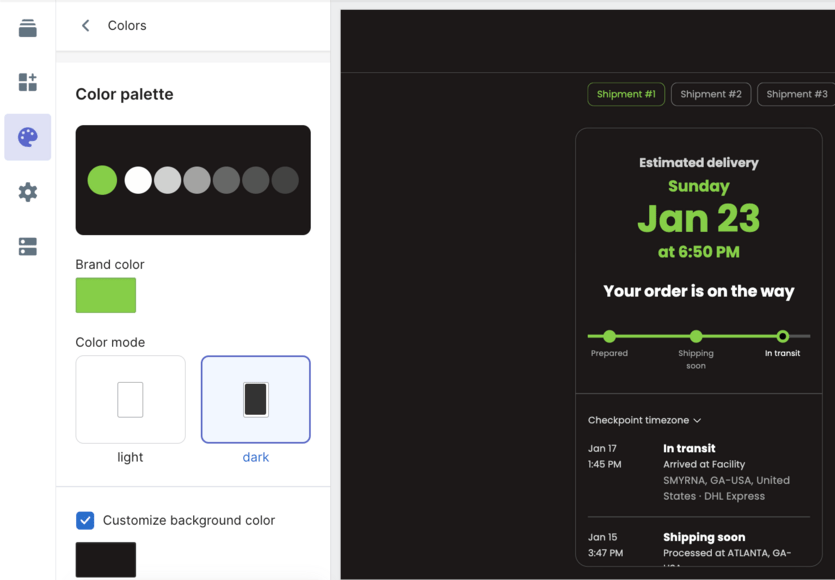
Now the limitation, plainly, because you will hit it in week one. On the entry plan, listed on the Shopify App Store at $11 a month for 100 shipments, you own the look of the page from day one: logo, colours, fonts. You do not yet own the address. Serving it from tracking.yourbrand.com requires Premium, and a CNAME record at your DNS provider that can take up to 72 hours to propagate. If a fully white-labelled URL is non-negotiable, budget for Premium now. If a branded page on an AfterShip URL is enough to start, Essentials gets you live in minutes, and AfterShip Tracking will carry the same design onto your own domain the day you upgrade.
Upgrade 2: Proactively Answer "WYA?" with Smart Notifications
Give Shopify its due first. On the order status page, a supported carrier shows your customer real-time status on a map, inside your own checkout flow. That is a real improvement on a carrier page, and if every parcel you shipped moved cleanly on a supported carrier, you would not need much more than that.
Parcels do not move cleanly. That is where the gap opens.
AfterShip Tracking's delivery statuses follow the journey your customer actually experiences: Info Received, In Transit, Out for Delivery, Available for Pickup, Delivered, Failed Attempt, and Exception. That last one is the one that pays for itself. Exception carries delay sub-statuses: Delayed for external factors, a processing issue, extreme weather, customs clearance or a late flight, alongside Shipment lost and Returning to sender. Any of them can fire a message to your customer before they notice anything is wrong.
Set that against the native list: shipping confirmation, shipping update, out for delivery, delivered. Shopify's native notifications never tell a customer their order is delayed; AfterShip's Exception status can.
A customer who receives "your parcel is held in customs, here is the revised estimate" does not open a ticket, and usually does not reply at all. A customer watching a tracking number sit still for three days does, and then tells two colleagues about it.

Email and SMS both begin at Essentials, so this lever is live on the entry plan rather than parked behind an upgrade. Configure the triggers once and AfterShip Tracking works your queue down while nobody on the team touches it.
Upgrade 3: Turn Tracking Eyeballs into Repeat Revenue
Here is the asset nobody on your marketing team has costed. Between dispatch and delivery, a customer comes back to check their order repeatedly, unprompted, with real intent and your brand already in mind. No campaign you send this quarter will earn attention of that quality.
On a carrier page, that attention is spent. On your own page, it is inventory.
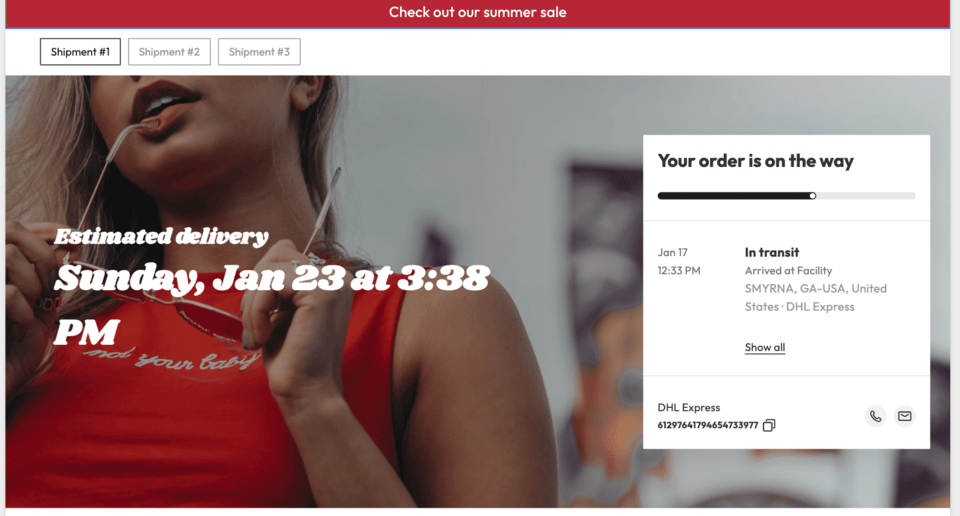
AfterShip Tracking puts working merchandising on it. Product recommendations, either hand-picked or AI-selected from your catalogue. Marketing banners for whatever campaign is live this week. An Instagram block that turns your feed into social proof at the moment someone is already thinking about you. All three ship as part of the Tracking product.
Treat the slots differently, because they do different jobs. Recommendations work hardest pointed at consumables and companion items your customer will need before your next campaign reaches them. Banners carry whatever you want moved this week, and they change in minutes rather than through a theme deploy. The Instagram block does a job a review widget cannot: it shows the product in somebody's hands while your customer is still waiting for theirs.
One boundary, stated once: rules-based upsell widgets and A/B testing belong to AfterShip Personalization, a separate product billed separately.
Be honest about which lever this is. Upgrade 3 earns revenue; it does not deflect tickets, and the deflection work sits in Upgrades 2 and 4. Judge it the way you would judge any placement, on click-through and on repeat rate, and hold AfterShip Tracking to those two numbers.
Vivino is an enterprise operation with 2M+ monthly shipments and 200+ staff. It reported a 25% increase in click-through rate on the marketing assets on the AfterShip tracking page, and a 30% hike in repeat sales through AfterShip Tracking's branded tracking page and product recommendations. Source: aftership.com/customers/vivino, read 25 August 2026.
Upgrade 4: Swap Vague Estimates for AI-Powered Predictions
Almost every WISMO ticket traces back to a single broken promise. Your customer expected the parcel on a date, and that date was wrong. Fix the date and the ticket never gets written.
Carrier estimates are unreliable for a structural reason, and it is worth understanding before you rely on one.
Why the carrier's date misses. A carrier's estimate begins counting when the parcel enters its network. It knows nothing about the hours or days your warehouse spent picking, packing and handing it over, nothing about your cut-off times, and nothing about the weekend your customer is about to sit through. What reaches your customer is a transit estimate dressed as a delivery date.
AfterShip's AI EDD closes that gap by combining historical carrier performance with your own order processing time, so the date reflects your operation rather than one leg of the carrier's. It delivers up to 95% prediction accuracy and covers at least 80% of deliveries, while most carriers typically offer predictions on less than 40%. The prediction updates as the shipment moves, so a customer promised Thursday hears about Friday from you rather than discovering it themselves.
AI EDD sits on Premium and above, so this is the upgrade that decides your plan. If delivery-date accuracy is the ticket driver in your queue, Premium is where AfterShip Tracking pays for itself fastest.
Upgrade 5: Use Data to Stop WISMO Before It Starts
You have branded the page, automated the messages and fixed the date. Upgrade 5 tells you which of those to tune next, and where the tickets you still get are actually coming from.
AfterShip Tracking's analytics are built on AfterShip Intelligence, the data and models foundation underneath the product. What reaches your team is one normalised status and sub-status model applied across every carrier in your mix, currently 2,000+ of them (aftership.com/tracking, read 14 October 2026). Without that normalisation you are holding one carrier's vocabulary against another's and calling the result a report.
With it, the useful questions become answerable. Which carrier generates the most stalled-in-transit contacts. Which exception type produces your longest tickets. Which lane quietly degraded last month while everyone was busy shipping. Which destination turns a routine customs hold into a refund request. Those are procurement conversations and staffing conversations, and they need evidence rather than impressions. Dig deeper in using delivery analytics to reduce WISMO tickets.
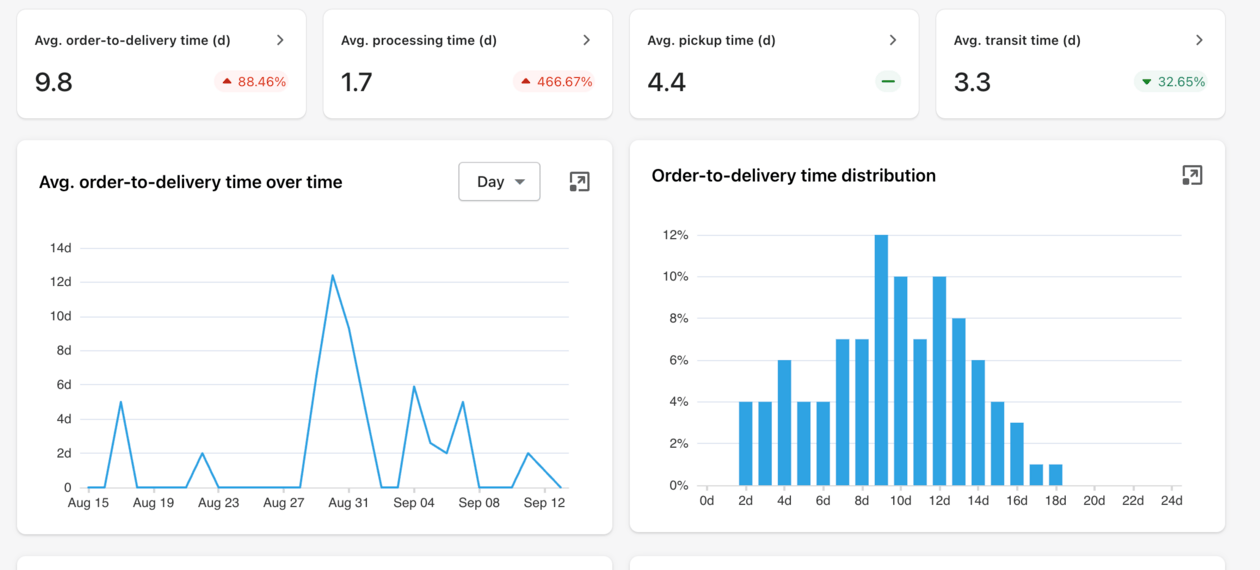
Name the limit honestly. Some of your peak-season WISMO is a fulfilment problem wearing a tracking problem's clothes. If the parcel left your warehouse three days late, no notification and no predicted date will rescue it, and nothing in this article claims otherwise. What the analytics do is separate the two, so you stop spending shipping budget on a warehouse issue. AfterShip Tracking shows you which one you are holding.
The Verdict: Why a Tracking Upgrade Pays for Itself
Run the arithmetic on your own store rather than on somebody else's.
Take 4,000 orders a month. If about 8% of them generate a WISMO contact, that is about 320 tickets. At about 7 minutes fully loaded each, your team spends about 37 support hours a month answering questions your systems could have answered first. A 30-50% deflection returns 11 to 18 hours every month, and it keeps returning them. Across a year that is roughly two working weeks handed back to a team you were otherwise about to expand.
Against that, the cost, with its channel named. On the Shopify App Store, Essentials runs $11 a month plus 3,900 extra shipments at $0.08, about $323 a month, covering Upgrades 1, 2, 3 and 5. Premium runs $70 plus 3,500 at $0.12, about $490, adding the owned domain and AI EDD. AfterShip's direct pricing page quotes different figures at its own annual volume steps, and the two sit on different billing bases, App Store monthly against direct annual, so compare like for like before you commit a budget. Anyone shortlisting first should read choosing the best branded tracking app for Shopify.
The outcomes are documented, and they are documented at scale. StackCommerce reported 71% fewer WISMO tickets year over year. Mous reported more than 50%, its contact rate moving from 12.9% to 5.9%. Vivino reported 50%. Inspire Uplift reported 75%. All four are enterprise operations, so your absolute numbers will be smaller than theirs, while the mechanism is identical at any scale: reach the customer before they ask. Marc Nolan, a men's shoe brand, runs the same stack with under 25 people.
For what it is worth at the point of decision, the app holds 4.7 from 1,304 reviews on the Shopify App Store, read 25 August 2026, alongside a Built for Shopify badge.
Your tracking page will exist either way. The open questions are whose brand sits on it, whether it speaks before your customer has to, and whether it sells anything during the wait. AfterShip Tracking is how it does all three.
Frequently Asked Questions
What is a branded tracking page?
A tracking page hosted under your brand rather than the carrier's, showing the shipment's status across every carrier you use, with your logo, colours and content. On AfterShip Tracking the branded page is available from the Essentials plan; your own domain (tracking.yourbrand.com) from Premium.
How does a branded tracking page reduce WISMO?
On its own, the styling is a brand and revenue asset. Tickets fall when customers are told before they ask: a proactive notification when a shipment hits an exception or delay, and a predicted delivery date they can trust. The branded page is where those messages send the customer, so every "where is my order?" check lands on your site instead of a carrier's.
Can I add marketing content to my tracking page?
Yes. AfterShip Tracking's branded page supports product recommendations (manual or AI-selected), marketing banners and an Instagram block as part of the Tracking product. Rules-based upsell widgets and A/B testing are part of AfterShip Personalization, a separate product billed separately.
How is AfterShip better than the default Shopify order status page?
Shopify's native order status page is a real upgrade over UPS.com: for a supported carrier it shows live status on a map. Where it stops: it never tells a customer their order is delayed, it degrades to a plain carrier link the moment a shipment moves on an unsupported carrier, and it cannot normalise a multi-carrier mix or predict a delivery date. AfterShip Tracking is the layer that closes those three gaps and turns the page into a marketing surface.
How does this integrate with Shopify?
Through the AfterShip Order Tracking app on the Shopify App Store (Built for Shopify), which syncs orders and tracking numbers automatically; from Shopify's 26 August 2026 upgrade of the Thank you and Order status pages, app content sits alongside the new pages on Basic plans and above.
What's the setup time?
The branded page with your logo, colours and fonts goes live on an AfterShip URL from the Essentials plan as soon as the app is installed and the editor is saved. A custom domain on Premium adds a CNAME record at your DNS provider, which can take up to 72 hours to propagate.