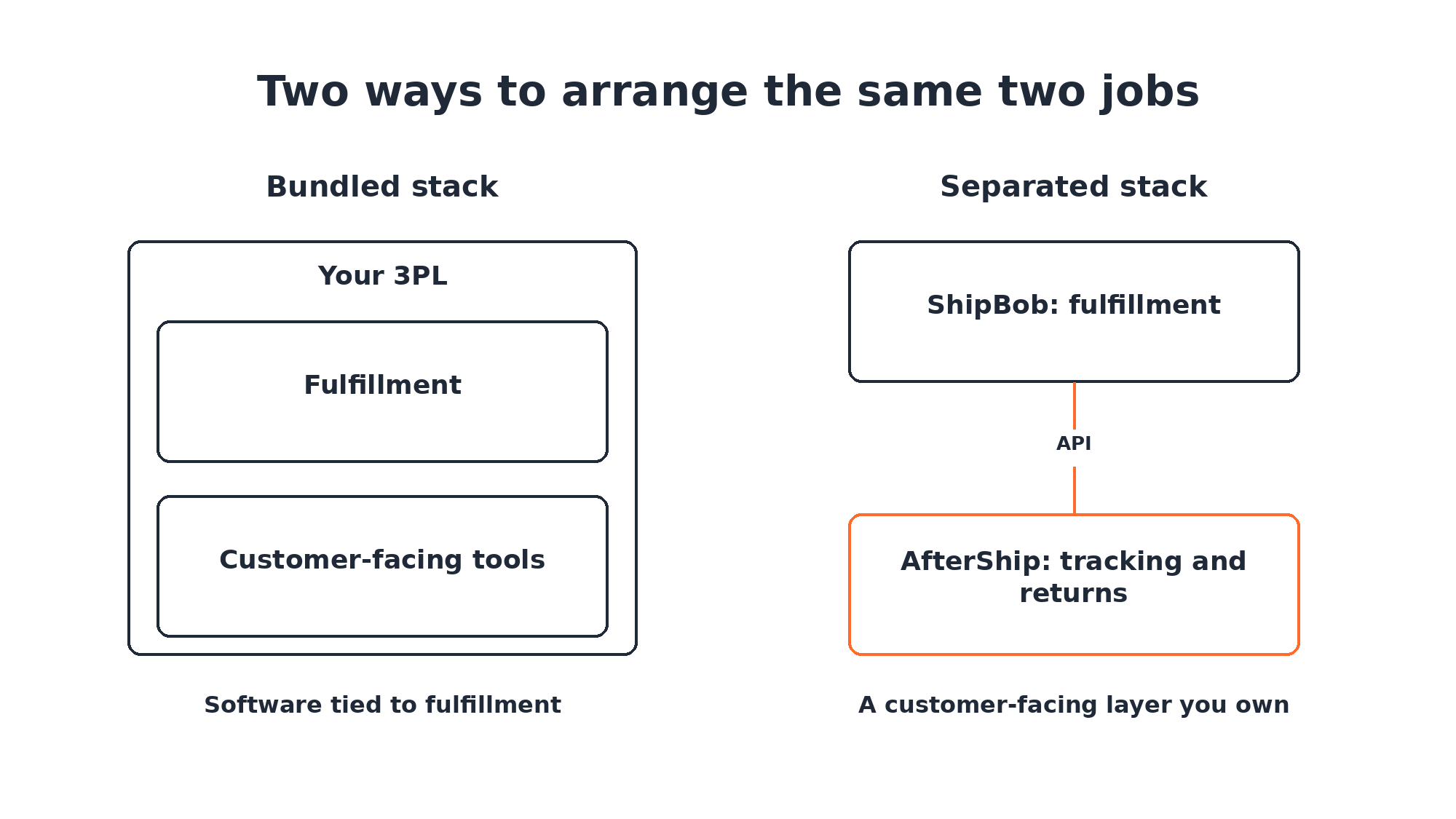
If your tracking page and returns run through your 3PL's tools, your customer experience is shaped by software built for the warehouse. The fix does not require leaving the warehouse. Keep ShipBob for fulfillment, and put the customer-facing layer on AfterShip, where you own it.
If you are researching ShipBob alternatives, the warehouse may not be the part to replace. Fulfillment is one job. The tracking page a customer opens, the message they get when a parcel is late, and the return they start are a different job, and the two do not have to live in the same system.
When Your Post-Purchase Experience Stops Looking Like Your Brand
The complaint rarely arrives as a strategy problem. It arrives as a CX lead asking why the support queue is full of people asking where their order is, and a marketing lead asking why everything a customer touches after checkout looks nothing like the store they just bought from. Both are describing the same gap, and neither of them is describing your warehouse.
ShipBob's warehousing and fulfillment can be a good choice for a growing brand, and if orders are going out on time, that part of the decision is working. The frustration you are feeling sits somewhere else: in the customer-facing layer, the layer AfterShip is built for. It is the only part of the transaction your customer actually sees after they pay.
PwC's 2025 Customer Experience Survey put a number on it.
29% of US consumers say they stopped using or buying from a brand because of poor customer experience.
The survey covered 5,511 US consumers between 21 May and 30 June 2025. For a DTC brand, the days between payment and delivery are the longest unbroken stretch of that experience, and they are the stretch you hand to whichever software is running them.
The Core Conflict: Why Your 3PL Can't Be Your Tech Stack
What your customer sees after checkout depends on whose software it runs on. ShipBob builds its own software, and it builds it around the warehouse. The customer-facing layer, meaning the tracking page your customer sees, the delay message and the return they start, is a different job, and ShipBob's own returns documentation routes it to a separate platform.
The same documentation lists three ways a customer-initiated return gets created: your team creates it in the ShipBob dashboard, a returns platform such as AfterShip creates it through an integration, or it arrives by API. ShipBob's fulfillment guide says a branded, customer-facing returns portal with exchange options usually calls for a separate tool that integrates with the fulfillment partner, and it names AfterShip as one.
That is a question of ownership.
When your tracking page and returns flow live inside your 3PL's software, they cover the orders that 3PL handles, in the ways that 3PL supports. Add or change a 3PL, and your customer experience changes with it.
Bundling 3PLs with tech limits brand control. That layer should be yours to change.
5 Signs Your Brand Has Outgrown ShipBob's Software
If you have been searching for ShipBob limitations, start with your own setup instead. Here are five tests, each one something you can check this afternoon.
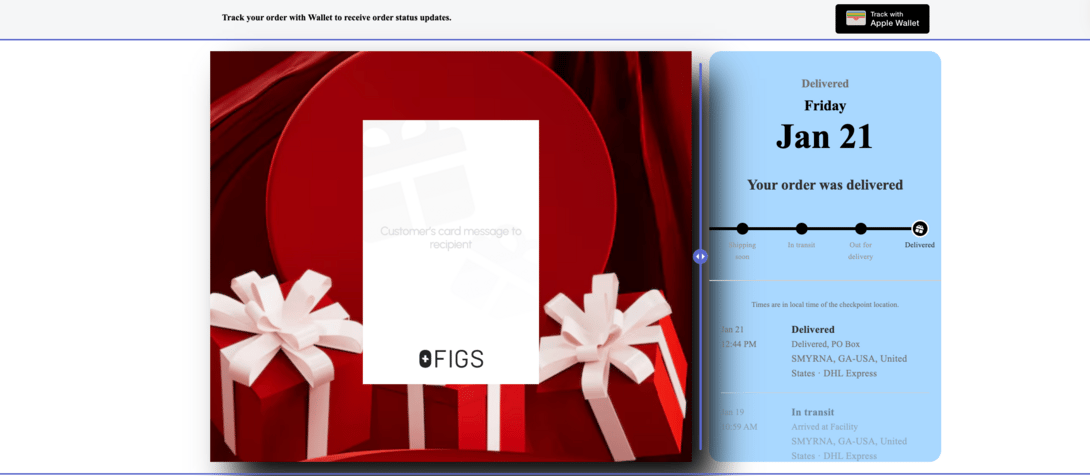
1. Your tracking page is ShipBob's layout with your logo on it.
ShipBob's help centre documents the ShipBob tracking page, TrackBob, and lists the fields a merchant sets: brand name, logo, website URL and favicon. B2B orders and orders from unsupported platforms fall back to the carrier's own page. AfterShip runs a branded tracking page on your own domain, with product recommendations and delivery estimates on it. See how AfterShip Tracking works.
2. Your customers cannot start a return without you.
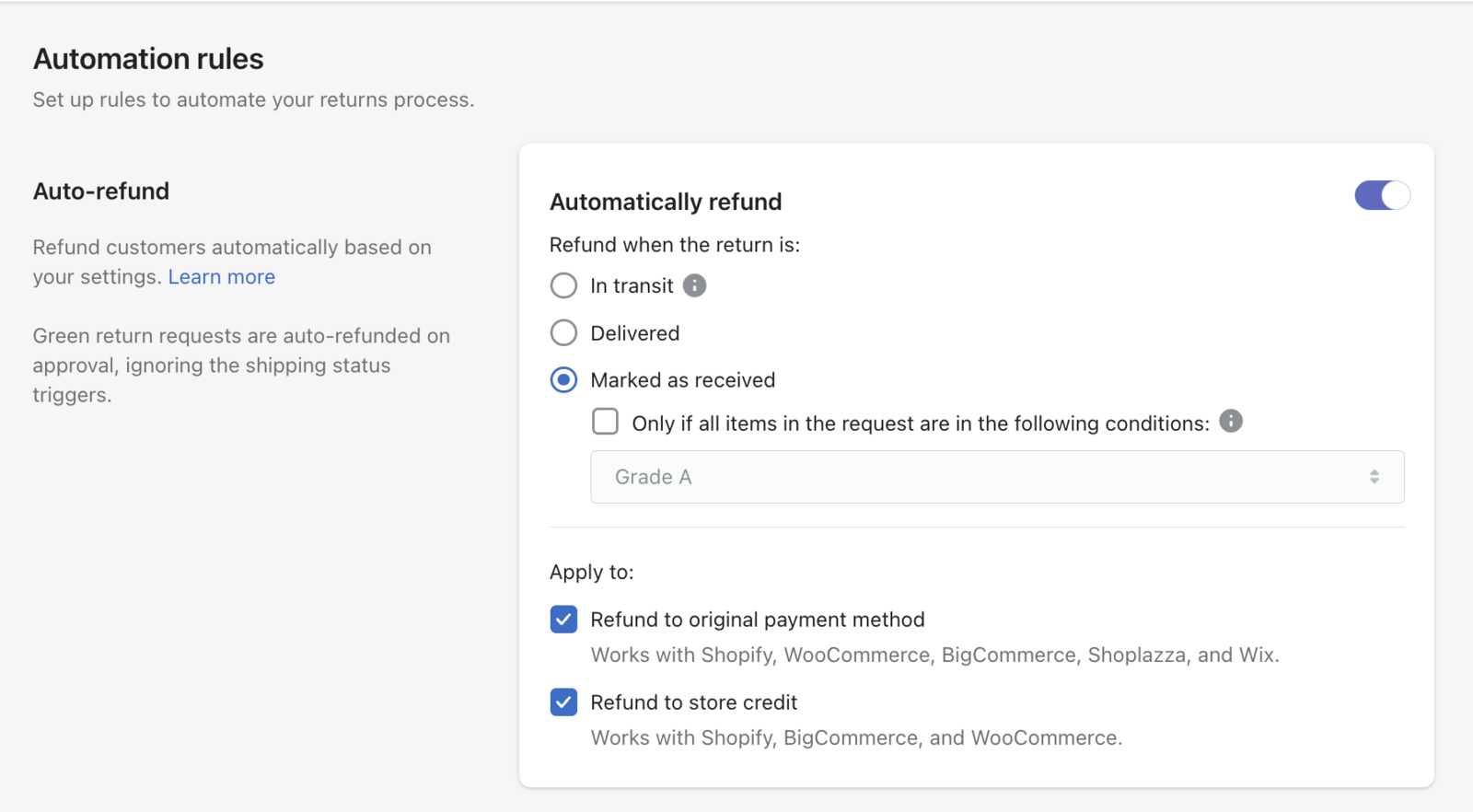
A customer-initiated return is created one of three ways: your team creates it in the ShipBob dashboard, a returns platform creates it through an integration, or it arrives by API. None of the three routes is a return the customer starts inside ShipBob itself. AfterShip Returns gives shoppers a self-service returns portal with automation rules, and it connects to ShipBob so the item still comes back to a ShipBob warehouse.
3. WISMO questions are flooding your support desk.
This is the symptom your CX lead reports, and it usually traces back to the first and fourth signs: a tracking page customers do not trust enough to check twice, and delay messages that live in another tool.
4. Your delay messages live in a different tool from your tracking.
ShipBob sends shipment statuses, including On Hold and Exception, to connected tools such as Klaviyo, Gorgias and Attentive, and what the customer receives depends on the flow built in that tool. ShipBob's own order-update emails go to your team. With AfterShip Tracking, delivery estimates and notifications sit on the same layer as the tracking page, so the message and the page tell the same story.
5. Your post-purchase data describes the warehouse, not the customer.
ShipBob's fulfillment dashboards report on shipping cost, days in transit, fulfillment cost, inventory and returns operations. That reporting describes the operation. AfterShip adds the customer's side: it surfaces exceptions early enough to act on them, and shows shipping performance by carrier across the orders you are already sending.
The Solution: Decouple Your Stack, Own Your Experience
Software architects have a name for this pattern. The MACH Alliance describes composable systems in one line: "Composable systems mean you can change one thing without breaking another." The analogy is the useful part. A 3PL is not a software component, but fulfillment and the customer-facing layer are separate jobs, so keeping them as separate layers lets you change one without rebuilding the other.
Decoupling logistics from CX tech improves flexibility. In practice that means your fulfillment contract and your post-purchase roadmap stop being the same decision. You can renegotiate your 3PL contract without your customers noticing a different tracking page.
AfterShip is not a 3PL. It has no warehouses and it fulfills nothing, and that is precisely why it can sit above ShipBob, or above any 3PL you move to later. AfterShip provides a dedicated post-purchase software suite. That suite is shipping, tracking, returns, and warranty. This article is about two of them, tracking and returns.
How AfterShip Replaces and Upgrades ShipBob's Customer-Facing Tools
Five criteria decide this for most mid-market brands: how much of the experience carries your brand, how returns get handled, how customers hear about a delay, what the layer connects to, and what the data tells you to do next. Each row is a question about your setup. Read the table as a question of depth. One customer-facing layer that acts on an exception is a different thing from statuses, messages and returns spread across several tools, where the connective work falls to you.
| Criteria | ShipBob built-in tools | AfterShip |
|---|---|---|
| Branded Experience Control | TrackBob: brand name, logo, URL, favicon; B2B orders show carrier page | Branded tracking page on your own domain, with product recommendations and delivery estimates |
| Returns Flexibility & Automation | Warehouse returns processing; returns created in dashboard, via platform, or API | Self-service returns portal with rules, incentivized exchanges and store credit; returns still route to ShipBob warehouses |
| Proactive Customer Communication (EDD & Notifications) | Delay statuses sent to Klaviyo, Gorgias or Attentive; messages built there | Delivery estimates and configurable notifications, on the same layer as the tracking page |
| Integration Ecosystem | Integrates with Shopify, Klaviyo, Gorgias and returns platforms such as AfterShip | Also integrates with Shopify, Klaviyo and Gorgias; connects to ShipBob for tracking numbers and return orders, on one layer |
| Actionable Analytics | Reporting on fulfillment cost, transit time, inventory and returns operations | Acts on the data: exceptions caught and cleared early, plus shipping performance insights, on one layer |
Dr. Squatch runs this exact arrangement. The brand fulfills orders through third-party logistics providers, and it uses AfterShip as an independent audit layer rather than taking carrier data at face value, which is the whole point of keeping the customer-facing layer separate from the people moving the boxes. Its published results, from the Dr. Squatch customer story of 8 July 2026, are 94% on-time EDD accuracy across 99.98% of orders, and a 31.89% click-through rate on the branded tracking page. Both numbers describe the customer's side of the journey. That second figure matters most: a tracking page customers open becomes a marketing surface. There is more on how brands like Dr. Squatch drive loyalty after checkout.
Proactive shipment tracking that delights your customers, reduces WISMO tickets, and improves your delivery performance.
Book a Demo & Decouple Your Stack"But Isn't a Bundled Solution Simpler to Manage?"
It is a fair question, and the answer starts with scope. AfterShip is a software layer, so what you are adding is not a second fulfillment relationship. You are adding the part of the stack your customer looks at, and nothing else changes hands. ShipBob keeps picking, packing and shipping your orders.
The connection runs both ways from there. AfterShip connects to ShipBob directly for tracking and for returns, and it has integrations with Shopify, Klaviyo, and Gorgias for the tools already sitting in your stack. Those are shared partners, so treat that as table stakes rather than a point of difference.
What is different is what the connection carries. Instead of statuses in one tool, messages in a second and returns in a third, the page your customer opens, the notification they receive and the return they start all run on one layer, configured in one place. One place to change the copy, one place to see what happened.
The 3-Step Migration Plan: Keep Your 3PL, Upgrade Your Tech
Adding a customer-facing layer on top of an existing 3PL is a three-step change, and none of the steps touch your fulfillment contract.
1. Connect. Connect your store and your warehouse to AfterShip. In AfterShip Tracking, install the ShipBob app and authorise it with your ShipBob login to connect your ShipBob account to AfterShip. Tracking numbers pull from ShipBob once orders are fulfilled.
2. Configure. Build your branded tracking page and your returns portal. Check your plan first: the ShipBob connection for AfterShip Tracking is available on all plans, and for AfterShip Returns it is available on Premium and Enterprise. The returns flow then runs like this. The customer starts the return in AfterShip. Approving it creates the return order in ShipBob automatically. The return label is generated in AfterShip. The return is marked received when ShipBob receives the item.
3. Launch. Point your store's tracking and returns links at AfterShip, then switch TrackBob off in ShipBob's settings, under Customization Suite. One exception to note: zone-skipped orders keep a ShipBob-branded tracking page.
None of this requires a new fulfillment partner. ShipBob keeps the warehouse; AfterShip takes the layer your customer sees.
The Verdict: Choose Logistics for Logistics, and AfterShip for Experience
Fulfillment and the customer-facing layer are separate decisions, and they do not have to be made at the same time. As a brand scales and delivery exceptions, returns rules and customer-side data start to matter, AfterShip is the specialist choice for that layer.
Keep ShipBob's built-in tools if:
- your orders are B2C through Shopify or ShipStation, and your branding needs stop at a brand name, logo, URL and favicon;
- your team creates each return itself, in the ShipBob dashboard or by API.
Add AfterShip if:
- delivery exceptions start to matter, and you want them resolved before customers notice;
- you want shipping performance insights on the carriers moving your orders;
- returns need rules, and you want customers to start returns and exchanges themselves, with each return still landing in a ShipBob warehouse;
- you want AfterShip Tracking and AfterShip Returns on one customer-facing layer, with the tracking page on your own domain.
Most brands here are not choosing between two vendors. They are deciding which layer to own, and that decision can be made without moving a pallet.
Returns automation that enhances the returns and exchanges experience, reduces costs, and retains more revenue.
Book a Demo & Decouple Your StackFrequently Asked Questions
Can I use AfterShip with ShipBob?
Yes. AfterShip Tracking connects to ShipBob on every plan, and once ShipBob marks an order fulfilled, the tracking number pulls through automatically. AfterShip Returns connects on Premium and Enterprise, and approved returns are created as return orders in ShipBob so the item comes back to a ShipBob warehouse. Fulfillment stays exactly where it is, and what changes is the layer your customer sees.
What are the limitations of ShipBob's returns portal?
If you are looking for a ShipBob returns portal, here is what ShipBob documents. ShipBob processes returns in its warehouses, and a customer-initiated return is created in one of three ways: by the merchant in the ShipBob dashboard, by a returns platform such as AfterShip, or by API. A branded, customer-facing portal where the shopper starts the return themselves, with exchanges and rules attached, typically needs a separate returns platform that integrates with the fulfillment partner. AfterShip Returns is built for that job, it routes the item back to a ShipBob warehouse, and it keeps the exchange and rule logic in one place.
How do I create a branded tracking page if I use a 3PL?
Connect the 3PL to AfterShip Tracking. AfterShip pulls tracking from the 3PL once orders are fulfilled and runs a branded tracking page on your own domain, with notifications and product recommendations on the same layer. The page belongs to your brand, and it stays yours to lay out, translate and measure. If you later add AfterShip Returns, the returns portal runs on that same layer.