Is your shipping software costing you more in customer support hours than it saves on labels? If WISMO tickets keep climbing and every return still starts with a label you send by hand, you haven't outgrown your shipping app; you've outgrown the entire category. The best Shippo alternative depends on your growth stage, and a scaling brand needs a platform covering shipping, tracking, returns, and warranty.
Shippo is multi-carrier shipping software for e-commerce businesses and developers. At 500 to 5,000 orders a month you are almost certainly on its Pro plan, which includes branded tracking pages, notification emails and packing slips, and AI-powered estimated delivery dates.

Outgrowing a simple shipping tool shows up first as workload.
The Telltale Signs You've Outgrown Shippo
You rarely notice the ceiling on a quiet Tuesday. You notice it the week after a promotion, when order volume climbs.
Four signals tend to arrive together. If three of them describe your last peak, the constraint has already moved past label creation.
- spiking WISMO tickets. Every "where is my order" message is a customer who checked something and still felt unsure. At 2,000 orders a month, even a small share of buyers writing in turns into hours of your team re-reading carrier scans.
- returns handled by sending labels, with no page where shoppers start their own return. A shopper emails, an agent replies, a label goes out one at a time. That workload rises in step with order volume, and every step of it is human.
- automation rules that route by item, weight and destination rather than by how carriers perform on a lane. Rules keyed to package attributes cannot see that one service has been running late into a particular region for three weeks.
- international shipping that feels chaotic. Customs fields, duties and longer transit windows each add a place where an order can stall quietly, and each one lands back in the same inbox.
A Smarter Way to Compare: The 3 Tiers of Shipping Solutions
Finding the best shipping software besides Shippo starts with the tier you are in. Shipping tools fall into three tiers, separated by how much of the post-purchase journey each one takes on.
Tier 1: Simple Label Printers. Software that turns an order into a label and stops there. Pirate Ship is the clearest example: free software, USPS and UPS labels. For a side business or a seller shipping a few dozen orders a month, this is where most alternatives to Shippo for small business sit.
Tier 2: Multi-Carrier Aggregators. These add carrier choice and rules on top of label creation. ShipStation is representative: multi-carrier labels and automation, with branded tracking and a branded returns portal starting on its Standard plan. This is where the post-purchase workload starts to outgrow the tool that prints the label.
Tier 3: Post-Purchase Platforms. AfterShip offers a post-purchase platform covering shipping, tracking, returns, and warranty. AfterShip's carrier choices are informed by tracking data, so services with a high exception rate on a route can be excluded at label time.
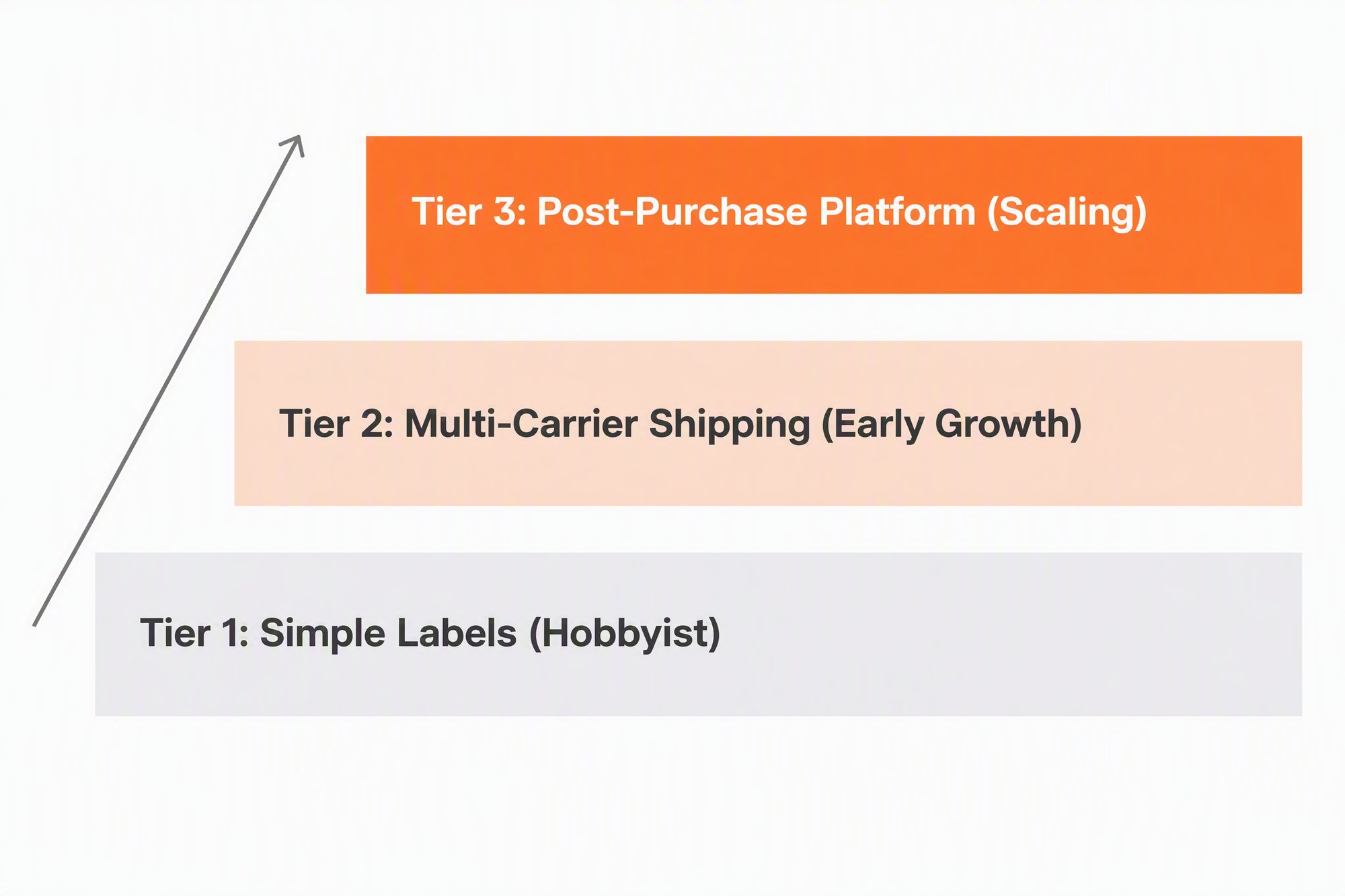
The three tiers of shipping solutions, ordered by how much of the post-purchase journey each one covers.
7 Best Shippo Alternatives for 2026, Categorized by Tier
These seven Shippo competitors are grouped by the tier they were built for; a wider comparison covers how the broader shipping software market is ranked.
Ratings in this list are G2 scores as of September 2026; Shippo, the benchmark here, holds 4.2/5 from 77 reviews.
1. Pirate Ship (Tier 1). Who it's for: a seller who wants USPS or UPS labels with no monthly software fee and nothing on top. What it does: Pirate Ship charges no monthly software fee, because the carriers pay for it. It prints USPS and UPS labels, sends customizable tracking emails that link to the carrier's page, and issues return labels on request. G2 rating: 4.5/5 from 24 reviews.
Key Limitations for a Growing Brand: Pirate Ship fits a Shopify or eBay seller shipping about 50 orders a month by USPS or UPS. For a store aiming for 1,000 orders/month, its tracking emails link out to the carrier's own page and its return labels are USPS only, so the post-purchase work stays with the store. Etsy no longer accepts new Pirate Ship connections.
2. Veeqo (Tier 2). Who it's for: a multichannel seller who wants shipping and inventory in one place. What it does: Veeqo is free multichannel shipping and inventory software, owned by Amazon. Its free shipping plan carries unlimited users, warehouses and shipments, and its automation rules act on delivery method, postcode, allocation warehouse and tags. G2 rating: 4.5/5 from 47 reviews.
Key Limitations for a Growing Brand: the free tier's scope is shipping, and paid plans add the inventory tools. Returns are logged as back-office return requests, so the shopper-facing half of a return stays with your team.
3. ShipStation (Tier 2). Who it's for: a brand that has outgrown one carrier and wants automation rules to route orders without a human deciding each one. What it does: ShipStation issues multi-carrier labels and runs automation rules across them. Its branded tracking page, branded notification emails, branded returns and exchanges portal and RMA workflows are on the Standard and Premium plans. G2 rating: 4.3/5 from 587 reviews.
Key Limitations for a Growing Brand: plan gating and price. Those branded tools are not on the Starter plan, so reaching them means buying a higher tier. In a ShipStation vs Shippo decision, check which plan carries the branded tools you need.
4. EasyPost (Tier 2). Who it's for: a team with engineering capacity that wants shipping logic inside its own application. What it does: EasyPost is a shipping API built for teams that integrate it, with a code-free option for Shopify stores. It is free for the first 3,000 labels a month, then charges a per-label fee.
Key Limitations for a Growing Brand: scope and packaging. Branded tracking and notifications are sold as a per-shipment add-on, and the API-first shape assumes someone maintains the integration.
5. Easyship (Tier 2). Who it's for: a seller who wants a free entry plan and adds shipping rules and branded tracking as volume grows. What it does: Easyship publishes free and paid plans. Shipping rules and branded tracking begin at its Plus plan, return labels are available on every plan, and returns management starts at Premier. G2 rating: 4.4/5 from 183 reviews. If you sell on Shopify, the narrower question is how Easyship and Shippo stack up specifically for Shopify.
AfterShip Shipping's own 'Discounted labels' rates are powered by Easyship, which negotiates the carrier rates, provides the label service, and bills the merchant directly; AfterShip creates a dedicated Easyship account during setup. Easyship is not part of AfterShip; it is a shipping partner.
Key Limitations for a Growing Brand: plan gating. The branded tracking and rules a scaling brand reaches for sit above the entry plan, and returns management sits higher still.
6. AfterShip (Tier 3). Who it's for: a brand at 500 to 5,000 orders a month whose support and returns workload has grown faster than its shipping volume. What it does: AfterShip is the tier-3 option that also creates labels, so shipping, tracking, returns, and warranty come from one vendor. AfterShip Tracking adds a branded tracking page and proactive notifications, and AfterShip Returns adds a branded returns page shoppers start themselves. On every AfterShip Shipping plan, Smart Carrier Recommendation uses AfterShip tracking data to exclude services with a high exception rate on a lane. On the Shopify App Store, AfterShip Order Tracking holds 4.6/5 from about 1,500 reviews and AfterShip Returns & Exchanges holds 4.7/5 from about 1,540 reviews, and both listings carry the Built for Shopify badge.
Key Limitations for a Growing Brand: scope. A seller shipping a few dozen orders a month, with no returns volume to manage, needs only the label, and a Tier 1 label printer covers that.
7. Narvar (Tier 3). Who it's for: an established retailer already running a separate label tool that wants a post-purchase layer on top. What it does: Narvar is a post-purchase platform whose products cover delivery promises, tracking, notifications, and returns and exchanges, and it works alongside a separate label tool. G2 rating: 4.2/5 from 186 reviews.
Key Limitations for a Growing Brand: scope. Narvar works alongside a separate label tool, so label buying stays with the tool you already run, and it publishes no pricing.
Of the two tier-3 platforms, AfterShip is the one that also creates the label.
Deep Dive: AfterShip as the Ultimate Shippo Alternative for Growth
AfterShip adds shopper-initiated returns and data-informed carrier selection to label creation. The platform covers shipping, tracking, returns, and warranty, and each product is priced separately. One data layer joins them: the tracking history AfterShip already holds feeds the decision made at the moment a label is bought, and labels created in AfterShip Shipping sync into AfterShip Tracking while a Tracking subscription is active.
Shipping
AfterShip Shipping puts the rates from every carrier account you have connected side by side before the label is bought.
Automation rules then take the per-order decision away from a person. Here is an example. On the Pro plan, send orders over 5 lb bound for a set of destination postal codes to carrier X. The same rule then runs on every order that matches.
Smart Carrier Recommendation is available on every AfterShip Shipping plan. It compares live rates across connected carrier services, excludes services with a high exception rate for the shipment's origin and destination based on AfterShip tracking data, and selects the service with the best balance of cost and delivery speed. Past performance on the route sits alongside the quoted price in that decision. Rules can key on SKU, order total, package weight, postal code and store, so the conditions match the way your catalogue and your destinations actually vary.
Tracking
Once the label exists, the shopper needs somewhere to check on it. A carrier status page answers in the carrier's branding, on the carrier's domain, with no route back to your store.
AfterShip Tracking puts that moment on a branded page you control. Proactive notifications reach the shopper when the status changes, which lifts the "where is my order" question out of the support queue before anyone types it. During a peak, that is one fewer reason for a shopper to open a ticket.
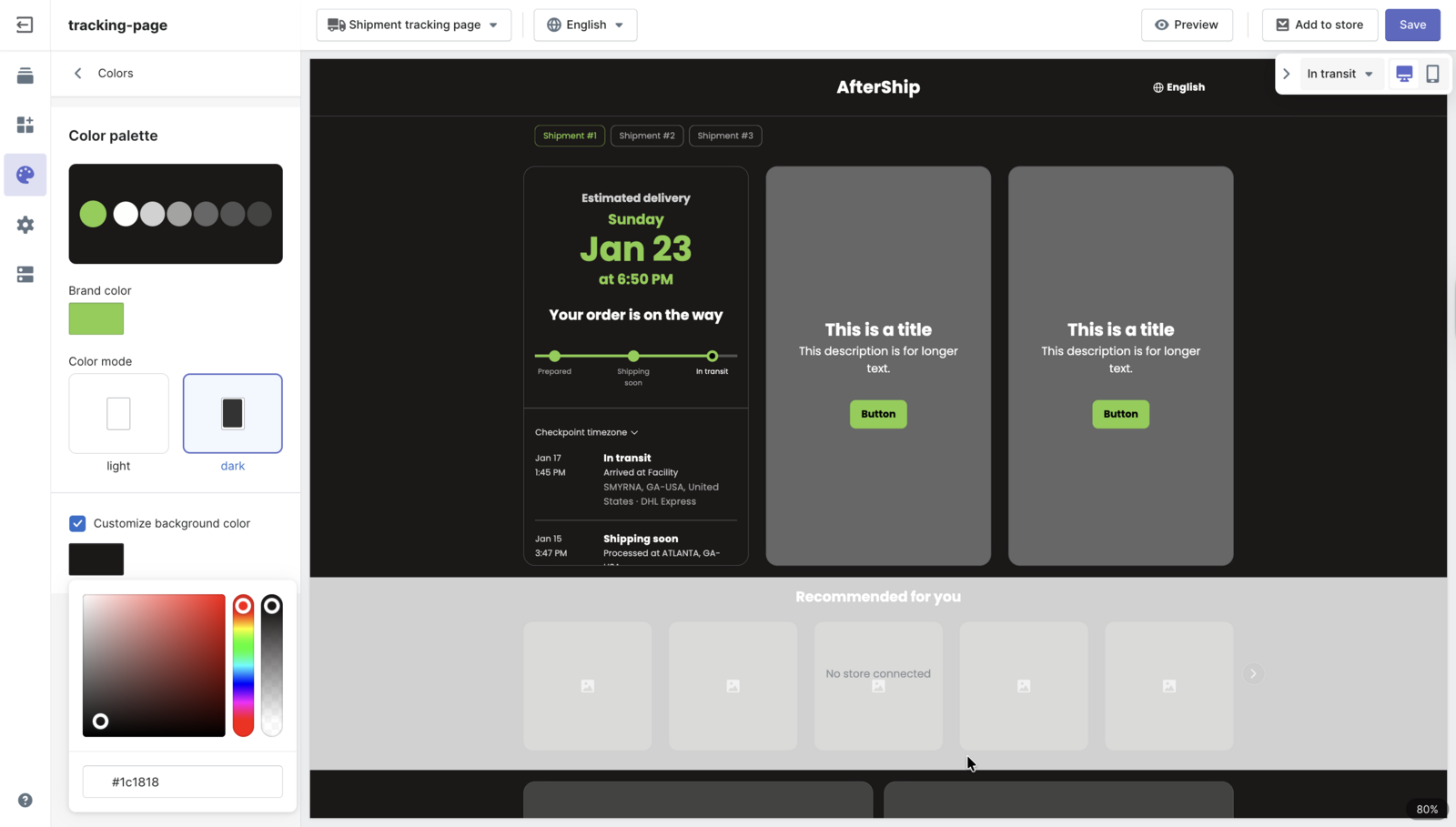
The page also carries product recommendations, available from the AfterShip Tracking Essentials plan, so a status check can end on something worth buying. Baymard Institute's 2026 study found that 51% of respondents say checking order status or delivery tracking is one of the most important account features an ecommerce site can offer. On that evidence the tracking page is an essential part of the modern customer experience.
Returns
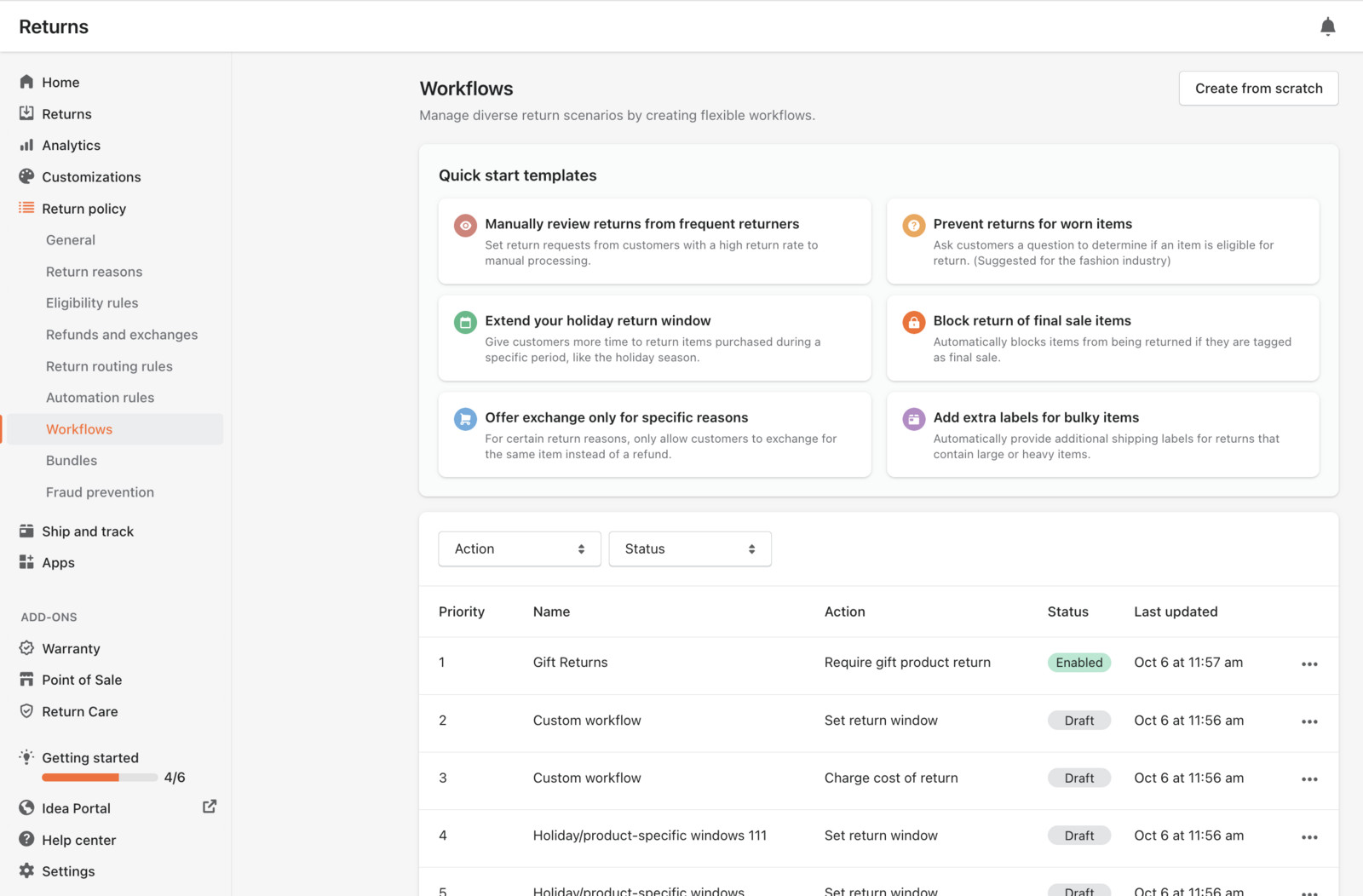
Returns work the same way. Sending return labels one at a time is the part that stops scaling first: every request is a message, a decision and a label, and that cost climbs with each order you add. AfterShip Returns gives shoppers a branded page where they start the return themselves, so the request arrives already checked against your policy instead of landing in an inbox.
The policy is where the work goes. With AfterShip Returns, returns can be defined and enforced by price, category, condition, days since purchase, or any combination, with AND/OR custom workflows on the Premium and Enterprise plans. The rules run before anyone on your team opens the queue, so the approvals that used to need a judgement call arrive already decided.
Head-to-Head: AfterShip vs. Shippo Feature & Philosophy Breakdown
For a growing brand, six criteria decide the choice: branded customer experience, returns management automation, analytics and insights, scalability and automation rules, whether one vendor covers shipping, tracking, returns, and warranty, and price at your volume. These six are the ones that move as volume grows, and AfterShip vs Shippo covers the rest.
AfterShip and Shippo Pro both offer branded tracking pages and notification emails.
Shippo's customer-facing tools are branded tracking pages and emails; AfterShip adds a shopper-initiated returns portal and carrier choices informed by tracking data.
| Criteria | Shippo | AfterShip |
|---|---|---|
| Branded customer experience | Shippo Pro: branded tracking pages, notification emails and packing slips; AI-powered estimated delivery dates | AfterShip Tracking: branded tracking page and proactive notifications. AfterShip Returns: a branded returns page shoppers start themselves |
| Returns management automation | Scan-based return labels | Shopper-initiated returns with eligibility rules on price, category, condition and days since purchase (AfterShip Returns Essentials); AND/OR custom workflows on Premium and Enterprise |
| Analytics & insights | Shippo Intelligence, available to API customers on Pro and Premier | Tracking data acts at the label decision: Smart Carrier Recommendation on every AfterShip Shipping plan excludes services with a high exception rate on a lane, based on AfterShip tracking data |
| Scalability & automation rules | Automation rules by item name, SKU, quantity, weight and destination | Automation rules by SKU, order total, package weight, postal code, store and more; plus Smart Carrier Recommendation on every plan |
| One vendor vs. a label tool | Multi-carrier shipping software with a web app and an API | Shipping, tracking, returns, and warranty from one vendor, each priced separately; AfterShip Tracking works with labels from any app |
| Pricing at your volume | See price table below | See price table below |
Shippo and AfterShip Shipping both publish volume-based plan prices with monthly and annual billing, and each AfterShip product is priced separately.
Software fee only, postage excluded. Label volume is per month. AfterShip prices are monthly and annual per month; Shippo's annual billing includes an automatic 10% discount.
| Labels a month | Shippo Pro, monthly | AfterShip Shipping Pro (includes automation rules), monthly / annual per month | AfterShip Shipping Essentials (no automation rules), monthly / annual per month |
|---|---|---|---|
| 500 | $29 | $89 / $69 | $35 / $29 |
| 1,000 | $54 | $89 / $69 | $47 / $39 |
| 2,000 | $79 | $89 / $69 | $59 / $49 |
| 3,000 | $139 | $109 / $89 | $71 / $59 |
| 5,000 | $139 | $159 / $129 | $99 / $79 |
The AfterShip customer story for StackCommerce reports an AfterShip Tracking result: StackCommerce reduced its WISMO tickets by 71% year over year.
Both Shippo and AfterShip Shipping automate carrier and package choices with rules. AfterShip Shipping's automation rules start on its Pro plan, which lists above Shippo Pro across roughly 500 to 2,000 labels a month, and Shippo includes rules on every plan. Smart Carrier Recommendation, on every AfterShip Shipping plan, uses AfterShip tracking data to exclude unreliable services, and AfterShip Tracking and AfterShip Returns, each sold as a separate product, add proactive tracking and a returns page shoppers start themselves.
Choose Shippo if:
- you ship a few hundred labels a month
- you send return labels by hand
- your rules only need item, weight and destination
Choose AfterShip if:
- shoppers should start their own returns in a branded portal
- you want carrier choices that exclude services with a high exception rate on a lane, using AfterShip tracking data
- you want shipping, tracking, returns, and warranty from one vendor, adding tracking and returns without replacing your label tool first
How to Make the Switch: A 3-Step Migration Plan
Moving off a label tool sounds like a migration project. It does not have to start as one.
- Audit what you run today. Count the labels you buy in a typical month, the hours your team spends answering "where is my order" and processing returns by hand, and what you currently pay across shipping, tracking and returns software. Write the numbers down. Without that baseline you will have no way to tell whether the change worked.
- Start a trial and connect your store. Setup is a store connection rather than a project plan. AfterShip Tracking reads the tracking numbers already sitting on your store's orders, no matter which app printed the label, so you can run tracking and returns alongside your existing label tool and change nothing about how labels get bought. That removes the usual reason for putting a switch off.
- Set up one automation and measure it. Pick a single change and let it run: a branded tracking notification, one returns eligibility rule, or a shipping automation rule on AfterShip Shipping Pro. Give it two weeks, then compare the ticket count and the handling time against the baseline from step 1. One measured result makes the rest of the decision straightforward.
Conclusion
Label printing is a solved problem at almost every price point. What changes between 500 orders a month and 5,000 is everything that happens between the label and the doorstep: whether the customer can see where the order is without emailing you, and whether a return starts on a page or in someone's inbox.
That is the work a post-purchase platform takes on. AfterShip covers shipping, tracking, returns, and warranty on one platform, so you can start with whichever piece is costing you the most time today and add the rest when it earns its place. Start a free trial of AfterShip and measure it against your own orders.
Simplify shipping and order fulfillment across Shopify, TikTok Shop, and your carrier network.
Book a demoFrequently Asked Questions about Shippo Alternatives
What is the most affordable Shippo alternative?
Pirate Ship and Veeqo charge no software fee; the merchant pays postage, and Veeqo takes a small commission on labels. The tradeoff is scope. Pirate Ship's tracking emails link to the carrier's own page and its return labels are USPS labels on request, and Veeqo logs returns as back-office return requests. Which of the two costs you least depends on where you ship and how many returns you handle.
Does AfterShip offer discounted shipping rates?
Yes. You can connect your own carrier accounts, use AfterShip's USPS discount account on any plan, or use Discounted labels, where Easyship negotiates the rates and bills you directly.
Can I use AfterShip just for tracking if I use another shipping app?
Yes. AfterShip Tracking imports tracking numbers from your store's orders whatever app created the label, which shows the modular nature of the platform. You can add tracking now, add returns when returns become the bottleneck, and keep your current label tool running while AfterShip covers the parts your customer actually sees.