Your monthly Mailchimp bill just arrived. You're staring at the cost per contact and have a sinking feeling you're paying a premium just to send "Your order has shipped" emails. If you're wondering whether a tool built for newsletters is the right choice for the most critical part of your customer journey, you're asking the right question.
Why Your General ESP is a Square Peg in a Round Hole for Post-Purchase
Yes, using Mailchimp for this is frustrating, and the frustration is not evidence you set something up wrong. Baymard Institute found that 51% of shoppers name checking order status or delivery tracking among the most important account features an ecommerce site can offer. That is how shoppers rank the account experience you already own, and you are asking a campaign tool to deliver it. So if you are weighing Mailchimp alternatives, keep the scope narrow: the post-purchase side of your stack, and leave the campaigns where they are. Mailchimp is a general email platform, not a post-purchase specialist. The mismatch shows up in four places.
- The data disconnect. A Mailchimp flow fires on a status your store sets, order placed or order fulfilled. AfterShip Tracking fires on carrier checkpoints, the scans a parcel collects after it leaves your warehouse. When a package stalls at a depot your store has no idea, so neither does your flow. AfterShip normalizes carrier data into 7 main and 33 sub-statuses, the resolution that difference buys.
- The generic experience. An ESP sends email. That is all it does. It cannot power a branded tracking page or a self-service returns portal, which is where a waiting customer goes next. Baymard maintains a dedicated benchmark for order tracking and returns UX, measured on its own terms, and an ESP does not reach those surfaces.
- The metering mismatch. Mailchimp meters on stored contacts, and subscribed, non-subscribed and unsubscribed contacts all count toward your limit. Order notifications also count against your monthly send quota, so the same mail is charged twice: once in the list you store, once in the sends you spend. AfterShip Tracking meters on shipments per year, which moves with the parcels you actually ship.
- The siloed journey. Your "shipped" email, your tracking page and your returns flow sit in three systems that never talk. There is no shortage of inspiring post-purchase ideas to borrow, and running them across that split is where effort goes. AfterShip is built to run those three surfaces on one set of shipment data.
The Specialist Advantage: Thinking Beyond the Inbox
The modern DTC stack is missing a layer that no ESP was built to fill: a Post-Purchase Experience Platform, one system that owns everything after checkout, from the carrier event to the tracking page to the return.
Treat that stretch of the journey as its own discipline and the economics change. Tracking, notifications, returns and analytics stop being four disconnected chores running on four sets of data, and become one operation with one source of truth. You spend less time reconciling and more time deciding.
The support queue is the clearest example. Handled reactively, "where is my order" is a cost center that scales in lockstep with order volume: more parcels, more tickets, more headcount. Handled proactively, that same moment is the most concentrated attention your brand receives between one purchase and the next, and a chance to earn the next one. AfterShip unifies order tracking, notifications, and returns management, so making that shift is largely a configuration exercise.
Your ESP was designed for a different job. Building a complete post-purchase experience is a job of its own: owning every step between checkout and the next order, and making that stretch produce revenue.
AfterShip vs. Mailchimp: A Post-Purchase Feature Showdown
Feature lists are easy to write and easy to ignore. The comparison worth running is the one framed around what your post-purchase email actually has to do: fire on the right event, land the customer somewhere you control, handle the return, promise a date you can keep, sell the next thing, and bill you on a basis that matches the work.
Six criteria, chosen for a brand that ships physical goods. Newsletter features are deliberately absent, because they are not the job being tested here.
| Criteria | AfterShip | Mailchimp |
|---|---|---|
| Real-Time Shipment Tracking Triggers | Fires on carrier checkpoint events as they happen, normalized across the carrier network into one consistent model, with the store-side order import periodic rather than instantaneous. | Fires on a store status such as order placed or order fulfilled. No carrier checkpoint data at any speed. |
| Branded, On-Site Tracking Experience | A fully branded tracking page on your own domain, carrying your navigation and creative. | No tracking page. Customers follow a link out to the carrier's site. |
| Integrated Self-Service Returns Portal | Self-service portal with conditional workflows, exchange and store-credit resolutions. | No returns portal. Returns are handled outside the platform. |
| AI-Powered Predictive Delivery Dates | Delivery-date prediction, with "Delivery arriving soon" as a documented proactive notification trigger. | No delivery-date prediction. |
| Post-Purchase Upsell/Cross-sell Capabilities | Product recommendation blocks on the tracking page itself, the highest-intent surface a brand owns between orders. | Product recommendation blocks inside order notification emails only, with no on-site surface to place them on. |
| Pricing Model for Transactional Comms | Meters on shipments per year, so what you pay moves with the parcels you send. | Meters on stored contacts, including unsubscribed and non-subscribed, and order notifications also draw down the monthly send quota. |
Now the fair concession. Mailchimp has more advanced features for pure email design and A/B testing of traditional marketing campaigns. That is a strength, and it points squarely at pre-purchase, at the campaigns that win a customer before any parcel exists. It also makes the case for specializing: design depth and split-testing are what a campaign tool should be excellent at, while carrier data, branded tracking pages and returns run on separate infrastructure and reward a separate kind of product. If you only need to send a single, basic "Order Shipped" email and have no desire to reduce support tickets or build a branded post-purchase experience, Mailchimp's core functionality can do that.
Everything past that single email is what AfterShip Tracking was built to run.
3 Ways AfterShip Creates a Post-Purchase Experience Mailchimp Can't
Three capabilities carry most of the difference between the two columns above. All three belong to AfterShip Tracking, and none of them is an email feature.
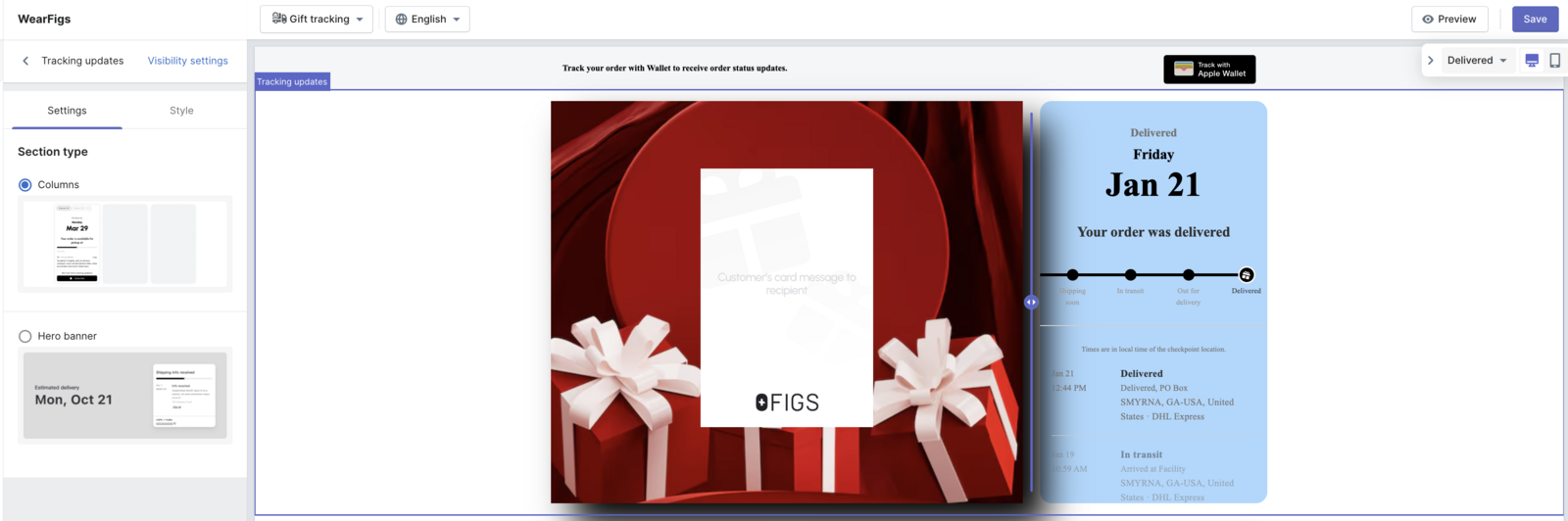
1. Turn tracking into a marketing channel. When a customer wants to know where their order is, they click. The question is where they land. A carrier's site answers and ends the visit: no branding, no catalogue, no reason to stay. A branded tracking page answers the same question on a page you own, with your navigation, your creative, and product blocks sitting alongside the delivery timeline. This is the highest-intent traffic your brand receives between purchases, and on a generic carrier page it converts to nothing. AfterShip provides branded tracking pages to drive repeat purchases.
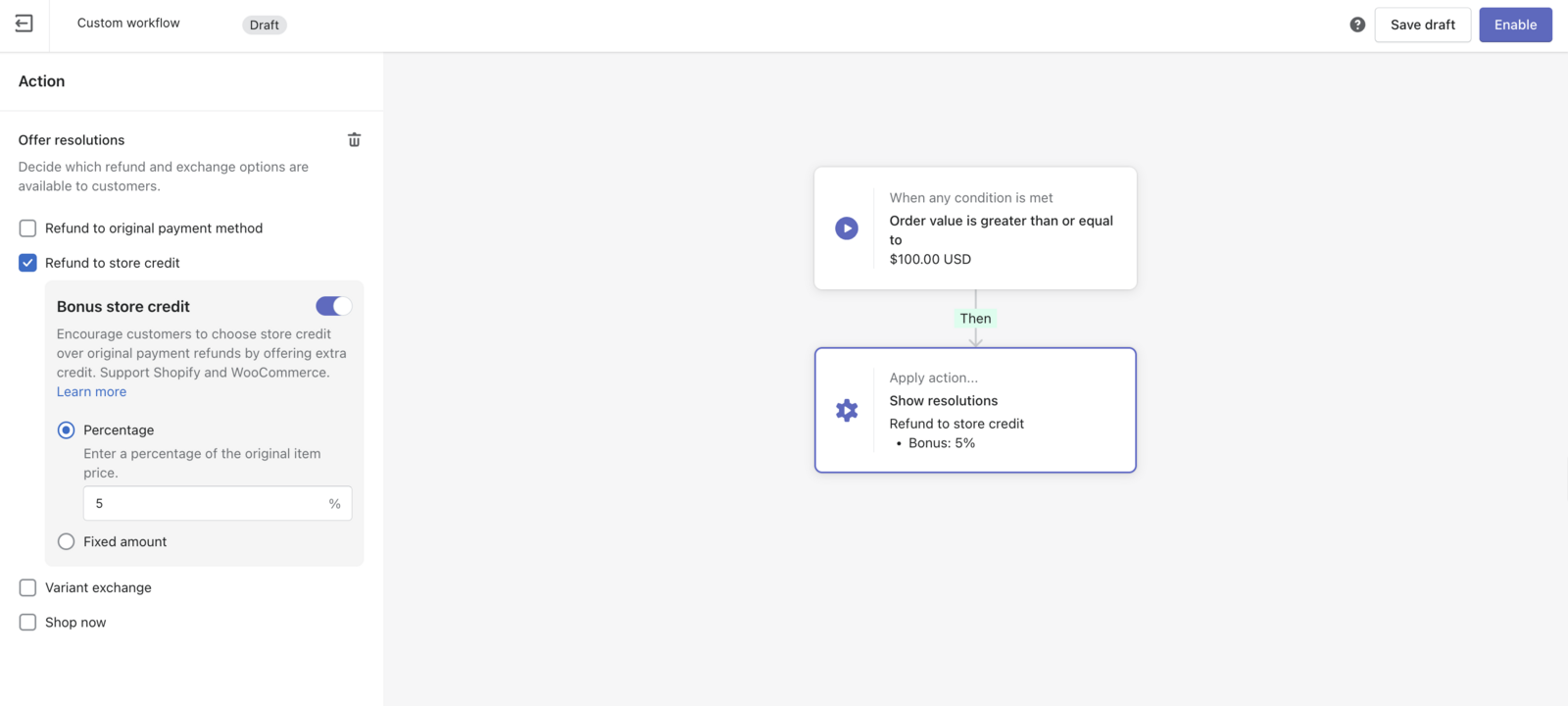
2. Automate your entire returns process. Returns are where post-purchase either compounds or leaks. A self-service portal lets the customer start the return without opening a ticket. Automation rules then decide what happens next: if the reason is wrong size, offer an exchange or store credit before a refund is ever on the table. That routing decision is the difference between money leaving and an order being retained. It runs on the same shipment data as the tracking page, so a return in progress is visible in the same place as the delivery that prompted it.
3. Build trust with proactive communication. The strongest post-purchase message is the one that arrives before the customer thinks to ask for it. Delivery-date prediction sets an expectation at the point of purchase. Delay notifications correct that expectation when the carrier slips, which is the moment trust is usually lost and a ticket usually gets raised. "Delivery arriving soon" is a documented proactive notification trigger, and it fires on the parcel's own progress, independent of anything your store has recorded. That is a predictive posture, and it is only available to a system reading carrier data directly.
With AfterShip, businesses receive an average open rate of 65% on shipment notification emails.
AfterShip reported that figure in March 2024, measured across its own platform rather than promised to any single store. It reflects something structural about this kind of mail: a customer opens a shipment notification because they are already waiting for it, which makes it the most reliably read message your brand sends all year.
"But I Don't Want to Rip and Replace..." - Building a Best-of-Breed Stack
You do not have to. That is the honest answer, and it is worth getting the detail right before you install anything, because the setup differs by ESP and nobody enjoys discovering that afterwards.
Here is what a Mailchimp merchant actually gets. Klaviyo and Attentive receive AfterShip Tracking events natively, with mapped events and pre-built flows waiting for them. Omnisend and Mailchimp connect through a generic webhook. AfterShip does publish a Mailchimp integration, but it belongs to AfterShip Email and imports your contacts, not your shipment events. That is a real difference in setup effort, and stating it plainly is better than letting you find it on install day. A generic webhook means the events arrive and nothing else is done for you: you decide what each payload means, build the trigger that consumes it, and maintain that mapping whenever either side changes. With a native integration, that work already exists. Mailchimp Transactional is worth naming here as well, since it is the path a developer would reach for: it is a Standard and Premium add-on, it requires HTML and API knowledge, and it sends from your store's own data, which means it adds no carrier visibility. For an ops lead who builds flows in the Mailchimp interface and does not write against APIs, it is not a realistic route.
None of that is an argument against the stack. Handled openly it forces the clean division of labour this article has been building toward, and it puts the choice in front of you before you have committed engineering time to the wrong half of it. Two architectures work, and they suit different teams and different appetites for build.
| Approach | How it works | Best when |
|---|---|---|
| Let AfterShip own carrier-event email (recommended) | AfterShip sends the shipment notifications itself, branded, on 7 key delivery statuses plus custom workflows, while Mailchimp keeps campaigns and lifecycle. | You want carrier-accurate, branded post-purchase email without engineering work. |
| Pipe events into Mailchimp | AfterShip Tracking events travel through a webhook, an iPaaS connector such as Zapier or Make, or the AfterShip API, into Mailchimp's Event API trigger. Standard and above is required for the pieces this depends on: the Webhook action, branching rules, up to 3 triggers, and flows longer than 4 steps. Essentials caps automation flows at 4 steps. | You want the flows built inside Mailchimp and have developer time to spend. |
AfterShip connects with your Shopify store directly, so the shipment data both approaches depend on arrives without custom engineering work on your side.
Whichever route you take, settle the duplicate-send question before you switch anything on. Three systems can send mail about the same order, and left on their defaults at least two of them will. Getting this wrong is not cosmetic. Two shipping emails from two senders reads as a business that has lost track of its own orders, and it lands at the exact moment your customer is already watching the parcel closely. Mailchimp's own documentation instructs merchants to disable duplicate order notifications, so the split below matches what both vendors already expect. One owner per message type.
| Message type | Owner | Action |
|---|---|---|
| Order confirmation and receipt | Shopify | Keep on. Shopify's order confirmation cannot be turned off, so make it the single receipt. Do not also enable Mailchimp's order confirmation. |
| Shipping and carrier-event updates: shipped, in transit, out for delivery, exception, delivered | AfterShip Tracking | Turn these on in AfterShip. Then check what Mailchimp is sending: order notifications are a classic-automations feature, so accounts without a pre-existing classic automation will not have them at all. If yours does, disable both "Order Invoice" and "Shipping Confirmation". Which one fires depends on payment status, and a store that charges at checkout produces paid, fulfilled orders that trigger Order Invoice rather than Shipping Confirmation. |
| Campaigns, newsletters, lifecycle and abandonment flows | Mailchimp | Keep on. This is what Mailchimp is for. |
"The main issue that it solved for us as a business was the communication portion with our customers and reduce the number of emails our customer service team received with questions such as where is my package, has it shipped yet, why is it delayed, etc."
An ecommerce operations manager at a mid-market company, writing on G2 on 14 July 2022.
Keep Mailchimp for your newsletters and acquisition. Plug in AfterShip to perfect the post-purchase journey.
The Verdict: When to Add AfterShip to Your DTC Stack
Stick with just Mailchimp if...
Your WISMO volume is low enough that your team absorbs it without noticing. You have no near-term plan for a branded tracking page or a returns portal. A single "Order Shipped" email is the whole of the post-purchase communication you want to run. That is a coherent position for a store still finding its footing, and there is no sense buying a specialist layer before you have volume to feed it.
Add AfterShip if...
AfterShip bands its tracking plans by GMV: Essentials for new stores under $1M GMV, Premium for growing brands $1M to $10M GMV, and Enterprise for anything over $10M GMV. Those bands tell you which tier you land in. They do not tell you when to move.
That signal is your own WISMO volume. A lifecycle marketer thinks in orders and tickets rather than in GMV, so the question worth answering is how many "where is my order" messages your team handled last month, and what that time cost you. Run those numbers through AfterShip's ROI calculator and let your own data set the timing. Your ticket queue decides when you move; the GMV band decides which tier. Either way, the stretch your ESP was never built to hold is exactly what AfterShip Tracking exists to run.
Frequently Asked Questions
Is AfterShip a full replacement for Mailchimp?
No, and it is not meant to be. Mailchimp keeps campaigns and lifecycle, AfterShip owns carrier-event messaging, Shopify sends the receipt. The three do different jobs, and the stack works best when each is left to do its own.
How does AfterShip's pricing work for post-purchase emails?
The two products meter on different bases. Mailchimp meters on stored contacts, including those who have unsubscribed or never subscribed, and order notifications also draw down your monthly send quota. AfterShip Tracking meters on shipments per year, so what you pay moves with the parcels you send.
Can AfterShip integrate with Klaviyo or Omnisend?
Klaviyo and Attentive receive AfterShip Tracking events natively, with mapped events and pre-built flows already in place. Everything else, Mailchimp included, reaches the inbox through a generic webhook or an iPaaS connector. The routes differ in how much of the wiring is done for you.
Will I send my customers duplicate emails?
Not if you follow the split in the set-up checklist. Leave Shopify's order confirmation on, since it cannot be turned off and makes a clean single receipt. Turn carrier-event updates on in AfterShip. In Mailchimp, check whether order notifications exist on your account, since they are a classic-automations feature, and disable them if they do.
What's the real ROI of improving the post-purchase experience?
It shows up in a few places: support tickets you never receive because the customer was already told, returns that convert into exchanges rather than refunds, and repeat purchases won on a tracking page you own. How much it adds up to depends on your order volume and ticket load, which is why AfterShip publishes an ROI calculator you can run against your own numbers.
