If you sell on TikTok Shop, your answers live in several places: TikTok Shop Seller Center, your ecommerce store, spreadsheets, and creator tools. Checking a failed order sync or last week's GMV usually means switching tabs and exporting data.
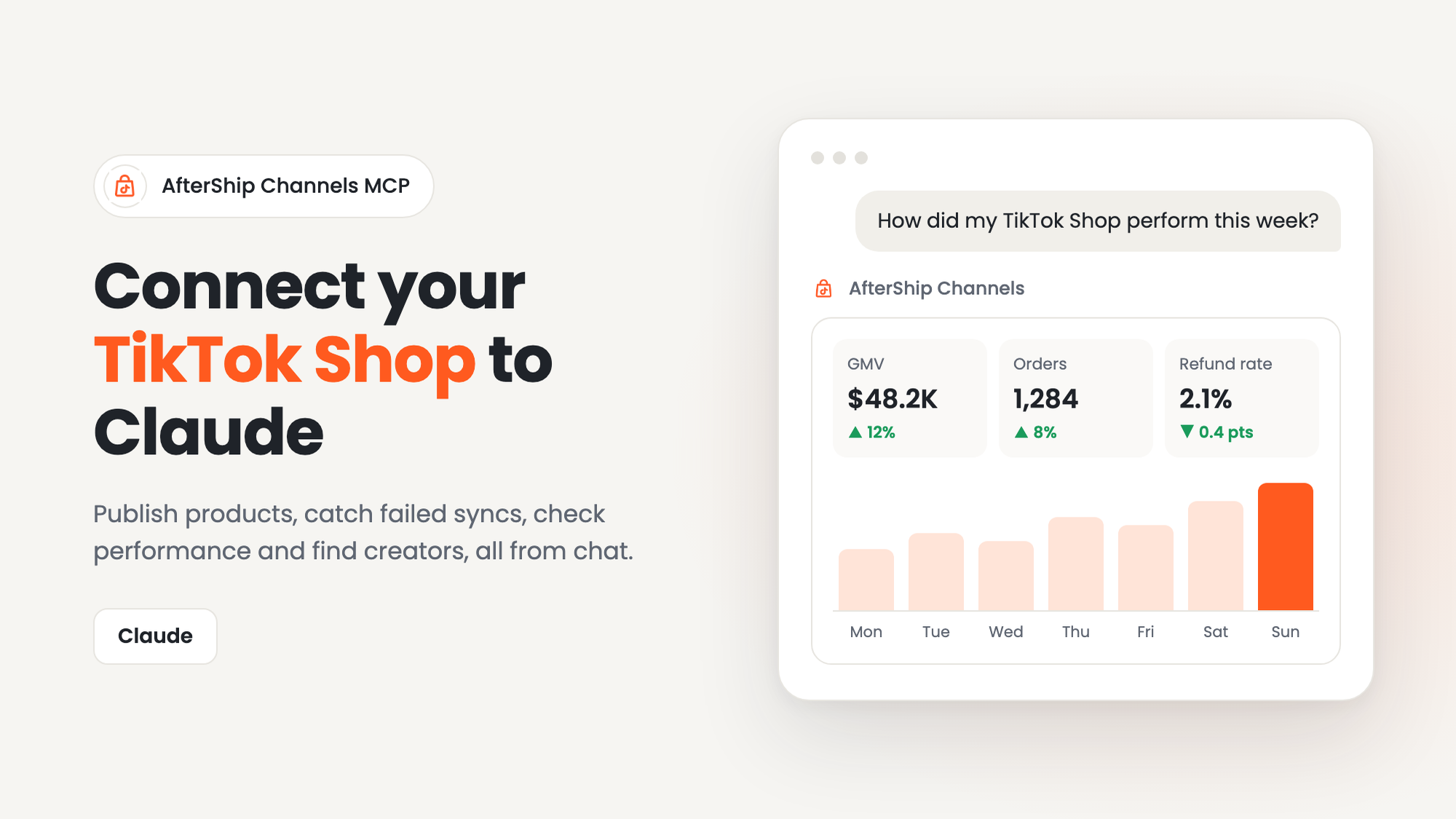
AfterShip Channels MCP connects your TikTok Shop to Claude, so you can ask in plain language and get answers from your live store data. This guide covers what it does, what you need, and how to connect in a few minutes.
What is an MCP?
MCP (Model Context Protocol) is an open standard that lets Claude connect to the tools you use. On its own, Claude can only talk about TikTok Shop in general. Once you connect AfterShip Channels MCP, it can read and act on your own catalog, orders, performance, and creator data, with your permission. Learn more about MCP.
What is AfterShip Channels?
AfterShip Channels is AfterShip's suite for growing sales on TikTok Shop. AfterShip Channels MCP connects two parts of it to Claude:
- AfterShip Feed connects your ecommerce store to TikTok Shop, so your products get listed and your orders and fulfillments flow between the two.
- AfterShip Affiliates helps you find TikTok creators, build creator lists, prepare outreach, and manage sample requests (US only).
Instead of switching between dashboards, you ask a question in chat and get an answer from your live AfterShip data. When you ask it to take an action, like publishing products, it shows you what will happen and waits for your confirmation.
What you can do once connected
| Use case | Try asking | Availability |
|---|---|---|
| Publish your first products | "Help me publish some of my products to TikTok Shop." | 16 TikTok Shop regions |
| Catch failed syncs | "Are there any orders or fulfillments that failed to sync on my TikTok Shop?" | 16 TikTok Shop regions |
| Check performance | "How did my TikTok Shop perform this week?" | 16 TikTok Shop regions |
| Find creators | "Find US TikTok creators who make skincare tutorials for young adults." | US only |
| Prepare outreach | "Help me prepare an outreach draft for the three creators I selected, promoting this moisturizer." | US only |
| Review creator lists and samples | "Give me an overview of my creator lists and sample requests." | US only |
Performance answers include GMV, orders, units, buyers, visitors, and refund rate, with period-over-period comparisons rendered as charts and tables. See all supported tools.
What you need
- Claude (Claude Desktop or Claude.ai), signed in. Using Claude Code? See the Claude Code install guide.
- An AfterShip account with access to the organization you want to connect
- For publishing, order sync, and performance: AfterShip Feed with an active Listing plan, and your store and TikTok Shop connected
- For creator features (US only): AfterShip Affiliates. New users can claim a 90-day trial, and searching for creators by description works even before your store is connected
How to connect to Claude
- Open Settings → Connectors.
- Search for AfterShip Channels and click Connect.
- Sign in to AfterShip in the browser tab that opens, and choose the organization you want to connect.
- Return to Claude. The connection is saved automatically.
- Start a new conversation and ask: "Check my AfterShip onboarding status."
Full guide: Install on Claude
Troubleshooting: If the sign-in window doesn't open, check that your browser isn't blocking pop-ups. If you see the wrong organization's data, remove the connector and connect again, choosing the right organization.
6 ways to use AfterShip Channels MCP
Once you're connected, these are the most common ways merchants use it. Copy any prompt to get started.
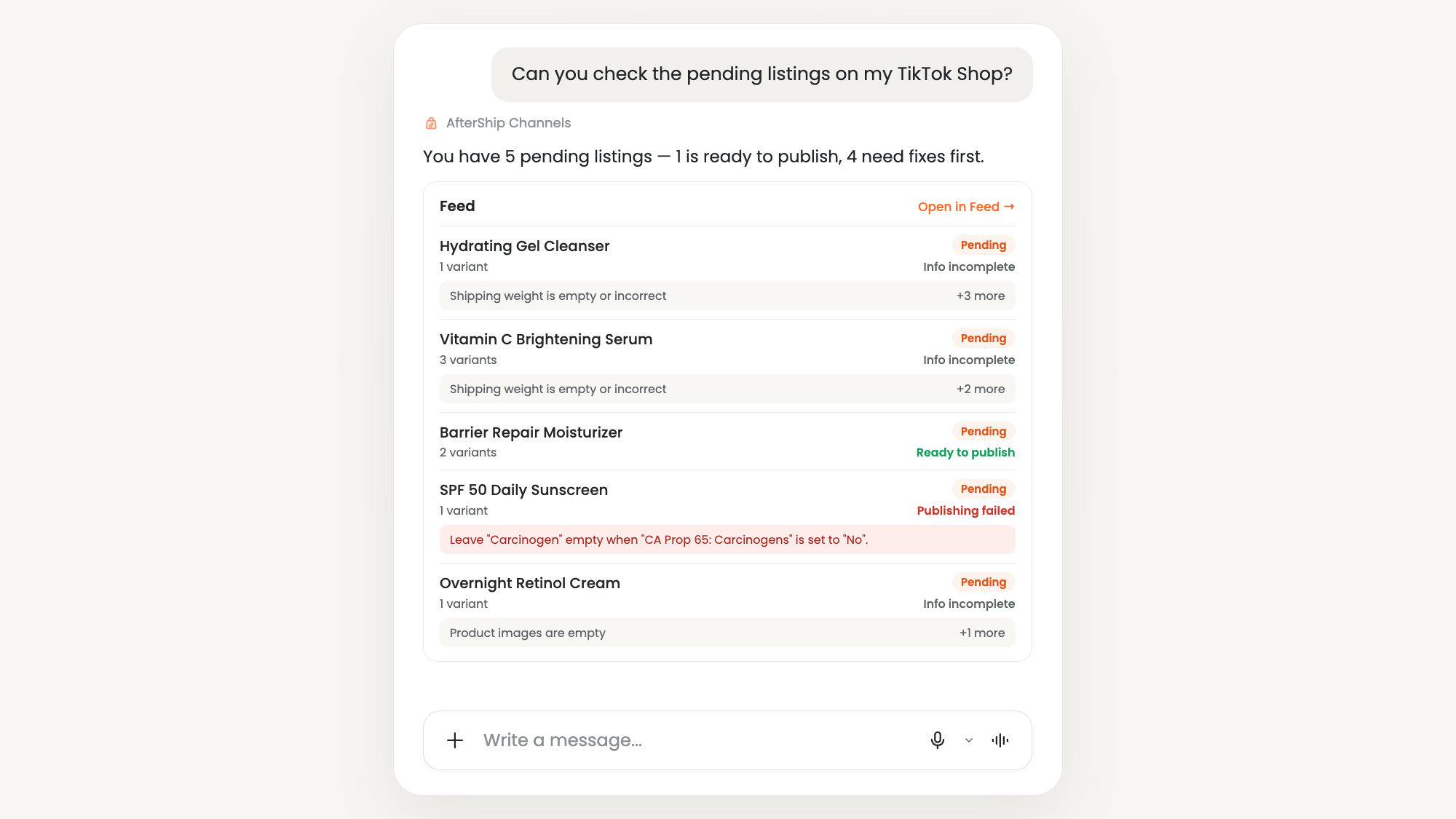
1. Publish your first products
When to use it: You've connected your store and want your first products live on TikTok Shop.
Try: "Help me publish some of my products to TikTok Shop."
Follow up: "Just publish everything in my 'Apparel' category."
What you get: Claude walks you through choosing a shop and products, shows a summary for you to confirm, and lets you know when your listings are live.
2. Catch failed order and fulfillment syncs
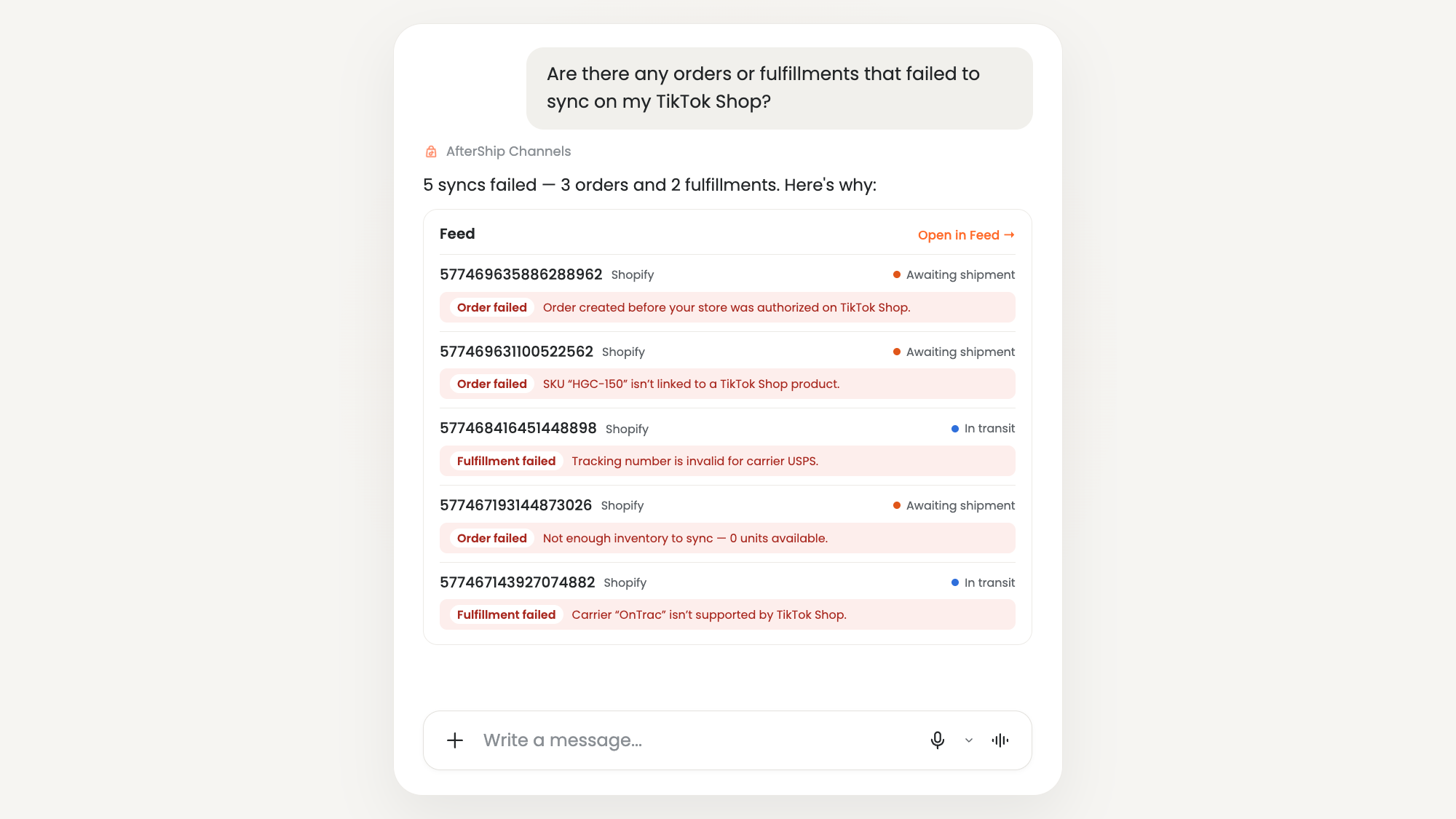
When to use it: You want to fix problems before they turn into cancellations or unhappy customers.
Try: "Are there any orders or fulfillments that failed to sync on my TikTok Shop?"
What you get: A list of affected orders with the reason each one failed.
Make it automatic (Claude Cowork): "Every day at 9am, check for orders or fulfillments that failed to sync and list them with the reason. Say 'all clear' if none."
3. Check how your shop is performing
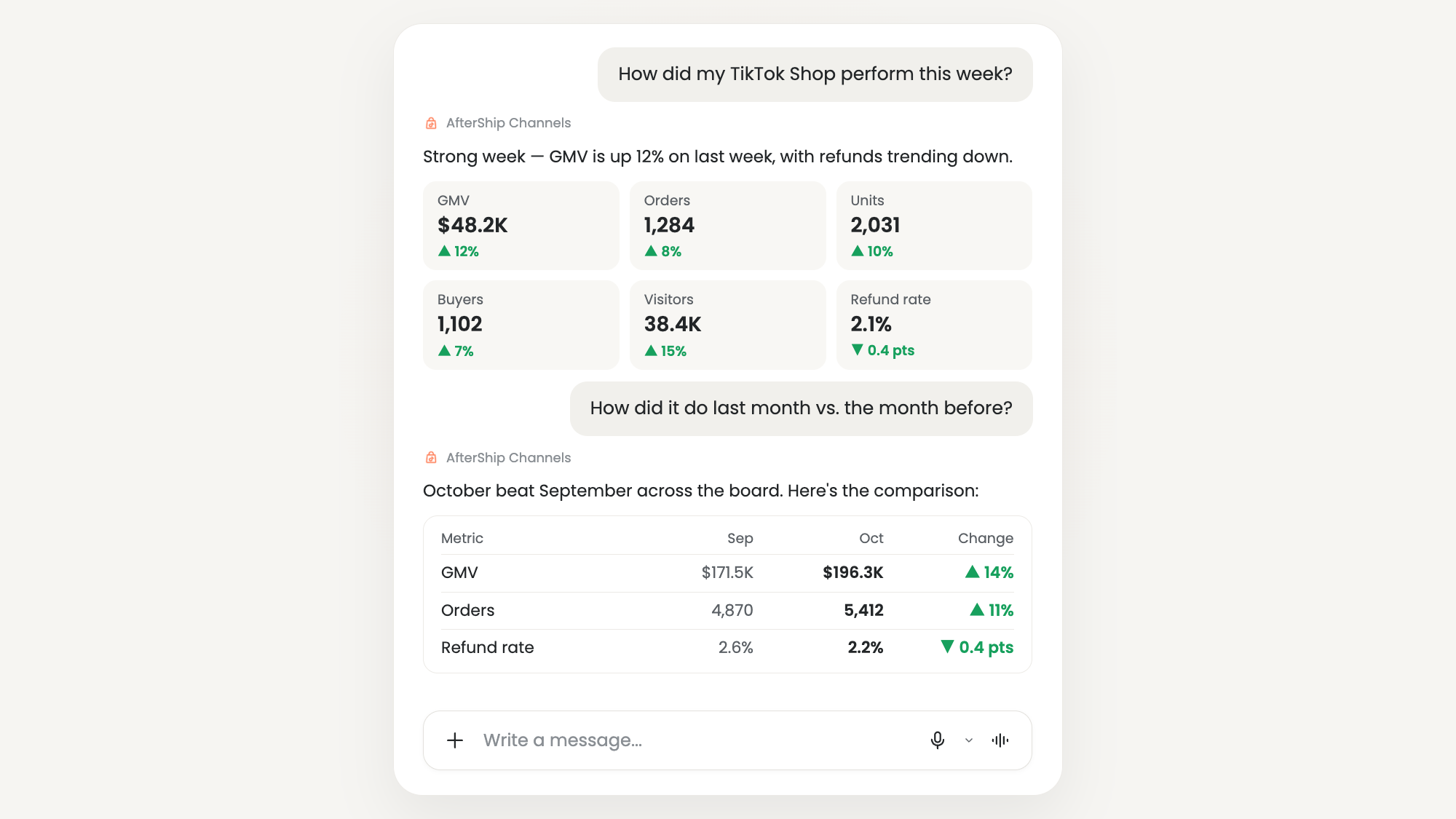
When to use it: You need a quick read on sales without exporting reports.
Try: "How did my TikTok Shop perform this week?"
Follow up: "How did my TikTok Shop do last month vs. the month before?"
What you get: GMV, orders, units, buyers, visitors, and refund rate, with period-over-period comparisons as charts and tables.
Make it a weekly digest (Claude Cowork): "Every Monday at 8am, give me last week's TikTok Shop performance vs. the week before, with a short summary."
Auto-sync products, inventory, and orders between TikTok Shop and major eCommerce platforms.
Book a demo4. Find your first creators
When to use it: You want to start or grow an affiliate program on TikTok Shop.
Try: "Find US TikTok creators who make skincare tutorials for young adults."
Follow up: "Use this moisturizer from my store to refine the search." or "Find more creators like @[username]."
What you get: A shortlist of up to 20 US creators, with key metrics and why each one matches your search. Narrow it down and save it to a list.
Comparing options? See TikTok Shop Affiliate Center vs. AfterShip Affiliates.
5. Turn a shortlist into an outreach draft
When to use it: You've picked creators and want to invite them to promote a product. Planning for BFCM? Follow this creator outreach timeline.
Try: "Help me prepare an outreach draft for the three creators I selected, promoting this moisturizer."
Follow up: "Offer a 15% commission and a free sample. Show me a summary to confirm before creating the draft."
What you get: An outreach draft with your terms, ready to review and launch in the AfterShip Portal. Requires a connected US TikTok Shop with Affiliates enabled.
6. Review your creator lists and sample requests
When to use it: You want a quick status check on your creator program.
Try: "Give me an overview of my creator lists and sample requests."
Follow up: "Focus on sample requests and summarize their current status."
What you get: A read-only summary of your lists and where each sample request stands.
You launched on TikTok Shop. Creators are how you grow it. AfterShip Affiliates finds the right creators to sell your products, reaches them at scale, and tracks every dollar of GMV they drive.
Book a demoSafe by design
- You stay in control. Publishing, creator list changes, and outreach drafts always ask for your confirmation first.
- Outreach stays a draft. You review and launch it in the AfterShip Portal.
- Scoped access. A single sign-in connects only the AfterShip organization you choose.
- Every action is logged. Each write action is recorded, so there's a record of what changed.
FAQ
Can I schedule checks to run automatically?
Yes. Scheduled checks, like a daily failed-sync check or a weekly performance digest, are available in Claude through Claude Cowork.
Which regions are supported?
Publishing, order sync, and performance work in 16 TikTok Shop regions. Creator features are US only.
I have more than one TikTok Shop. Is that a problem?
No. Name the shop in your first prompt, and it will be remembered for the rest of the conversation.
How long does the connection last?
Your approval is valid for 90 days. After that, reconnect AfterShip to keep using it.
Does it work with my other connected tools?
Yes. It works alongside other tools you've connected, like Shopify's MCP, so you can go from product to TikTok Shop listing to creator outreach in one conversation.
Do I need an AfterShip account?
Yes. AfterShip Channels MCP works through AfterShip Feed and AfterShip Affiliates.
Get started
Already using AfterShip Feed or Affiliates? Connect in a few minutes:
New to AfterShip? Sign up for AfterShip Feed to list your products on TikTok Shop, then connect Claude. Selling in the US? You can also claim a 90-day AfterShip Affiliates trial and start finding creators from chat.