You're debating Mailchimp vs. Dotdigital because your 'Your Order Has Shipped' emails feel lifeless and aren't driving repeat sales. But what if the problem isn't the email platform itself, but the generic data you're feeding it? Let's analyze the platforms, then show you the data that truly makes them powerful for DTC.
Choosing an email service provider is one of the few stack decisions you cannot quietly reverse. Templates, flows, segments and deliverability history all live inside it, and switching means rebuilding every one of them.
Most Mailchimp vs Dotdigital comparisons stop at the feature checklist. Builder screenshots, segmentation depth, deliverability claims. What they skip is the factor that decides whether your post-purchase email earns anything back, which is how much either platform can actually act on once the order leaves your warehouse.
So this piece does both. An even-handed read of the two platforms for a brand shipping 500 to 10,000 orders a month, and then the part that makes either one worth the money.
The Quick Verdict: Who Should Choose Mailchimp vs Dotdigital?
Most readers arrive with a shortlist of two and a deadline. Here is the short answer, before the analysis that supports it.
| Choose Mailchimp if... | Choose Dotdigital if... |
|---|---|
| Nobody owns email full time | Someone owns email full time |
| You need output from day one | You can absorb a learning curve |
| Email is the channel, SMS a bonus | You need SMS, MMS, WhatsApp and push in one place |
| You are scaling up from a simple setup | You are rebuilding a program that outgrew its tools |
The two sections that follow set out the evidence behind each column.
Mailchimp for DTC: The King of Usability
Mailchimp excels in ease-of-use for growing DTC brands.
A marketing manager with no dedicated ops resource can build a campaign, cut a segment and ship it the same afternoon, and the brand recognition means most new hires already know where everything lives.
The Shopify integration reinforces the same strength. Mailchimp receives nine documented Shopify events covering product views, searches, cart activity, checkout starts and completed checkouts, every one of them pre-purchase.
Where it gets tighter is the plan ladder.
- Automation depth is tier-gated. The Marketing Automation Flows builder, renamed from Customer Journey Builder in June 2025, caps Essentials at four flow steps. Standard is the first plan with full multi-step automation, and both Standard and Premium allow up to 200 flows.
- Billing counts more contacts than you would expect. Subscribed, unsubscribed and non-subscribed contacts all bill. Archived, cleaned and deleted contacts do not, but a customer sitting in two audiences bills twice.
- Transactional email is a separate purchase. It is a paid add-on available only on Standard and Premium, which puts your order and shipping confirmations outside the plan you bought for marketing.
- SMS is native, on a use-it-or-lose-it credit model. It is available from Essentials up across the US, Canada, UK, Belgium, Australia and much of Europe. Unused credits are forfeited every billing cycle, and it is not a Twilio integration underneath.
The tradeoff is honest and easy to plan around. The plan you start on is the easy one, and the automation you will want by month six sits a tier or two above it.
Dotdigital for DTC: The Automation Powerhouse
Email, SMS, MMS, WhatsApp, push and web personalisation all run from one platform, which changes the shape of a program once your customers stop living in the inbox alone. Dotdigital provides advanced omnichannel automation for scaled e-commerce.
Rebranded from dotmailer in 2019, it now serves over 4,000 brands.
The Shopify sync is broader than most. It covers customers, subscribers, orders, catalog, cart and metafields, typically refreshing every five minutes, and order records carry purchase date, line items and current order status, though no carrier or tracking event travels with them.
The tradeoffs are mostly about what the platform asks of your team.
- The learning curve is steeper. The automation builder rewards a team with the time to design programs properly. Without that time you are paying for capability nobody configures.
- Billing runs on your peak, not your average. Dotdigital bills on the highest number of marketable contacts during a billing period. A contact fully suppressed across email, SMS and WhatsApp stops being billable, but marketable on any single channel is enough to bill.
- Transactional terms are not published. It runs on dedicated transactional IP addresses with a default limit of 50,000 per calendar day, and whether that volume is included or metered is not stated anywhere public.
The bigger gap is pricing itself. Dotdigital publishes no price on its own website in any currency, and we checked three ways on 10 August 2026: the pricing URL returns a 404, site search for "pricing" and "cost" surfaces only customer stories, guides and promotional terms, and the top navigation carries no pricing item at all. The only published figure sits on the company's Shopify App Store listing.
Set side by side, the two platforms price on different logic as much as at different levels.
| Plan tier | Mailchimp, regular monthly rate | Dotdigital |
|---|---|---|
| 5,000 contacts | Essentials $75 · Standard $100 · Premium $350 | Not published |
| 10,000 contacts | Essentials $110 · Standard $135 · Premium $350 | Not published |
| 25,000 contacts | Essentials $270 · Standard $310 · Premium $620 | Not published |
| Published price source | Own pricing page, full ladder | "Plans from $187/month (regional variances apply)", Shopify App Store |
Mailchimp publishes a rate card you can model against today. Dotdigital arrives at a number through a sales conversation. Both are normal ways to buy software, and which one suits you depends on how your own procurement runs.
The Blind Spot: Why Your ESP is Only as Good as Your Data
Neither Mailchimp nor Dotdigital receives a carrier event.
Mailchimp's documented Shopify event set stops at completed checkout. Dotdigital's sync carries current order status, but no carrier or tracking event travels with it. So between "your order has shipped" and the parcel landing on a doorstep, there is a window of several days in which your ESP learns nothing new and says nothing.
That window is the most attention your brand gets all month. Omnisend's 2026 benchmark, drawn from more than 20 billion campaign emails, puts shipping confirmation open rates at 62.67%, described in the source as the highest open rate of any email type in the dataset, against an average of 30.22% across industries. Post-purchase email runs roughly 2 to 3 times the engagement your team spends its week chasing. One caveat travels with any open-rate figure: since 2021, Apple Mail's Mail Privacy Protection has been able to preload tracking pixels, which can make some emails appear opened before a subscriber reads them.
The events that would fill that window are ordinary logistics facts: In Transit, Out for Delivery, Delivery Exception, Return Initiated, Return Processed. Your ESP can act on every one of them the moment it is told. Nothing in either platform is feeding it to you.
How AfterShip Unlocks Post-Purchase Revenue in Your ESP
Take the cost first, because it changes how you read everything after it.
There is no one-click app for this. You connect AfterShip to Mailchimp or Dotdigital through a webhook and a connector such as Zapier or Make, or through the AfterShip API on the Premium tier, which needs developer input to set up. Neither ESP appears in the AfterShip integrations directory, and there is no published template to copy.
The tier requirement is specific. Tracking's API and webhooks are gated to Premium and Enterprise. Returns' API and webhooks are Premium and above. Every recipe below assumes a Premium plan on whichever product it draws from.
If you were running Klaviyo or Attentive, none of this would apply. Those are native AfterShip event integrations and the connection is pre-built. AfterShip maintains powerful integrations with leading ESPs, and which ones are native is a fair input to your ESP decision, so weigh it before you choose.
Three routes get you from an AfterShip event to a send.
| Route | What you build | Tier and skill needed |
|---|---|---|
| AfterShip API and webhooks | Subscribe to Tracking webhooks, map each event to a Mailchimp Event API trigger or a Dotdigital program enrolment | Premium or above · developer required |
| iPaaS connector, Zapier or Make | AfterShip event into Zapier or Make, then the ESP action; you wire and maintain it | Premium or above · low-code |
| Shopify webhook relay | Shopify order and fulfillment webhooks as the trigger source | Depends on the event granularity you need |
Here is what actually travels down the wire.
AfterShip supercharges ESPs with real-time delivery and returns data.
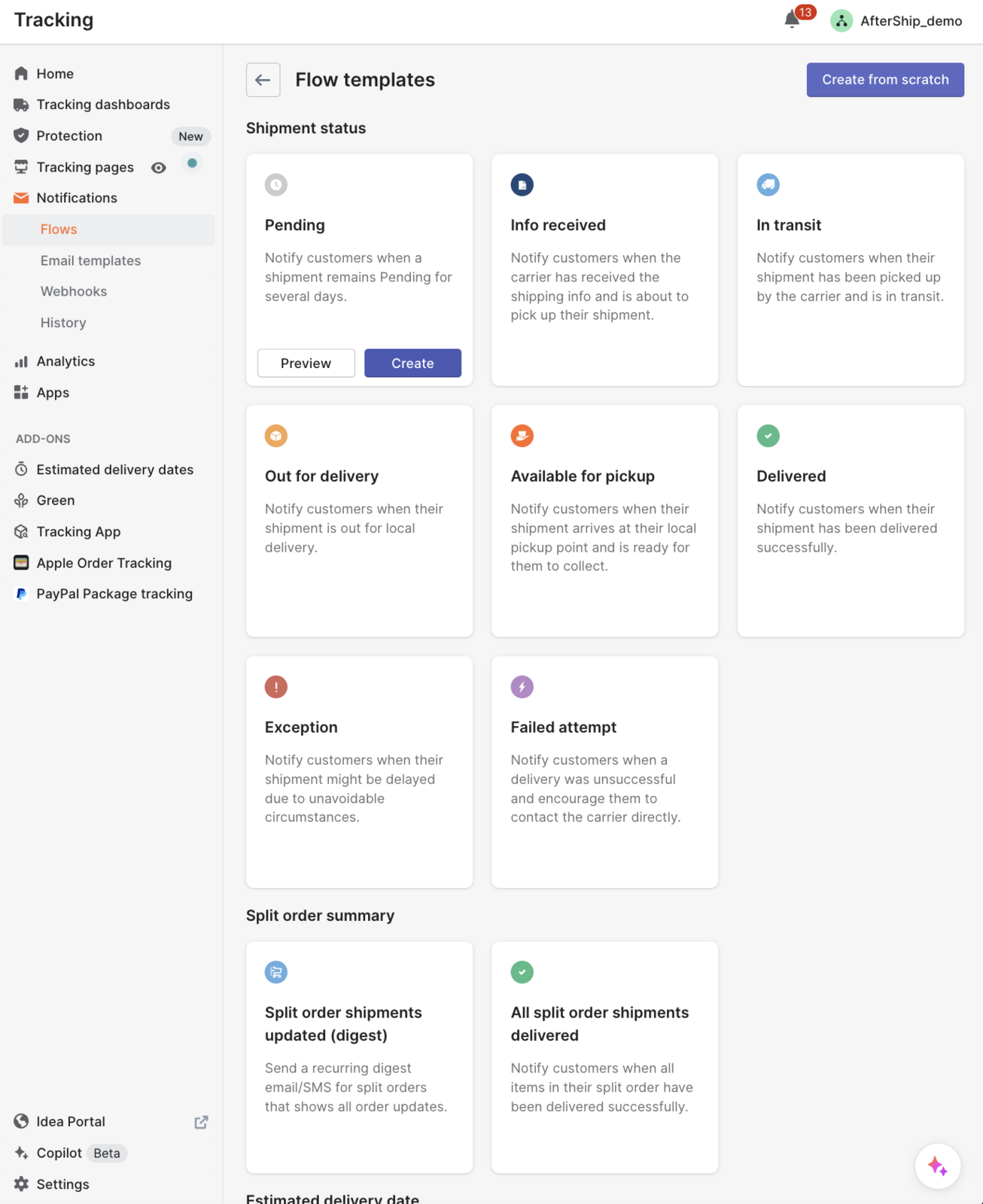
Delivery events arrive normalized across 1,700+ carriers, so a delay reads the same way whether the parcel sits with a national post or a regional courier, and returns events arrive covering the full RMA lifecycle. Inside Tracking you choose which statuses start a workflow, from the first carrier scan through exception states to delivery, and each one switches on or off independently. That is what makes proactive notifications based on real-time delivery statuses configurable per status.
Three recipes are worth building, in ascending order of what they return.
- The proactive package-stuck flow. A Delivery Exception fires from Tracking, your middleware hands it to Mailchimp's Event API or enrolls the contact in a Dotdigital program, and the customer gets a branded, reassuring email before they think to write in. This is the flow that reduces 'Where Is My Order?' (WISMO) tickets, the support contacts from customers chasing a parcel.
- The excitement builder. AfterShip's AI EDD predicts delivery dates at up to 95% of EDD prediction accuracy, with coverage of at least 80% of deliveries against under 40% for most carriers. That is accurate enough to send an "arriving tomorrow" email and hang a cross-sell on it, because you are not promising a date you cannot hold.
The third is the one worth building first, and the only one of the three that recovers revenue instead of deflecting a ticket.
The smart win-back. Returns Premium exposes the return lifecycle programmatically: request submitted, approved, resolved, exchange order created, each carrying its resolution and outcome. Store credit is one of those resolution types.
So when a return is approved and the outcome is store credit, your middleware reads the webhook, branches on the outcome, and triggers a flow in Mailchimp or Dotdigital that tells the customer what their credit is worth and puts something in front of them worth spending it on.
Think about who that email reaches. Someone who has just told you what did not work, who is still engaged enough to complete a return, and who has a balance sitting in your store. There is no better-qualified audience on your list, and automating communication throughout the returns process is where most brands stop short of using it.
Be clear about what this is. It is buildable, but it is not the pre-built native flow a Klaviyo merchant gets handed. You are wiring it yourself, and you should price that in.
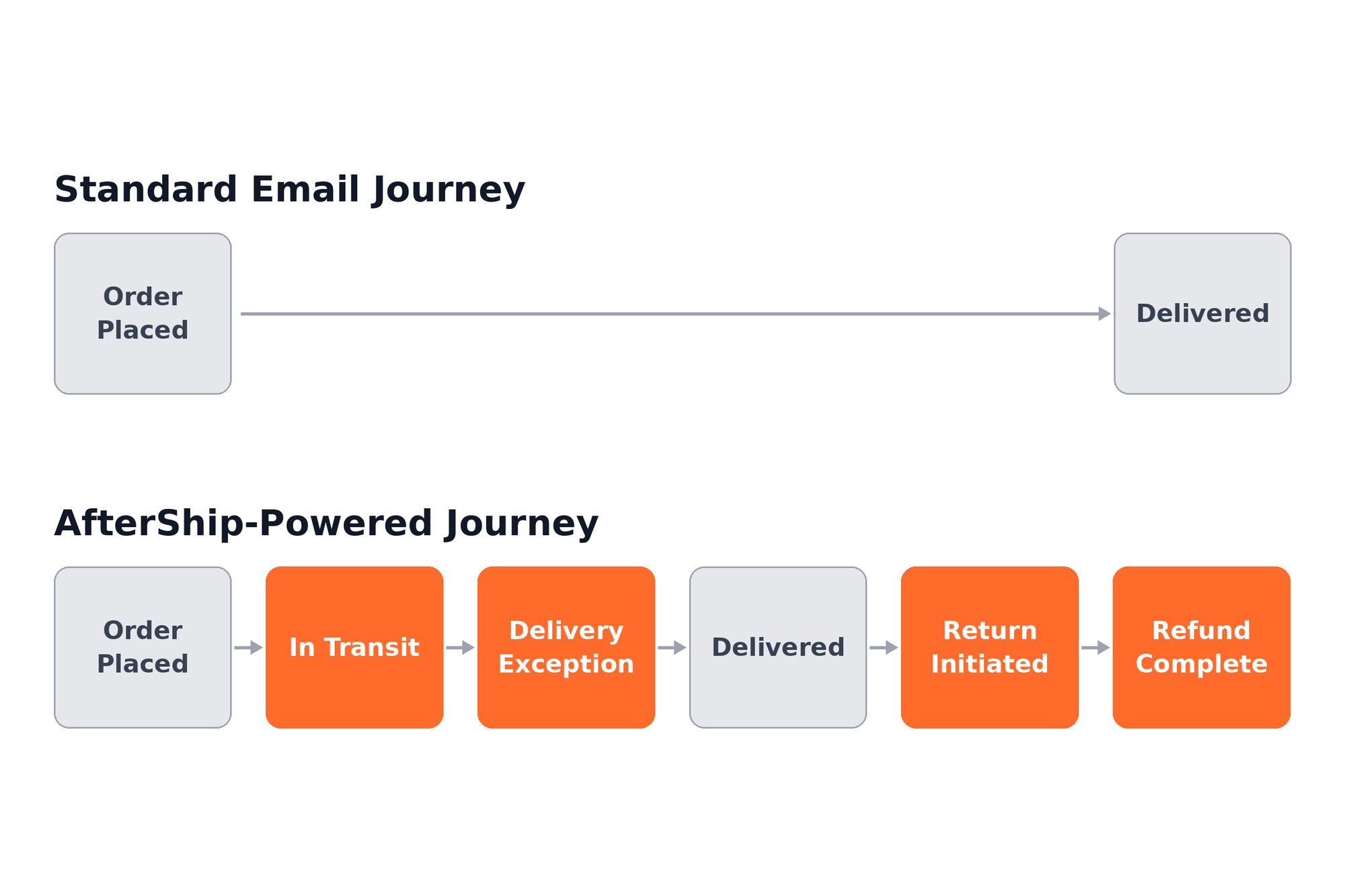
The ESP you choose still owns your campaign calendar, your templates and your deliverability. How much of the post-purchase window it can speak into at all is decided by the event feed sitting behind it.
Feature Breakdown: Mailchimp vs. Dotdigital for Post-Purchase CX
Everything above compresses into four rows.
Read the fourth column as conditional. It describes what either platform can do once delivery and returns events reach it, on a Premium plan, wired through one of the three routes.
| Feature | Mailchimp | Dotdigital | Supercharged with AfterShip |
|---|---|---|---|
| Automation Logic | Marketing Automation Flows; Essentials capped at four flow steps, full multi-step from Standard | Robust automation builder, steeper learning curve | Delivery and returns events become triggers and branch conditions |
| Segmentation by Delivery Status | No carrier event in the documented Shopify event set | No carrier event in the sync; order status only | Segment on In Transit, Out for Delivery or Delivery Exception |
| Returns Communication | No returns event in the documented event set | No returns event in the Shopify sync | Return approved, with resolution and outcome, including store credit |
| Proactive Notifications | Transactional email is a separate paid add-on | Transactional on dedicated IPs, terms not published | AI EDD predicts arrival at up to 95% of EDD prediction accuracy, on at least 80% of deliveries against under 40% for most carriers |
Rows one and two are a fair fight between the two platforms. Rows three and four are decided entirely by whether an event feed is sitting behind the one you pick.
The Final Verdict: Which Platform Wins for Your Stage?
Under $5M GMV, take Mailchimp. The usability advantage compounds when nobody on the team has time to learn a second system, and the automation ceiling on the middle tiers clears what most brands at that stage will actually build.
Over $5M GMV, or with genuine omnichannel needs, take Dotdigital. The automation depth earns back its learning curve once someone owns it full time, and the channel spread stops being theoretical. If that is you, Book a Demo and pressure-test the event layer against your own volumes before you sign either contract.
That settles the ESP. The AfterShip decision runs on a different number.
No GMV threshold tells you when a post-purchase layer starts paying for itself, and inventing one will not survive the first VP who asks where it came from. Use your WISMO contact rate instead. Above roughly 5% of orders, a dedicated post-purchase layer pays for itself.
| Input | Figure |
|---|---|
| WISMO contacts at a 5% rate, 500 orders a month | 25 a month |
| Cost per assisted contact | $13.50 median, per Gartner, "Benchmarks to Assess Your Customer Service Costs", February 2024 |
| AfterShip Tracking Premium at this volume | $59 a month, billed annually, at the 6,000 shipments per year slider |
| Deflected contacts needed to break even | Roughly five a month |
The headroom is the point. Break-even sits well below the contact volume a brand at that rate is already absorbing every month. Mous moved its contact rate from 12.9% to 5.9% with AfterShip, the difference between a queue you staff for and one you stop thinking about.
Engagement moves with it. Inspire Uplift recorded a 40% increase in email click-through after putting AfterShip's post-purchase data behind its sends.
“AfterShip Tracking helped Inspire Uplift greatly improve our customer experience and transparency into the entire shipment process globally across many carriers. Without a platform like AfterShip Tracking, it would be difficult for us to serve customers globally on the scale we currently do.”
Aaron Wallace, CEO
Read their story →Be straight about the boundary. AfterShip Tracking and AfterShip Returns are not ESPs. They do not run promotional campaigns or lead nurturing, and their focus is the post-purchase journey. For a complete marketing strategy you still need a dedicated ESP like Mailchimp or Dotdigital. What these two products do is make that investment worth more than it would be alone.
Run your own numbers before you argue for either. AfterShip's ROI calculator takes your AOV, ticket cost and WISMO share and returns a figure you can defend in a budget meeting. If you want to see where the pieces plug in, see how AfterShip integrates with your marketing stack.
The ESP is the harder decision to reverse. The event layer behind it decides how much you get back from either one, and it is the piece you can still add without migrating anything. The post-purchase angle on this pairing is covered in why the Dotdigital versus Mailchimp question misses the bigger one.
Proactive shipment tracking that delights your customers, reduces WISMO tickets, and improves delivery performance.
Explore AfterShip's Marketing IntegrationsFrequently Asked Questions
Does AfterShip integrate with Mailchimp and Dotdigital?
Not as a native, one-click integration. Klaviyo and Attentive are native AfterShip event integrations, where the connection is pre-built. For Mailchimp or Dotdigital you build the connection once, through a webhook into a connector such as Zapier or Make, through Shopify's order and fulfillment webhooks, or through the AfterShip API on the Premium tier, which needs developer input to set up. Once it is built, every delivery and returns event is available to your flows from then on.
Can I use AfterShip to send marketing emails?
Not through the products this article is about. AfterShip Tracking and AfterShip Returns are a post-purchase data and experience layer. They supply the real-time delivery and returns events your ESP turns into automated flows, and AfterShip Tracking can also send branded shipment-status notifications. They are not an ESP and will not run your promotional campaigns, newsletters, or lead-nurture. AfterShip does offer a separate email-marketing product, AfterShip Email, but for the post-purchase automations described here, AfterShip complements Mailchimp or Dotdigital rather than replacing them.
What is the difference between transactional and marketing emails?
Marketing emails promote. Campaigns, newsletters and launches go to a list on your schedule. Transactional emails confirm something the customer did or something that happened to their order, sent one to one and triggered by an event rather than a calendar. The distinction matters commercially, because transactional sends reach people who are already paying attention. What separates a bare status notice from a message worth opening is the quality of the event behind it, and that is the layer AfterShip supplies.
