You are asking whether Parcel Perform is the best tool for tracking emails because you already know notifications are the most-opened messages you send, and because what you want from them runs past reducing WISMO tickets into retention, repeat orders and a brand voice that holds after checkout. The question underneath is quieter: when you want to change one next Friday, who has to do it?
Both platforms are credible and built for different operators. This Parcel Perform vs AfterShip comparison covers shipment notification emails only, never the whole platform, and it is written for whoever runs post-purchase customer communications day to day.
The Quick Verdict: Who Wins for Email Notifications?
AfterShip is the stronger choice for brands whose CX team wants to own the notification programme and iterate on it without engineering help. Parcel Perform is the stronger choice for a logistics-led team with developer resource that wants deep carrier-event granularity and is content for the vendor to configure the experience.
Both of those are real businesses. Only one of them is probably yours.
If your stack is Shopify plus Klaviyo plus a helpdesk, and the person who wants to reword the Out for Delivery template is the same person answering tickets about it, ownership decides this before any feature list does. If you want the whole-platform view rather than the email one, Parcel Perform measured against AfterShip covers it.
The stakes sit in the open rate.
Shipping-confirmation emails had the highest open rate of any email type in Omnisend's 2025 dataset published in May 2026: 62.67%, with a 16.01% click rate across more than 20 billion campaign emails and 470 million automated sends. Omnisend is an email platform reporting its own numbers, not independent research, and Apple Mail Privacy Protection inflates category open rates by 14 to 18 points.
Even discounted for that inflation, nothing else you send performs like shipment status emails. This is the most valuable owned space between checkout and delivery, and the rest of this comparison is about who controls what goes in it.
Feature Breakdown: AfterShip vs Parcel Perform for Email
Five criteria decide this for someone who owns the notification programme rather than the logistics contract: editor control, trigger depth, what the email can sell, what you can measure, and whether it talks to the tools already in your stack.
| Criteria | AfterShip | Parcel Perform |
|---|---|---|
| Visual Email Editor and Brand Control | Drag-and-drop editor from Essentials, plus an HTML editor. Documented block palette including header, hero, shipment items, buttons, layout and custom code | Real-time HTML editor with 40+ custom data fields. No visual builder documented. Parcel Perform states it configures notification design for the customer |
| Automation Triggers and Proactivity | Named delivery events including Exception, Failed Attempt and Available for Pickup, plus conditional and trigger splits, A/B random split, time delays, and more than 30 trigger filters | Extensive delivery triggers advertised, including time-based triggers. Filtering and split-testing not documented |
| Built-in Monetization Tools | Product recommendations inside the email with four strategies, Premium and above. Static promo codes via text, bar or custom code blocks | Best-practice templates and shipment item display. No documented recommendation engine inside the notification editor |
| CX-focused Analytics | Delivery performance, exception rate and tracking-page engagement. Email and SMS open and click rates at Enterprise tier | Carrier transit and delivery performance data science. Notification open, click and bounce documented on an older page |
| Integration with the CX Stack | Klaviyo, Attentive, Omnisend and Gorgias listed in the integration directory | Klaviyo supported through configured webhooks |
Every row in the AfterShip column is something a CX team can change itself, without a ticket.
Round 1: Email Editor & Brand Control
Your promotion goes live Monday and the Out for Delivery email still carries last season's hero image. Who changes it, and how fast?
AfterShip offers a drag-and-drop visual editor from the Essentials plan. At 1,000 to 50,000 orders a month you are on Premium, so it is already in the plan you pay for.
The block palette is documented publicly. Header, hero, shipment items, buttons, text links, social links, layout, visibility rules, product recommendations and a custom code block. Drag a shipment-items block above the hero, drop a product-recommendations block beneath it, hide a section for one language. That is direct manipulation on a canvas. The queue behind a change request disappears. AfterShip's email editor allows full brand customization without code.
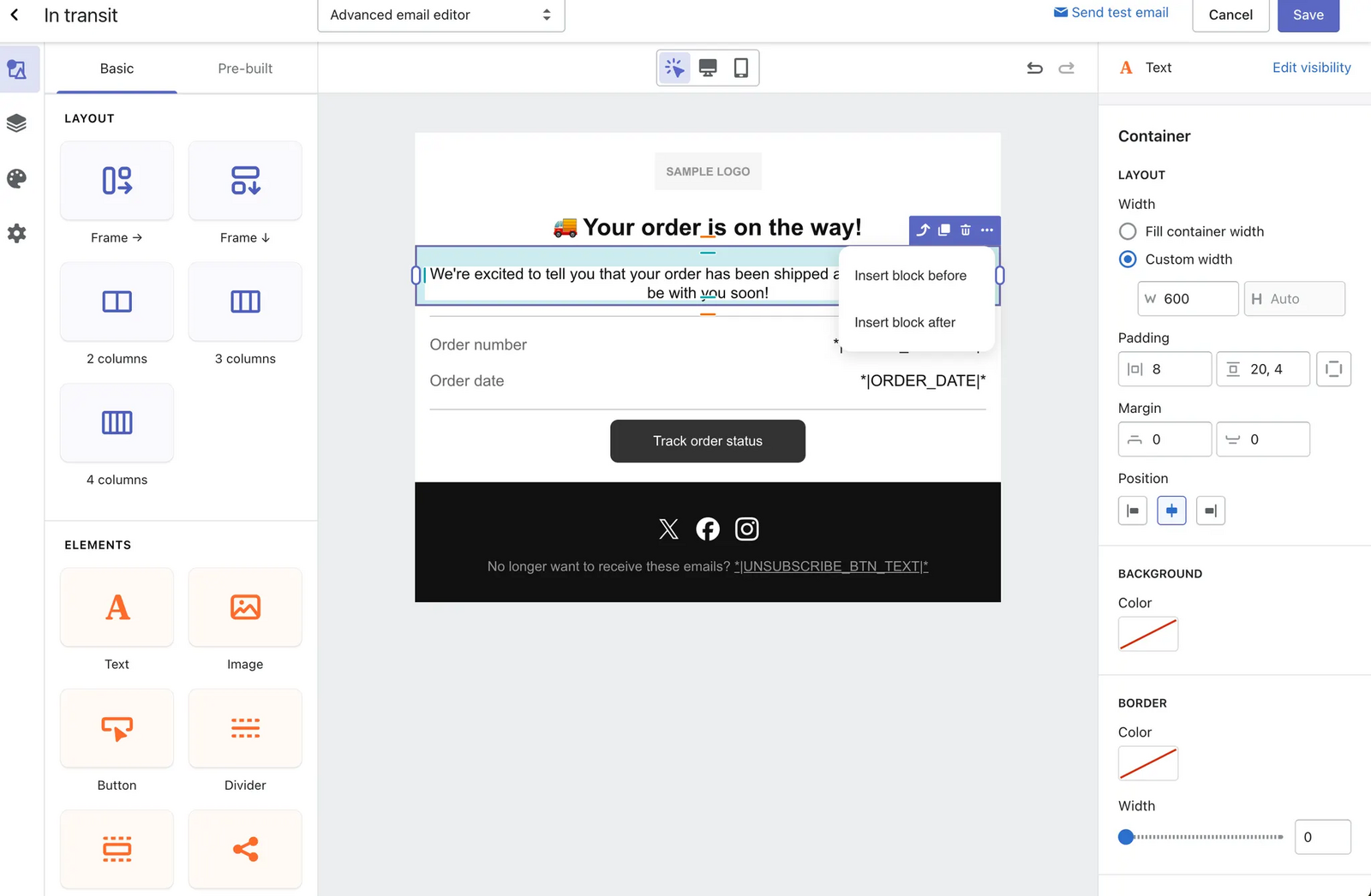
Parcel Perform tracking emails are edited in a real-time HTML editor that its documentation describes. More than 40 custom data fields pull shipment context into the message. It does not document a visual builder.
Its own page states the model: "We configure data integration, tracking page, and notification design exactly to your needs."
The same sentence reads differently in October.
When peak season turns the programme into a weekly edit, vendor-configured setup becomes a queue. The Black Friday template needs a different hero on Tuesday, the Exception email needs softer language while a carrier runs late, and each change is a request rather than an afternoon's work. A week is a long time on your highest-opened message. It still goes out, to every customer waiting on an order, sounding like last month's campaign.
A director at a small business, writing on G2 in April 2026: "The branded tracking pages and notification workflows are especially strong". That review was incentivized and collected on a G2 invitation, so weigh it accordingly.
Branding the template is half the job. The notification events you can send on are the other half.
Round 2: Automation Triggers & Proactivity
Exception, Failed Attempt and Available for Pickup are the three that turn a bad delivery into a save. Each fires at the moment something has gone wrong, which is the only moment an email can still convert a refund request into a rescued order.
AfterShip sends on Info Received, In Transit, Out for Delivery, Available for Pickup, Delivered, Failed Attempt and Exception.
Every platform in this category detects delivery events. The question worth asking is what your team can build once one fires.
Inside a notification flow you can add conditional splits and trigger splits, insert time delays, and run a random split for A/B testing with no plan gating on it. That last one matters. Testing subject lines on your most-opened message is not reserved for an upgrade.
Filters are where segmentation gets specific. You can branch on whether a package was damaged, was lost, or was returned to sender, on a revised delivery estimate, on the carrier, or on transit time. There are more than 30 trigger filters in total, across four families: campaign behaviour, cart behaviour, shopping behaviour and customer attributes. They are gated by the data you connect, not by the plan you buy.
Parcel Perform advertises extensive delivery triggers of its own, including time-based triggers. Detection is not the differentiator here. What separates the two is whether the person who owns retention can assemble a different message for a damaged parcel than for a late one, this afternoon, without a developer.
Round 3: Monetization & Driving Repeat Purchases
Commercial content inside a transactional email is a category norm, not an AfterShip invention. The question is what the email can actually carry, and on which plan.
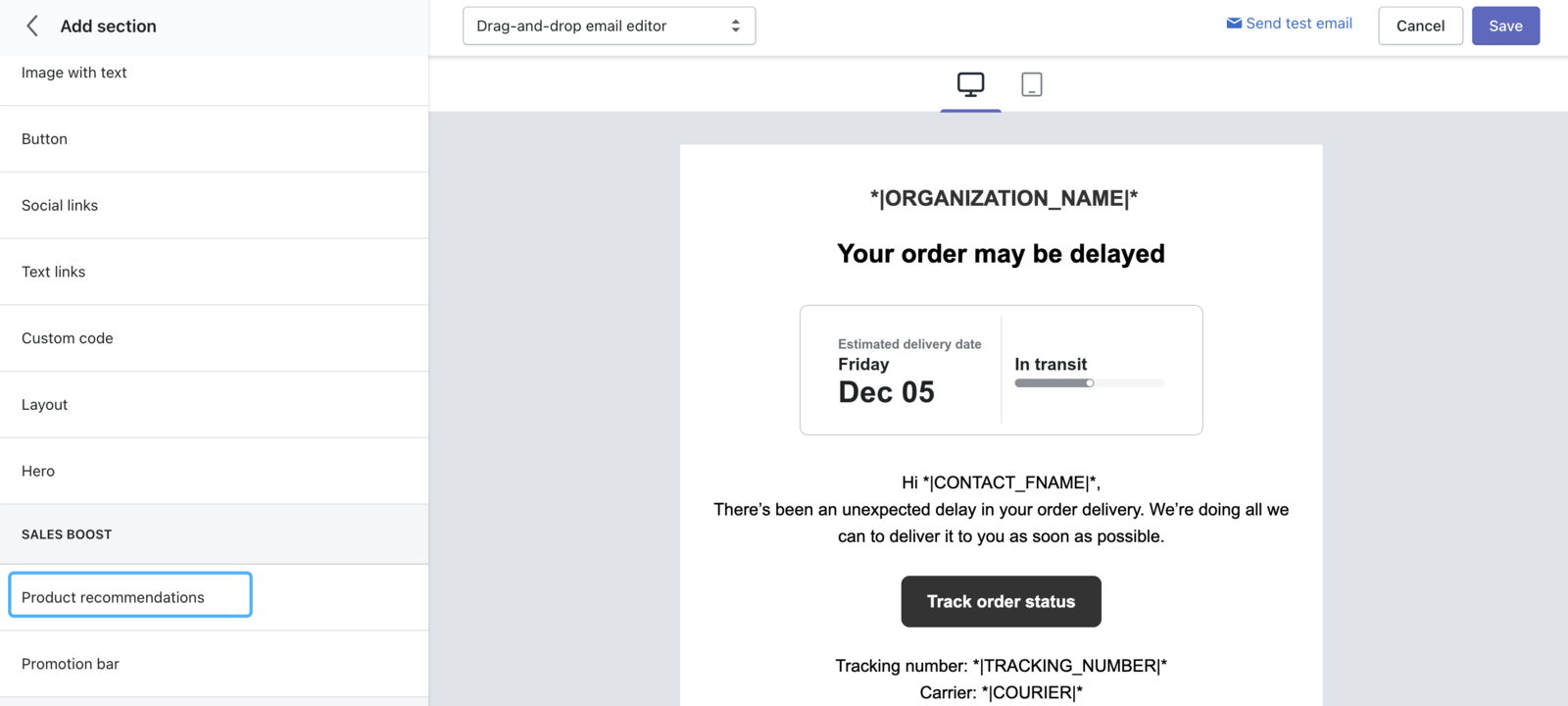
AfterShip tracking emails support product recommendations on Premium and above. The block sits in the same palette as everything else, with four strategies to choose from: Next LLM, Best sellers, Frequently bought together, and Custom.
Free and Essentials get none of them. If you are evaluating this on the Essentials price, the recommendation block is not part of what you are buying.
On a message that opens at the rate shipping confirmations do, a recommendation block is the difference between a status update and a second order. AfterShip emails drive revenue with AI-powered product recommendations.
Promotional codes work differently, and the limit matters before you plan around one. A pre-created code can be placed in a tracking email through the Text block, the Bar block or the Custom code block. AfterShip Tracking does not generate or personalise codes, so every recipient sees the same static string.
One thing to check with your own counsel: under the FTC's primary-purpose rule, an email mixing transactional and commercial content is classified by whichever purpose dominates.
Review collection sits outside the email entirely. AfterShip Reviews connects to Tracking and fires review requests automatically once an order is delivered, a connected product triggered on the delivery event rather than a widget inside the message.

None of these three is unique to AfterShip. What decides it is the same thing that decided Round 1: whether your team can configure them without waiting on someone else.
Round 4: Which Analytics Actually Matter?
Tracking-page engagement is real and it sits on the analytics page. The two numbers reported there are customer engagement and click-through rate, and both are things a CX lead can act on week to week.
Email and SMS open and click rates are also real, under Notifications then Flows. They are an Enterprise-tier capability. On Premium you will not have them, and the programme should be planned knowing that.
Revenue is where evaluations go wrong. There is no email revenue attribution metric on any plan, so no report will tell you what a tracking email earned. The revenue case runs through the mechanism: a recommendation block rendering inside a message your customer already opened.
Parcel Perform's analytics are built for a different job. Carrier transit times and delivery performance across lanes are what its data science serves, which is useful to whoever owns the carrier mix. Its notification-level open, click and bounce reporting is documented only on an older page and could not be confirmed current.
Wineshipping, a third-party logistics provider serving 1,500 wineries rather than a DTC brand, reports that its combined tracking-and-notification experience drove up to an 80% drop in WISMO. That story credits AfterShip Tracking alone, carries no date, and never attributes the result to email.
Open rate is the weakest number in this category. Apple Mail Privacy Protection fires the tracking pixel whether or not a human reads the message, so a rising open rate can mean nothing changed at all. Judge a notification programme on clicks, on exception recovery, and on delivery outcomes.
The Final Verdict: Which Is Right for Your Brand?
If your CX team wants to own the notification programme and change it on its own schedule, AfterShip is the stronger choice: a drag-and-drop editor on the plan you will actually buy, split testing inside the notification flow, and product recommendations rendering in the email itself.
Parcel Perform excels at logistics data; AfterShip excels at customer experience. Parcel Perform is the stronger choice for a logistics-led organisation with developer resource that wants carrier-event granularity and is content for the vendor to configure the experience.
Read as a Parcel Perform review for email tracking, this is the fair summary: its delivery-data depth is real, and its implementation model is a genuine strength for a team without front-end developers, because the vendor configures the tracking page and the notification design during onboarding. You get a designed programme without staffing for one.
For a CX team that wants to change a template before a Friday promotion, that same model is the constraint.
The same pattern shows up across the broader post-purchase landscape. Look at AfterShip's full tracking capabilities and the principle holds throughout: the person who owns the customer relationship should own the surface it runs on.
Getting Started with AfterShip's Email Notifications
Setting this up is a smaller job than the evaluation was.
- Connect your store. Shopify, and the other supported platforms, sync orders and shipments into Tracking without a developer.
- Open the drag-and-drop editor and brand one template, starting with Delivered. That is the message that lands when the experience went right.
- Switch on the events that matter. Exception and Failed Attempt first, because those are the messages that rescue an order.
- Add one filter or one A/B split. Branch on a damaged parcel, or test two subject lines on your highest-opened message.
None of this needs a sprint. The first three are an afternoon's work.
Proactive shipment tracking that delights your customers, reduces WISMO tickets, and improves your delivery performance.
Book a demoFrequently Asked Questions
Does AfterShip integrate with Klaviyo?
Yes. Klaviyo appears in AfterShip's integration directory, alongside Attentive and Omnisend for marketing, and Gorgias for helpdesk. The two systems operate side by side rather than in competition. If Klaviyo is already your marketing system of record, nothing about adopting AfterShip Tracking asks you to move it.
Can I use my own email service provider with AfterShip Tracking?
Yes, and plenty of brands do. Routing tracking events into your ESP and sending from there is a legitimate architecture, and if your team has already built shipment flows in Klaviyo it may be the least disruptive path.
Native sending wins on three things. Notifications live in the same system as the shipment data, so there is no sync lag between a carrier scan and the message reporting it. Templates carry shipment context without mapping fields by hand. And transactional volume does not count against your ESP send tier, which starts to matter once you are past a few thousand orders a month.
How does AfterShip pricing compare to Parcel Perform for email notifications?
They are not comparable in the way the question implies. AfterShip publishes tiered pricing openly, so you can work out what a notification programme costs before you speak to anyone. Parcel Perform is quote-based and publishes no comparable public rate card, which means the answer depends on a scoping conversation. For a team that has to defend a number to finance, published pricing is easier to build a case on. For a third-party view before you commit, G2's AfterShip vs Parcel Perform comparison sets the two side by side.
Which notification events can AfterShip send emails for?
AfterShip sends email notifications on Info Received, In Transit, Out for Delivery, Available for Pickup, Delivered, Failed Attempt and Exception.
Three of them matter most. Available for Pickup, Failed Attempt and Exception are the moments a delivery is going wrong, and they are the messages that turn a support ticket into a save. Each one can carry its own template, its own filters and its own recommendation block, so the emails your customers need most are also the ones you have the most control over.