You're spending more time in a spreadsheet of tracking numbers than on your next product launch. A label is where Pirate Ship and ShippingEasy both stop: neither hands your shopper a self-service return, and ShippingEasy's four branded emails have nothing to send when a package goes quiet. AfterShip runs shipping, tracking, returns, and warranty off one data layer, so the label is the start of the customer's journey rather than the end of your visibility into it. Search for the best shipping software for Shopify and you get label tools. The question is not which label costs less, but which layer you are buying.
Pirate Ship vs. ShippingEasy: The 10-Second Verdict
Choose on a capability you are missing, not on the number of orders you shipped last month. If ClickPost is the platform you are weighing, see what ClickPost rate comparison misses.
ShippingEasy vs Pirate Ship comes down to scope. Pirate Ship fits while you are working label by label across USPS and UPS. ShippingEasy fits while multi-carrier labels and automation rules are the whole job. AfterShip is the call once the work moves past the label: when a shopper needs a delivery date before checkout, when someone has to tell that shopper the date has slipped, or when a return has to resolve without a support agent touching it.
What forces the move is a capability you cannot buy on the plan you are currently on. Rank a shortlist of the the platforms we ranked this year on what your shopper sees, because monthly price picks the tool you replace next year. On the platform side of that argument, AfterShip Tracking rates 4.7 out of 5 from 311 reviews on G2.
Who Should Use Pirate Ship (And When to Move On)
Pirate Ship is the right call while the label really is the whole job.
Pirate Ship is free label software for USPS and UPS shipments. It includes Cubic pricing, and it charges nothing for the software itself. You pay postage.
What it does not carry is what starts to matter as volume climbs:
- No rules engine, so every routing decision stays a human decision, order by order.
- No hosted branded tracking page, so the status check happens on a carrier site rather than on yours.
- No API, so fulfillment cannot be wired into the rest of your stack, and anything you need elsewhere gets exported by hand.
The move happens when one of those becomes the bottleneck. Usually it arrives as an afternoon you skip rate shopping because you are behind, a week your inbox fills with questions your own site cannot answer, or the first time you need shipment data somewhere other than a browser tab.
When Does ShippingEasy Become the Right Choice?
ShippingEasy is the right call while labels and rules are the whole job.
ShippingEasy adds multi-carrier support and basic automation rules. It bills one subscription and also covers inventory integrations, a hosted branded tracking page, and four branded shopper emails. Its own help centre draws the edges of that branded experience, and they are worth reading before you commit:
- Coverage is partial. The branded experience runs on USPS domestic, UPS, and third-party FedEx. "All other shipments will continue to get the standard confirmation email to track the order."
- None of the four branded emails is an exception or delay notification, and the estimated-delivery-date email only fires after a carrier scan. Nothing reaches the shopper while a package is sitting still.
- Returns stay with your team. "ShippingEasy does not provide a portal for your customers to request a return label from your website."
Read together, those three lines describe a tool that brands the good news and routes the bad news to your inbox. That boundary is usually where alternatives to ShippingEasy for small business shipping start getting a serious look, and it is worth testing before the year is out. A timed head-to-head on ShippingEasy vs Easyship shows how much each one actually saves.
The Real Question: Are You Optimizing for Labels or for Growth?
Thirty minutes saved at the label printer is a real win, and it is the smallest one still available this year.
Most advice on how to scale shipping operations stops there. A shopper who never hears that a package has stalled does not file a complaint about your fulfillment workflow. They just stop buying. That cost lands in a different column of your P&L from the one shipping software gets judged on. The label is the first domino, not the whole game.
AfterShip Shipping is where that domino falls. You compare live rates and delivery times across 130+ carriers in one screen, then set automation rules, on Shipping Pro and above, so the right carrier and service get applied for you at import. A rule can be as plain as routing every order over 5lb to UPS Ground, and it runs on every order after that without anyone deciding again.
Where that shipment goes next is what separates the three tools in this comparison.
Introducing AfterShip: A Platform for the Entire Journey
AfterShip is not another shipping tool. It is an integrated post-purchase platform that a shipping tool sits inside.
AfterShip provides one platform for shipping, tracking, returns, and warranty. It runs off one data layer, so a delayed delivery, a return and the next order read from one customer record rather than three systems.
One thing is worth stating plainly, because the pricing depends on it. AfterShip Tracking is a separate subscription. The branded tracking page, shopper notifications and pre-purchase delivery date belong to Tracking: AI EDD is a capability inside it on Tracking Premium and up, and revised-EDD notifications start at Tracking Essentials. AfterShip Shipping prints the labels and picks the carriers. It carries no shopper-facing layer of its own.
On the label side, AfterShip Shipping can auto-select the carrier service with the best balance of cost and speed. On the shopper side, Tracking takes over once the label exists.
Feature Breakdown: Pirate Ship vs. ShippingEasy vs. AfterShip
The rows below are buying questions.
| Criteria | Pirate Ship | ShippingEasy | AfterShip |
|---|---|---|---|
| Software cost at 500 orders/month, and what it covers | $0, postage only. Labels for two carriers | $29.99/mo (Basic, 201-500 shipments), monthly billing only. Labels, rules, and a branded page for part of that volume | Shipping Essentials $29/mo billed annually ($35 monthly) + Tracking Premium $59/mo billed annually ($70 monthly) = $88/mo annual, $105/mo monthly. Labels across 130+ carriers, plus the shopper-facing layer the other two do not sell |
| Discounted carriers included | USPS and UPS | USPS and UPS (One Balance) | 130+ carriers in one integration (Shipping) |
| Adding FedEx or DHL | Not offered | Bring your own account, behind a paid add-on: $15/mo on Basic, so $44.99/mo all in | Connect your own carrier accounts in Shipping and apply your negotiated rates |
| Shipping rules automation | No rules engine | Automation rules included on Basic | Automation rules - for example, route every order over 5lb to UPS Ground - on Shipping Pro and above |
| Branded tracking page | No hosted branded page | Yes - one page per account, and covering only USPS domestic, UPS, and third-party FedEx. "All other shipments will continue to get the standard confirmation email to track the order" | Yes - AfterShip Tracking |
| Proactive delay or exception notification | Not offered | No exception or delay email among its four branded templates | Yes - AfterShip Tracking, from Essentials: "Automatically email or SMS your customer when a sub-status changes or the EDD shifts" |
| Delivery estimate before purchase | Not offered | Its estimated-delivery-date email fires only after a carrier scan | AI EDD, Tracking Premium - predicts delivery dates with up to 95% accuracy |
| Self-service returns portal | Pay-on-use return labels, merchant-initiated | "ShippingEasy does not provide a portal for your customers to request a return label from your website." | Yes - AfterShip Returns |
| Scalability to 5,000+ orders/month | No API | Enterprise $189.99/mo at 6,001+ | Platform tiers plus API |
The difference is completeness, not presence. AfterShip Tracking brands the whole carrier list, flags a slipping date, and routes returns to AfterShip Returns. ShippingEasy brands part of its list, sends nothing while a package sits still, and puts returns in your inbox.
Beyond the Label: What the Shopper Actually Experiences
Your shopper never sees your shipping software. They see whether anyone told them what was happening.
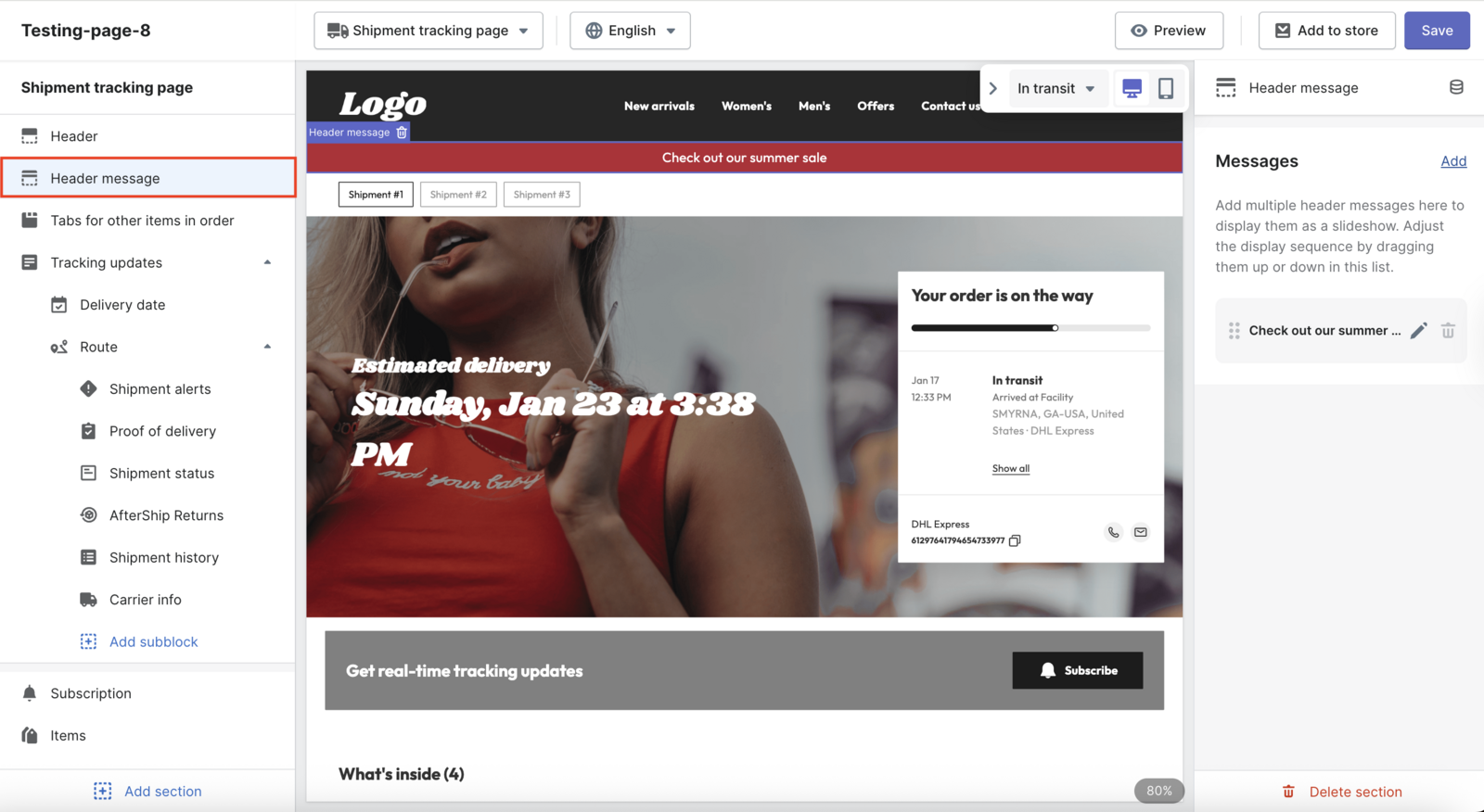
Picture one order. Before checkout, AI EDD on Tracking Premium shows a delivery date modeled on how that lane actually performs, so the buying decision is made against a real date, not a guess. The package ships. Two days in, a sub-status changes and the date moves, and AfterShip Tracking sends a revised-EDD notification, available from Tracking Essentials up, so the branded tracking updates reach the shopper before they think to go looking. The item turns out to be the wrong size, and AfterShip Returns takes it back through a self-service portal that can offer an exchange instead of a refund.
Now the disconnected version of that same order. No date before checkout. Silence while the package sits in a facility. A return that opens with an email to your support address and closes with someone pasting a label into a reply. Same carrier, same transit time, same product, and a different customer at the end of it. It is the same shipment described twice: once by a system that knows the customer, and once by three that do not.
Dr. Squatch runs AfterShip's AI EDD, a Tracking Premium capability, on its product pages rather than saving it for the tracking page, which tells you where a delivery date works: before the order exists, not after.
Pricing Re-framed: Calculating the True Cost of Shipping
All three publish their rates openly, so the question is what the money buys rather than what anyone is hiding.
Pirate Ship charges nothing for the software and you pay postage. ShippingEasy bills one subscription. AfterShip bills Shipping and Tracking as two line items, each billed on its own, because Tracking is a separate product doing separate work rather than a bundled upsell: Shipping Essentials at $29 a month billed annually, Tracking Premium at $59. At 500 orders a month ShippingEasy is $29.99 against AfterShip's $88. AfterShip prices as a platform because it is one, and the spend starts making sense the month a delayed order costs you a support ticket and a repeat customer.
Both AfterShip figures are annual-billing prices. Month to month they are higher, and the annual toggle is the difference between a stack you compare on list price and one you will actually pay for. There is no hard spend cap on that stack. Run past your label volume and you get an alert rather than a shutoff, which matters more than it sounds like in a peak week.
AfterShip Shipping prices from AfterShip Shipping pricing, checked October 2026.
That support ticket is where the rest of the arithmetic sits. Gartner's February 2024 benchmark puts it plainly: "The median cost per contact is $1.84 for self-service and $13.50 for assisted channels." A contact you never receive is money that never leaves, which is how you turn shipping costs into an advantage rather than a line item to squeeze.
The Final Verdict: Choosing the Platform for the Brand You're Building
Nobody outgrows a shipping tool on a date. They outgrow it the first time they need a capability the plan does not include.
- Pirate Ship is the right call while you ship USPS and UPS only, you are content to work label by label, and nobody expects a branded tracking experience from you. No source we found identifies an order volume at which Pirate Ship breaks; what triggers a move is a capability, not a count.
- ShippingEasy is the right call while multi-carrier labels and automation rules are the whole job, and nobody in your business is on the hook when a shipment goes quiet.
- AfterShip is the right call when any one of these becomes true: you need a shopper to see a delivery date before they buy; you need to tell them proactively when that date slips; you need returns to run without a support agent; or you need shipping, tracking, returns, and warranty reading from one data layer instead of three separate tools.
Simplify shipping and order fulfillment across Shopify, TikTok Shop, and your carrier network.
Book a demoFrequently Asked Questions
Is Pirate Ship really free, and does it only do USPS?
The software is free; you pay postage only. It carries USPS and UPS, not USPS alone. What is not behind it: a rules engine, a hosted branded tracking page, or an API.
When does a delivery date shift reach the shopper?
AfterShip Tracking sends a triggered notification when a sub-status changes or the estimated date moves, from Tracking Essentials up. AI EDD, which shows a date before checkout, sits on Tracking Premium.
Does ShippingEasy offer annual billing?
ShippingEasy publishes no annual billing option on any public buying surface. Its help centre states: All costs (plus applicable taxes, if any) are per month.
What does AfterShip cost compared to ShippingEasy at 500 orders a month?
Two line items, billed separately: Shipping Essentials and Tracking Premium. The comparison table in this article carries both figures. They are billed apart because Tracking is a separate product doing separate work, not a bundled upsell, and you can run Shipping without it. What the second line buys is the shopper-facing layer: the branded tracking page, the notification when a delivery date moves, and AI EDD on Tracking Premium showing a date before checkout. None of it ships with the label engine.
What is the cheapest shipping software for 500+ orders per month?
That depends on what you count. Software price is one line on the bill, and the orders you do not keep are another. When a shipment goes quiet, who finds out first: someone in your business, or the shopper emailing to ask? If it is the shopper, no volume threshold will help, because what you are missing is a capability rather than a bigger plan. That is where shipping, tracking, returns, and warranty on one data layer starts earning its second line item.