Your customer sees 'Delivered.' Your support agent sees 'In Transit.' The carrier's own site says something else again, and the package is nowhere to be found. None of those screens is lying: a parcel's tracking record is assembled from separate scan events that different systems receive, label and publish at different moments, and nobody in that chain is reconciling them for you.
That gap is structural, and knowing how the chain is built tells you which problems you can fix.
The Tracking Bermuda Triangle: When Carrier, App, and Reality Don't Align
The notification lands at 2:14 in the afternoon: delivered. Your customer checks the porch, the mailbox, the side gate, the neighbor. Nothing is there. They open the tracking app they were told to use, which still reads out for delivery. They open the carrier's own page, which says something different again. Then they write to you.
Multiply that by a week of orders and you are looking at your support queue. Route app false alerts, parcels frozen on one facility scan for four days, a delivery confirmation that lands before the parcel does: each is a shopper who cannot answer their own question and now needs one of your people to try. Your agent opens the same three screens, finds the same three answers, and can offer only a guess.
What makes this expensive is that none of those screens is wrong. Each is a separate reading of a record nobody reconciled, and the carrier that produced it says so:
"The absence of a delivery scan on a mailpiece does not necessarily indicate that the item was not delivered."
The organization that owns the scan says a missing scan proves nothing about where the parcel is. The record and the parcel are two different objects, and they are allowed to disagree.
Behind the Curtain: How Standard Carrier Tracking Actually Works
Carrier tracking was built to run a logistics network, not to reassure your customer, and that explains most of what you are seeing.
A carrier's tracking database collects events reported by whatever touched the parcel: USPS describes its own source data as coming from business mailers' files, handheld scanners, retail equipment and mail processing equipment. Four kinds of reporter, each on its own schedule, writing one record a shopper reads as a single timeline.
The delivery scan is a person pressing a button, and that button stops the clock. A driver can press it at the curb, at the truck, at the wrong door, or once at the end of a street for six parcels. The physical event and the carrier's label for it can be forty feet and twenty minutes apart.
False delivery alerts are caused by non-standardized carrier scan events.
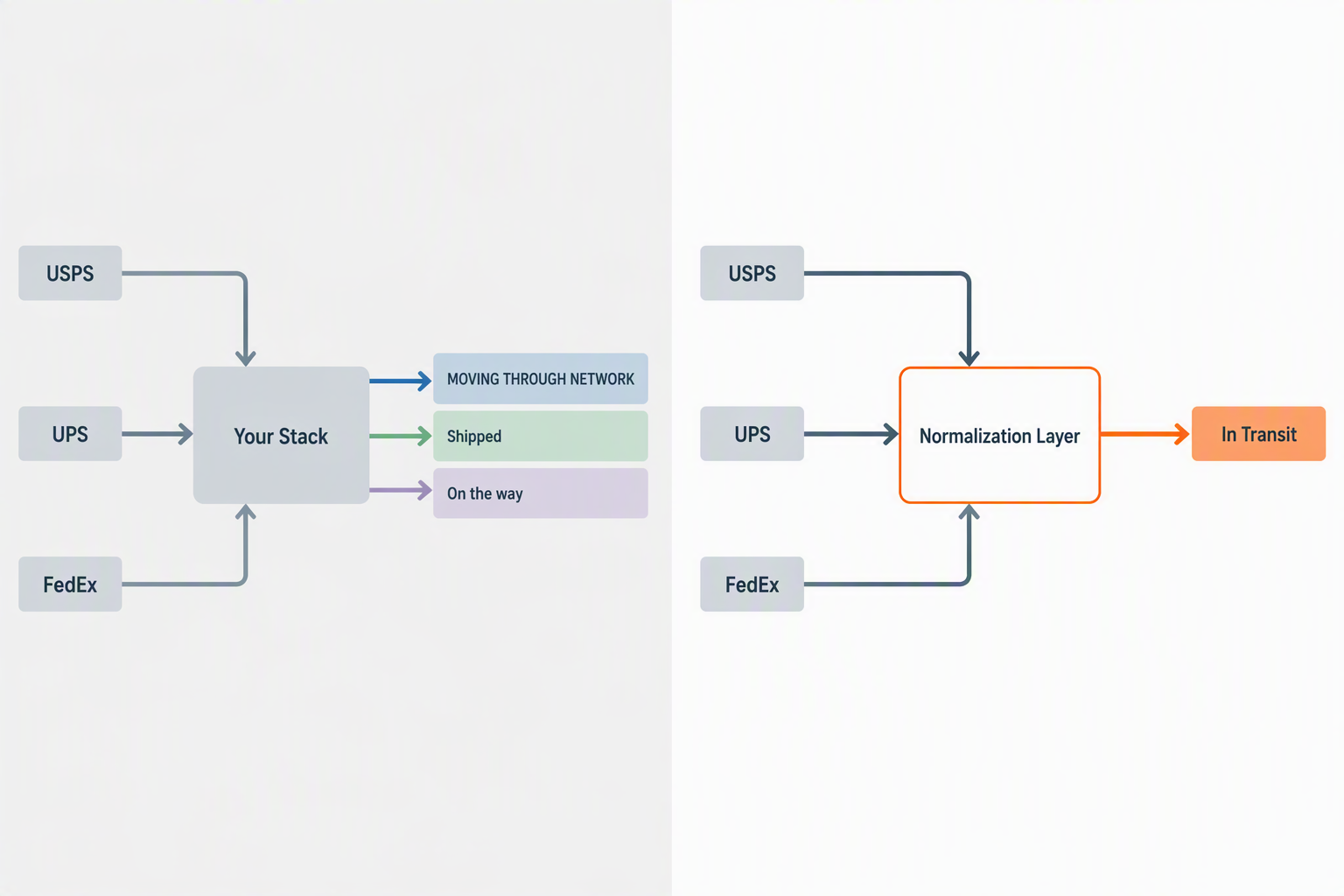
Then there is the language. Carriers do not share a vocabulary. USPS writes MOVING THROUGH NETWORK, UPS writes Shipped or On the Way, FedEx writes On the way. Watch one state, a parcel running behind: USPS calls it Arriving Late, FedEx calls it Running late, and UPS publishes no delay status at all, folding it into Exception. DHL's developer documentation tells its own integrators that it strongly recommends using structured status codes instead of free-text descriptions. That is a carrier telling engineers not to trust the words it publishes.
Keep three objects apart and the rest gets easier: the physical event, the carrier's status label for it, and the standardized status a platform assigns after reading that label. Most arguments about tracking accuracy are really arguments about which of the three someone means.
The App Layer: Why a Second View Doesn't Correct the Source Data
So you install something better. A branded tracking page, a mobile app, notifications sent on your behalf: the shopper stops refreshing the carrier's site and starts looking at a surface you chose. The experience improves. The data underneath it does not change.
A consumer-facing app layer over carrier data reads the same events from the same carriers, and it inherits their timing along with their content. Route documents this about its own app: its help pages state that while it works directly with shipping carriers to provide the most up-to-date information, it is possible that the carrier's website may display updates more quickly than the app, and that these short delays are expected and normal. Consumer apps like Route often use the same flawed carrier data.
A second view can also introduce errors that were not in the source. Route documents that too, telling shoppers the app may mistakenly classify tracking information to the wrong carrier, and that the updates they receive may then not be accurate. The remedy it publishes is a shopper reporting the mistake from the Orders tab.
An app layer does more than display. Route publishes exception rules of its own, including a state it raises when a delivered scan has not followed an out-for-delivery scan within eighteen hours. A second view of an unreconciled feed is still an unreconciled feed, and somebody has to do the reconciling. By default, nobody in that chain does.
The Business Cost of Bad Data: A Rising Tide of WISMO Tickets
You do not need an industry benchmark to size this. You need two numbers you already have.
Order-status contacts per month x your loaded cost per contact = your monthly WISMO bill. Both numbers are already in your helpdesk.
Gorgias reports that up to 30% of incoming customer service tickets are shipping status requests. Use your own figure; the outside one only establishes the category.
But the arithmetic hides something. Sort a month of contacts and three piles appear. "Where is it" is a shopper who has lost the thread and wants the current state. "It is late" is a parcel genuinely behind, and the shopper wants a new date. "It says delivered and it is not here" is a shopper on a porch with nothing on it.
Only the first two are addressable by a data layer. A reconciled feed, a status that means the same thing whichever carrier produced it, and an alert when a parcel goes quiet will drastically reduce WISMO tickets in those two piles. The third is a physical problem wearing a data costume: no software produces a parcel a driver left at the wrong address. Knowing which share of your queue sits where is the first useful thing you can do, and it is where AfterShip starts.
The Real Solution: How B2B Data Aggregation Creates Order from Chaos
The fix is a layer that reads every carrier's events and rewrites them into one vocabulary before anyone sees them. AfterShip's developer documentation states the mechanism plainly: "The checkpoint messages received from couriers are mapped to these subtags." Each carrier goes on writing whatever words it likes, and the platform decides what those words mean. AfterShip normalizes data from 2,000+ carriers into one standardized status set.
Three things follow, and each is documented. Carrier auto-detection cross-checks tracking numbers to identify the right carrier and correct a shipment tagged to the wrong one, so a mis-classification is fixed upstream instead of arriving as a complaint. Threshold-based detection flags a shipment that has sat pending past a window you set yourself, at 24, 48 or 72 hours, so a parcel that goes quiet raises its hand before the customer writes in. And AI EDD, a capability inside AfterShip Tracking, predicts a delivery date with up to 95% accuracy, which fills the space between scans where a shopper would otherwise be guessing.
Here is what none of that does. No tracking platform can create a scan event a carrier never generated: if a driver marks a parcel delivered at the truck, every downstream system shows delivered, ours included, and that is exactly why the fix isn't a prettier map. Normalization corrects what each carrier's status means so "delivered," "out for delivery," and "with driver" line up across carriers; anomaly detection and threshold alerts flag a parcel that has gone quiet past a set window; and predicted delivery dates fill the gap between scans. None of that invents a scan. It makes the scans you do get trustworthy, and it acts on the silences between them.
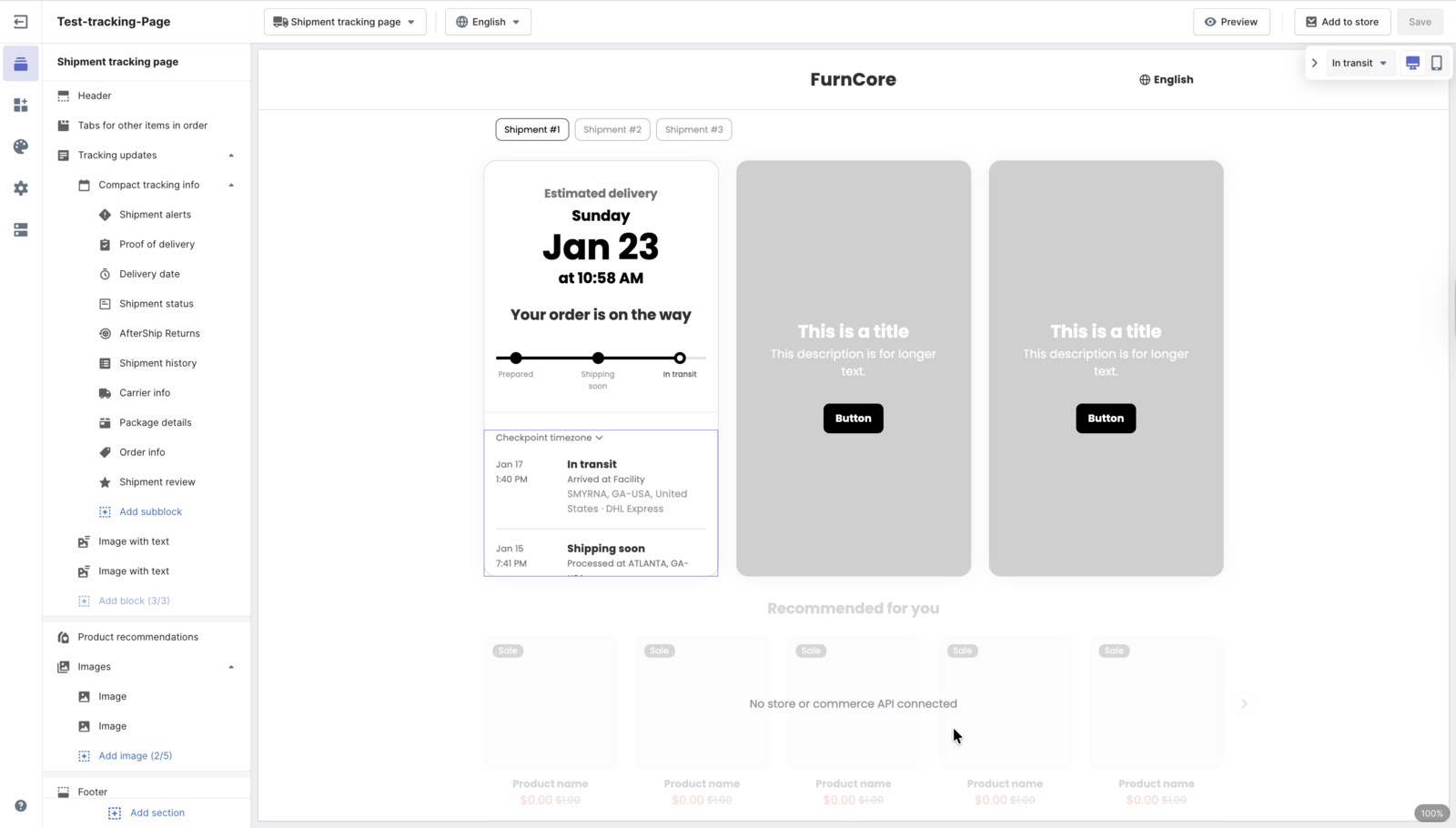
The status block reads "In transit" while the checkpoint beneath it still says "Arrived at Facility": the normalized status above, the carrier's own raw wording below.
Head-to-Head: AfterShip vs. Route vs. Direct Carrier Tracking
| Criteria | Carrier Tracking | Route App | AfterShip Platform |
|---|---|---|---|
| Data Source & Reliability | The originating record, from human-triggered scans. | Carrier-originated data; can lag the carrier's site. | Same carrier events, ingested across 2,000+ carriers, reconciled into one layer. |
| Status Standardization | Each carrier publishes its own vocabulary. | A shopper-facing glossary of carriers' own status strings. | A developer-facing normalized taxonomy, with the checkpoint-to-subtag mapping published. |
| Proactive Issue Detection | None surfaced to the merchant. | A delay trigger and a Delivery Status Not Updated state. | Threshold detection at 24, 48 or 72 hours, plus carrier auto-detection. |
| Branded CX Control | Shopper leaves for a carrier page. | Branded tracking and notifications via its product. | Branded tracking pages and notifications your brand owns. |
| WISMO Reduction Potential | Not a goal of the system. | Email, SMS, web and app notifications. | StackCommerce cut WISMO tickets 71% against a 25% goal. |
| Developer API Access | Each publishes its own API and schema. | Docs cover the protection widget, order sync, claim webhooks. | A documented tracking API, a published status enumeration and webhook specifications. |
Read the table as one argument rather than six. Weigh Route vs standard carrier tracking accuracy and you land in the same place: all three columns start from the same carrier events, so the question is what happens to those events next. Two columns pass them through in the carriers' own vocabulary. One rewrites them into a single vocabulary and publishes the rules for doing so. If you want the two-vendor version of this argument, weighed on pricing and platform scope rather than data mechanics, we have written a head-to-head comparison of AfterShip vs. Route.
StackCommerce set out to cut WISMO tickets by 25% and beat the target.

“AfterShip's shipment tracking is pretty amazing stuff. And I think the 71% drop in WISMO tickets is due to us providing that tracking visibility to our customers.”
Deryck Lim, Sr. Operations Manager
Read their story →Choose AfterShip if:
- you run more than one carrier and need delivered, out for delivery and with driver to mean the same thing across all of them
- you want a parcel that has gone quiet past a set window to raise a flag before the customer writes in
- you want the delivery promise to come from your own data layer rather than a carrier's estimate
- you want shipping, tracking, returns, and warranty on one data layer rather than stitched-together point tools
A simpler view may be enough if:
- direct carrier tracking: you ship on one carrier, at low volume, and are content for shoppers to leave your site for the carrier's page
- a consumer tracking app: the parcel view you want is the shopper's own cross-store one rather than a branded page on your own storefront
For a brand new Shopify store with minimal orders, the free version of a consumer app might seem appealing, and for a while it is. It is also a temporary fix that accrues technical debt as you scale: the moment order-status contacts become a noticeable cost centre is the moment that brand has outgrown a consumer-grade solution.
Tracking inaccuracy is a systemic data problem, not a random bug, and only a dedicated B2B data-aggregation platform solves it at scale.
Your 3-Step Plan to Eliminate Tracking Inaccuracy in 2026
1. Audit your WISMO. Tag a month of order-status contacts into the three piles from earlier. You then know what share of your queue a data layer can touch, which is the number your business case rests on.
2. Define your source of truth. Decide which surface is authoritative when systems disagree, and make it one you control. Sending a shopper to a carrier page hands your most anxious moment to a system built for logistics, and you hear about the failure when the ticket arrives. A more reliable, dedicated tracking platform puts that decision back in your hands.
3. Model the ROI on your own numbers. Take the addressable share from step 1, apply your loaded cost per contact, and compare it against what a platform costs. Do that arithmetic yourself rather than borrowing a benchmark, and the answer holds up in a meeting.
Proactive shipment tracking that delights your customers, reduces WISMO tickets, and improves your delivery performance.
Book a demoFrequently Asked Questions About Tracking Accuracy
Why does Route say my package is delivered when it isn't?
The delivered state does not originate in the app. It originates in a carrier scan, and a delivery scan is a person pressing a button that stops the clock. Pressed at the truck, at the wrong door, or once for several parcels, it records delivered while the parcel is elsewhere. Every downstream view shows what the carrier published, Route and your own store included.
How do I fix false delivery alerts?
For a single parcel, carriers ask shoppers to wait a business day, check safe locations, entrances and neighbors, then request the delivery-scan detail, which records where the scan was taken. Structurally you can do better than repeating that one ticket at a time: detect the exception on your own data layer and notify the shopper first, so the first message comes from you.
Why do the carrier's site, my store and a tracking app disagree at the same moment?
Because they read the same feed on different cadences. Carrier events publish in bursts, and each system downstream ingests and processes them on its own schedule, so at any second one has consumed an event another has not. The gaps are normal: FedEx tells customers it is not unusual for a shipment to go more than 24 hours without an update.
Is there an alternative to Route for reliable tracking?
Most alternatives to Route for Shopify merchants are consumer apps of the same shape, so the useful question is which layer owns your tracking data. A consumer app gives a shopper a cross-store parcel view. A tracking data layer reconciles carrier events into one status vocabulary, flags a shipment that has gone quiet, and puts the result on surfaces your brand controls. AfterShip Tracking is built as that layer, which is why it answers the merchant version of this question.