A shipment exception tells you something went wrong. Shipping exception management is the process of identifying shipment issues, investigating what happened, deciding how to respond, taking action, and tracking the issue through resolution.
For ecommerce teams, that distinction matters. Knowing that an order is stuck in transit, being returned to sender, or marked delivered but not received doesn't resolve the issue. Someone still needs to determine what happened, decide whether intervention is necessary, communicate with the right people, and follow the case through resolution.
If you're looking for an explanation of individual carrier statuses and what different exceptions mean, see our guide to what is a delivery exception and our shipment exception glossary.
For merchants, the bigger operational challenge is what happens after an exception is identified.
Why shipping exceptions become an operational problem
A shipping exception rarely ends with an alert.
Once an issue is identified, customer service or operations teams may need to:
- Determine which shipments actually require attention.
- Investigate the shipment journey and carrier status.
- Check the customer's order and relevant context.
- Decide on the appropriate response.
- Contact the customer, warehouse, or carrier.
- Take a resolution action, such as a reship, refund, customer compensation, or carrier claim.
- Keep track of what's already been done and whether the issue was ultimately resolved.
That workflow can span multiple systems. A team might identify an issue in a tracking platform, check the order in Shopify, visit a carrier website such as FedEx, UPS, or USPS, communicate through a helpdesk or email, and use a spreadsheet or internal communication tool to keep track of the outcome.
The workload adds up quickly.
Consider a merchant shipping 10,000 orders per month. If 10% of those shipments experience an exception, that's 1,000 exceptions in a single month.
At 10 minutes of manual investigation per exception, those cases represent roughly 167 hours of work per month. Even spread across three customer service operators, that's nearly two hours per person, per day spent investigating shipment exceptions alone.
And that's before accounting for the rest of the team's responsibilities.
This is why effective shipping exception management isn't just about detecting problems. It's about creating a repeatable workflow for deciding which issues need attention and moving them efficiently toward resolution.
Shipping exceptions can vary significantly. A package that's stuck in transit requires a different response from one that's being returned to sender or one that's marked delivered but can't be located by the customer.
But the operational workflow behind resolving them generally follows the same five steps:
Identify → Understand → Decide → Act → Resolve
Here's what each step looks like.
1. Identify which shipments need attention
Not every unusual tracking event requires immediate intervention.
Some exceptions resolve on their own as the shipment continues through the carrier network. Others may require the merchant to step in.
The first job of an effective exception-management workflow is therefore not simply to surface every shipment exception. It's to help teams understand which shipments require attention and where they should start.
That could include issues such as:
- Return to sender (RTS)
- Delivered but not received (DNR)
- Stuck in transit
- No scan after label creation
- Other carrier-reported exception events
A centralized exception queue can give customer service and operations teams a clear starting point instead of requiring them to manually search for problematic shipments.
2. Understand what happened
Identifying an exception is only the beginning.
Before deciding how to respond, teams often need additional context.
For example:
- What does the latest carrier event say?
- How long has the shipment been in its current state?
- What was in the order?
- What is the order value?
- Has the customer already contacted support?
- If so, what has already been communicated?
- Has anyone on the team already taken action?
- Has the order already been refunded or reshipped?
Customer communication is an important part of that context. Before taking action, teams need to know whether the customer has already reached out, what they've shared, and whether someone on the team has already responded. Without that visibility, an operator may hesitate to act, or risk starting a duplicate conversation.
Ideally, exception management brings that context into the same workflow, so teams can understand what has already happened before deciding whether to initiate a new conversation.
Without the necessary context readily available, investigating a single exception can require moving between tracking systems, ecommerce platforms, carrier sites, helpdesks, and internal tools.
Bringing shipment, order, customer, and communication context together helps teams move from “Something went wrong” to “Here's what happened and what we need to do next.”
3. Decide how to resolve the exception
There isn't one correct response to every shipment exception.
A merchant might choose to wait for additional carrier movement, contact the customer for more information, reach out to the carrier or warehouse, reship an order, issue a refund, compensate the customer, file a carrier claim, or take another resolution action.
The right decision can also depend on the individual order.
For example, a team may handle an inexpensive replacement differently from a high-value order. A repeat customer may require different consideration than a first-time shopper. And a shipment that has already been reshipped may need different treatment from a newly reported issue.
The more context teams have before making that decision, including the shipment history, order details, and previous customer communications, the more confidently they can determine the appropriate next step.
This is why exception management needs more than automation. Teams need enough context to make informed decisions, and the flexibility to handle cases differently when needed.
4. Take action
Once a team understands what happened and decides what to do, the workflow needs to move from investigation to action.
Depending on the exception, that might mean:
- Contacting the customer
- Contacting the warehouse
- Contacting the carrier
- Reshipping an eligible order
- Refunding an eligible order
- Compensating the customer, such as with a gift card
- Filing a carrier claim when eligible to recover the value of a lost or damaged shipment
- Taking another resolution action
Sometimes, taking action also requires input from the customer. For example, a merchant may need to confirm whether the customer prefers a refund or reshipment, or collect an updated delivery address before proceeding.
Rather than managing that exchange separately through an email inbox, a structured exception-management workflow can capture the customer's response and add it directly to the shipment's exception details. This gives the team the information they need to take the next step without searching for a reply and manually copying it between systems.
For lost or damaged shipments, the workflow may also continue after the customer has been taken care of. The merchant may need to file a claim with the carrier to recover the value of the shipment.
The fewer disconnected systems teams have to move between, the easier it becomes to turn an identified issue into an actual resolution.
And safeguards matter.
For example, AfterShip prevents duplicate refunds within its exception-management workflow. Multiple reshipments are possible, but if an order has already been reshipped, the merchant is reminded before proceeding with another reshipment.
5. Track the issue through resolution
Taking an action doesn't necessarily mean the case is finished.
Teams still need to answer questions like:
- What action has already been taken?
- Who took it?
- Has a replacement order been created?
- Has a refund or other compensation been issued?
- Is additional follow-up with the customer or carrier required?
- Is the shipment issue still in progress?
- Has the case actually been resolved?
Without a shared record, teams risk duplicating work or losing track of an issue as it moves between people and systems.
A complete shipping exception management workflow therefore needs to preserve the history of the case and make its current resolution status clear.
Detection tells you there's a problem. Exception management helps you see it through to resolution.
Manage shipping exceptions from identification through resolution with AfterShip
Exceptions Workspace in AfterShip Tracking gives ecommerce teams a dedicated place to manage shipment exceptions from identification through resolution.
Instead of piecing the workflow together across different systems, teams can use Workspace to:
- See what needs attention: View and prioritize exception shipments in a dedicated queue.
- Understand what happened: Review shipment, order, customer, and exception context together.
- Decide what to do: Investigate an individual case and determine the appropriate response.
- Take action: Contact relevant parties and take resolution actions such as reship or refund for eligible Shopify orders.
- Track resolution: See what's already been done and where each case stands.
Workspace also supports user-defined exception rules alongside standardized carrier exception signals, giving merchants more control over which shipments enter their exception-management workflow.
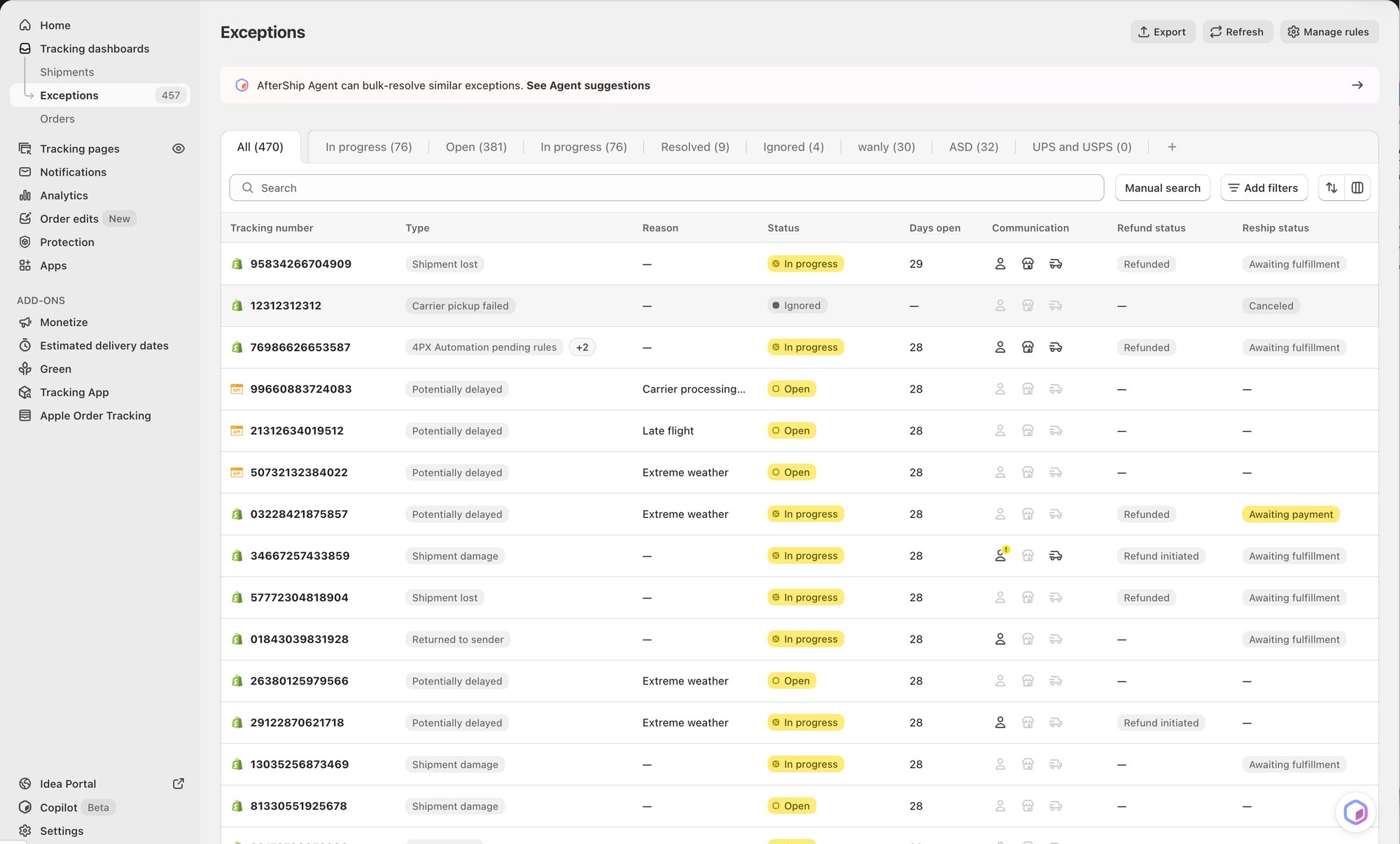
For Shopify merchants using AfterShip Tracking, this turns exception handling into a more structured operational workflow rather than a series of disconnected investigations.
Learn more about AfterShip Tracking for Shopify.
Where AI fits into shipping exception management
Some exceptions require individual attention. Others are repetitive enough that investigating them one by one creates unnecessary work.
That's where AI can play a different role.
Exceptions Workspace gives teams individual visibility and control, while AfterShip's Exception Handling Agent helps teams handle repetitive exception work at scale.
The Agent can:
Group related exceptions → Investigate the context → Recommend what to do → Prepare actions → Merchant reviews and approves
The merchant remains in control of the final decision.
Consider a team with 10 shipments experiencing a similar exception.
If those cases require individual decisions, the team can use Workspace to review them separately, perhaps reshipping five orders, refunding three, and handling the remaining two differently.
If the team is comfortable handling the shipments together, Exception Handling Agent can group them into a task, investigate the cases, recommend an action, and prepare that action for the merchant to review and approve.
The result is flexibility in how exception work gets done:
Individual control when you need it. AI assistance when you want it.
For a deeper look at how AI can investigate and prepare resolutions for groups of shipment exceptions, read our guide to the AfterShip Exception Handling Agent.
What to look for in a shipping exception management solution
Shipping exception management involves more than displaying carrier statuses. When evaluating how to manage exceptions at scale, ecommerce teams should consider whether their workflow supports the entire path from identification to resolution.
Centralized exception visibility
Teams should have a clear way to identify which shipments need attention without manually searching through tracking data.
Look for the ability to organize exceptions into an operational queue and distinguish between shipments that require action and those that don't.
Context for confident decision-making
A status such as “return to sender” doesn't necessarily tell an operator what they should do.
Teams may need shipment history, order information, customer context, previous actions, and customer communications before they can make a decision.
Knowing whether a customer has already reached out, and what has already been discussed can be particularly important. Without that context, operators may hesitate to act or risk duplicating communication that has already happened elsewhere.
The less time operators spend assembling that context manually, the more confidently they can move toward resolution.
Resolution actions
A strong exception-management workflow shouldn't stop once an issue is identified.
Consider whether teams can move directly from investigation to the actions required to resolve the issue, whether that's communicating with the right party, reshipping an order, issuing a refund, compensating the customer, filing a carrier claim, or taking another appropriate action.
When customer input is required, consider whether the workflow can also capture structured information such as a preferred resolution or updated delivery address, and make it available to the operator without requiring manual copy/paste between systems.
Resolution tracking
Teams should also be able to see what has already happened.
A clear activity history and resolution status can help prevent duplicated work and make it easier for different operators to understand where a case stands, including whether additional customer or carrier follow-up is still required.
AI assistance with human control
For teams managing exceptions at scale, AI can help reduce repetitive investigation and preparation.
But customer-impacting decisions still require appropriate controls.
Look for AI capabilities that can assemble context, recommend next steps, and prepare actions while allowing the merchant to review and approve those actions before they're executed.
Learn more about how AI-assisted exception handling works with the AfterShip Exception Handling Agent.
Get started with AfterShip Exception Management
AfterShip is bringing exception management into the broader AfterShip Tracking experience so ecommerce teams can move from identifying shipment issues to actually resolving them.
The solution combines two complementary experiences:
Exceptions Workspace
Individual visibility, context, actions, and resolution tracking.
Use Workspace when your team wants to investigate an individual shipment, make a case-specific decision, take action, and follow the issue through resolution.
Exception Handling Agent
AI-assisted investigation, recommendations, and grouped actions.
Use Agent when your team wants AI assistance investigating groups of related exceptions and preparing recommended actions for review and approval.
Together, they give teams the flexibility to manage exceptions based on how they want to work:
Frequently asked questions about shipping exception management
What is shipping exception management?
Shipping exception management is the process of identifying shipment issues, investigating what happened, deciding how to respond, taking action, and tracking the issue through resolution.
Unlike shipment tracking alone, exception management focuses on the operational work required after an issue is identified.
For more information about what individual exception statuses mean, read our guide to delivery exceptions.
What is the difference between a shipping exception and shipping exception management?
A shipping exception is an event or condition that disrupts the expected delivery journey.
Shipping exception management is the workflow a merchant uses to investigate and respond to that issue, from identifying which shipments need attention through taking action and tracking resolution.
See the shipment exception glossary for more information about the term.
What are common shipping exceptions ecommerce teams manage?
Common shipment exceptions include return to sender, delivered but not received, stuck-in-transit shipments, and shipments with no carrier scan after label creation.
The appropriate response depends on the exception, shipment status, order information, customer context, and merchant policies.
How should ecommerce teams handle shipping exceptions?
Ecommerce teams should use a structured workflow to identify exceptions requiring attention, investigate shipment, order, and customer context, decide on the appropriate response, take action, and track the issue through resolution.
Before taking action, teams should also understand whether the customer has already reached out and what has already been communicated. Centralizing this context can reduce manual investigation, duplicate communication, and tool switching.
Can shipping exception management be automated?
Parts of the workflow can be assisted by AI, but the appropriate level of automation depends on the merchant and the type of exception.
For example, AfterShip's Exception Handling Agent can group related exceptions, investigate context, recommend a resolution, and prepare actions for merchant review and approval.
Merchants can also use Exceptions Workspace when they want to review and resolve shipments individually.
What's the difference between Exceptions Workspace and Exception Handling Agent?
Exceptions Workspace is designed for individual exception management, giving teams visibility into specific shipments, relevant context, resolution actions, and status tracking.
Exception Handling Agent provides AI assistance for exception work at scale, grouping related issues, investigating them, recommending next steps, and preparing actions for merchant review and approval.
Merchants can use both depending on how they want to handle a particular set of exceptions.
Can AfterShip issue refunds or create reshipments when resolving an exception?
For eligible Shopify orders, merchants can take resolution actions such as refund or reship directly within the exception-management workflow.
AfterShip prevents duplicate refunds. Multiple reshipments are allowed; if an order has already been reshipped, Workspace displays a reminder before the merchant proceeds with another reshipment.