You're getting more orders than ever. Congratulations. The bad news? You're also getting more orders than ever. If your "fulfillment center" is your garage and your "shipping department" is you after dinner, you're at a critical crossroad. The choice you make now, between smarter software and full outsourcing, will define your ability to scale. Almost every brand at 50 to 500 orders a month needs better shipping software, not a 3PL. Here is how to tell which side of that line you are on, and what to run once you know.
Most searches for pirate ship vs shippo vs shipmonk line the three up as versions of the same product. Two sell you software. The third takes the physical work off your hands.
You didn't start a business to become a packing expert.
Software vs. 3PL: What's the Actual Difference?
Picture your fulfillment operation as a car you drive yourself. Shipping software is the engine and GPS bolted onto it: you still choose the route, but you move faster. Pirate Ship, Shippo and AfterShip Shipping sit here.
A 3PL is a chauffeur you hand the keys to. ShipMonk is a third-party logistics provider: your inventory lives in their warehouse, their staff pick and pack, their systems buy the labels.
What shipping software does. Shipping software helps you buy and print shipping labels in-house. What it does not do is store inventory, pick orders, or pack boxes.
What a 3PL does. A 3PL service outsources your warehousing, packing, and shipping operations. What it does not do is leave you in control of packing, exception speed, or what the unboxing looks like.
Shipping software vs 3PL is a sequencing question. Almost every brand that ends up with a 3PL runs shipping software first, often for years, because it keeps in-house fulfillment survivable while volume climbs.
The 3-Minute Quiz: Is Your Business Ready for a 3PL?
Most advice here leads with order volume. Treat those numbers carefully. Every published threshold traces back to a company that sells fulfillment: Fulfillrite points at 100 to 300 orders a month, ShipBob at 250, Red Stag at 500.
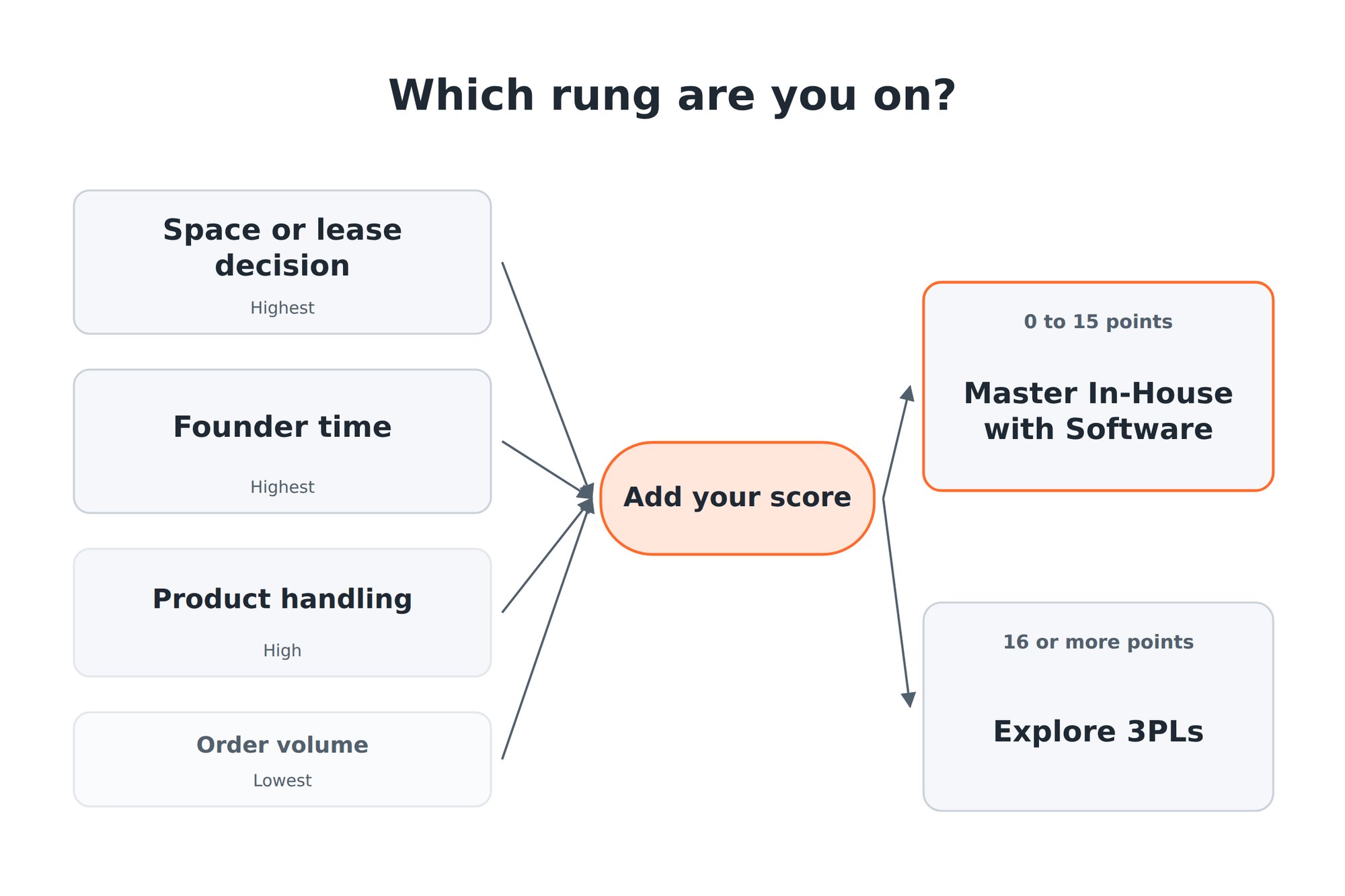
The brands that genuinely needed a 3PL were pushed there by constraints: a lease decision, a founder who could not step away, an awkward product, a peak that broke something. Order count is in the quiz, and it is the lightest question.
Score each answer, then add them up. Twenty-six points are available, and the first two questions carry ten of them.
| Question | Score 0 | Middle | Top |
|---|---|---|---|
| Are you about to make a space or lease decision? | No | Thinking about it: 3 | Already committed: 5 |
| Does fulfillment stop if one specific person is unavailable? | No | Mostly: 3 | Completely: 5 |
| Hours a week you spend packing and shipping | Under 5 | 5 to 15: 2 | Over 15: 4 |
| Does your product need special equipment or unusual space? | No | Somewhat: 2 | Yes: 4 |
| Did last peak season expose something that broke? | No | Some strain: 2 | Yes: 3 |
| Do you have room for three months of inventory? | Yes | Tight: 2 | No: 3 |
| Orders you ship per month | Under 200 | 200 to 500: 1 | Over 500: 2 |
0 to 15: software is your next move. The section below is yours.
16 or more: constraints are already running your calendar. The 3PL section is yours.
If You Scored 0-15 Points: Master Your In-House Fulfillment with Shipping Software
Most people reading this scored in this band, and that is the honest answer. You are not ready for a 3PL.
If you ship fewer than 50 orders a month, stay on Pirate Ship. A free account that prints USPS and UPS labels covers you, and software you will not stretch is money better spent on inventory.
Software wins here for four reasons: control over how every box is packed and what the customer opens, your branding on the parcel, a tool to pay for instead of warehouse space and pick fees, and the freedom to change carriers or packaging in an afternoon rather than a contract renegotiation.
The best shipping software for small business at this stage is the one you will still be running at three times your volume. For the wider field, there is a broader roundup of top-ranked shipping software in 2026. At that stage the practical choice is usually between two tools, which we compare in the low-volume label comparison.
Pirate Ship vs. Shippo vs. AfterShip Shipping: A Head-to-Head for Growing Brands
Here is how the three compare at 50 to 500 orders a month. Prices come from each vendor's own pricing page, August 2026.
| Criteria | Pirate Ship | Shippo | AfterShip Shipping |
|---|---|---|---|
| Pricing model | No monthly fee. USPS and UPS rates only. | Starter free to 30 labels/mo. Pro from 17 dollars/mo | Three plans, no free tier. Essentials from 9 dollars/mo, rising with label volume. Pro 69 dollars/mo |
| What this reader pays | 0 dollars | 17 dollars/mo | 9 to 29 dollars/mo at 50 to 500 orders |
| Supported carriers | USPS and UPS | 40+ for rates and labels | 130+ (87 internationally connected) |
| Own carrier account | Not documented | Supported | 1 on Essentials, 5 on Pro, unlimited on Enterprise |
| Automation | Batch label printing | Automations on all plans | Batch creation and multi-carrier rate calculation at Essentials. Rule-based automation documented Pro and Enterprise |
| Branded tracking | Carrier tracking page only, no branded page. | Included in Pro | AfterShip Tracking, a separate subscription |
| Delivery estimates | None | "Estimated delivery dates powered by AI" in Pro. No published accuracy figure | AI-predicted delivery dates inside AfterShip Tracking. |
| Data layer | Labels only. | Labels plus a basic tracking page. | One record per order feeding shipping, tracking, returns, and warranty. |
| Best for | USPS and UPS shipping at low volume with zero software cost | A merchant wanting one cheap subscription covering labels and a basic branded experience | A brand building a post-purchase stack it will not outgrow |
Carrier reach. Pirate Ship covers USPS and UPS, Shippo 40+ carriers, AfterShip Shipping 130+ with 87 internationally connected. That stays theoretical until an order lands outside your usual USPS lane and you cannot quote the rate.
Your own carrier accounts. Pirate Ship does not document bringing your own; Shippo supports it. AfterShip Shipping allows one on Essentials, five on Pro and unlimited on Enterprise, which matters the week you negotiate your first direct UPS rate.
Automation depth. All three batch; the depth differs. Pirate Ship batch-prints labels. Shippo includes automations on every plan. AfterShip Shipping handles batch creation and multi-carrier rate calculation from Essentials, with rule-based automation documented on Pro and Enterprise.
Shippo bundles a basic branded experience into its Pro plan. AfterShip's branded tracking and AI delivery estimates come from AfterShip Tracking, a separate subscription on the same platform. A closer read of AfterShip vs Shippo sets those two side by side on rates, labels and tracking.
For the label-by-label numbers, there is a detailed comparison of shipping software for small businesses running the Shippo vs Pirate Ship pricing in full.
If you ship only USPS at very low volume, Pirate Ship's free plan is a no-brainer. But the moment you want to compare carriers, automate decisions, and give customers a branded tracking-and-returns experience, you'll outgrow it, and AfterShip Shipping is the platform built to take you from your first 100 orders to your first 3PL without starting over.
Why AfterShip is the Smartest Starting Point
On label price alone at low volume, a pay-as-you-go tool like Pirate Ship, or Shippo at the entry tier, will be cheaper than AfterShip. If printing the cheapest possible USPS label is your only goal and you ship a handful of orders a month, start there.
AfterShip Shipping publishes three plans and no free tier. At 50 to 500 orders a month that is 9 to 29 dollars a month.
Multi-carrier rates and batch labels at Essentials. Essentials includes multi-carrier rate calculation and batch label creation, so you batch-print 50 labels in one click instead of buying them one at a time. You can compare real-time shipping rates across connected carriers. AfterShip's own guidance is explicit that these are parcel rates, not freight or LTL.
Rule-based automation, the reason to step up. Documented on Pro at 69 dollars a month and on Enterprise, it is why growing brands move up a tier instead of switching tools.
Carrier selection is a separate capability from the rules engine. AfterShip Shipping can auto-select the carrier service with the best balance of cost and speed.
A stack you do not outgrow. AfterShip Tracking and AfterShip Returns are billed separately and run on the same platform as Shipping. Your tracking pages, notifications and returns portal survive a change in your fulfillment setup. The next section covers that change.
If You Scored 16+ Points: It's Time to Consider a 3PL like ShipMonk
A score above 15 means the constraints have stopped being theoretical: you are weighing a lease against a fulfillment contract, or one person is the single point of failure.
What outsourcing buys you is real. Your evenings and floor space come back, capacity absorbs a Q4 spike without seasonal hiring, and a warehouse network puts inventory closer to your customers.
What it costs you is also real. You lose control over how orders are packed and presented, mistakes happen at someone else's bench on someone else's timeline, and the pricing is hard to compare before you are in a sales conversation.
ShipMonk is the name that comes up most, and it is worth being precise about who it sells to. Its own site describes the platform as "designed to help large enterprise brands" and invites you to "Talk to an enterprise solutions expert". It also promises "Mom and pop support at a global scale", so the door is not shut on smaller brands. Treat it as the named example of the category, not a recommendation for you. Choosing the right 3PL partner covers the evaluation.
Comparing a 3PL against your current setup is where most advice on when to use a 3PL falls apart, because the in-house side is the half you have to work out for yourself.
So audit yourself instead. Take last month's hours spent packing and shipping, multiply by what your time is worth, add packaging, storage and the postage you already pay, then divide by orders shipped. That number is defensible because you built it.
ShipMonk publishes no dollar figures. Three fees decide your bill:
- Storage, a published fee category.
- Receiving, bundled inside fulfilment fees.
- Onboarding, quantified only inside a custom quote.
The monthly minimum is calculated by "multiplying your monthly order volume by your first item pick fee and then reducing it by 20%", so the floor moves with your own pick rate.
For an industry anchor, The Fulfillment Advisor's 2025 warehousing market report (28 August 2025, more than 600 warehouses) puts a one-item B2C order at 3.20 dollars, monthly minimums rising from 337.50 to 517 dollars, and long-term storage fees now charged by 48.6% of warehouses against 23.33% a year earlier.
The Bridge: How AfterShip Connects Your Software and Your Future 3PL
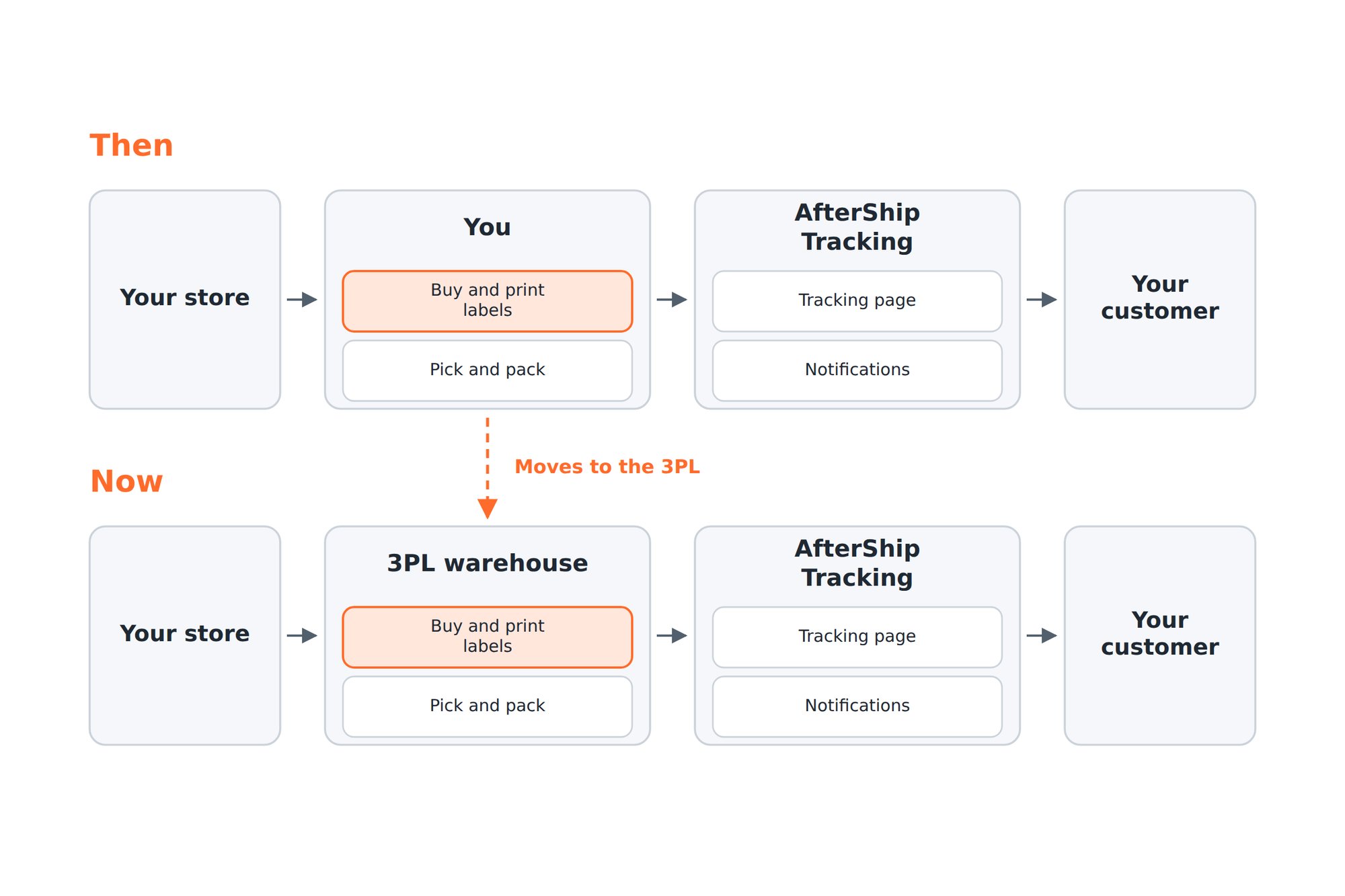
The 3PL buys and prints the labels. That is the job. Your label tool is the piece that gets replaced, and AfterShip Shipping is a label tool. Pretending otherwise would not survive your first week with a warehouse.
Your tracking layer is a different story. Six of the ten partners in AfterShip's own 3PL and Warehouse integrations category feed AfterShip Tracking directly. The Extensiv integration, listed as available on all plans, shows the mechanism: tracking numbers generated in the warehouse system import into AfterShip automatically, firing your branded tracking pages, your email and SMS notifications, and your delivery analytics. AfterShip has published the point plainly, that Tracking works independently of where you print your labels.
One setup detail decides how complete your notifications are. Notifications are not sent retroactively, so a shipment that reaches AfterShip already in transit will not trigger the earlier-status emails it missed. Connect the 3PL by API push at label creation rather than a nightly file, so tracking starts at the first scan and every status notification fires.
Your Fulfillment Roadmap
Three rungs, in order.
Start with software. Print labels in-house, keep control of packing and branding.
Master in-house fulfillment. Batch labels, connect your own carrier accounts, automate the sorting you do by hand.
Graduate to a 3PL when constraints force it. Space, then people, then handling, then volume, in that order.
Choose your shipping software with the handoff in mind. With AfterShip, Shipping is what the warehouse takes over, and Tracking and Returns stay with you.
Simplify shipping and order fulfillment across Shopify, TikTok Shop, and your carrier network.
Book a demoFrequently Asked Questions
When should I switch from shipping software to a 3PL?
Switch when constraints make the decision for you, not when you hit an order count. The reliable triggers are a lease or space decision, fulfillment that depends on one person, a product needing special handling, and a peak that broke something. Published volume thresholds come from companies that sell fulfillment, so treat them carefully. Score yourself on the quiz above: 16 or more means the conversation is worth having.
Is Pirate Ship or Shippo better for a Shopify store shipping 200 orders a month?
Pirate Ship is free and covers USPS and UPS. Shippo's entry paid tier adds more carriers plus a basic branded experience. At 200 orders a month the question that matters is what you will need at 600, and the table above compares all three on that basis. AfterShip Shipping sits on the same platform as AfterShip Tracking and Returns, each billed separately, which makes the handoff to a 3PL easier later.
How much does a 3PL like ShipMonk cost?
ShipMonk publishes no dollar figures. Its fee structure names storage, receiving and onboarding, and it calculates a monthly minimum from your order volume and first item pick fee. Onboarding is quantified only inside a custom quote, so you cannot compare a 3PL against your in-house cost until you have been through a sales conversation. Ask for all three fees in writing, and use the industry benchmark above as your floor.
What happens to my branded tracking pages when a 3PL takes over fulfillment?
The 3PL buys and prints the labels, so your label software is the piece that gets replaced. Your tracking layer does not have to be. AfterShip Tracking is a separate subscription that accepts tracking numbers generated inside a warehouse system. Notifications are not sent retroactively, so ask how often your 3PL pushes data. Once connected, your branded tracking pages, notifications and delivery analytics keep running as they did before the handoff.