If you're manually reconciling inventory between your WMS and Shippo, you're not just wasting time; you're creating a system guaranteed to fail. Every stockout, every mis-shipment, every delayed order is a symptom of a disconnected tech stack. For scaling brands, this isn't a minor headache; it's a hard ceiling on growth. Stock stays in the WMS you already run, and the fix is to add AfterShip's post-purchase layer to it rather than replace the label tool you have.
The Breaking Point: When Shippo and Your WMS Stop Talking
Your warehouse system knows what is on the shelf. Your label queue does not, and the distance between those two facts is where the day goes. A popular SKU sells through by mid-morning, but orders already exported downstream cannot learn that, so they ship short or bounce back. Cycle counts stay clean inside the four walls and drift the moment data leaves them. Fulfillment SLAs slip, not because the pick was slow, but because someone had to carry a file between systems first. Disconnected shipping and WMS tools often lead to overselling and fulfillment errors.
Stock decisions get made against data that is minutes-to-hours stale between the warehouse system and a label tool never handed a stock figure. Manual reconciliation and CSV re-keying scale with volume, so the real cost is your per-order handling time multiplied by monthly order count. Routing inherits the same blind spot: origin and carrier get chosen without a view of what is available to pick. Cin7, which builds warehouse systems, makes the same case in its own guide: tighter warehouse management speeds fulfillment and improves accuracy.
None of this is an argument for buying an integrated Warehouse Management System (WMS). You already run one, and it works. It is an argument for connecting the layer that starts once the label prints, where AfterShip Tracking and AfterShip Returns operate.

Why Shippo Isn't Built for Integrated Warehouse Operations
A shipping tool and a warehouse system do different jobs, and the split between them is architectural rather than a question of features. Shippo is a shipping tool, not a warehouse management system (WMS). Search for Shippo inventory management and what you find is a label workflow: the shipping layer is never handed a quantity to reason about. Shippo warehouse management describes the connectors a warehouse system uses to reach it, not a stock record Shippo keeps. The Shippo limitations that matter to a brand running its own warehouse are structural.
Shippo's simple interface and pricing can be very appealing when you're just starting out. However, that simplicity becomes a critical limitation once your order volume and inventory complexity grow. Shippo never sees stock levels, so every stock decision has to be made before an order reaches it. AfterShip Tracking and AfterShip Returns are the post-purchase layer that connects to the warehouse system you already run.
Shippo connects to several warehouse systems for orders and labels, including inside Linnworks and through Extensiv and ShipHero. Those connections send orders to Shippo and bring tracking back; they do not carry stock. Extensiv's integration notes state that Shippo does not support inventory sync, so stock levels stay in the WMS.
Bridging that boundary with Zapier or a spreadsheet introduces data lags that turn into costly stockouts. The same ceiling appears for brands using retail systems like Brightpearl, where the warehouse system is doing serious work the shipping layer cannot read.
What that leaves a WMS-run brand is an unclosed gap on the warehouse side of every order, and closing it is exactly what AfterShip Tracking and AfterShip Returns are built to do.
What a True WMS-Shipping Integration Looks Like: A Workflow Comparison
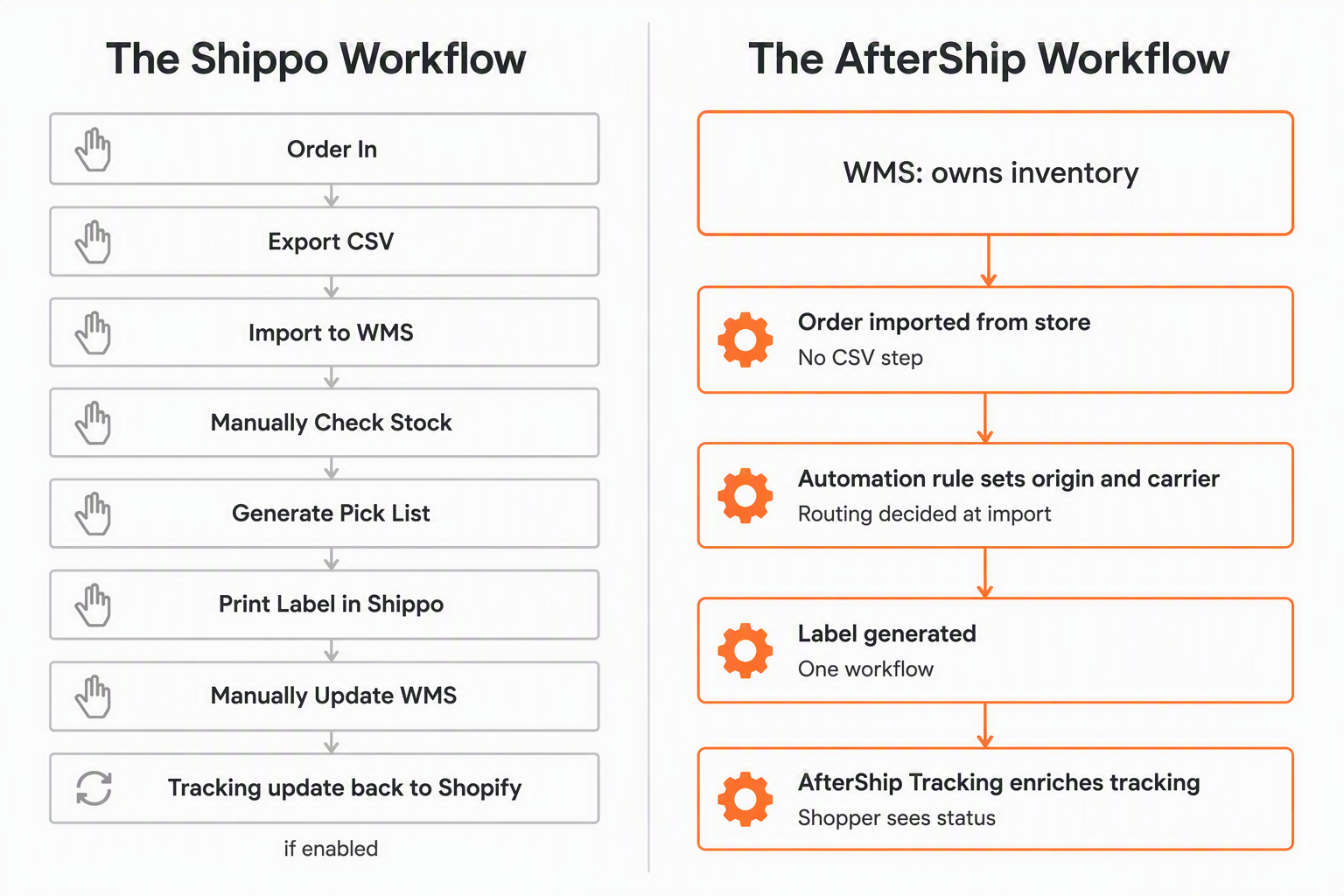
Follow one order from the moment it lands. Where the warehouse system has no Shippo connection, a Cin7 or a custom build, it takes eight moves: the order arrives, someone exports a CSV, imports that file to the WMS, checks stock by hand, generates the day's pick lists, prints the label in Shippo, updates the WMS by hand, and then Shippo sends the tracking number and fulfillment update back to Shopify. That last move is opt-in and fires only once Shopify sync and fulfillment settings are enabled, and it carries two documented exclusions: all items must be set to manual fulfillment in Shopify, and orders on third-party fulfillment or drop shipping do not update automatically.
The gap that survives is the one that decides your week. The write-back carries labels and tracking, never stock, so every stock decision still happens before the order reaches Shippo. Neither shipping tool holds stock, and the WMS remains the system of record.
The AfterShip workflow puts four moves around that same system of record. The WMS stays the hub that owns inventory. The order imports from the store, an AfterShip Shipping automation rule assigns the ship-from location and the carrier, the label generates, and AfterShip Tracking takes the tracking number, enriches it and shows it to the shopper.
How AfterShip Bridges the Gap to Your WMS
Your WMS keeps owning inventory in every path described below. What changes is what happens on either side of the label.
Robust API & Webhooks
The AfterShip Shipping API is built for two-way communication with your store and your carriers: rates in, labels and tracking out. What it documents is that surface: rates, labels, manifests, pickups, shipper accounts, address validation and webhooks. It does not hold a conversation with a warehouse system, and it exposes nothing that stands in for one. The Locations resource returns carrier service points, not your warehouses. That distinction is worth holding onto when you are budgeting API latency across a fulfillment path, because rate shopping calls sit on the carrier side of the wall while your stock queries stay behind it, answered by the system that owns them.
Pre-built Integrations
AfterShip Shipping publishes storefront integrations: Shopify, BigCommerce, WooCommerce and TikTok Shop. ShipHero, NetSuite and ShipBob integrate with AfterShip Tracking and AfterShip Returns. Extensiv and Zoho Inventory integrate with AfterShip Tracking. Peoplevox integrates with AfterShip Returns.
That last one is the reverse leg most stacks leave manual. When an RMA is approved in AfterShip Returns, the integration creates the return in Peoplevox and reports the receipt result back, keeping the warehouse and the returns portal in step without manual re-keying.
The Peoplevox and ShipBob returns integrations are on AfterShip Returns Premium and Enterprise, and each AfterShip product is billed separately.
Shippo brands the tracking page and generates return labels, but documents no shopper-initiated returns portal and no path that writes a completed return back into the merchant's warehouse system. AfterShip Returns does both.
Connecting the forward leg is what shows up first at the help desk. StackCommerce reduced WISMO tickets by 71% using AfterShip Tracking. Mous saw a 54% reduction in WISMO tickets with AfterShip Tracking.
Automation Rules Engine
AfterShip Shipping routes orders to multiple warehouse locations using automation rules. That is the job AfterShip Shipping's automation engine does at the moment of import, and a working rule reads in one line: IF the ship-to postal code is in your West Coast ZIP list AND the package weight is under 5 lb, THEN set the ship-from location to the West Coast warehouse. Three constraints sit beside it. Rules are available on Pro and Enterprise only. They are capped at 10 rules outside Enterprise. They are executed once, when the order is imported.
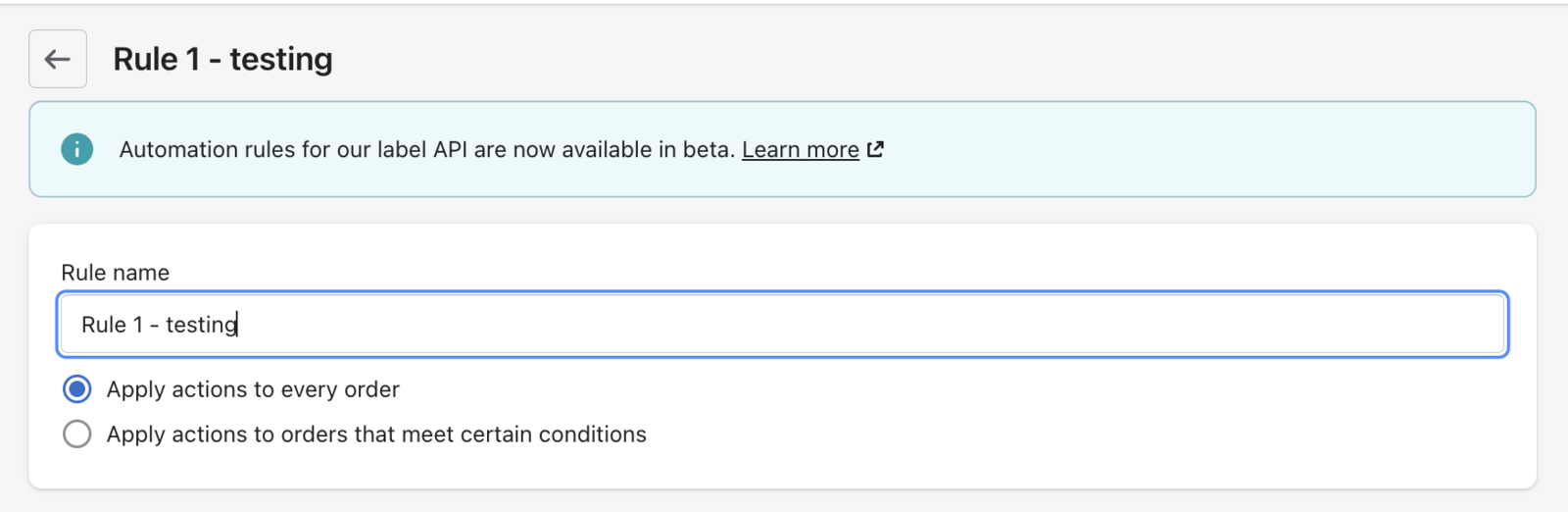
AfterShip Shipping's fixed automation rules are a Pro-plan feature, capped at 10 rules outside Enterprise, whereas Shippo includes automation rules on every plan. On every AfterShip plan, Smart Carrier Recommendation, which is off by default until you switch it on, excludes carrier services with a high exception rate on the shipment's origin-and-destination lane (using AfterShip tracking data) and re-evaluates every shipment, so you get performance-aware carrier selection without hand-maintaining rules at all.
AfterShip vs. Shippo: The Verdict for Brands with a Warehouse
Four criteria decide this, and a team searching for a Shippo alternative with WMS support is really testing all four: how each platform connects to a warehouse system, how it routes orders across more than one of them, how far its automation rules reach, and what its API actually documents. For a warehouse team, a direct AfterShip vs. Shippo comparison is only useful if it answers all four.
| Criteria | AfterShip Shipping | Shippo |
|---|---|---|
| WMS integration method | No WMS, ERP or inventory-system integration on AfterShip Shipping; its integrations are four storefronts. AfterShip Tracking and AfterShip Returns integrate with ShipHero, Extensiv, Peoplevox and NetSuite | Warehouse systems connect for orders and labels (inside Linnworks, through Extensiv and ShipHero); no inventory sync; CSV import |
| Multi-warehouse order routing | Multiple ship-from locations on all plans; a Pro or Enterprise automation rule sets the ship-from location per order | Multiple sender addresses, no published limit; a rule selects the sender address |
| Automation rule depth | 11 documented conditions, ~8 actions incl. set ship-from location; Pro/Enterprise, capped at 10 rules outside Enterprise, run once on import | 8 documented conditions, 4 actions; included on every plan, no published rule limit |
| API documentation & support | Documented resources for rates, labels, manifests, couriers, cancel labels, pickups, cancel pickups, shipper accounts, address validation, Locations (carrier service points) and webhooks | Documented objects for addresses, shipments, rates, transactions, orders, batches and tracking; webhooks on transaction, track and batch events |
For a brand that already runs a WMS, the answer is to add AfterShip's post-purchase layer to the WMS you already run, not to rip out Shippo. Scaling brands leave when performance, complexity (multi-label, rules), analytics and economics start to matter, and AfterShip is the specialist choice when they do.
Shippo fits if:
- You ship from a single location and run no dedicated WMS.
- Your warehouse system already connects to Shippo for orders and labels, and labels are all you need from that connection.
AfterShip fits if:
- Your WMS should stay the system of record while AfterShip Tracking takes fulfillment and tracking data from warehouse systems such as ShipHero, Extensiv and NetSuite.
- Returns approved in your returns portal should create the return in your warehouse system and report the receipt back, without manual re-keying (AfterShip Returns, Premium and Enterprise).
- You want automation rules that set the ship-from location and carrier per order, with rates and delivery times compared in one place (AfterShip Shipping; rules on Pro and Enterprise).
- You want carrier selection that excludes services with a high exception rate on a lane, using AfterShip tracking data (Smart Carrier Recommendation, on every AfterShip Shipping plan once switched on).
Proactive shipment tracking that delights your customers, reduces WISMO tickets, and improves your delivery performance.
Book a demoFrequently Asked Questions (FAQ)
Does Shippo have built-in inventory management?
No. Shippo is a shipping tool, not a warehouse management system (WMS). Its API documents addresses, shipments, rates, transactions, orders, batches and tracking, with no inventory, stock or product object anywhere in that set. Extensiv's integration notes state that Shippo does not support inventory sync, which is why a warehouse system connected to Shippo still keeps every stock figure on its own side. Stock and labels do live in one workflow, but only when your WMS keeps the stock and AfterShip Tracking carries the shipment outward.
How do I connect a WMS to Shippo?
Through the warehouse system's own connector. Linnworks runs Shippo inside its interface, Extensiv sends orders to Shippo and brings tracking back, and ShipHero connects Shippo carrier accounts for discounted rates and regional carriers. None of those connections carries stock. Where the warehouse system has no Shippo connection, orders move by CSV import. The practical way to connect Shippo to WMS platforms is to accept that split, then put AfterShip Tracking on the side of it that faces your shopper.
What are the best WMS for Shopify stores?
That turns on your catalogue, your order profile and how your warehouse is staffed, and no single system wins for every Shopify brand. What is worth checking before you commit is which ones your post-purchase layer already speaks to. AfterShip Tracking integrates with ShipHero, NetSuite, ShipBob, Extensiv and Zoho Inventory. AfterShip Returns integrates with ShipHero, NetSuite, ShipBob and Peoplevox. Whichever you run keeps owning inventory, while AfterShip Tracking carries the shipment story out to the shopper.
Can I keep Shippo and add AfterShip Tracking and Returns?
Yes. AfterShip Tracking does not require the label to be bought through AfterShip Shipping, so it takes the tracking number your store or warehouse system already produces, whatever printed it. AfterShip Returns is a separate product, and each AfterShip product is billed separately, so you can start with one and add the other later. The same holds if you run other popular shipping platforms alongside it. Your WMS keeps owning inventory, and AfterShip Tracking and AfterShip Returns close the gaps on either side of it.