A freight shipment does not fail the customer in the line haul. It fails at the appointment. Parcel scans arrive continuously; freight milestones arrive hours apart and often in batches, and the event that generates the support ticket is the delivery appointment nobody told the customer about. The software managing that shipment was built for freight procurement, not for your brand's customers, and in 2026 that is no longer sustainable.
Your CX team knows this before your dashboard does. A customer who spent four figures on a sectional or a commercial oven is not checking a tracking page out of idle curiosity. They are trying to find out whether to take a day off work, and the answer they get is a PRO number, a terminal city, and silence.

That silence is expensive, and it is not a carrier problem. It is a tooling problem, and the tool most operators reach for was never designed to solve it. Every hour of it converts into WISMO contacts, the where-is-my-order tickets your team answers by logging into a carrier portal on the customer's behalf.
AfterShip is not a transportation management system. It does not rate freight, book loads, generate labels or bills of lading, or audit carrier invoices. Your TMS does those things, and this guide assumes you will keep it.
The Core Flaw: Why Your TMS is Built to Fail Your Customer
A transportation management system is a procurement tool. It exists to compare rates, tender loads, enforce contract terms, and give you a defensible cost per hundredweight at the end of the quarter. Judged on that work, a good TMS earns its licence fee several times over.
Its audience is you. Every screen, alert and report inside it was designed for a logistics manager making an operational decision, which is why the customer-facing edge of the system tends to be the thinnest part of it.
That thinness shows up in four specific places:
- Tracking events written for the loading dock. Terminal scans and status codes are precise for operations and close to meaningless for a shopper. The delivery appointment is the event that decides whether someone takes a day off work, and it is the event your customer is least likely to be told about in time to act on it.
- Communication that carries someone else's voice. Where updates do go out, they typically read as carrier or vendor communication, on a URL your customer has no relationship with, at a moment when your brand is the one being judged.
- Portals your customer was never meant to use. Carrier and partner portals were built for freight professionals. Handing a consumer a login and a PRO number transfers your visibility problem to them and calls it self-service.
- A freight-only view of a mixed-mode order. The sofa moves LTL, the cushions move parcel, and the system that can see one has no idea the other exists. Your customer bought one order and has to track it in two places.
Some transportation management systems do send customer notifications, and several offer partner or consignee portals. Those features are real and they help. The question worth asking in 2026 is how far down they go: does the shopper land on a branded page on a domain you own, or on one you do not control? Does a single normalized event model span both parcel and freight, so both legs of one order read in the same vocabulary? And is anything in the stack accountable for the tickets that never get raised because the customer was told first?
If your LTL software's primary value is rate shopping, it is not a customer experience tool.
The 2026 Strategy: Decouple Operations from Experience
The operators getting this right in 2026 stopped looking for one system to rule the whole shipment. They separated the two jobs and bought the strongest tool for each.
Freight operations stay where they belong. Rate shopping, tendering, load consolidation, contract management and invoice audit are internal disciplines with an internal audience, and a TMS is the correct home for all of them.
Customer experience moves to a layer that sits above the freight stack and above the parcel stack at the same time. Its job is to ingest whatever every carrier emits, normalize it into one vocabulary, and put it in front of the customer on surfaces your brand controls. LTL software manages freight; post-purchase platforms manage the customer experience.
The payoff is independence at both layers. You can swap carriers without rebuilding your notification logic, and change TMS vendors without your customers noticing anything at all.
It also changes what you are buying. Instead of asking a procurement platform to grow a customer-experience product, you evaluate each layer against the job it actually does: the TMS on cost, coverage and contract control, the post-purchase layer on carrier reach, event depth, communication control and the reporting you can defend in a quarterly business review.
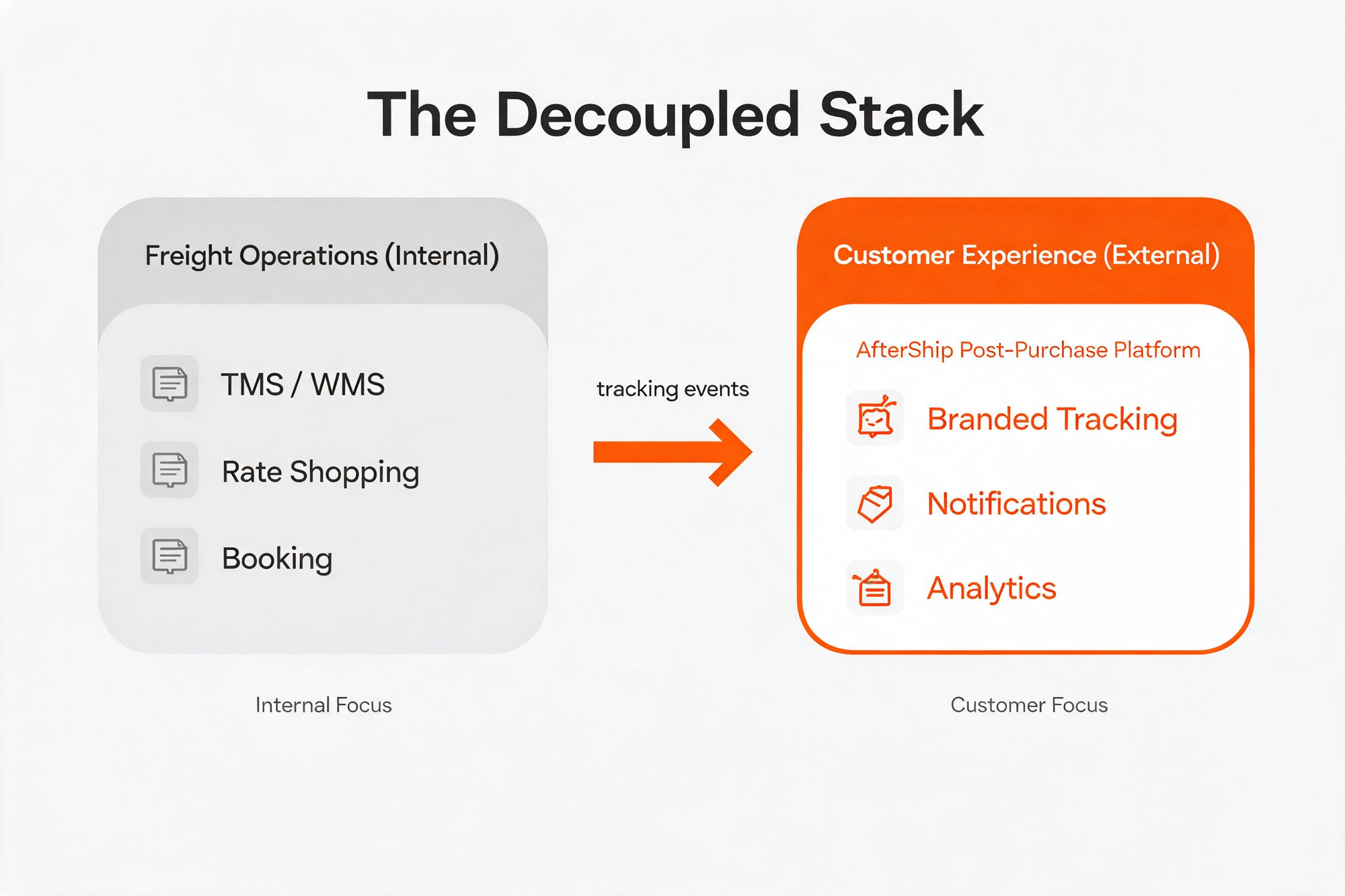
A mixed-mode operation needs both systems, and each job deserves the strongest available tool you can put on it. Run your LTL shipping software for the procurement work it does well, and put a post-purchase platform on top for everything the customer sees. AfterShip was built for that second job, and the rest of this guide covers what you should hold it to.
What is a Unified Post-Purchase Platform?
A post-purchase platform owns everything between "order confirmed" and "delivered", across every mode you ship in. It moves no freight and books no loads. Its work begins the moment a carrier emits an event and ends when the customer stops needing to ask.
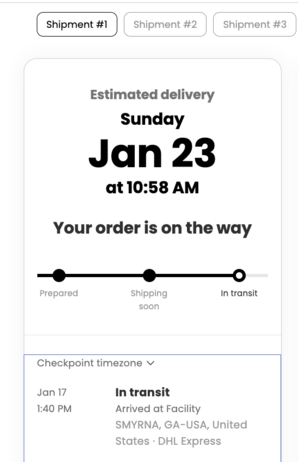
The mechanism is straightforward. The platform ingests what every carrier publishes, normalizes those events into one consistent vocabulary, and presents the result on pages and messages your brand controls. A unified platform combines LTL and parcel tracking into one branded view.
For a mixed-mode operation, the specifics that decide whether a platform can actually do this are worth naming. Carrier reach comes first: AfterShip Tracking connects to 1,700+ carriers for read-only visibility, and that network includes LTL freight carriers alongside the parcel carriers you already watch. Branded tracking pages put the shipment on a domain you own rather than one you borrow. Proactive email and SMS notifications move the burden of checking off the customer. Carrier and lane performance reporting turns the same event stream into something you can take into a budget conversation. On the freight API question specifically, see Banyan measured against AfterShip Shipping.
One boundary is worth drawing before it causes confusion in an RFP. AfterShip also sells multi-carrier parcel shipping, a separate product for rating and printing labels, and that product is parcel only. Nothing in this article's freight discussion depends on it, and no part of it produces a freight label or a bill of lading.
The tracking layer, by contrast, was built for exactly the mixed-mode problem a furniture or equipment retailer has every day. Read-only visibility is what makes it safe to add: AfterShip reads what your carriers publish and never sits in the path of the freight itself, which is why adding it changes nothing about how your loads get tendered or how your rates get negotiated.
How AfterShip Unifies LTL and Parcel for a Single Customer View
Take an order most freight-shipping retailers will recognize. A customer buys a sofa and a set of cushions in a single checkout. The sofa moves LTL on a PRO number. The cushions move parcel on a tracking number. Today that customer gets two experiences, or one experience and one silence.
Here is what the unified path looks like.
- You supply the identifiers. The merchant passes the PRO number for the sofa and the tracking number for the cushions. AfterShip holds the carrier connections itself, so nobody has to open a freight carrier account, request API access, or route a vendor security review. That difference turns an IT and procurement project into a configuration task.
- Both shipments attach to the same order. For merchants on paid Tracking tiers, the sofa and the cushions sit under one order and one customer record, on the operations dashboard and on the branded tracking page the customer sees. The shopper opens one link and finds their whole purchase.
- Every carrier's events get translated into one vocabulary. Freight carriers and parcel carriers describe the world differently, and AfterShip normalizes both into the same set of statuses. Where a freight carrier publishes an appointment event, it surfaces as a delivery-appointment or customer-contacted checkpoint. Where the carrier publishes only terminal activity, it surfaces as consistent in-transit checkpoints. The shopper reads the same language for both legs of the order, without learning any freight terminology to do it.
- Your CX team works one queue. Both shipments appear in one dashboard, with the same filters and the same exception flags. Nobody holds two carrier portals open and reconciles them by hand.
Set the expectation honestly on timing, because it is the thing an operations leader will test first. Freight milestones commonly publish less frequently than parcel scans, so freight checkpoints arrive on a slower rhythm and no platform can invent an event a carrier has not published. What changes is what happens to each milestone once it lands: it gets normalized, it gets attached to the right order, and it goes out to the customer without anyone deciding to send it.
How a 3PL Gives Each Retail Client Its Own Branded Experience
For a 3PL, the requirement inverts. Each retail client needs a branded experience of its own, carrying that retailer's name and voice all the way through to the shopper.
AfterShip handles this with a parent-and-child organization structure. Each retail client gets its own child organization carrying its own branded tracking pages, its own notification rules and its own estimated delivery dates, so the experience the shopper meets reads as the retailer's brand. Role-based access keeps each client's data and users separated from the next. The parent organization keeps consolidated reporting across the whole book of business, which is what lets you answer a client asking how their lanes performed last quarter without exporting anything by hand or exposing another client's numbers to do it.
Two things to scope accurately before you build a proposal around this. Running multiple brands, regions and teams from one AfterShip organization sits on the Enterprise plan on the published Tracking pricing page, so budget it as an enterprise line item. Per-client sending domain and sender identity, along with any ceiling on the number of client brands, are not published, and those belong in a sales conversation.
The model is already running at scale in parcel. Wineshipping, a tech-enabled 3PL that ships around 8 million packages a year for more than 1,200 wineries, runs AfterShip Tracking across its client base. Its client Splash Wines reports 2x referral program registrations, a 15% reduction in returns, and email open rates as high as 79.5% on its post-purchase messaging.
Wineshipping's Director of Marketing, Emily K, describes a delivery problem with exactly the shape of a freight appointment. Somebody has to be home, the shopper does not know it, and the failed attempt costs real money.
"In the United States, shipping wine is heavily regulated, meaning someone of legal drinking age needs to be home to sign for the package, and many consumers aren't aware of this. They expect the delivery to be like Amazon, where it can just be left at the door."
Emily K, Director of Marketing at Wineshipping, in the Wineshipping and Splash Wines customer story
Those figures are parcel outcomes from a parcel operation, and they are worth reading as evidence of the structure rather than of the mode: one platform, many client brands, each one whole to its own customers. A 3PL running this structure can give a new retail client a complete branded tracking experience on day one, carrying that client's own name, notification rules and reporting from the very first shipment.
Key Capabilities to Demand from Your LTL-Ready Platform in 2026
Turn the argument into a checklist you can take into a vendor call. Five questions separate a platform that can carry freight from one that will quietly hand your customer back to the carrier.
- Can you verify the carrier roster before you buy? Ask for the specific LTL carriers you tender to, by name, alongside your parcel carriers. A published carrier directory you can search yourself beats a number on a slide.
- Will it fit the stack you already run? An API-first platform pulls order data from your ERP or WMS and pushes tracking events back into your TMS and your helpdesk. Anything that demands a parallel data entry workflow adds manual work to the team you were trying to relieve.
- How granular are the automation rules? A freight leg and a parcel leg deserve different triggers. Arrival at terminal and a scheduled delivery appointment should be able to fire different messages than a parcel going out for delivery.
- Does the vendor tell you how often each carrier publishes? Freight and parcel run on different clocks, as covered above, and a platform that implies otherwise is setting your CX team up to over-promise.
- Can you compare LTL against parcel in one view? This is the criterion that deserves a straight answer, and it gets one below.
Freight redelivery is the cost that makes all five worth paying for. Estes Express Lines publishes its redelivery charge in its own rules tariff, so this is a number you can verify without asking a salesperson for it.
Estes Express Lines rules tariff EXLA 105 FF, Revision 3 (MC-97275), Item 830 REDELIVERY, effective 2 January 2026. Redelivery is charged at $10.00 per 100 pounds, with an $85.00 minimum per shipment. If the consignee instead accepts delivery at the carrier's premises, the charge is a $20.00 flat fee. Charges must be paid or guaranteed before the shipment is redelivered, which leaves the freight sitting at the terminal in the meantime.
Now the straight answer on the fifth question. AfterShip's delivery and carrier performance analytics report on-time rate, exception rate and transit time from a single dataset, broken out by carrier and by lane, and there is no shipment-mode dimension. There is no one-click toggle between LTL and parcel, and a dedicated freight analytics TMS will look more turnkey on this one criterion.
Three routes get you the separation. Group and filter by individual carrier, which is the intended in-product path and the fastest to set up. Segment by shipment tag, if your freight shipments are tagged on import. Or export the raw data and cut it by mode in your warehouse, which is the route to a genuinely automated mode-level view. The Essentials plan carries a basic reporting dashboard; the carrier-level custom views and the raw-export route both sit on Premium and above.
That answer costs us the criterion and buys the other four, which is the trade a procurement reader should want from anyone selling them software. Weigh it the same way you would weigh multi-carrier parcel management solutions against a single-carrier tool: on what the whole stack delivers across a year of live shipments.
Proactive shipment tracking that delights your customers, reduces WISMO tickets, and optimizes your delivery performance.
Book a demoFrequently Asked Questions about LTL Software Strategy
Does AfterShip replace our TMS?
No. Your TMS rates freight, books loads, generates labels and bills of lading, and audits carrier invoices. AfterShip does none of those things. It owns the visibility and customer experience layer that sits on top of your TMS, which is why most mixed-mode operations run both.
Does AfterShip predict delivery dates for freight?
No. AI EDD is a parcel prediction product. On a freight leg, AfterShip surfaces the carrier's own committed or estimated delivery date alongside its scan events.
How fresh is freight tracking data in AfterShip?
As fresh as the carrier publishes it. Freight tracking is typically milestone-based rather than continuous, so checkpoints arrive on a slower rhythm than parcel scans. Each milestone that does land is normalized into the same vocabulary as a parcel scan and pushed to your customer proactively, so the shopper is told when their shipment moves instead of being left to go and check.
Which LTL carriers does AfterShip track?
AfterShip tracks major LTL carriers by PRO number and automates customer notifications. The platform tracks freight carriers including TForce Freight, Old Dominion, Estes, XPO, Saia, R and L Carriers, ABF, FedEx Freight, Southeastern, Averitt, Dayton Freight and AAA Cooper, on either a tracking number or a PRO number. AfterShip holds the carrier connections, so you do not need to open a freight carrier account to get visibility. For 3PLs, the same coverage runs across every client organization under one parent.
The Final Mile Is a Customer Experience Problem, Not Just a Logistics Problem
Every freight decision you make in 2026 arrives at a doorstep, and the person standing there does not know or care which system tendered the load. They know whether they were told what was happening. On large-item eCommerce, that single fact is doing more work than your carrier mix.
The proof runs at scale. eBay, a marketplace parcel operation, uses AfterShip to normalize events from a long list of carriers into one reliable view, and the results are the kind of numbers a logistics leader can take into a budget review.
eBay's published results with AfterShip: more than 200,000 packages auto-corrected every month, a 10% improvement in estimated delivery date accuracy in 2024, more than $1 million in operational savings, and a valid tracking rate up more than 20%.

“AfterShip's tracking event and carrier data fuels core eBay processes, including training our estimated delivery date tool, triggering notifications, and providing our customers with a clear answer to: 'Where's my package'.”
Skyler Loth, Product Manager, eBay Shipping Tracking
Read their story →Those figures are parcel outcomes from a marketplace, and what they demonstrate is the thing that matters to a freight-shipping retailer: the events of many carriers resolved into a single dependable picture, holding up at a volume where a fraction of a percentage point becomes real money.
A furniture brand shipping LTL is running the same problem with fewer shipments and higher stakes per order. One missed appointment on a sectional carries the carrier's redelivery and storage charges plus the goodwill cost of a customer who took a day off and got nothing, and that customer tells people. The economics of getting freight communication right work in your favour precisely because the shipment count is low and the order value is high.
Choosing LTL shipping software in 2026 means choosing two things and being clear about which is which. Keep your TMS for the freight. Put a post-purchase platform above it so that every shipment, on every mode, reaches your customer in your voice, on your page, before they have to ask. AfterShip is built to be that layer, and the carrier roster, the branded surfaces and the customer proof are all there to be checked before you commit.
