You didn't start your business to compare shipping rates and print labels. If you were weighing Sendle against Shippo, the choice has changed: Sendle stopped taking parcel bookings on 11 January 2026. A new owner bought the brand in July 2026, and in September 2026 its site says it is under construction for relaunch. Under 500 orders a month, start with a label tool you can use today, and move to AfterShip Shipping once late or failed deliveries start costing you time.
The Short Answer: Your 2026 Verdict in 30 Seconds
Under 500 orders a month, the Sendle vs Shippo Shopify question comes down to where your store is this month, not where you hope it will be next year. You are choosing a first shipping tool, not a five-year platform, and that is a smaller decision than it feels. Pick the line below that describes you now.
- When you are printing a handful of labels a month: Shopify's built-in labels, or the free plan on Shippo or AfterShip Shipping.
- When you are shipping more every month and watching the software fee: compare the paid plans by label volume and billing term.
- When you want carrier choice shaped by delivery performance on your lanes: AfterShip Shipping.
How to Think About This Choice: A Tool for Now vs. A Platform for Growth
You are comparing three tools that do the same first job. Every one of them prints a carrier label for a Shopify order, which is why most Shopify shipping apps for small business look alike on the listing page.
A label tool stops there by design. Shippo and Shopify's built-in labels buy the postage, print the label, and send tracking updates to your customer. For a store packing a few dozen orders a week, that is the whole job.
The growth path has a different shape. AfterShip's suite of shipping, tracking, returns, and warranty is built so a shipment keeps working after the parcel leaves your door: AfterShip Shipping creates the label, and AfterShip Tracking picks up the same shipment data from there. Each of those is its own plan, so it is an upgrade path you walk one step at a time rather than a bigger purchase on day one.
Head-to-Head Comparison for New Shopify Stores: The Three Options You Can Use Today
Under 500 orders a month you are buying three things: a software fee you can predict, the carriers you actually ship with, and what happens after the label prints.
| Criterion | Shopify's built-in labels | Shippo | AfterShip Shipping (Shopify App Store listing) |
|---|---|---|---|
| Software fee (postage excluded) | Built into Shopify admin, no second app to pay for. | Starter free, up to 30 labels a month; Pro $19/month or $205/year to 200 labels, $29/month or $313/year to 500. | Free, 10 labels a month; Essentials $11/month or $108/year, 100 labels a month; Pro $89/month or $828/year, 2,000 labels a month. |
| Label carriers, US and Australia | US, USPS, UPS, DHL eCommerce, DHL Express and FedEx; Australia, Australia Post. | US: USPS, UPS, FedEx; DHL Express international. Australia: own Australia Post account. | 130+ carriers in one integration, including USPS, UPS, DHL and Australia Post. |
| Delivery performance and tracking | Order status page and shipping emails, including out-for-delivery and delivered updates. | Tracking pages and notification emails on every plan, with your branding on Pro. | Smart Carrier Recommendation on every plan excludes high-exception carrier services on your lane; labels sync to AfterShip Tracking (separate plan). |
Prices are as published in September 2026, from Shippo pricing and AfterShip Shipping's Shopify App Store listing. The 130+ carrier figure comes from AfterShip Shipping's own Shipping page, and carrier and tracking details from each vendor's help pages. Postage is billed separately on all three.
For a longer shortlist, see how other tools like Easyship and Pirate Ship stack up.
The Verdict: Who Wins for a Store Under 500 Orders/Month?
Start from what you need this quarter, because under 500 orders a month each of the three options has a trigger you can check against your own numbers.
Start with Shippo if...
- Your monthly label count still fits inside Shippo's free Starter plan.
- You want automation rules and shipping reports working from your very first label.
Use Shopify's built-in labels if...
- You would rather buy labels inside Shopify admin, where the order already lives, with no second app to install or learn.
- The carriers Shopify sells labels for already cover your lanes: Australia Post if you ship from Australia, and USPS, UPS, DHL eCommerce, DHL Express or FedEx if you ship from the US.
Move to AfterShip Shipping when...
- You want carrier choice to account for which services keep running into delivery exceptions on the lanes you actually ship. Smart Carrier Recommendation runs on every AfterShip Shipping plan, including the free one, so it applies from your first label.
- You want the label you create to feed AfterShip Tracking directly once you add a Tracking plan, so a shipment is in your tracking tool from the moment it is created, instead of being picked up later from the Shopify order.
Once delivery performance and what happens after the label prints start to matter, AfterShip Shipping is the specialist choice.
The Hidden Costs: What the Free Plans Don't Tell You
A free plan is free software, and that is a narrower promise than it sounds. Run the same three checks over all three options, AfterShip Shipping's Free plan included, before you decide what each one will really cost you to run.
- Postage is separate. On every option here, the carrier's postage is billed apart from the software fee, so a free plan never means free shipping.
- Your own carrier account can carry its own per-label charge. If you connect an account you already hold, such as Australia Post, check whether the plan you are on adds a charge for each label on top.
- The hours after the label prints. Answering "where is my order?" emails one at a time and processing returns by hand costs you the thing you have least of, and no plan page prices that for you.

That third check is the only one of the three that grows with every order you win. If you are weighing how much of it you can hand to software, read up on the best branded tracking apps for Shopify before you commit to a plan.
When You'll Outgrow Your First Shipping Tool
The day your first shipping tool stops being enough rarely announces itself. It shows up as four things landing in your week at once.
- Your WISMO tickets are overwhelming your inbox. The same question arrives a dozen times a day, and answering it means opening a carrier site in another tab every single time.
- You spend time every week processing returns manually. Approvals, labels and refunds are all still yours to issue, one message thread at a time.
- Late or failed deliveries reach your customers before you see them. You find out a parcel went wrong when the customer tells you, which is the most expensive way to find out.
- You need carrier choice based on delivery performance, not rate alone. Two services can quote almost identically and behave nothing alike on the same lane.
StackCommerce reduced WISMO tickets by 71% using AfterShip Tracking, and Deryck Lim, Sr. Operations Manager, gave the reason plainly: "I think the 71% drop in WISMO tickets is due to us providing that tracking visibility to our customers." The detail is in AfterShip's StackCommerce customer story.
If you ship from Australia, the practical first move is to connect Australia Post to AfterShip Shipping and keep using the carrier account you already hold.
Your Next Step: AfterShip's Shipping, Tracking, Returns, and Warranty Suite
If two or three of those four are already true in your week, the next tool has to do more than print.
AfterShip Shipping prints carrier labels for Shopify orders, the same first job the two label tools above do. The difference sits in how it picks the service. Smart Carrier Recommendation, available on all AfterShip Shipping plans, excludes carrier services with a high exception rate on the shipment's lane, based on AfterShip's historical tracking data. A service that keeps stalling on the route between your warehouse and your customer stops being put in front of you for that route.
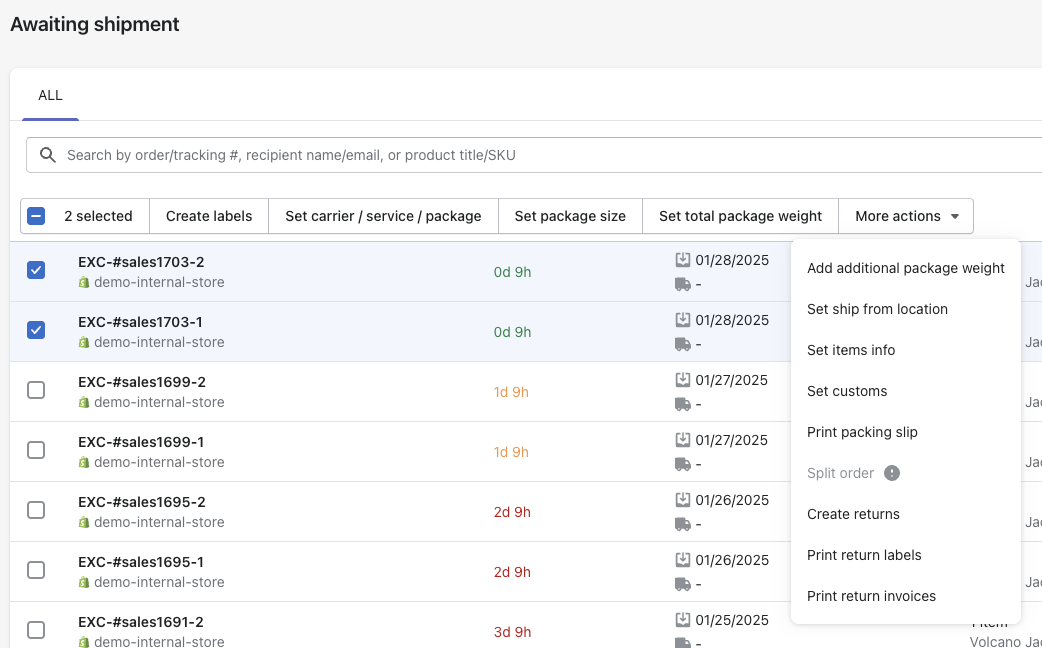
Labels created in AfterShip Shipping can sync into AfterShip Tracking once you add a Tracking plan. That is the shape of the suite: AfterShip connects shipping, tracking, returns, and warranty on one data layer.
Each piece is bought on its own. AfterShip Tracking is its own plan and AfterShip Returns is its own plan, so you add the next one when the work justifies it. The practical effect is that a shipment you create does not have to be found again later, because it is already the record your tracking tool is working from.
If you want the two put side by side feature by feature rather than by trigger, we have published the AfterShip vs Shippo breakdown.
Is AfterShip Right for You Today? An Honest Answer
AfterShip Shipping and Shippo both start you on a free plan with a monthly label cap. If you ship 30 labels a month or fewer, Shippo's free plan covers every label, while AfterShip Shipping's free plan covers 10. Past that point the price order changes with your volume, so the choice turns on what the label does after it prints. AfterShip Shipping is built for the part of the job that begins when the label comes off the printer, and that part keeps costing you time as your volume climbs.
Final Thoughts: Start Smart, Plan for Growth
Pick the label tool you can install this week and start printing. The first choice is reversible, and getting it wrong costs you a few hours. If you want to see the wider field before you commit, we have put together a broader shipping software comparison.
What matters more is knowing what that label will need to feed later: the tracking your customers keep asking for, the returns you are still handling by hand. When that day arrives, AfterShip Shipping is the step you plan for, and you add the next plan when you need it.
Frequently Asked Questions
What happened to Sendle?
Its operating company ceased shipping on 11 January 2026, and Shopify no longer offers Sendle labels. A new owner acquired the brand, trademarks and domain in July 2026, but not the company. In September 2026 the site carried an under-construction page with no bookings or prices. Former customers need a replacement, not a migration. Sources: Shopify's Help Center and SmartCompany, 23 July 2026.
What can Australian Shopify stores use instead of Sendle?
Three work today for former Sendle Australia customers. Shopify's built-in labels sell Australia Post postage inside Shopify admin, with no second app. Shippo connects your own Australia Post MyPost or eParcel account. AfterShip Shipping has an Australia Post integration, so your existing Australia Post account carries over and you can add tracking as a separate plan later.
Is Shippo free for Shopify stores?
Shippo's free Starter plan covers up to 30 shipping labels a month. AfterShip Shipping also has a Free plan. On both, paid plans are priced by the number of labels you create each month and billed monthly or yearly. The carrier's postage is always paid separately from the software fee.
Can I use Shippo and AfterShip at the same time?
Yes. Shippo prints the label and sends the tracking number back to your Shopify order, and the connection between the two runs through that order rather than through a direct integration. AfterShip Tracking, which is its own plan, imports fulfilled Shopify orders once your store is connected, then runs branded tracking pages and notifications for them.