You need a multi-carrier shipping API that holds up for US carriers while those carriers keep changing their own APIs. If your search began with Shippn API vs EasyPost API, Shippn's own FAQ describes an international package-forwarding service that accepts no labels created outside its platform and offers no domestic shipping, so the comparison that fits is AfterShip Shipping against EasyPost. On documented uptime commitment, US parcel carrier coverage, developer tooling, and one developer portal across shipping, tracking, returns, and warranty, AfterShip Shipping is the specialist choice.
Why US Developers Are Seeking Shippn API Alternatives in 2026
The carriers underneath any shipping integration have been changing their own APIs, and every one of those changes lands on whoever maintains it.
- USPS. "The USPS Web Tools API platform was retired on January 25, 2026 and service disruptions are underway," per the USPS Web Tools page.
- UPS. "UPS has deprecated the existing Access Key-based authorization for all APIs," moving integrations to OAuth 2.0, per its Access Key to OAuth 2.0 migration guide.
- FedEx. "Effective July 1, 2026, FedEx Web Services will move to maintenance-only support," with all future enhancements and innovations delivered through FedEx APIs, per FedEx developer announcements.
Three carriers, three separate migrations. Integrate each carrier directly and every one of them is your sprint: new auth, a different payload shape, different error semantics, a regression pass.
A maintained multi-carrier API absorbs that work instead of your code. AfterShip Shipping publishes migration guides for FedEx, DHL Express and UPS: each guide lists the steps on your account, and the move to the carrier's current API runs through AfterShip Shipping.
Introducing the Contenders: AfterShip vs. The Field
What a US developer needs from this layer is narrow: label and rate coverage for the carriers you actually ship with, a sandbox to build against, and documentation that matches the endpoint.
AfterShip provides a modern REST API for multi-carrier shipping. The AfterShip Shipping API runs at https://api.aftership.com/postmen/v3 and covers 100+ carriers according to its developer carrier guide, and it is one product in AfterShip's shipping, tracking, returns, and warranty suite.
EasyPost describes itself as a shipping API with 100+ carriers, with separate test and production API keys.
Headline carrier counts match, so architecture decides which multi-carrier shipping API United States teams should build on. One stack gives you shipping and tracking from the same API and sends you to a partner platform for returns. The other puts shipping, tracking, returns, and warranty behind a single developer portal, with shipping decisions informed by AfterShip's own tracking data.
AfterShip vs. EasyPost: Shipping API Comparison
The criteria below are the ones a team lives with after the integration ships: a contractual uptime commitment, US parcel carrier support, what is actually documented, official SDKs, the rate limits you hit during rate shopping, and what else sits on the same platform. AfterShip Shipping API supports 100+ carriers, including USPS, UPS and FedEx. If you are choosing the best shipping API for rate shopping, read the rate-limit and carrier rows first, then compare other multi-carrier shipping software against the same list.
| Criteria | AfterShip Shipping | EasyPost |
|---|---|---|
| API Uptime / SLA | SLA commitment to 99.9% monthly Service Uptime, with service credits; Shipping API Uptime metric on its status page | Agreement contains no uptime commitment; product page cites "99.99% historic uptime"; status page with API uptime bars |
| US Carrier Support | 100+ carriers per its developer guide; label and rate for USPS, UPS, FedEx, DHL Express, OnTrac and GLS US | 100+ carriers; carrier guides for regionals including OnTrac, GLS US, LSO, Spee-Dee, UniUni and Veho |
| Documentation | Versioned REST reference, downloadable OpenAPI schema, dated changelog, carrier capability guide, sandbox with no label charges | REST reference, test and production API keys, dated release notes |
| Official SDKs | Current Java SDK, plus the OpenAPI schema for generating clients in other languages | C#, Go, Java, Node.js, PHP, Python, Ruby |
| API Rate Limits | 10 requests/sec per organization on Pro, custom on Enterprise; 429 with rate-limit headers | Five requests/sec on index endpoints; load-based limiter for buying and rating |
| Webhooks | 14 delivery attempts with exponential backoff; HMAC-SHA256 signature header | Up to six retries; HMAC signature header |
| Ecosystem Value | Shipping, tracking, returns, and warranty APIs in one developer portal under one authentication scheme; Shipping labels sync into Tracking | Tracking API and Advanced Tracking with branded pages and notifications; returns through partner platforms |
That first row is the one that matters at a vendor review: AfterShip's SLA puts a monthly Service Uptime figure in writing, with service credits when it is missed.
The Migration Playbook: Moving to AfterShip's Shipping API in 3 Steps
Migrating is three calls and a webhook endpoint. Take them in this order and nothing touches production until you decide it should. Each call is documented in the AfterShip Shipping API docs.
- Connect your carriers. Create shipper accounts through the Shipper Accounts endpoints, or connect your own carrier accounts so your negotiated rates apply: up to 5 on Pro, unlimited on Enterprise. The Labels API, the Shipping rates API and webhooks are available on Pro and Enterprise. Authentication is an API key passed in the
as-api-keyheader, with AES or RSA signed requests available if your security review asks for them. If you are moving accounts that already exist, the migration guides noted earlier are the checklist: FedEx and DHL Express move from XML to REST, and UPS moves to OAuth 2.0. FedEx accounts "must migrate to the FedEx REST API via AfterShip", and UPS customers "must reauthorize their accounts", so budget a pass over every connected account before you switch traffic.
- Get rates. A POST to
/ratesagainst the sandbox base URL. Labels you generate in the sandbox are not charged, and the same API key works in sandbox and production, so you are not juggling two sets of credentials while you build.
curl --request POST \
--url https://sandbox-api.aftership.com/postmen/v3/rates \
--header 'Content-Type: application/json' \
--header 'as-api-key: YOUR_API_KEY' \
--data '{
"async": false,
"is_document": false,
"shipper_accounts": [
{ "id": "3ba41ff5-59a7-4ff0-8333-64a4375c7f21" }
],
"shipment": {
"ship_from": {
"contact_name": "AfterShip Shipping",
"company_name": "AfterShip Shipping",
"street1": "230 W 200 S LBBY",
"city": "Salt Lake City",
"state": "UT",
"postal_code": "84101",
"country": "USA",
"phone": "19835553752",
"email": "[email protected]"
},
"ship_to": {
"contact_name": "AfterShip Shipping",
"company_name": "AfterShip Shipping",
"street1": "230 W 200 S LBBY",
"city": "Salt Lake City",
"state": "UT",
"postal_code": "84101",
"country": "USA",
"phone": "19835553752",
"email": "[email protected]"
},
"parcels": [
{
"box_type": "custom",
"dimension": { "width": 10, "height": 10, "depth": 10, "unit": "cm" },
"description": "Food XS",
"weight": { "unit": "kg", "value": 1 }
}
]
}
}'
EasyPost reaches the same result by a different route. You create a Shipment, and per its documentation a Shipment created with a valid to address, from address and parcel automatically populates its rates.
curl -X POST https://api.easypost.com/v2/shipments \
-u "EASYPOST_API_KEY": \
-H 'Content-Type: application/json' \
-d '{
"shipment": {
"to_address": {
"name": "Dr. Steve Brule",
"street1": "179 N Harbor Dr",
"city": "Redondo Beach",
"state": "CA",
"zip": "90277",
"country": "US",
"phone": "8573875756",
"email": "[email protected]"
},
"from_address": {
"name": "EasyPost",
"street1": "417 Montgomery Street",
"street2": "5th Floor",
"city": "San Francisco",
"state": "CA",
"zip": "94104",
"country": "US",
"phone": "4153334445",
"email": "[email protected]"
},
"parcel": {
"length": "20.2",
"width": "10.9",
"height": "5",
"weight": "65.9"
}
}
}'
- Generate a label. Add the service type, the shipper account and billing, then POST to
/labels. The shipment block is the same one you just sent to/rates.
curl --request POST \
--url https://sandbox-api.aftership.com/postmen/v3/labels \
--header 'Content-Type: application/json' \
--header 'as-api-key: YOUR_API_KEY' \
--data '{
"billing": { "paid_by": "shipper" },
"return_shipment": false,
"is_document": false,
"service_type": "ups_ground",
"paper_size": "4x6",
"shipper_account": {
"id": "3ba41ff5-59a7-4ff0-8333-64a4375c7f21"
},
"shipment": {
"ship_from": {...},
"ship_to": {...},
"parcels": [...]
}
}'
Then point a webhook at your consumer. AfterShip Shipping makes 14 attempts to deliver each webhook with exponential backoff, and signs every request with an am-webhook-signature header carrying an HMAC-SHA256 of the body. A consumer that goes down for an afternoon still receives its events, and can verify them when it comes back up.
Beyond the Label: Why an Integrated API Platform Matters
Printing the label is where the next set of problems starts. Your customer still wants a tracking page and notifications, and sooner or later your CX team wants a returns flow.
On EasyPost, a Tracker is generated automatically when you buy a label, and its Advanced Tracking product adds custom-branded tracking pages and automated email and SMS notifications. For returns, EasyPost's own content points merchants to partner platforms, naming Loop, ReturnGO and ReturnLogic.
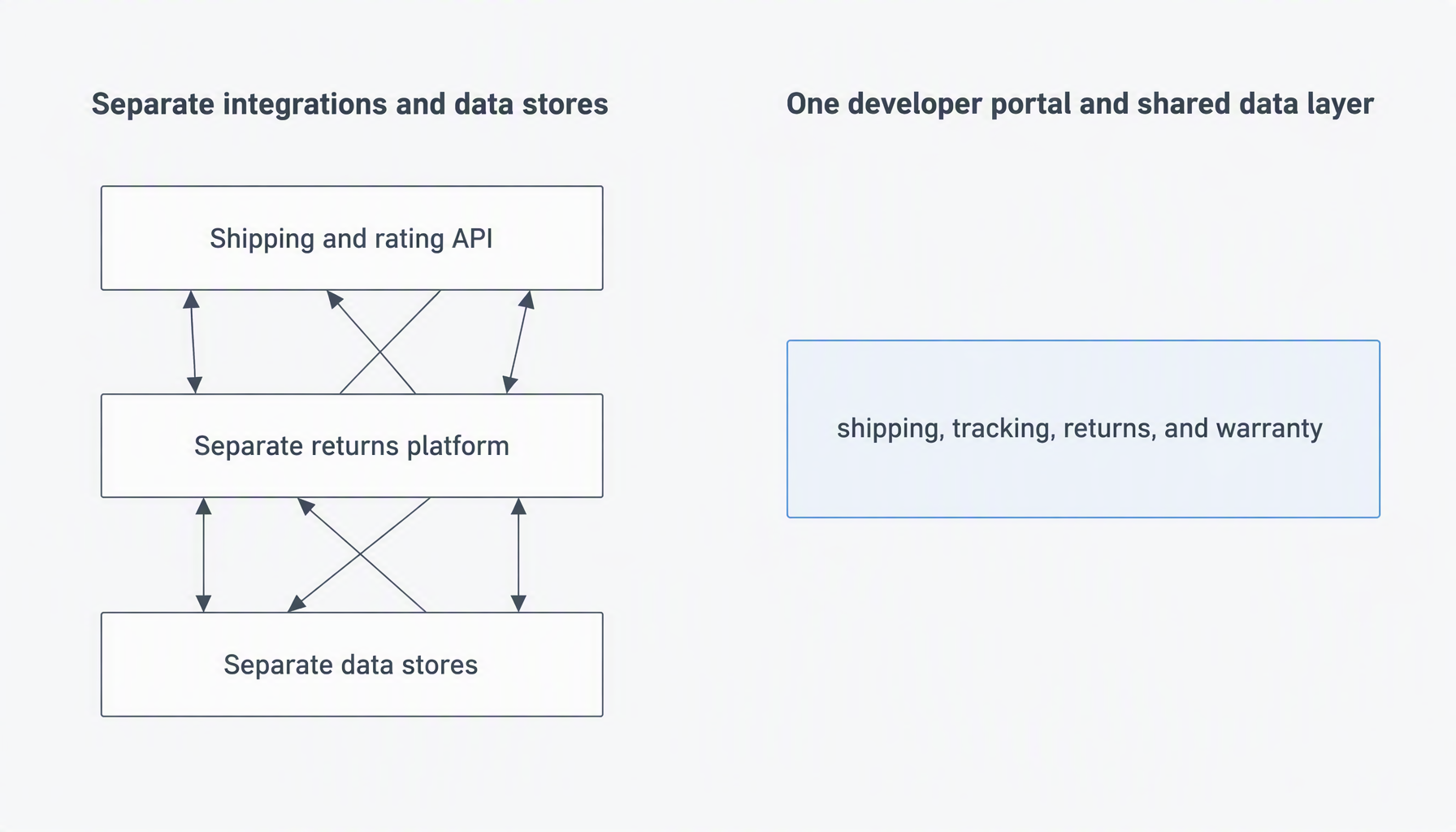
Where AfterShip differs is how many of those pieces sit behind one door. AfterShip's shipping, tracking, returns, and warranty APIs live in the same developer portal, and each authenticates with the same as-api-key header, so returns come from the same vendor instead of a separate partner platform. A label created through AfterShip Shipping can sync into AfterShip Tracking; the sync needs an active AfterShip subscription, because each product is billed separately.
The shared data also shapes carrier choice inside AfterShip Shipping: Smart Carrier Recommendation, a feature on all AfterShip Shipping plans, excludes services with a high exception rate for the shipment's origin and destination, based on AfterShip's own tracking data.
From the AfterShip Tracking customer story: StackCommerce has been able to reduce WISMO tickets by 71%, achieve 99% shipment tracking visibility, and 90% on-time delivery rate.
When the stack grows, the next API is already in the AfterShip developer portal.
Does AfterShip have the developer tools I need?
What SDKs are available?
AfterShip Shipping offers a Java SDK plus a downloadable OpenAPI schema for any language. If you are shortlisting shipping APIs with Python SDK support specifically, the official client today is Java, and a Python or Node.js client can be generated from the OpenAPI schema on the API Overview page.
How good is the documentation?
Judge it on what is published: our comprehensive developer documentation carries a versioned REST reference on /postmen/v3 with per-endpoint request and response schemas, a downloadable OpenAPI schema, a dated changelog you can diff between releases, a carrier capability guide showing which carriers support label and rate calls, and a webhook specification with its signature scheme. Each of those pages is public, so you can check a claim against the source before you commit to the integration.
What are the rate limits and how is uptime?
The Shipping API allows 10 requests per second per organization on Pro, with custom limits on Enterprise. Exceed it and you get a 429 response with rate-limit headers telling you when to retry. On uptime, AfterShip's SLA commits to "reasonable endeavours to achieve a 99.9% Service Uptime during any given calendar month", backed by service credits when uptime falls short, and its public status page reports Shipping API uptime as a metric of its own. The status page shows that metric in month, week and day views. Separately, the Labels API, the rates API and webhooks are available on Pro and Enterprise.
Is there a sandbox environment?
Yes. Labels generated in the AfterShip Shipping sandbox are not charged, the same API key works in sandbox and production, and Test mode is enabled from the Shipping admin. You can build the integration and generate labels end to end before going live. Point the base URL at the sandbox host with the same key while you build, then point it at the AfterShip Shipping production host.
The Verdict: When to Choose AfterShip's API
For US developers at scaling eCommerce brands, this comes down to when the surrounding requirements start to bite. The choice changes once performance commitments have to be defensible to someone above you, once US parcel carrier coverage is on the checklist, and once the rest of the post-purchase stack becomes your problem too. AfterShip Shipping is the specialist choice at that point. If your lanes also include LTL or freight, see how the freight shipping APIs compare first.
Choose EasyPost if:
- You are assembling labels, rates, and tracking in your own custom stack and will source returns separately through a partner platform.
- You want EasyPost's Free Access plan, whose first 3,000 labels a month are free, then $0.08 per label (the free allowance does not apply to bring-your-own-carrier-account plans).
- You need an official client library in a language other than Java today.
That changes when shipping, tracking, returns, and warranty need to share one data layer rather than several integrations you maintain yourself, which is where AfterShip's single developer portal earns its keep.
Choose AfterShip if:
- You want one authentication scheme across shipping, tracking, returns, and warranty APIs, with Shipping labels syncing into AfterShip Tracking.
- Your webhook consumers need a long delivery-retry window (AfterShip Shipping makes 14 delivery attempts with exponential backoff).
- You want carrier recommendations that exclude services with a high exception rate on a given lane, using AfterShip's own tracking data.
- You want a Shipping-API-specific uptime metric on the status page plus a 99.9% Service Uptime SLA backed by service credits.
Simplify shipping and order fulfillment across Shopify, TikTok Shop, and your carrier network.
Book a demo