Choosing a multi-carrier shipping API is not a procurement decision. It is a commitment to an integration you will still maintain in three years: brittle webhooks, a rate limit you meet during a flash sale, a response body that does not match the documentation. On failure handling and on what each vendor will commit to contractually, the AfterShip Shipping API is the one to build on. A separate comparison covers how Shippo stacks up against other platforms; this teardown stays on the Shippo vs ShipEngine API comparison and where AfterShip lands.
Shippo vs. ShipEngine vs. AfterShip: The 60-Second Verdict for Tech Leads
AfterShip Shipping is a REST shipping API inside AfterShip's post-purchase suite.
| Criteria | AfterShip Shipping | Shippo | ShipEngine (ShipStation API) |
|---|---|---|---|
| SDKs and tooling | Two official SDKs the docs link, Java (released July 2026) and Node.js, plus a downloadable OpenAPI schema, an in-browser "Send API Request" console and rendered cURL samples on every endpoint | Python, Node.js, Java, C# and PHP, plus a community Go library; downloadable OpenAPI YAML | JavaScript, .NET, Java, Python, Ruby and PHP; OpenAPI 3.0 definitions and Postman collections |
| Rate limits (each vendor's own units, not ranked) | 10 requests a second per organization on Pro; custom on Enterprise | Per endpoint, per minute, for example 500 creations a minute on core objects | 200 requests a minute by default; 20 in sandbox |
| Webhook delivery | 14 delivery attempts with exponential backoff (2^n x 30s); every webhook HMAC-SHA256 signed | Retries twice; acknowledgement expected within three seconds; Webhooks API in beta; HMAC signing enabled on request | Three attempts about 30 minutes apart; every webhook RSA-SHA256 signed |
| Contractual uptime commitment | 99.9% Service Uptime SLA backed by a service-credit schedule (10% to 100%), under an enterprise agreement | 99.9% uptime SLA listed on the Premier plan | API terms provide the service "as is"; no SLA document published |
| Observed status-page uptime (self-reported, windows differ, not ranked) | Publishes a Shipping API uptime metric over day, week and month windows | Status page publishes no numeric uptime figure | 99.99% over the past 90 days |
| API access and entry price | Labels, rates, carrier accounts, US address validation and webhooks start on Pro: $89 a month billed monthly, $69 billed annually | API Starter has no monthly fee: 30 labels a month free, then 7 cents a label | Free plan $0 on ShipStation's carrier accounts; Advanced from $75 a month for 1,000 labels |
| Own carrier accounts | Carrier accounts API; 5 accounts on Pro, unlimited on Enterprise | Connect your own accounts through the API | Advanced plan and above |
Two rows carry that verdict: webhook delivery, and the contractual uptime commitment. Rate limits appear in three different units and are not ranked, and no one wins on SDK count. If you want the wider field, you can compare leading multi-carrier shipping software separately. Below about 1,200 labels a month AfterShip costs more, which the pricing section answers.
Developer Experience: Time-to-First-Label & Documentation Quality
Start with the documentation, because it is the only part of an API you can judge before writing code. AfterShip publishes a downloadable OpenAPI schema, an in-browser Send API Request console, and a rendered cURL sample on every endpoint page; its Calculate rates page puts navigation, reference and request builder in three panels. Shippo publishes a downloadable OpenAPI YAML, a dated version header and a public changelog. ShipEngine publishes OpenAPI 3.0 definitions and Postman collections, and runs no REST API changelog.
That gap is not cosmetic. Postman's 2025 State of the API report, drawn from over 5,700 developers, architects, and executives, found that 82% of organizations have adopted some level of an API-first approach while 55% still report inconsistent documentation.
Time to a first successful call comes down to keys. AfterShip issues one API key that works in sandbox and production, and sandbox label generation is free. Shippo issues separate test and live keys, and its test rates may differ from live. ShipEngine issues a TEST_ key whose sandbox covers UPS, FedEx and USPS only and excludes webhooks and batching, so the two behaviours most worth rehearsing are the two you cannot.
The same job, a rate request, on all three:
# AfterShip Shipping
curl -X POST "$AFTERSHIP_BASE/postmen/v3/rates" \
-H "as-api-key: $AFTERSHIP_API_KEY" \
-H "Content-Type: application/json" \
-d '{ ... }'
# Shippo
curl -X POST "$SHIPPO_BASE/shipments" \
-H "Authorization: ShippoToken $SHIPPO_TOKEN" \
-H "Content-Type: application/json" \
-d '{ ... }'
# ShipEngine (ShipStation API)
curl -X POST "$SHIPENGINE_BASE/v1/rates" \
-H "API-Key: $SHIPENGINE_API_KEY" \
-H "Content-Type: application/json" \
-d '{ "rate_options": { "carrier_ids": [ ... ] } }'
AfterShip and ShipEngine both accept inline addresses and parcels; ShipEngine nests the carrier ID list inside its rate options object, as the block above shows. All three separate rating from purchase, so a failed rate call never buys a label.
API Architecture & Reliability: What Happens When You Scale to 10,000 Shipments/Day?
Shipping API reliability shows up in what your queue does when something fails, not at peak throughput.
Rate limits first, and the units before the numbers. AfterShip Shipping documents 10 requests a second per organization on Pro, custom on Enterprise, and returns its limit state in rateLimit headers. ShipEngine documents 200 a minute by default, 20 in sandbox, with Retry-After on a 429. Shippo documents per-endpoint limits per minute, for example 500 creations a minute on core objects. Different units, different scopes: ranking them would be arithmetic, not evidence.
Webhook delivery is where they diverge. AfterShip retries on an exponential backoff and signs every webhook with HMAC-SHA256. Shippo retries twice, expects acknowledgement within three seconds, labels its Webhooks API beta, and enables HMAC signing on request. ShipEngine makes three attempts about 30 minutes apart, RSA-SHA256 signed.
AfterShip Shipping documents 14 delivery attempts with exponential backoff. Published on the AfterShip Shipping webhook documentation.
Uptime splits into what is reported and what is signed. Shippo lists a 99.9% uptime SLA on its Premier plan. ShipEngine's status page reports 99.99% over the past 90 days, while its API terms provide the service as is. The windows differ, so each is reported with its own and not ranked.
AfterShip publishes a 99.9% Service Uptime SLA backed by a service-credit schedule, available under an enterprise agreement, not as a plan feature. Published in the AfterShip service level agreement.
One gap is shared: none of the three documents an idempotency key for label purchase, so a retrying worker needs its own deduplication.
The Strategic Choice: Why One Account and One Data Layer Matter
If you only ever buy labels, one vendor is enough. Few teams stop there. Before the platform argument, the honest design note: inside AfterShip, each product keeps its own versioned endpoints, its own webhook signature header and its own rate-limit model. That is a deliberate choice about versioning, not four products pretending to be one endpoint.
What they share is the layer underneath. AfterShip's shipping, tracking, returns, and warranty APIs sit on one AfterShip account, the same as-api-key authentication, the same AES and RSA request-signing options, one data layer and one documentation hub. Adding tracking next year means new endpoints on credentials you already hold. The depth on that side is its own subject: a developer's verdict on logistics tracking APIs covers it.
The alternative is not that anyone lacks the capability. Shippo and ShipEngine both publish tracking APIs. The alternative is a second vendor, a second contract, a second authentication scheme and a second data model to keep reconciled, and that bill arrives in the quarter after you ship.
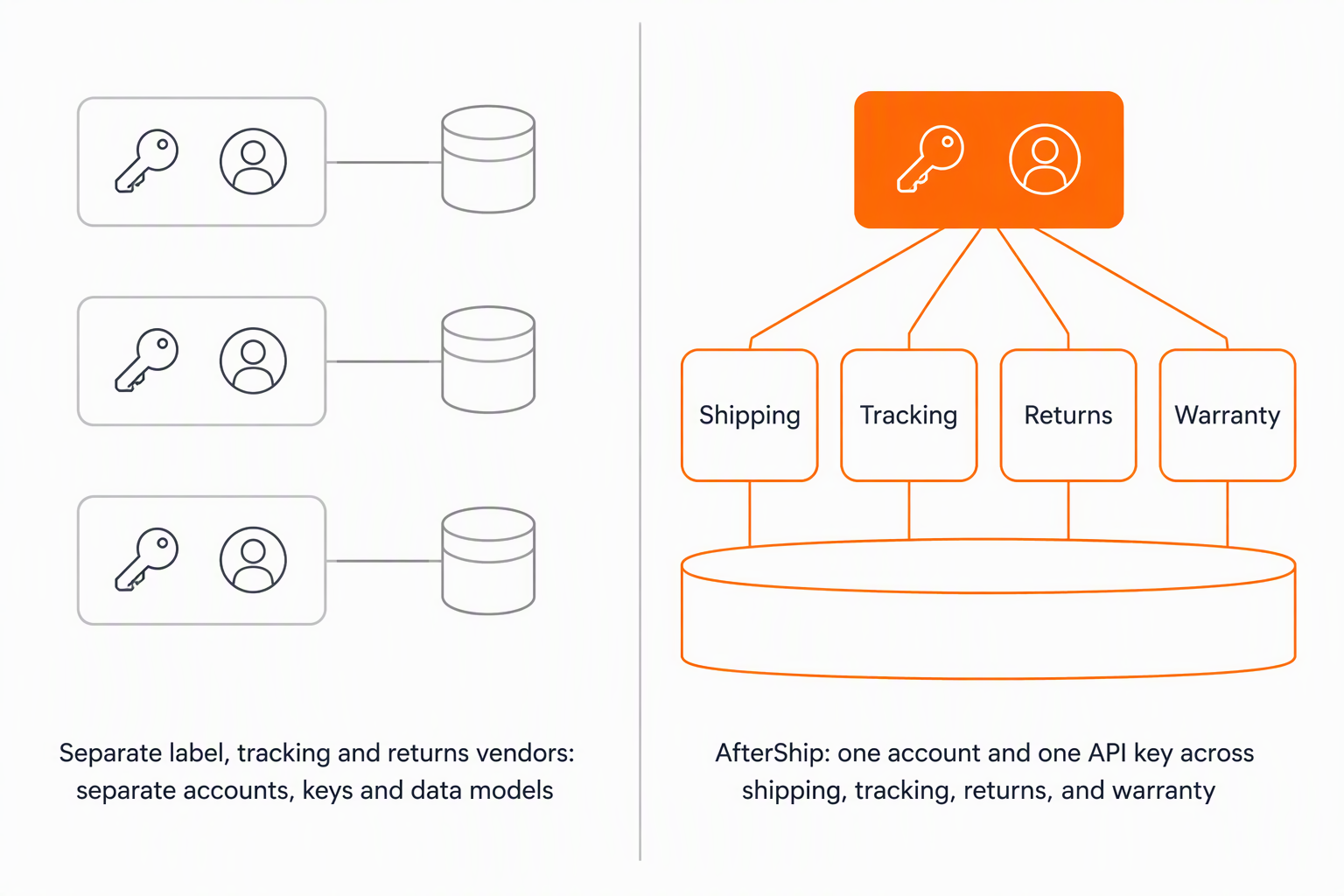
Feature Deep Dive: Beyond Label Generation
Past the label call, four capabilities decide how far the integration goes.
- Rate shopping across your own carrier accounts. AfterShip exposes a Carrier accounts API and returns rates across several shipper accounts in one call, with 5 accounts on Pro and unlimited on Enterprise. Shippo connects your own accounts through the API. ShipEngine requires its Advanced plan for your own accounts; its Free plan uses ShipStation's own carrier accounts.
- Address validation. AfterShip includes a US address validation API on Pro, currently marked Beta. Shippo charges per lookup. ShipEngine gates the standalone endpoint to Advanced, with inline validation inside rate and label calls on Free.
- International documentation. All three generate customs documentation. AfterShip returns a commercial invoice when the invoice field is present, with electronic trade documents for FedEx. Shippo returns commercial invoice copies on the transaction and supports paperless trade. ShipEngine submits customs forms electronically for UPS, FedEx and DHL Express.
- Labels and operations. AfterShip returns PDF or ZPL and exposes manifests, pickups, cancellations and a return-shipment flag. Shippo adds a batch endpoint of up to 10,000 labels per request. ShipEngine documents manifests, pickups and domestic return labels.
Pricing Models: Comparing True Cost of Ownership at Scale
Read each published price for what it actually buys. On AfterShip, the Shipping API endpoints, labels, rates, carrier accounts, US address validation and webhooks, start on the Pro plan, billed as a platform fee on a stated billing term. Postage sits outside it, and so does everything that is not the Shipping product.
The other two are shaped differently. Shippo's API suits teams starting small, with pay-per-label pricing and no monthly fee. Its API pricing page sets the free allowance and the per-label rate. ShipEngine, now ShipStation API, prices API access in tiers by monthly label volume. Its Free plan runs on ShipStation's own carrier accounts, and the ShipStation API pricing page lists the tiers. Those are billing shapes rather than a full product comparison, which an honest verdict on AfterShip vs Shippo takes up separately.
Shape is not cost, which is why the table below prints list prices at three volumes. A separate AfterShip teardown makes the total cost of ownership argument for a technical team; this one stays narrower and rests on two checkable things: the list prices below, and the integration surface you maintain, meaning the accounts, API keys, data models and webhook formats your team keeps working.
Cost at volume (published list platform fees, postage excluded, using your own carrier accounts):
| Labels per month | AfterShip Shipping Pro, billed monthly | ShipEngine Advanced | Shippo API Starter |
|---|---|---|---|
| 1,000 | $89 (covers up to 2,000) | $75 | $67.90 |
| 2,000 | $89 | $150 | $137.90 |
| 10,000 | $259 | $600 | $697.90 |
Footnotes for the table: all figures read from each vendor's own pricing page on 18 and 21 September 2026; postage is separate for all three; ShipEngine's Advanced plan publishes 1,000, 5,000 and 10,000 stops at $75, $325 and $600 with per-label overage of $0.075, $0.065 and $0.060; Shippo's figure is 30 free labels then 7 cents a label; AfterShip's Pro slider reads $89 at 2,000 labels a month and $259 at 10,000 on monthly billing. Re-verify every figure on publish day.
Below about 1,200 labels a month, both competitors cost less: Shippo charges no monthly fee and ShipEngine's Free plan is $0 on its own carrier accounts, while the AfterShip Shipping API starts on the Pro plan. Shippo's pay-as-you-go stays cheaper to about 1,300 labels a month. Above that crossover AfterShip's published platform fee is the lowest of the three at every volume in the table, and the failure-handling and SLA differences apply at every volume.
Two per-call extras sit outside the platform fee: Shippo charges for each address validation, ShipEngine for validations above its included calls, and AfterShip includes US address validation on Pro.
The Final Verdict: Which Shipping API Should You Build On in 2026?
There is no single best shipping API for developers, because the right answer moves with volume and with what you expect to add next. Read the two lists below as independent tests rather than a scorecard: the first is where the AfterShip Shipping API is the better thing to build on, and the second is where another API fits the job you have.
Choose AfterShip Shipping if:
- Your integration must survive a failing endpoint: 14 signed delivery attempts with exponential backoff, against two retries and three attempts.
- You need an uptime commitment with a remedy attached rather than a status-page number, and a vendor that publishes a 99.9% Service Uptime SLA with a service-credit schedule when you move to an enterprise agreement.
- You ship beyond about 1,300 labels a month and want the lowest published platform fee of the three.
- You expect to add tracking, returns or warranty later and would rather keep one account, one API key and one data layer than add a vendor.
- You want request signing (AES or RSA) and a sandbox whose labels cost nothing, on the same key as production.
Choose Shippo or ShipEngine if:
- You are starting small and want API access with no monthly platform fee.
- You need a single batch call for very large label runs (Shippo publishes up to 10,000 labels per request).
- You need an official SDK in a language AfterShip does not publish (ShipEngine publishes six, Shippo five plus a community library).
- You are already operating inside the ShipStation ecosystem and want its API alongside it.
Simplify shipping and order fulfillment across Shopify, TikTok Shop, and your carrier network.
Book a demoFrequently Asked Questions
What happens to a webhook if my endpoint is down during a deploy?
AfterShip Shipping retries a failed delivery on an exponential backoff and signs every webhook, so a short outage during a deploy is absorbed rather than lost. The per-vendor attempt counts and signing schemes are in the comparison table above, and they differ enough to change how much replay logic you write. Whichever you choose, treat delivery as at-least-once and make the handler safe to run twice.
How do I verify that a webhook really came from the vendor?
All three sign their webhooks, so the verification code is short in every case. AfterShip Shipping and Shippo use HMAC, and ShipEngine uses RSA. The practical difference is defaults and scope: AfterShip signs every webhook, Shippo enables HMAC signing on request, and the same AfterShip account also offers AES and RSA request signing for the calls you send, so verification is one pattern rather than one per direction.
Will a rate limit stop me during a flash sale?
Read the unit before the number. AfterShip Shipping publishes a per-second limit per organization on Pro and a custom limit on Enterprise, ShipEngine publishes a per-minute limit, and Shippo publishes per-endpoint limits per minute. Because the units and scopes differ, the useful question is not whose number is larger but whether your burst pattern fits the shape, and whether the ceiling moves when you grow. On AfterShip it does.
If I add tracking or returns later, is that a second integration?
It is a new set of endpoints, not a new vendor. AfterShip's shipping, tracking, returns, and warranty APIs run on the account and credentials you already hold, against one data layer, so the work is reading new endpoint documentation rather than negotiating a second contract, wiring a second authentication scheme and reconciling a second data model. Each product keeps its own versioned endpoints and its own webhook signature header, a deliberate versioning choice, and the account underneath stays the same.
