Congratulations on 1,000 orders a month. Before you replace Shopify Shipping, check what it and Shopify Flow already do, because several of the usual reasons to leave no longer apply. The reasons that remain are regional carriers, a proper rules screen and, above all, what happens after the label: which carrier delivers on each lane, and what your customer sees while they wait. That last part is where AfterShip fits.
The Shippo vs Shopify Shipping question usually gets answered with an order count, which is why so many brands switch and find nothing much changed. The wider field of label tools is mapped in a comprehensive shipping software comparison. At this size the choice comes down to three: the platform you have, one multi-carrier tool, one post-purchase suite.
Shippo vs Shopify Shipping vs AfterShip Shipping Compared
Five criteria decide this for a brand shipping 500 to 1,500 orders a month: who each tool suits, which carriers it reaches, where its rules live, what the shopper sees, and how it charges.
| Feature | Shopify Shipping | Shippo | AfterShip Shipping |
|---|---|---|---|
| Best For | Shops on Shopify's own carrier accounts | Regional carriers or a rules screen | Lane performance and the post-purchase experience |
| Carrier Network | USPS, UPS, FedEx, DHL on Shopify's accounts | Adds regional carriers: OnTrac, GLS US | Major US and global carriers, plus regional carriers such as OnTrac and GLS US on your own accounts. |
| Automation Rules | Shopify Flow, a separate free app | Unlimited rules on every plan | Pro and Enterprise, up to 10 rules |
| Branded CX | Branded shipping and delivery emails | Branded tracking pages and emails on Pro | AfterShip Tracking (separate): pages, email and SMS from Essentials |
| Pricing Model | No separate software fee; billed with Shopify | Starter free to 30 labels monthly; Pro $54 a month, 501 to 1,000 labels | Free plan to 10 labels monthly; Pro $89 a month, up to 2,000 labels, monthly billing |
All three buy labels. AfterShip Shipping is the one that sits inside a suite covering shipping, tracking, returns, and warranty, which is what matters once the label stops being the problem.
When Does Shopify Shipping Stop Being Enough?
Shopify Shipping limitations show up in your own week, not on a dashboard. Orders start arriving for addresses your default carrier handles badly, a batch goes out on the wrong service because you were picking rates by hand at 7pm, and the same three customers email to ask where their parcel is. If price is the deciding factor, we ran the label rate comparison between Shippo and Shopify Shipping.
Shopify Shipping suits stores that ship with Shopify's own carrier accounts. Shopify's own help centre publishes the carrier list. Four limits end it.
- No regional carriers such as GLS US or OnTrac for labels bought in Shopify.
- Shopify shows every eligible service for an order, international included, but customs details are entered product by product, and duty-paid labels are limited to a few DHL and Canada Post services.
- Automation runs through Shopify Flow, a separate free app that buys one label per fulfilment and skips orders sent to a third-party fulfilment service; there is no rules screen inside Shopify Shipping itself.
- Shopify sends branded shipping and delivery emails, but it does not send shipment updates by text.
Three of them are operational: which carriers you can reach, how much of the international work you do by hand, and where the rules live that stop the wrong service being bought. They cost you hours, and hours are the thing you have least of.
The fourth one costs you something else.
A shopper who cannot see where the parcel is asks you instead, and that queue grows with every order you add. That is where Shippo vs Shopify Shipping stops being the useful question. Which of those four limits you are hitting is the whole decision.
Shippo vs. Shopify Shipping: Head-to-Head Breakdown
Four things separate these two at 500 to 1,500 orders a month.
Carrier Network and Rates
Your carrier list is set by where your customers are, and it stops mattering the day a lane needs a carrier you cannot buy. Shippo offers more carrier options than Shopify's native shipping solution. That is the multi-carrier shipping Shopify sellers switch for: OnTrac runs on your own account there, and GLS US is on its carrier list too.
Shopify buys on its own negotiated accounts for USPS, UPS, FedEx and DHL. Whether that covers you depends on whether your volume sits in the lanes those four serve well.
At this size the discovery is usually the same: a region starts converting, the parcels get slow, and the fix is one of the regional carriers.
Pricing and What You Actually Pay
Software cost is the part you can see. Postage is the part that actually moves, and it moves by service and destination, which is why no honest like-for-like rate comparison exists between the two.
Shopify Flow adds no separate software fee to the Shopify plan. Shippo's published pricing puts the rules screen on Pro, which starts at 501 labels a month on monthly billing.
The hour you spend to compare real-time shipping rates by hand is the cost nobody puts on the invoice.
Automation and Batch Processing
Rules are where the hours go back. Shippo puts them on every plan with no cap on how many you write, keyed on things like weight, SKU and destination, and when two rules could apply the one listed first wins.
Shopify's automation lives in Flow, covered earlier, and it can default to the cheapest carrier and service available. Batch work is capped: you can select up to 250 orders at a time and print up to 100 labels at once.
Both will pick the lowest rate for you without being asked. The difference you feel daily is whether your rules sit in a dedicated screen or inside a separate automation app.
International Shipping
International changes the job from picking a rate to filling in paperwork. Shippo generates customs forms and commercial invoices automatically, defaults to delivered duty unpaid, and charges a fee for duty-paid labels on DHL Express and UPS.
Shopify collects duties and import taxes at checkout on every plan, which is the half of the problem most merchants feel first. The customs entry and the duty-paid label limits are the half that stays manual.
If international is a rounding error in your mix, none of this decides anything. If it is a real share of your orders, it decides the tool.
All four decisions end the moment the label prints, and what follows is the where-is-my-order queue. StackCommerce reduced its WISMO tickets by 71% year over year using AfterShip Tracking. The numbers are set out in StackCommerce's customer story.
The Verdict: Choose Shippo If... Choose Shopify Shipping If...
Two answers, and neither depends on your order count.
Stay on Shopify Shipping while its own carrier accounts and Flow cover the operation. If your parcels move on USPS, UPS, FedEx and DHL, if Flow's one-label-per-fulfilment action matches how you fulfil, and if no part of your day is being lost to rate picking, the platform you already pay for is doing the job. Switching costs you setup time and buys you capability you are not using yet.
Move to Shippo when you need regional carriers such as OnTrac or GLS US, or a dedicated rules screen. Those are the two thresholds. Neither is a volume number. Both are visible in your own lane mix and your own order flow, and you can check them in an afternoon. One of them is usually already true by the time a founder starts looking.
The Problem with a 'Good Enough' Upgrade
Both of those answers fix the label. Neither changes what decides which service gets bought, and neither changes what your customer sees while they wait.
Shippo publishes branded tracking pages, notification emails and AI delivery estimates, and Shippo Intelligence surfaces delivery performance from the shipments you run through it. Its scope is your own account.
The question at this stage is whether the carrier you are about to buy has been failing on that exact lane for other merchants too, and whether the shopper gets told before they write in. Answering the first needs delivery data from beyond one account. Answering the second needs a post-purchase layer of its own.
Both are questions about scope. A brand at this size answers them by widening the data and widening the product, which is where the third option in the shortlist earns its place.
The Smarter Upgrade: AfterShip for a Unified Growth Platform
AfterShip Shipping is a label and rate product, and its rules screen is where a growing brand stops picking services by hand.
AfterShip Shipping lets you build rules on weight, destination and SKU that assign a carrier service automatically (Pro and Enterprise, up to 10 rules outside Enterprise). Its Smart Carrier Recommendation, on every plan, steers each shipment away from services with a high exception rate on that lane, using AfterShip tracking data.
The signal is the exception rate on your origin-and-destination pair, so a cheap service that keeps missing on that lane gets steered around. Rules run once, when orders are imported, so the routing decision is made before anyone opens a batch.
AfterShip Shipping combines label printing with a full post-purchase experience platform. That platform is AfterShip Tracking, a separate subscription, and it holds the branded tracking page, the shipment notifications and the delivery estimate a shopper sees before buying. Designing that page is its own subject, and our guide to a branded tracking experience that drives sales covers it. The suite runs wider than the label: shipping, tracking, returns, and warranty, each with its own pricing page.
Every option here has a no-cost entry: Shopify Shipping adds no separate software fee to the Shopify plan, Shippo Starter is free to 30 labels a month, and AfterShip Shipping has a free plan at 10 labels a month. Past those quotas AfterShip is not the cheapest option for a store that size. It earns its place when the cost of a late or failed delivery, and of the support that follows, is larger than the subscription.
What AfterShip Adds Once the Label Is Bought
Two problems survive the label. The first costs you money on the shipment; the second costs you time on the ticket.
- You're trying to stop the wrong service being bought: AfterShip Shipping's Smart Carrier Recommendation, on every plan, excludes services with a high exception rate on that lane, using AfterShip tracking data. It selects the carrier service; you still review the shipment and create the label.
- You're trying to cut 'where is my order' contacts: Shippo Pro adds branded tracking pages and notification emails, and AfterShip Tracking adds text updates from the Essentials plan and, on Premium and Enterprise, Klaviyo triggers for events such as in transit and out for delivery.
A suggested service is not a new idea. Shopify surfaces one from your own past orders, and what differs is the record it reads from.
The events you can act on are the ones a carrier reports: info received, in transit, out for delivery, available for pickup, delivered, failed attempt and exception. Each one is a place to reach the shopper before the shopper reaches you.
If you want the two products set against each other feature by feature, we keep a direct comparison between AfterShip and Shippo. Both answers draw on the same tracking data, which is why they arrive as one decision.
Final Verdict: The Right Shipping Solution for Every Growth Stage
The best shipping software for Shopify is the one that clears your constraint, and volume only hints at when the stage changes.
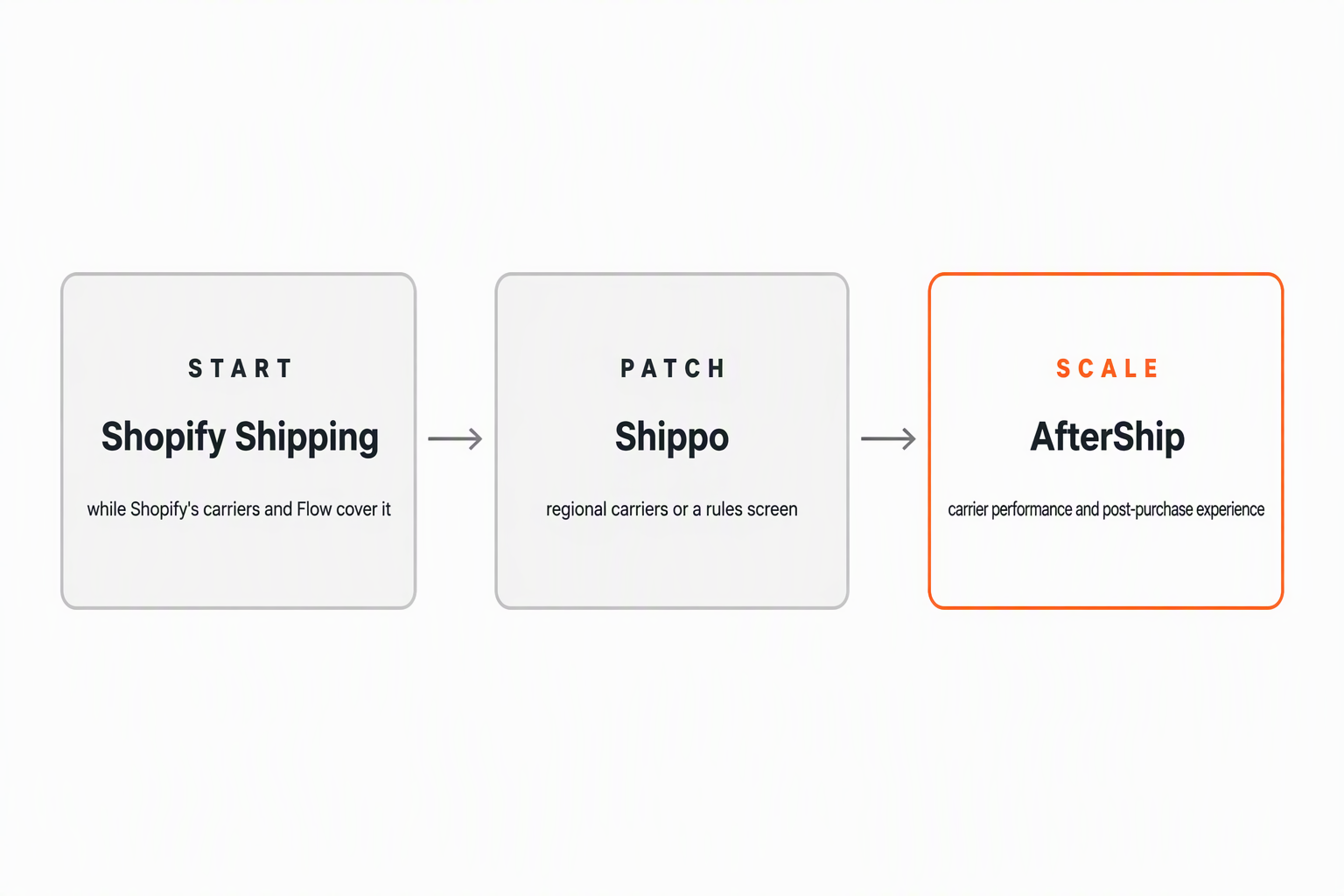
Start is Shopify Shipping with Shopify Flow, and it holds while Shopify's own carrier accounts and one-label-per-fulfilment automation cover the operation. Patch is Shippo, and it starts when you need regional carriers or a dedicated rules screen. Scale is AfterShip, and it starts when carrier performance per lane and the customer's post-purchase experience become the constraint.
Stay with a label tool while:
- Shopify's or Shippo's carrier list reaches every lane you sell into.
- Buying the right label quickly is the whole job.
- Your platform's shipping emails are enough for the shopper.
Move to AfterShip when:
- Routing should happen on import, before anyone opens a batch.
- You want the shopper told what is happening without your team typing it, which is AfterShip Tracking, a separate subscription.
- Returns and warranty are the next two decisions on the same stack.
- The same lane keeps failing and you want the service picked on that record.
Simplify shipping and order fulfillment across Shopify, TikTok Shop, and your carrier network.
Book a demoFrequently Asked Questions
Is Shippo cheaper than Shopify Shipping for 1,000 orders?
On software, Shopify is cheaper: Shopify Flow adds nothing to your existing Shopify plan, while Shippo Pro is $54 a month at 501 to 1,000 labels on monthly billing. Postage is the larger number and it moves by service and destination, so the two cannot be compared like for like. No independent study puts one ahead of the other on delivered cost.
Can I use my own carrier accounts with AfterShip?
Yes. AfterShip Shipping lets you connect your own carrier accounts on every plan, with one account on Free, one on Essentials, five on Pro and no limit on Enterprise. Each regional carrier you add, OnTrac or GLS US among them, uses one of those slots, so a brand running a regional carrier alongside its own UPS or FedEx account needs the Pro tier.
Does AfterShip integrate with Gorgias?
Yes, as an AfterShip Tracking integration. Gorgias is one of the customer-experience partners AfterShip Tracking connects to, and the integration pushes shipment status into the helpdesk so a support agent can answer a where-is-my-order ticket without opening a carrier site. Because Gorgias sits on the Tracking subscription rather than on AfterShip Shipping, it is worth costing the two products separately when you plan the stack.
Can Shopify show my customer a delivery date before they buy?
Yes. Shopify's automated delivery dates appear at checkout on Basic and above for US orders, and they show only when the predicted delivery falls within five days. Outside that window, or outside the US, there is no date at checkout. AfterShip Tracking offers an AI-powered delivery estimate on its Premium and Enterprise plans, on a separate subscription.
What do I lose by leaving Shopify Shipping?
Three things. Shipping insurance of up to $200, which requires Shopify Payments on Grow, Advanced or Plus. Label billing inside your Shopify invoice, so postage moves to a separate bill. And Shopify's own negotiated carrier rates, which you replace with your own accounts or your new tool's. AfterShip Shipping keeps the label buying in one place and adds the tracking data behind the service choice.