This is the fourth piece in our BFCM countdown series. You can find the 90-day plan in the BFCM playbook and the creator math can be found in The Funnel Math: How Many Creators Do You Actually Need for TikTok Shop BFCM 2026?
Starting October 9, TikTok Shop caps how many creators you can invite:
- Weekly quota based on your seller tier and each creator's tier
- 200 creators per day, max, for new invitations
- Third-party tools share the same quota as Seller Center
Every invitation sent to the wrong creator is a slot you lose for the week, and the cap lands right as BFCM outreach peaks. So the real test of a creator search is simple: does it find the right creators, and does it keep finding them past page one?
Every affiliate tool now says it has AI search, including TikTok's Affiliate Center. You describe the creators you want, and it returns a list. So we tested it. We ran the same three searches in the Affiliate Center and in AfterShip Affiliates, using the kind of creator descriptions merchants write, and scanned about 100 results from each. Here's what came back:
5x more cooking creators in AfterShip Affiliates
Search: "creators with 50k+ followers who love cooking" (first ~100 results in each tool)
2.6x more fitness moms in AfterShip Affiliates
Search: "fitness moms who post home workout videos, under 100k followers"(first ~100 results in each tool)
24 teachers found in AfterShip vs 4 from the Affiliate Center
Search: "teachers who share classroom setup and teacher life videos", against 10,000 matches in AfterShip Affiliates
On October 1, 2026, we typed the same words into both tools and scanned about 100 results from each. We counted creators whose display name matched the brief (for example "chef" or "kitchen" for cooking). It's a strict test that undercounts matches, and you can rerun it yourself.
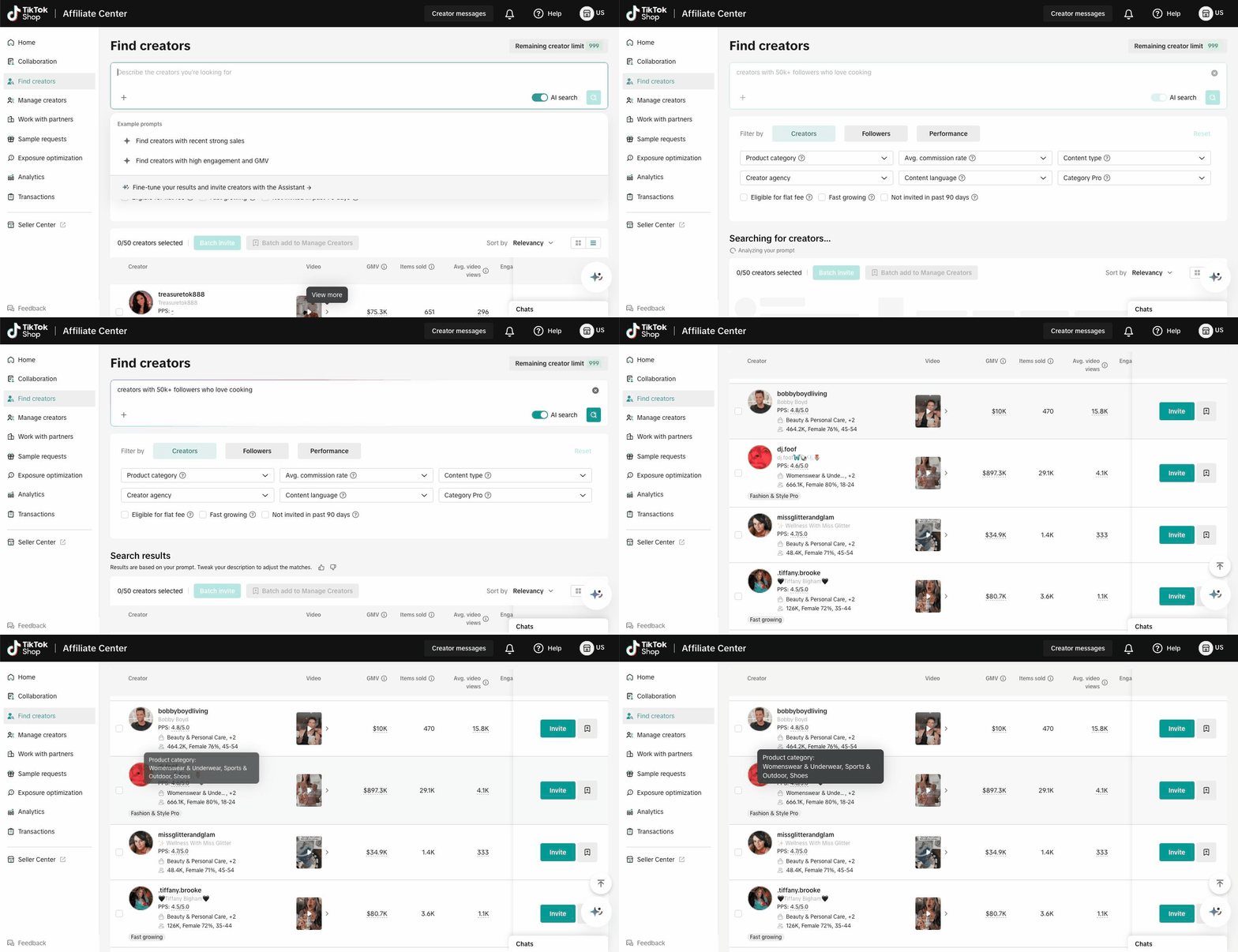
Search 1: "creators with 50k+ followers who love cooking"
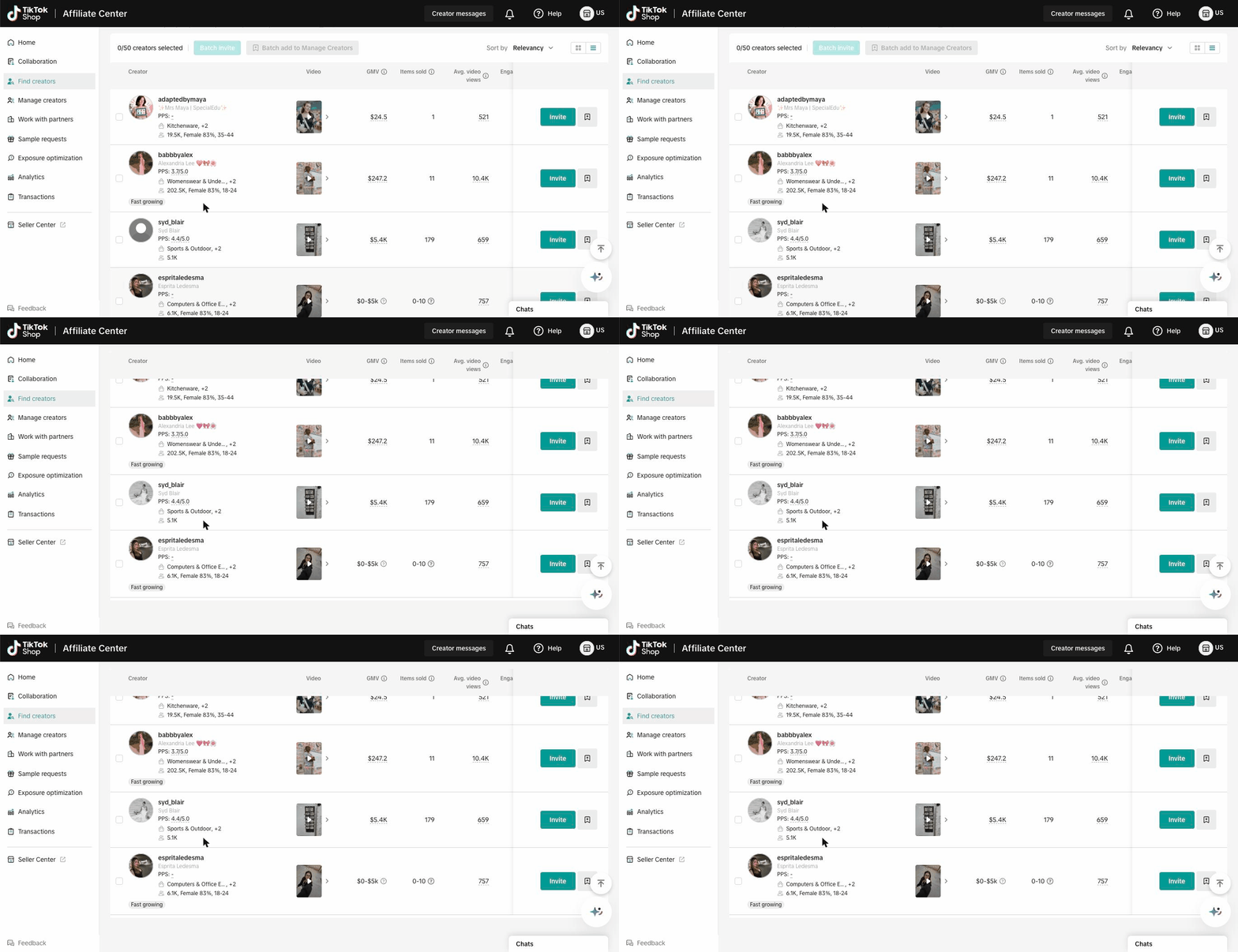
TikTok Affiliate Center: The follower filter worked, with 11 of the first 12 creators over 50K followers. The cooking part didn't. Only 4 of those 12 mainly sell food or drinks, and the third creator on the list sells womenswear, sports gear and shoes. The page also doesn't show how it read your request. It only says is the the results are based on your prompt.
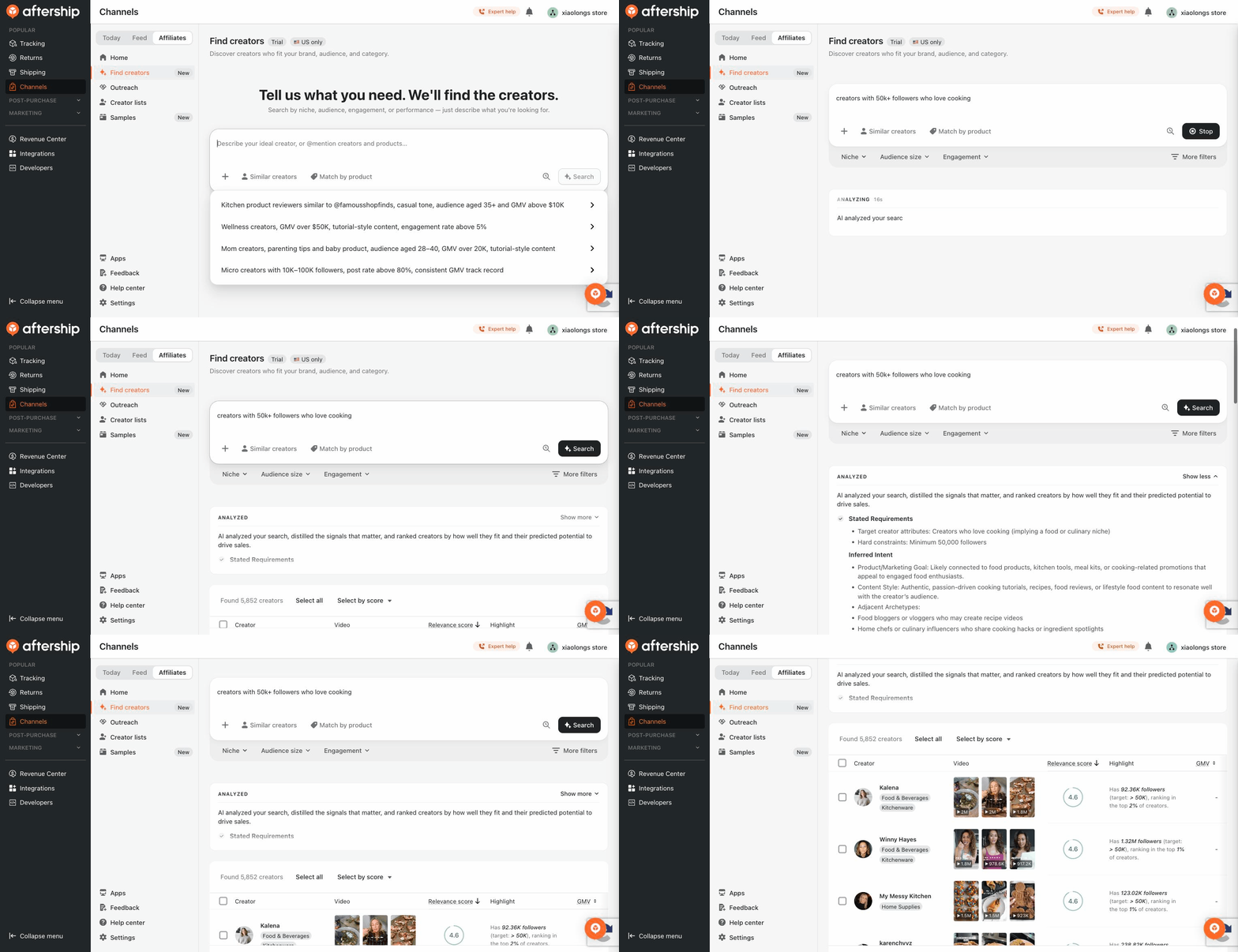
AfterShip Affiliates: It split the request into a niche (cooking) and a hard rule (more than 50K followers). All 15 creators on the first page met the follower rule. Each row shows three recent videos, and on the rows we checked, they were cooking videos.
The matches kept coming further down the list. 23 of the first 105 creators had "cooking," "kitchen" or "chef" in their name, compared with 4 of the Affiliate Center's first 96.
Page 4 alone had 7 cooking creators. That's more than the Affiliate Center found in all 96 results.
Search 1. Affiliate Center: "creators with 50k+ followers who love cooking": hovering the third result shows it sells womenswear, sports and outdoor gear, and shoes.
Search 2. AfterShip Affiliates, same search: the request is parsed into requirements and constraints, then each result shows three recent cooking videos.
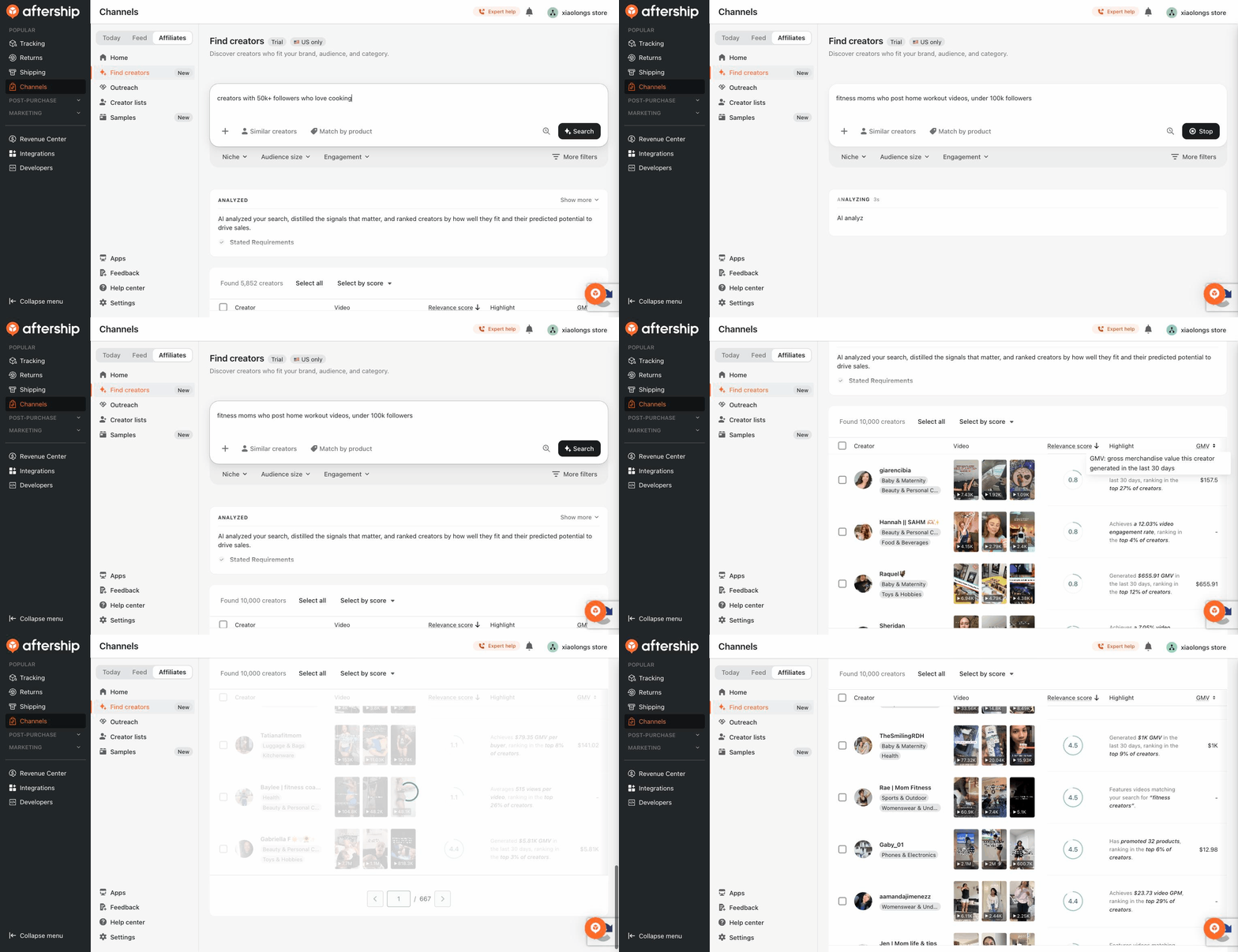
Search 2: "fitness moms who post home workout videos, under 100k followers"
Both tools kept every first-page creator under 100K followers. The difference was who showed up.
TikTok Affiliate Center: Its top three were the same three creators, in the same order, that it returned for a completely different search: “snowboard and ski creators who post gear reviews.” None of its first 12 creators had "mom" or "fitness" in their name.
The results also drifted as we scrolled. Sports & Outdoor sellers made up two-thirds of page one (8 of 12) but less than half of results 49 to 96 (23 of 48). Deal accounts and clothing sellers took their place.
AfterShip Affiliates: It showed how it read the search: "moms" as a persona and "home workout videos" as a content type. Its first two pages are almost all workout videos, from creators who describe themselves as a "fit mom," a "mom fitness" account or a "fitness coach + mom." Many rows point to the matching videos as the reason the creator was picked.
In the first 105 results, 14 creators called themselves a mom or a fitness creator, compared with 5 in the Affiliate Center's first 96.
Search 3. Affiliate Center: "fitness moms who post home workout videos" and "snowboard and ski creators who post gear reviews" return the same top three creators in the same order.
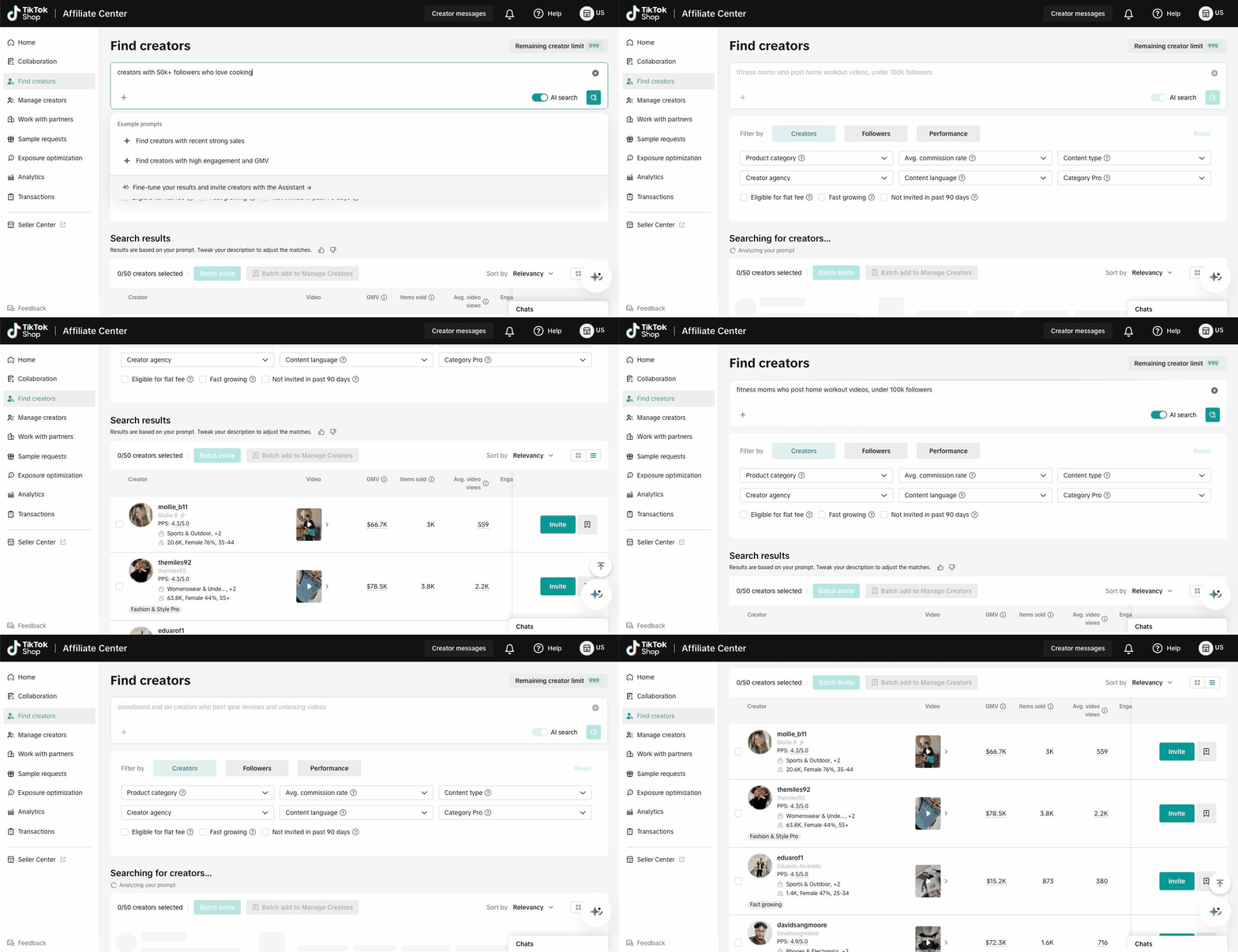
Search 4. Affiliate Center: fitness-moms search, scrolling past the first page showing tools, womenswear and menswear sellers and men’s sports accounts mix in with the few fitness moms.
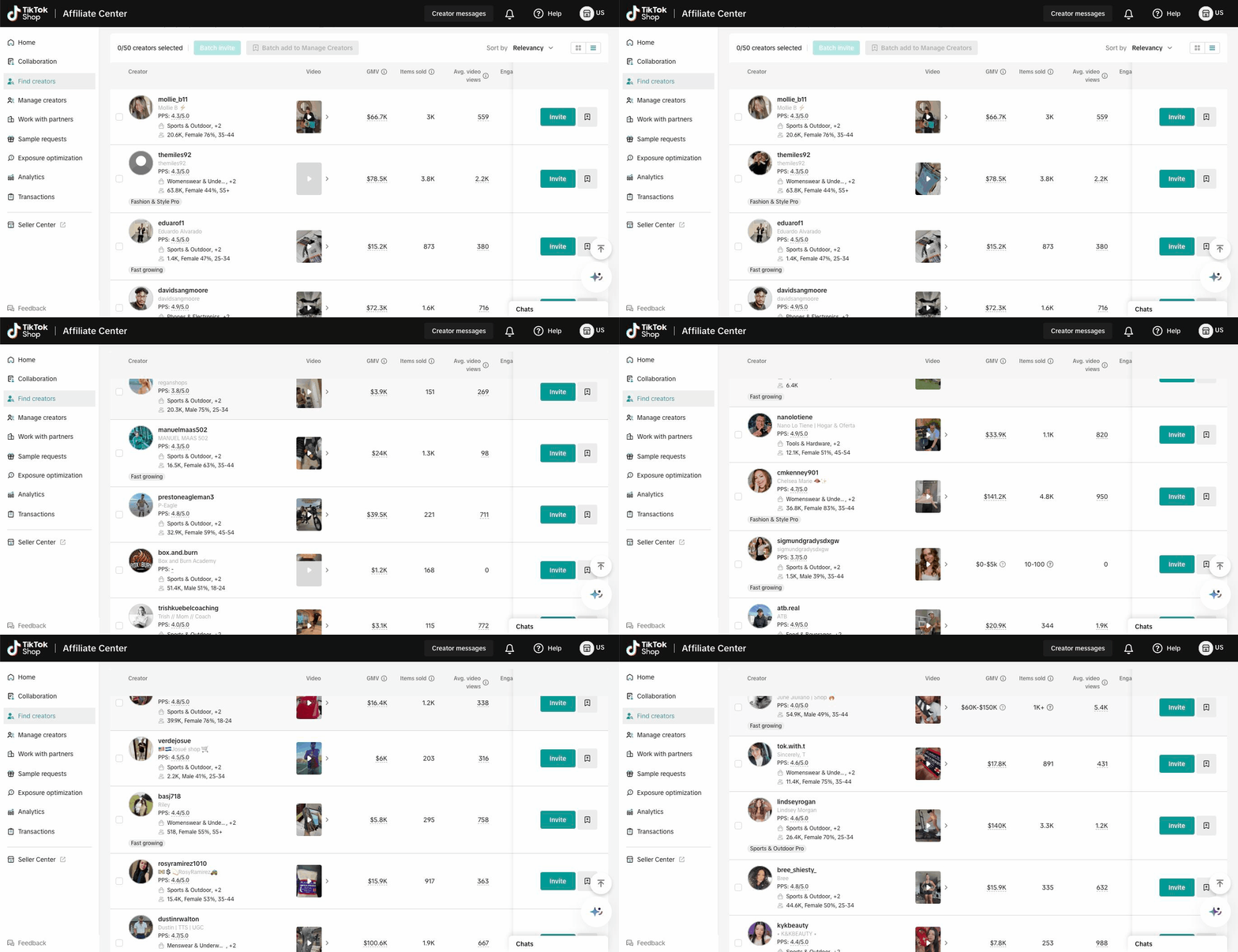
Search 5. AfterShip Affiliates, same search, pages 1 to 2: workout videos throughout, matching-video highlights, and creators such as a “Mom Fitness” account and a fitness creator whose product tag is Furniture.
Search 3: "teachers who share classroom setup and teacher life videos”
This search showed the widest gap of the three.
TikTok Shop Affiliate Center: It returned 4 creators in total, and a second run returned 4 again. Only one of them is a teacher. The other three sell womenswear, sports gear and computer equipment.
That's because "teacher" describes who a creator is, not what they sell. TikTok has no product category for it, so a search built on sales data has very little to work with.
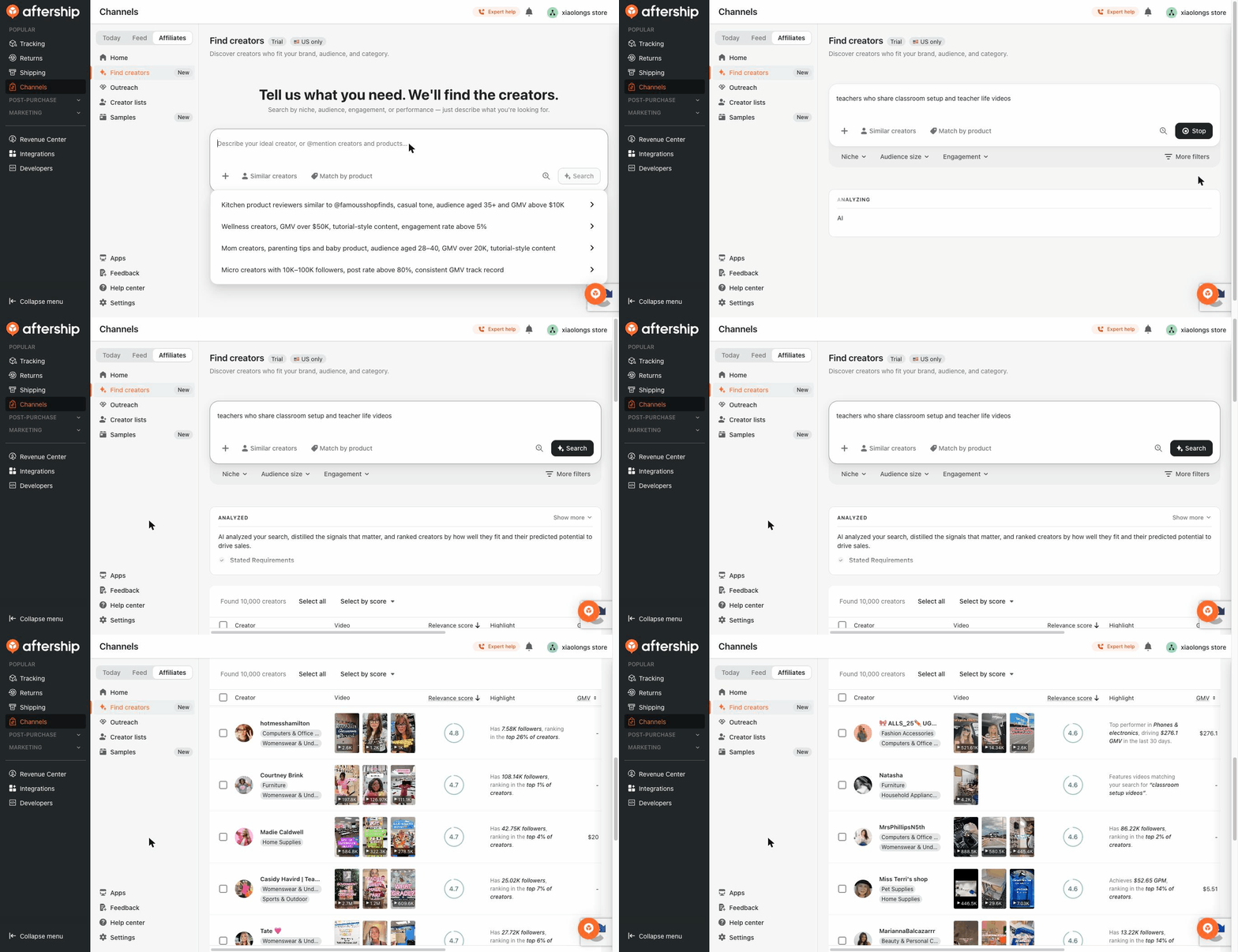
AfterShip Affiliates: It reported 10,000 matches, and we checked the first 103. Of those, 24 had "teacher," "classroom," "educator" or a "Ms." or "Mrs." classroom name in their display name. They include kindergarten teachers, a special-education teacher and a classroom-decor account. The later pages had even more of them than the first page did.
Search 6. Affiliate Center: "teachers who share classroom setup and teacher life videos. The search returns 4 creators in total and the list ends there.
Search 7. AfterShip Affiliates, same search: 10,000 matches, with classroom videos and teacher creators on the first two pages.
Why the results differ: sales data vs content
The gap comes down to what each tool knows about a creator.
| TikTok Shop Affiliate Center | AfterShip Affiliates | |
|---|---|---|
| Knows creators by | What they sell: GMV by product category, sample scores, collaboration metrics | What's in their videos |
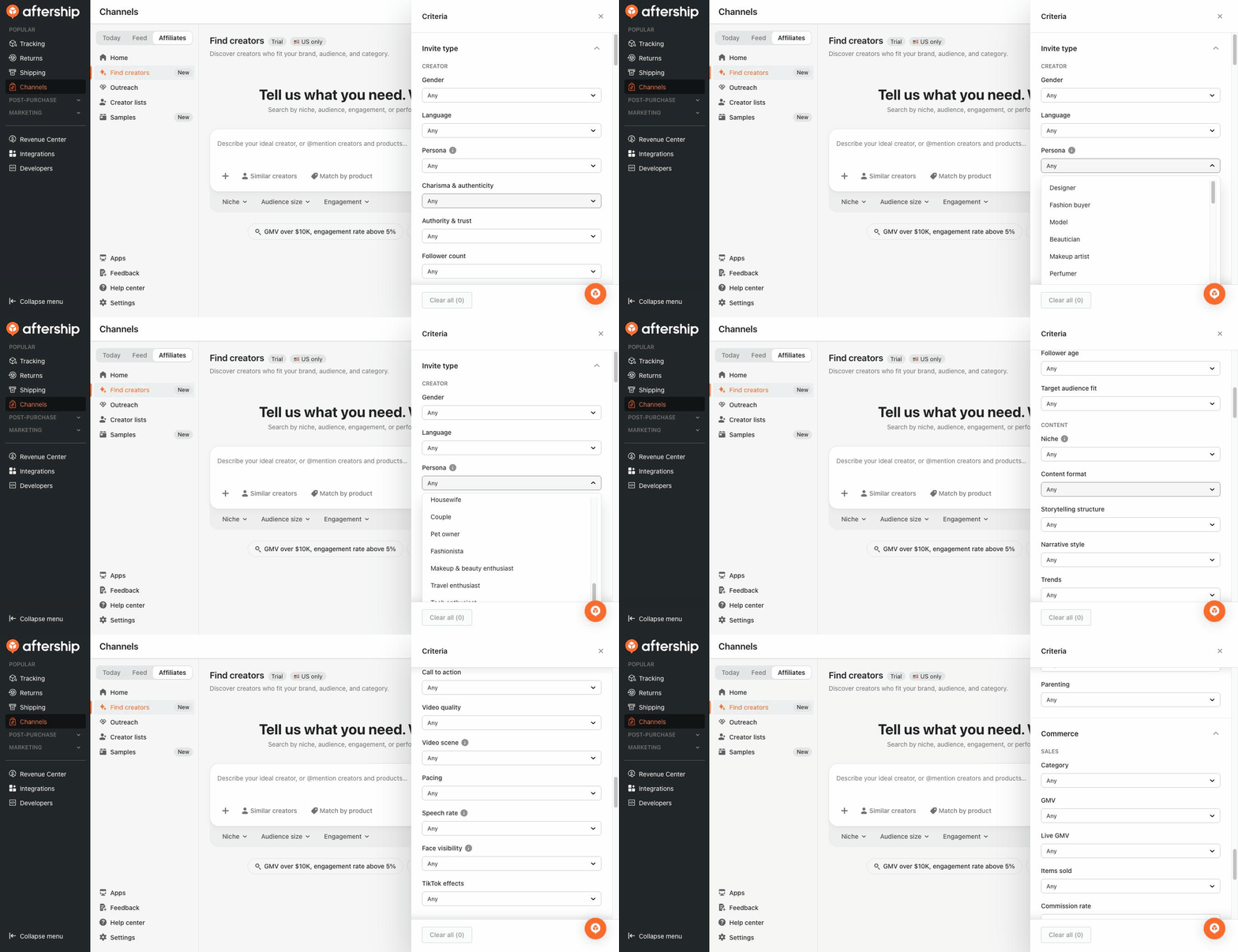
| Search filters | Product category, agency, language, follower demographics, performance metrics, sales-based Category Pro badge | 42+ Creator personas (such as mom, fitness coach, pet owner, foodie), target-audience fit, 20 content attributes |
| Content filters | Video or LIVE only | Format, storytelling, tone, setting, pacing, face on camera |
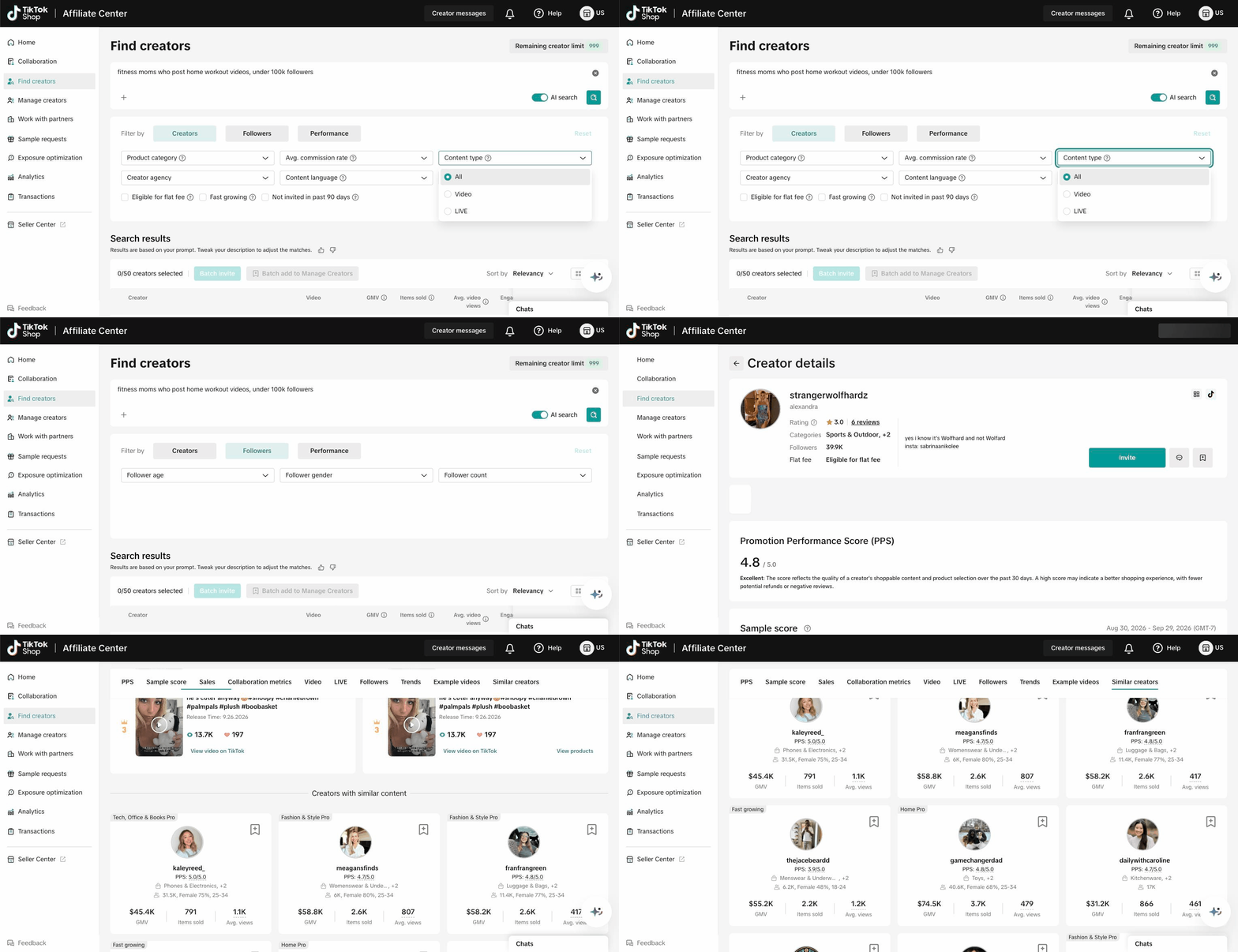
| In our test | A fitness-apparel creator's "similar content" panel suggested sellers of phones, womenswear, luggage, toys and kitchenware | A creator who calls herself a fit mom showed up on page 2 of the fitness search, even though her product tag is Furniture |
TikTok's guide says Smart Creator Search can also match on video genre and persona (Smart Creator Search guide), but we didn't see either in these results. A search that only looks at what a creator sells would never connect that fit mom to fitness.
Search 8. Affiliate Center: the Find Creators filters, where content type offers only All, Video or LIVE, then the "creators with similar content" panel on a fitness-apparel creator's profile, which lists sellers of phones, womenswear, luggage, menswear, toys and kitchenware.
Search 9. AfterShip Affiliates: the Criteria panel, scrolling from persona (42 values) through the content filters such as format, tone and video scene.
What this means for your BFCM invitations
With a weekly quota, a search that stays on target for several pages can fill a week of invitations from one list. When the results drift after the first dozen, you end up rewriting the prompt and running it again, and some of the off-target creators slip into your invitations anyway.
On the persona and content briefs we tested, AfterShip Affiliates kept finding the right creators well past the first page. One good list can fill a week of invitations. A list that drifts means rewriting prompts and wasting slot.
After the search: a first message written for each creator
Finding the right creators is only half the job. An invitation that gets ignored still uses up a slot.
AfterShip Affiliates writes each direct message for the creator who will receive it, based on:
- What their videos show
- The product you're promoting
- The tone you pick: professional, friendly or enthusiastic
The messages don't quote a creator's follower count or GMV back at them. When there isn't enough to say something relevant, the tool sends a standard template instead of inventing a connection. You can preview every message before it goes out.
Run your own search
The quickest test is the search you were already planning to run in Seller Center this week:
- Type the same description into AfterShip Affiliates.
- Check how it read your request and which videos show up on each row.
- Compare the first few pages with what the Affiliate Center gives you.
- Preview the message each creator would get before you spend any invitations.
Disclosure: AfterShip Affiliates is a paid product. You can rerun every search in this piece in Seller Center for free.
You launched on TikTok Shop. Creators are how you grow it. AfterShip Affiliates finds the right creators to sell your products, reaches them at scale, and tracks every dollar of GMV they drive.
Get a demoFrequently Asked Questions
Is the TikTok Shop Affiliate Center free?
Yes. The Affiliate Center has no subscription fee. What you pay for is the commissions, flat fees and samples you offer creators.
Do third-party affiliate tools get more outreach than Seller Center?
No. TikTok says invitations sent through the API or third-party tools use the same weekly quota as invitations sent in Seller Center. A tool can change which creators your invitations go to, but TikTok sets the quota.
What changes on October 9, 2026?
TikTok starts rolling out a weekly invitation quota based on your seller tier and each creator's tier. You can add up to 200 creators to new invitations a day, and sellers whose invitations perform well can earn bonus invitations. You can see your current quota for each creator tier under Collaborations > Target Collaborations.
Is Smart Creator Search good enough for BFCM creator outreach?
US sellers can use it to search in plain language and to anchor a search on a product or a reference creator. On the persona and content briefs we tested, it found 4 cooking creators and 5 fitness moms in its first 96 results, and it returned only 4 creators in total for a teacher search.
How did you compare the two searches?
On October 1, 2026 we typed the same words into both tools, read up to about 100 results from each, and counted the creators whose display name matches the brief. It's a strict test, and anyone can rerun it.
Why did the Affiliate Center return only 4 creators for teachers?
Its search and filters are built around product categories and sales data, and "teacher" describes a persona, so there is no product category to match it to. AfterShip Affiliates tags creators by persona and by what their videos show, which is why the same search returned 10,000 matches there.
Can AfterShip Affiliates personalize creator outreach messages?
Yes, for direct messages. It writes each message for the creator who will receive it, based on their content and the product you're promoting. You pick the tone, you can preview every message before it goes out, and it falls back to a standard template when there isn't enough to say something relevant.
