Why Your Basic Tracking Setup Is Costing You More Than You Think
Is your team still spending hours each day answering "Where is my order?" tickets? That is not a customer service problem, it is a sign your tracking setup has stopped matching what you now need it to do. Which tier is right for you is set by the capabilities your volume makes worth paying for, not by the volume itself. The one exception is the Free plan's hard 50-shipment cap. If returns are on your list as well, the AfterShip Returns plans are priced on their own ladder.
Before you compare tracking platform tiers, get a number you can defend. Pull last month's helpdesk export, count what share of contacts asked where an order was, and price that share at a cost per contact. Do not borrow someone else's ratio. Yours is the only one your finance lead will accept.
Gartner published the unit cost in February 2024. Median cost per contact is $1.84 self-service against $13.50 assisted. Gartner measured across all industries, not only direct-to-consumer retail, so read the figure as an order of magnitude for your own model.
Agent time is only the first of three costs. The second arrives when a shopper leaves your site for a carrier's page. Baymard's 2025 research on self-service found that the retailer has no control over how a third-party shipper presents information, and that some shoppers blame the store rather than the courier for what they find there.
The third is engagement you have already paid for and do not collect. AfterShip reports 3.2x views per order on a branded tracking page. Those are repeat visits from people who have already bought, landing on a page you own. If your storefront runs on Magento, the equivalent setup is covered in what a Magento storefront needs at each tier.
Shoppers expect that page to exist. Baymard's 2026 quantitative research found 51% of respondents say checking order status or delivery tracking is one of the most important account features an ecommerce site can offer.
Moda Operandi reduced shipment exceptions by 25% and cut WISMO inquiries by 65%.
Reported in AfterShip's Moda Operandi customer story.
Three costs, three separate sources. Resist rolling them into one headline figure, because that is the first thread anyone reviewing your business case will pull.
The Growth-Tier Framework: Matching Capabilities to Order Volume
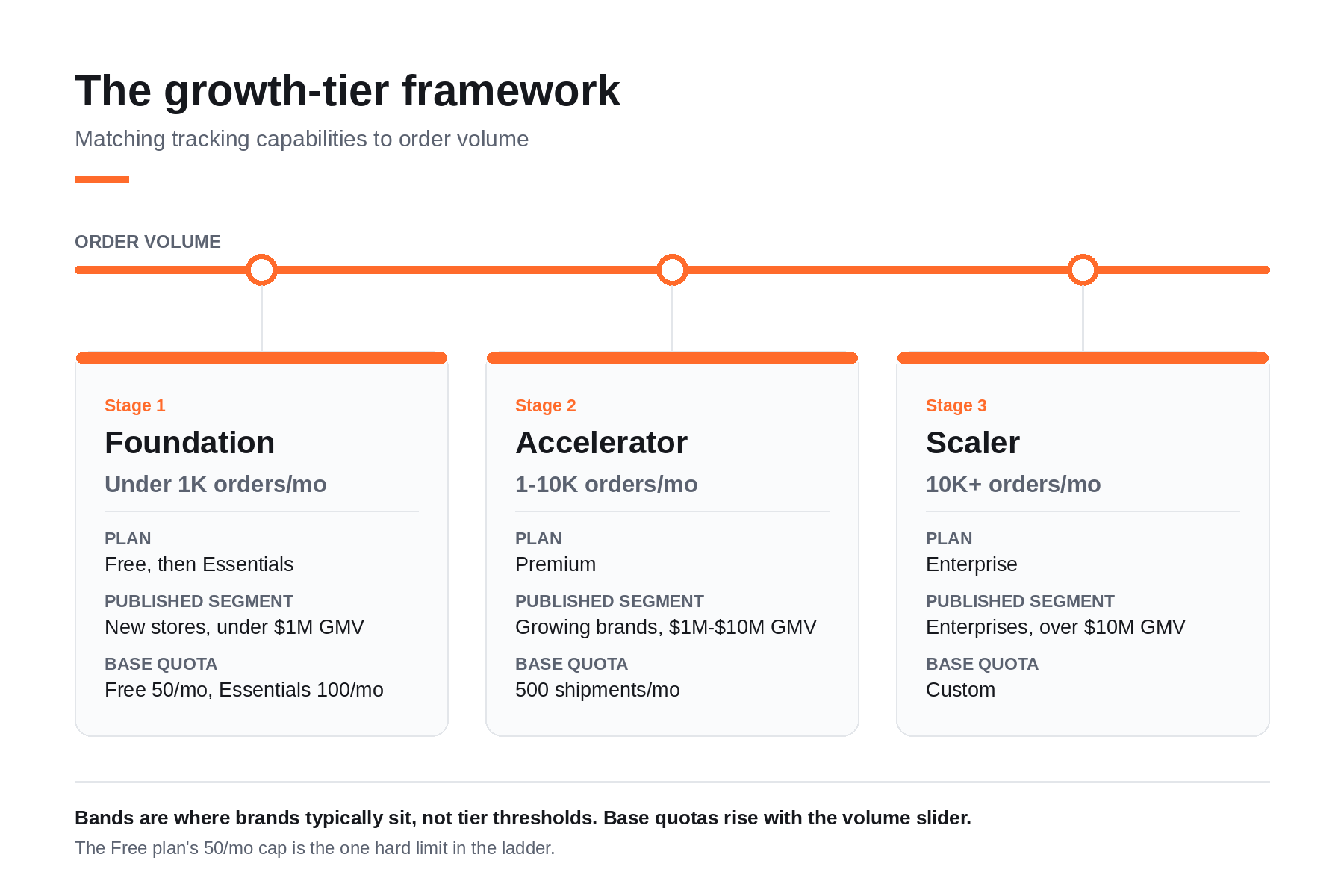
Growing brands need features that match their specific order volume. AfterShip's own customer segmentation maps ecommerce tracking features onto three stages: Foundation is under 1,000 orders a month on Free or Essentials (under $1M GMV), Accelerator is 1,000 to 10,000 on Premium ($1M to $10M), and Scaler is 10,000 and above on Enterprise (over $10M).
Read those bands as where brands typically sit, not as thresholds that force a tier.
Crossing a volume line does not move you up. On the pricing page a volume slider sets your quota and your price together, so a plan's published shipment allowance is a starting point you can raise without changing tier. What moves a brand between tracking platform tiers is a capability it has started to need. The single exception is the Free plan, whose cap is hard and cannot be raised at all.
Stage 1: The Foundation (Under 1K Orders/Month) - Winning Back Time
What Essentials buys at this stage is the ability to reach a customer before they reach you. Proactive email and SMS notifications fire on shipment events, so the update arrives without anyone opening a ticket.
Delivery sub-status reporting, split-order digest notifications and carrier auto-correction cover the cases that generate the most confusing contacts. An order arriving in two boxes. A parcel stalled at a stage the top-level status does not name. A mistyped carrier that would otherwise return nothing. Multi-lingual support handles customers who do not read your store's default language.
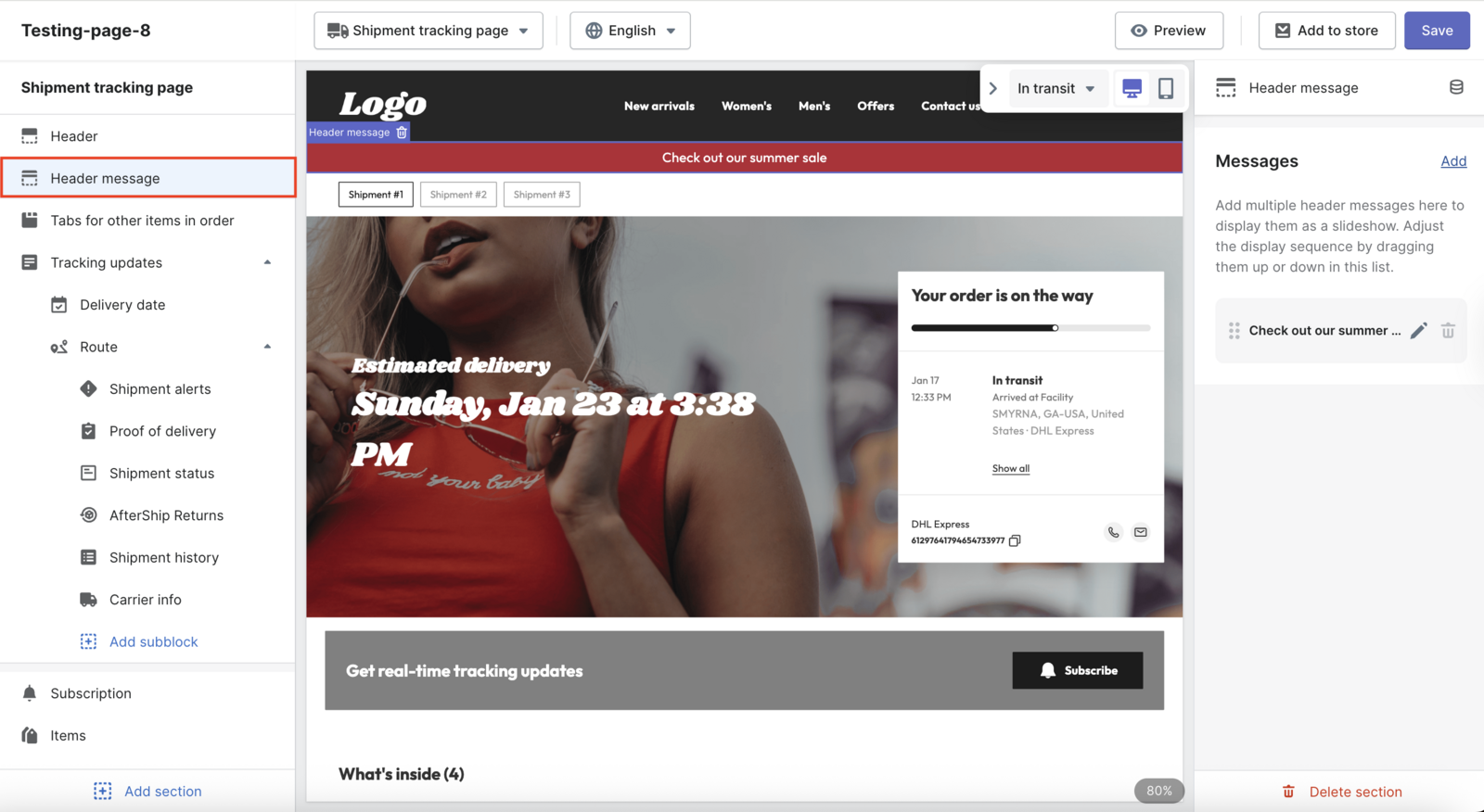
Be clear about what you are not buying here. A branded tracking page is already included on the Free plan, along with carrier-based delivery estimates and carrier auto-detection. What Essentials adds to that page is your own logo and colours.
The other thing Essentials adds is room. Free covers 50 shipments a month, as published on AfterShip's Shopify App Store listing, with a one-time free import of up to 500 shipments. Essentials raises the base to 100 shipments a month at $11 billed monthly, or $9 a month billed annually.
Carrier auto-detection and auto-correction are only as good as the network behind them. AfterShip's published count is 2,000+ carriers, listed on its Tracking pricing page and checked on 14 October 2026. Wider detection means fewer of the "where is my order" contacts, or WISMO tickets, that start when tracking simply stops updating.
At this stage the question worth asking is whether a customer ever has to ask you for an update that your own page could have sent them first.
Stage 2: The Accelerator (1-10K Orders/Month) - Owning the Experience
Premium is where the tracking page becomes yours. Custom CSS, custom statuses, tracking clips and multiple pages sit behind your own domain with AfterShip branding removed, so a waiting customer stays inside an experience your team controls.
Post-purchase messaging moves into the stack you already run. Integrating with your marketing stack like Klaviyo, or with Attentive on SMS, lets tracking events fire the same flows as the rest of your marketing, with delivery context attached to each one. AI product recommendations turn the page a customer keeps returning to into a merchandising surface.
That combination is what merchants at this stage tend to single out. AfterShip Tracking holds 4.7/5 across 311 reviews on G2.
AI-powered delivery estimates (AI EDD) put a date on the product page, at checkout and on the tracking page, accurate up to 95%. A shopper who believes the date waits for it.
The full analytics feature set covers carrier performance, transit times and exceptions. Carrier performance analytics show which lanes produce delivery exceptions. A carrier portal reports on its own parcels, and a platform's native tracking reports on orders, but neither one normalizes every carrier's status vocabulary into a single order-level model. That normalization is what makes the data prescriptive: a lane you can renegotiate, a carrier you can move volume away from, a delivery promise you can defend with evidence. For a brand at this volume, that turns a suspicion about a slipping carrier into something you can put in front of them.
Premium runs $70 billed monthly, or $59 a month billed annually, on a base of 500 shipments a month, with the Tracking API and webhooks available at 10 requests per second. At this stage the page, the promise and the data all become assets your team owns and can act on.
Stage 3: The Scaler (10K+ Orders/Month) - Operating at Scale
Enterprise is the tier most buyers misread. The analytics, the delivery estimates and the API all arrive at Premium and stay there. What Enterprise adds sits around the product: the operational and governance layer a larger organisation needs in order to run it.
Dedicated onboarding comes with a named CSM who stays with the account, so the person who picks up during peak already knows your carrier mix. Enterprise security arrives with contractual SLAs and enterprise SSO, which starts to matter once access is owned by an identity team instead of an ops lead.
Multi-org management is usually the capability that triggers the move. A business running several storefronts, or one brand across several regions, can hold them under a single organisation with reporting that consolidates across all of them.
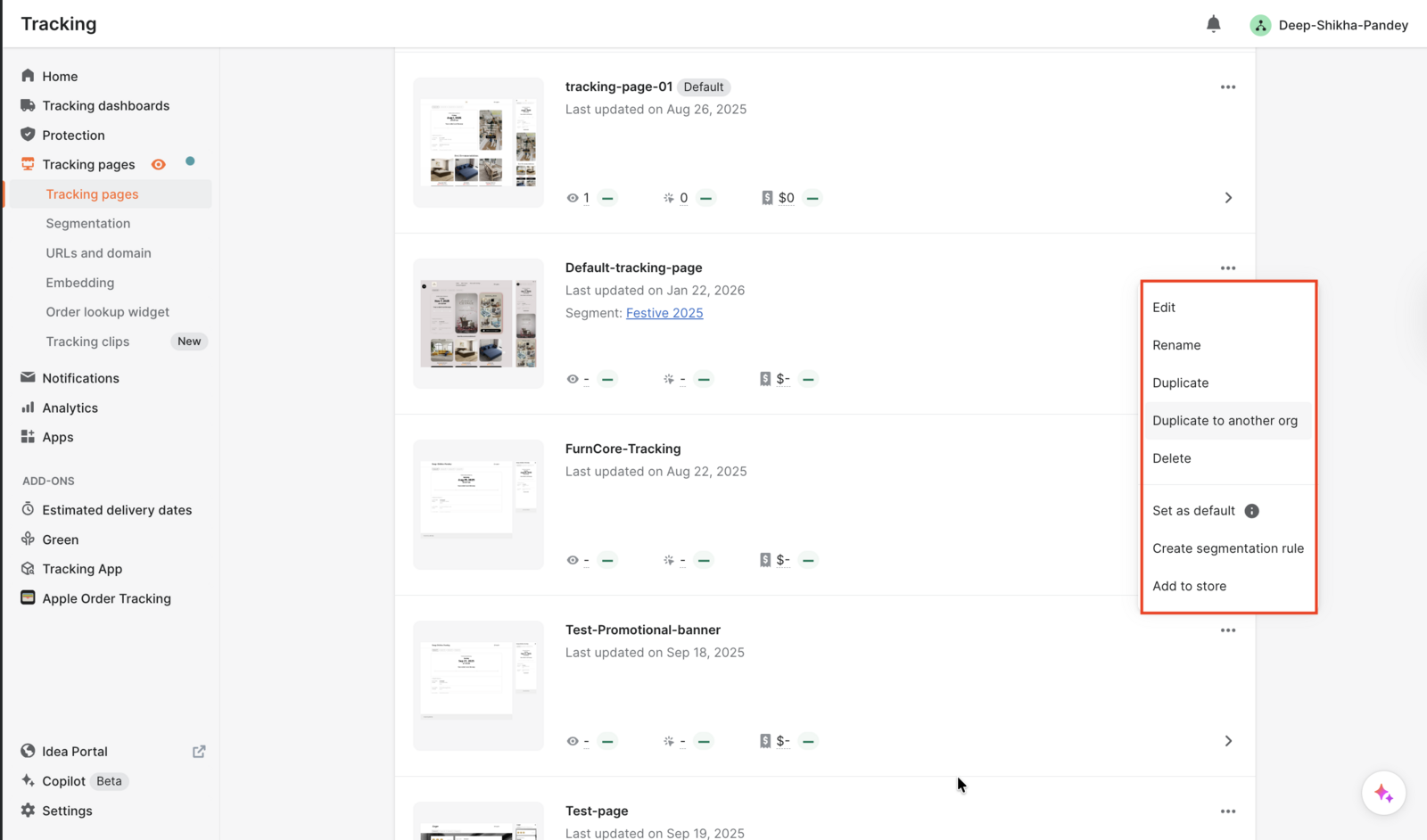
The rest is contractual and technical fit: contracts can be non-standard, integrations can be built against a proprietary OMS, WMS or ERP when the systems of record predate anything an off-the-shelf connector expects, and the API rate limit is set per account above Premium's published ceiling.
None of that appears on a pricing page, which is why Enterprise is quoted and not listed. When your constraint has moved from what the product does to how your organisation runs it, talk to an expert about what the contract needs to cover. The platform underneath is the same one your team was already running at Premium, so the move adds governance to a system they already know.
Which Tracking Tier Is Right for Your Brand?
Find your problem in the left column, then read across to the capability that solves it and the tier it sits on.
| Business Challenge | Under 1K orders/mo (Free and Essentials) | 1-10K orders/mo (Premium) | 10K+ orders/mo (Enterprise) |
|---|---|---|---|
| Reducing order-status tickets | Free page; Essentials adds proactive notifications | AI EDD sets a date shoppers trust | Premium tooling, plus a named CSM |
| Brand control of the experience | Essentials adds your logo and colours | Custom domain, custom CSS, no AfterShip footer | Same page tooling across every organisation |
| Driving repeat revenue | Branded page shoppers return to | AI product recommendations on that page | Same, duplicated across storefronts |
| Justifying software spend | Published quota; Essentials adds an overage rate | Slider prices your next tier | Non-standard contract terms available |
| Operational efficiency at scale | Carrier auto-correction on Essentials | Carrier and lane performance analytics | Enterprise SSO, SLAs, multi-org management |
On the Tracking pricing page you can compare the plans with each quota and its overage rate printed together. Essentials bills $0.08 per shipment past your quota and Premium bills $0.12, charged only on what you exceed, with alerts and no service cut-off.
Read that as a billing signal. At 500 shipments a month billed monthly, Essentials at a 100 quota plus 400 overage is $43, the same plan with the slider at 500 is $35, and Premium is $70. Buying room inside your tier is cheaper every time. The extra $35 buys the custom domain, the delivery estimate and the carrier data.
Beyond Tracking: When to Bundle Your Post-Purchase Stack
Return volume scales with order volume, and it scales faster than most teams plan for. The brand that has just fixed its tracking usually finds the queue has simply moved: the tickets asking where an order is have been replaced by emails asking how to send one back.
AfterShip sells shipping, tracking, returns, and warranty as one post-purchase suite, which means the returns decision does not have to start with another vendor evaluation. If you already run tracking on the platform, you can manage your returns process on the same order data and the same carrier network.
Warning: once tracking is handled past 10K orders a month, a manual returns process is the next constraint.
That threshold is not arbitrary. It is the point at which a spreadsheet-driven RMA process stops absorbing the volume, and the labour cost of running it starts to look like the ticket cost you have just removed. Brands at that threshold can see post-purchase software compared for mid-market brands before adding another vendor contract.
The Verdict: Which Tier Is Worth Paying For
Most advice on when to upgrade tracking plan tiers starts with volume. These two lists start elsewhere, on different axes: staying is about organisational readiness, moving up is about a capability you can name.
Stay on your current tier if:
- order-status contacts are absorbed inside existing helpdesk hours with no dedicated owner
- post-purchase has not yet appeared in a marketing or roadmap plan
- a fixed monthly software line is still hard to defend at your stage
- you cannot yet name the one metric an upgrade would move
Move up a tier if:
- you need the tracking page on your own domain with no AfterShip footer
- you need automation rules that act on an exception rather than report it
- you need carrier and lane analytics to hold carriers to their service levels
- you need Klaviyo or Attentive to fire on tracking events
- you need SSO, multi-org and a named CSM
One honest exception runs against all of it. For a new store under 50 shipments a month, the Free plan's hard cap, Free is the right place to start: a branded tracking page, carrier-based delivery estimates, carrier auto-detection, and a one-time import of 500 shipments, per the Shopify App Store listing. Do not pay for what you do not need yet. The ladder is there for when you do.
Proactive shipment tracking that delights your customers, reduces WISMO tickets, and improves your delivery performance.
Compare Tracking PlansFrequently Asked Questions
What happens if I go over my monthly shipment quota?
You are billed for each shipment past your quota, not cut off. The per-shipment overage rate is published next to each plan's base quota, and the charge applies only to what you exceed by. There is no hard spend cap and no service interruption, so a peak month raises your bill without breaking your tracking.
Can I put the tracking page on my own domain with Essentials?
No. Essentials gives you a branded tracking page carrying your own logo and colours, but a custom domain and the removal of AfterShip branding are Premium capabilities. If your priority is that a customer never appears to leave your site, that is a Premium decision.
How does AfterShip know which carrier a tracking number belongs to?
Carrier auto-detection matches a tracking number to its carrier automatically and is included on the Free plan. Carrier auto-correction, which fixes a mis-assigned carrier before it reaches the customer, is an Essentials capability. Both run against AfterShip's carrier network, so a store shipping across several carriers never has to tell the system which one to check.
Do I need Enterprise to get the analytics or the Tracking API?
No, and this is the most common misreading of the ladder. The full analytics feature set, AI EDD, and the Tracking API and webhooks are all Premium capabilities. Enterprise adds an operational and governance layer on top: dedicated onboarding with a named CSM, contractual SLAs, enterprise SSO, multi-org management, and custom integrations against a proprietary OMS, WMS or ERP.
What tracking features do growing ecommerce brands need?
A brand between 1,000 and 10,000 orders a month typically needs four things a basic setup does not provide: a tracking page on its own domain, proactive email and SMS notifications, a delivery estimate accurate enough that shoppers act on it, and carrier and lane analytics granular enough to hold carriers to their service levels. On AfterShip Tracking all four sit on Premium.