How many times today did you open a carrier's website on a customer's behalf? If the answer is anything above zero, your tracking tool is doing the easy half of the job and handing you the hard half.
Most AfterShip vs 17track accuracy comparisons you will read assert that one tool is more accurate. Almost none of them show you how to check. So ask a blunter question before you look at a single feature list: when a vendor says its tracking is accurate, what number is it pointing at, and can you find that number yourself?
You can. It takes about ten minutes. It starts with understanding why a tracker that is slightly wrong turns into work that lands on your desk.
Why an Inaccurate Tracker Turns Into Support Tickets
A "where is my order" ticket usually starts with a customer who looked at your tracking page, did not believe what they saw, and asked a human instead.
Three separate mechanisms produce that same ticket.
The first is lag. A carrier scans the parcel in the morning, your tracking page shows the scan in the afternoon, and the customer who checked at noon saw a page that looked frozen.
The second is vocabulary. One carrier calls it "In Transit", another says "Arrived at Facility", a third posts "Manifest Received". Your customer reads three different words for one situation and cannot tell which of them means the box is moving.
The third is the silent date change. The delivery estimate slides by two days, nobody tells the customer, and the promise you made at checkout quietly breaks itself.
At 50 to 1,000 orders a month there is no support team to absorb any of this. The tickets land on the person who is also doing purchasing, packing and marketing, which is where the real cost of a cheap tracking tool shows up: in your hours.
Each of the three mechanisms is testable before you buy. Lag maps to refresh cadence, vocabulary maps to status standardization, and the moving date maps to delivery prediction. Those three tests are what separate a general-purpose lookup tool from a dedicated tracking solution.

The Three Questions That Actually Separate Tracking Tools
Ask any tracking vendor these three questions, in this order. Every answer below comes from a page the vendor publishes itself, so you can open the same pages and confirm the wording has not moved since this was written.
Question 1: What is your delivery-prediction accuracy, and where is it published?
AfterShip publishes the number. Its AI EDD pages state delivery-prediction accuracy of up to 95%, and state that the model is trained on over 4.4 billion shipments, which is the part most vendors leave out. Coverage is published alongside it: AfterShip states that its estimates cover at least 80% of deliveries, while most carriers typically offer predictions on less than 40%. AfterShip also names a customer against that figure, with Dr. Squatch reaching 88% EDD accuracy.
17TRACK publishes no delivery-prediction accuracy figure of any kind. That is not a statement about how its predictions perform. It is a statement about how much you can verify before you pay, which is nothing.
Question 2: How often does the data refresh, and where is that documented?
AfterShip documents timely updates via API (around 60 min. or less), plus instant delivery status updates via webhook, on its Tracking page.
17TRACK's own developer documentation, as published in August 2026, states that subsequent trackings will be made every 6~12 hours based on the shipping status checked last time, and that delivered and exception packages are checked every 24 hours.
Both vendors document a cadence, which is more than most of this category manages. One is documented in minutes and one in hours, and that gap is exactly the frozen page your customer emails you about.
Question 3: Do forty carriers arrive as one status model, or as forty?
This is the question almost nobody asks and one that quietly shapes your ticket volume. Both vendors publish a status model, so the test is which surface the wording sits on, because the surface tells you who the capability was written for.
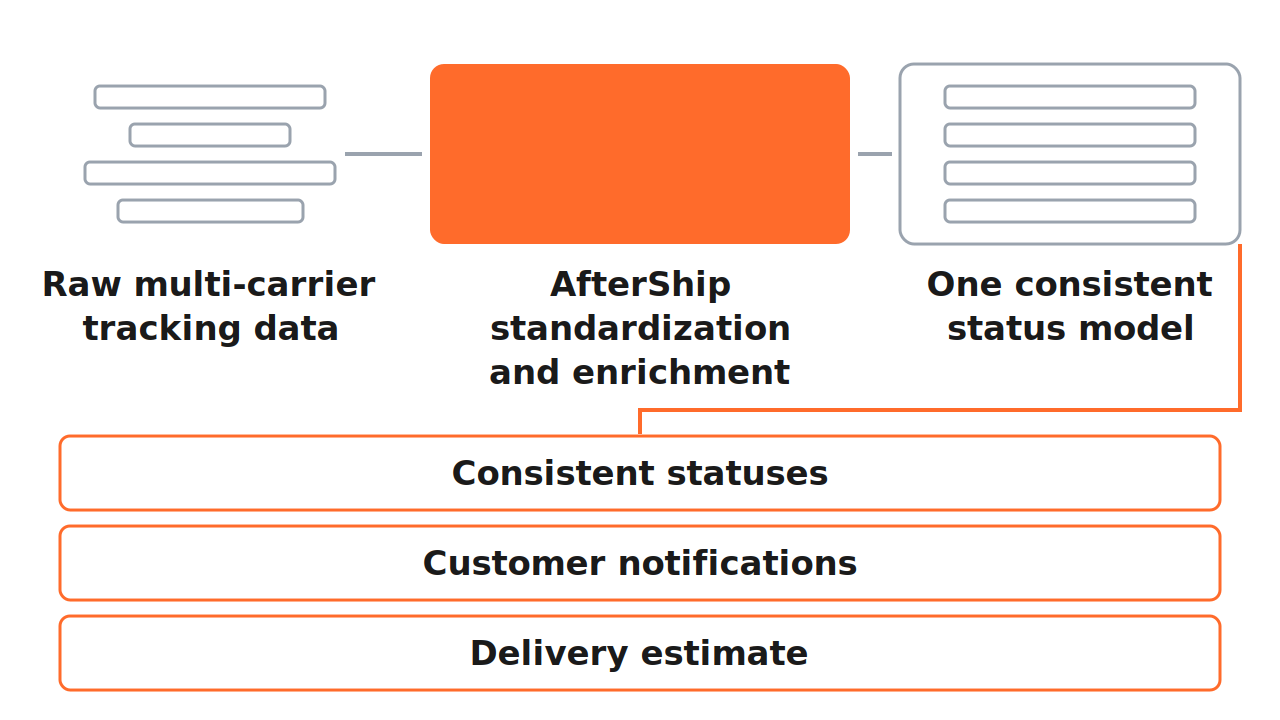
AfterShip publishes automatic delivery status standardization and tracking information enrichment as capabilities of the merchant product, on its Tracking page, across 1,400+ carriers in one integration. Separately, and as a matter of standing in the postal system itself, AfterShip is the only tracking service provider that is an official UPU Consultative Committee Member, the regulatory authority of the world's post offices.
17TRACK publishes its status model in its Tracking API documentation, which sets out a main status of the shipping process along with sub-status and status-code tables. Its API page describes that product as "For developers and dev-capable teams" and as "Built for logistics providers, ecommerce platforms, SaaS companies, and payment platforms".
So run the check on the page, not on the claim. 17TRACK documents its status model on the surface a developer builds from. AfterShip documents standardization on the surface a merchant buys from.
Run all three tests before you migrate anything, and run them on the tool you already pay for. Then take two or three shipments currently in transit, open the carrier's own site and your tracking page side by side, and see whether they agree and how far behind yours is running. That is cadence, measured on your own orders.
On accuracy, on cadence and on standardization, AfterShip answers each one with a published figure, a documented refresh window and wording you can quote back to it.
AfterShip vs 17track: The Head-to-Head
Both of these are real merchant products. 17TRACK ships a genuine merchant offering carrying Shopify's own Built for Shopify badge, and on the three tests above it publishes a documented refresh cadence and a status model, with no accuracy or coverage figure alongside them.
So the table below compares what each vendor publishes, not what each vendor claims. Every cell traces to a page you can open. Where a vendor documents nothing, the cell says so. If you want the wider field before you commit, we maintain a complete overview of tracking platforms covering the rest of the category.
| Criteria | AfterShip | 17track |
|---|---|---|
| Delivery date prediction, published accuracy | AI EDD, up to 95%, trained on over 4.4 billion shipments | No accuracy figure published |
| Update cadence, as documented by each vendor | Around 60 min. or less via API; instant via webhook | Every 6~12 hours; every 24 hours once delivered or exception |
| Carrier status standardization | Automatic status standardization and enrichment, on the merchant product page | Status model published in the developer API documentation |
| Reliability transparency and support | Public component-level status page with dated incident history; 2 business day email response target | 99.9% SLA covering the developer Query API, compensated in API quota |
| Key integrations: Shopify, Gorgias, Klaviyo | Supported | Supported |
| Delivery performance analytics | Centralized dashboard and delivery performance reporting across carriers | Transit time, on-time delivery and exception order analysis, on its top tier |
| Proactive customer notifications | Email from Essentials up; SMS metered by segment and destination; notifications on EDD changes | Email notifications, gated by tier |
| Branded customer-facing tracking page | Your own logo and domain from Essentials, banner assets, status timeline | Branding removal gated to a paid tier |
Sources: AfterShip rows from aftership.com/edd, aftership.com/tracking and aftership.com/pricing/support, verified 2026-08-22. 17track rows from api.17track.net/en/doc and 17track.net/en/api, verified 2026-08-22, and the 17TRACK Shopify App Store listing, verified 2026-08-13.
Use it as a checklist. Take any row that matters to your operation, open the source page in a second tab, and confirm the wording for yourself before you weigh it. Read down the first column and the pattern is consistent: one vendor answers with a published figure, the other answers with a product built for a different buyer.
The Verdict in 30 Seconds
- Delivery prediction. AfterShip publishes an accuracy figure, a coverage figure, the size of the dataset behind them, and a named customer result. 17TRACK publishes no figure of either kind.
- Refresh cadence. Both document one. AfterShip's is documented in minutes, 17TRACK's in hours.
- Status standardization. Both publish a status model. AfterShip publishes standardization on the merchant product page, 17TRACK inside its API documentation for developers.
- Where AfterShip is honestly weaker. On Essentials or Premium, the plans a business at this volume actually buys, AfterShip ships Standard support with no contractual uptime SLA. The contractual SLA is a Silver or Gold feature and is realistically out of reach at this size. Set against that, AfterShip publishes a public, component-level status page with a dated incident history, so you can verify reliability yourself instead of accepting a number on trust. 17TRACK's own 99.9% SLA covers its developer Query API and compensates in API quota, so it does not reach a Shopify merchant's tracking experience at all.
- Where 17TRACK is the right answer. A merchant who needs multi-carrier lookup and a tracking page, and nothing more demanding than that.
- What decides it. Each figure in AfterShip's column can be checked before you spend anything.
It Is More Than a Dot on a Map
Your customer sees a page, and judges you on it.
That page is one of the few parts of the fulfillment chain they open by choice. It gets opened repeatedly during the days when the purchase is still fresh and the buying decision is still being validated in their head.
On an AfterShip branded tracking page, that page carries your logo and your domain. It carries your marketing and banner assets, which point that traffic back at your catalogue. Underneath sits a clean status timeline and an AI-powered delivery estimate, which is the same prediction engine the accuracy figure describes.
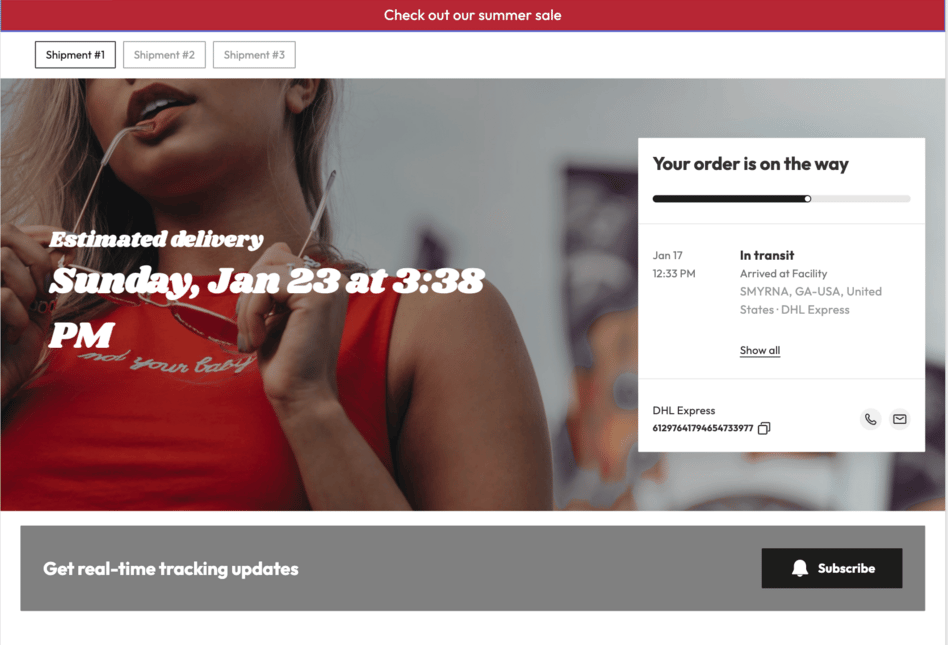
Picture the alternative. A shopper who clicks a tracking link and lands on a page carrying a logo that is not yours has left your store, and whatever they do in the next few minutes belongs to somebody else's session. The parcel still arrives. The attention goes somewhere you do not control, at a moment when the customer is thinking about the thing they bought from you.
One caveat worth being straight about, because it affects what you should test on the free plan. Logo customisation starts at Essentials, so the free AfterShip tracking page is not on-brand. Evaluate the free plan for data quality, and evaluate the paid plan for the page your customer sees.
On the 17TRACK side, the equivalent controls sit behind a paid tier: its Shopify listing shows delivery estimates and branding removal as line items on the same paid plan. That is worth knowing before you compare entry prices, because the entry tier and the tier that produces a modern, brand-first tracking experience are not the same tier.
AfterShip hands you that page as merchandising surface, under your own brand.
What the Numbers Look Like in Practice
Method is only worth so much without an outcome attached to it.
In a published AfterShip case study, Mous reported that its contact rate, meaning WISMO tickets measured against order volume, fell from 12.9% to 5.9%. That is a 54% relative reduction in the exact ticket category this article opened on. Mous is a larger brand than the reader this article is written for, and the figure comes from a documented case study. Treat it as evidence that the mechanism works. Your own first month will produce your own number.
The mechanism itself is the unglamorous part. Fewer surprises reaching the customer means fewer customers writing in.
At your volume the arithmetic is smaller and the shape of it is identical. A customer who gets an accurate estimate, and a status update they can read without translating it, has no reason to open your inbox. Remove the reasons and the tickets go with them.
That is what to look for when any vendor shows you proof: a named customer, a stated denominator, and a figure you can trace to a published page and check yourself. AfterShip's is on the record.
The Final Verdict: When to Choose AfterShip vs 17track
For a Shopify business at this volume, AfterShip is the choice, and the reason is auditability.
AfterShip publishes a delivery-prediction accuracy figure, a named customer result measured against that figure, the size of the dataset behind it, a documented update cadence, and a public component-level status page carrying a dated incident history. You can check every one of those before you spend anything. 17TRACK ships a capable merchant product and publishes none of them.
That verdict stands with the support limitation named above still on the table. A vendor that shows its working can be held to it, which is the whole argument for paying for tracking at all.
Is 17track ever the right choice for a business?
Yes, in a narrow case. A merchant who needs multi-carrier lookup and a customer-facing tracking page, and who does not need a published accuracy figure, a refresh cadence measured in minutes, or a status model documented on the merchant surface, will find it does that job. Those three things stay optional right up until support volume makes them load-bearing. That is usually the week the calculation changes, and it is the point at which a growing Shopify merchant is better served by AfterShip.
How much does AfterShip actually cost for a small business?
AfterShip Tracking starts free and scales with shipment volume. The pricing page is slider-driven, so your number depends on the volume you move and the billing basis you pick, and you can model it yourself before you talk to anyone. Start on the free plan and use it to audit the tracking data itself against your own orders: whether the statuses arrive standardized, and how quickly they move. That is the cheapest way to confirm what AfterShip publishes before you commit a budget to it.
Getting Started With Accurate Tracking in 10 Minutes
Setup is short enough to finish before your next order ships, and short enough that testing the claims in this article costs you an afternoon at most.
- Install AfterShip Tracking from the Shopify App Store and authorise your store. As a Shopify-native tracking app, it reads your existing orders and fulfillments straight away.
- Let your carriers connect. AfterShip offers direct connection with no credentials required, so there are no carrier accounts to hunt down or API keys to paste.
- Point your tracking page at your own domain and upload your logo and banner assets, which begins at Essentials.
- Turn on the notification triggers your customers actually need, also from Essentials up, so the delivery estimate reaches them before they think to ask for it.
- Watch the dashboard for a week and compare what it reports against what your customers tell you. That comparison is the audit this whole article has been arguing for.
AfterShip Tracking improves what your customer sees after checkout, with standardized carrier statuses, proactive notifications and an AI delivery estimate on a tracking page carrying your own brand.
Start on the free plan