Your rate shopping is a browser full of carrier tabs and a spreadsheet you maintain by hand. Your support queue fills with people asking where their order is, and your CFO wants a number for what shipping actually costs.
The market moved underneath you. Alternative and regional carriers more than doubled their share of US parcel revenue in a single year, from 3.4% in 2024 to 7.2% in 2025, according to the Pitney Bowes Parcel Shipping Index 2026 report. If dropshipping is your model, see the NextSmartShip alternatives for dropshippers.
If you run operations at a DTC brand shipping between 1,000 and 50,000 orders a month, that shift is your cost lever and your new customer experience problem at the same time. This guide is narrower than a comprehensive post-purchase software comparison for mid-market brands. It covers multicarrier platforms for mid-market DTC and the criteria that actually decide whether you switch.
The Breaking Point: 5 Signs You've Outgrown Your Basic Shipping App
None of these signs mean you chose the wrong tool. They mean your operation outgrew it, which is what growth does to software.
- Manual rate shopping is a part-time job. Someone opens the carrier portals for each batch and picks by eye. That is hours a week spent on arithmetic a rules engine finishes in milliseconds, and the savings you miss compound on every parcel.
- WISMO tickets are overwhelming support. WISMO means "where is my order", and it is the highest-volume, lowest-value ticket type you have. When that count grows faster than your order count, your post-purchase communication is the bottleneck, not your headcount.
- You have no visibility into carrier performance. You know what you paid each carrier last month. You do not know which one ran late, in which zone, on which service level, so you go into renegotiation armed with price and nothing else.
- Returns are a manual mess, and the ones your 3PL shipped are worse. Your returns workflow was built around shipments your own system created. A return on a 3PL-fulfilled order has no label path through it, so it arrives as an email and gets handled by a person, and the same is true of a customer in another country if the portal is domestic.
- International shipping is a black box. Duties, restricted items and customs paperwork sit outside the dashboard you actually watch. You learn something went wrong when the customer tells you.
Signs one through three cost you money. Signs four and five cost you customers, and they sit exactly where your current tool's coverage stops.
What a Multicarrier Platform Is, and Why It Is Not Just Shipping Software
Label software prints labels. A multicarrier platform manages the order after it leaves the building.
The difference is the data model. Multicarrier platforms automate rate shopping across carriers to reduce cost per parcel, and the same order record then carries what you paid, where the parcel is, what you told the customer, and what came back. A unified post-purchase platform combines shipping labels, branded tracking, and returns management on that one record.
Gartner covers the category in its Market Guide for Multicarrier Parcel Management Solutions, most recently in the 2026 edition.
Why the category matters right now is a question the parcel data answers directly. Pitney Bowes attributes the revenue-share shift to alternative carriers winning on price and regional speed in the DTC and ecommerce markets, and the same Parcel Shipping Index report names delivery tracking and reliability as opportunities for improvement for those carriers.
Read those two findings together and the trap is obvious. The cheaper carriers and the riskier customer experience are the same carriers, so adding them without a platform watching them converts a shipping saving into a support cost.

The 4 Pillars of a Mid-Market Multicarrier Platform
Four capabilities decide whether a platform holds at your volume. Score every shortlist against them in this order, because it matches the order your costs break.
Intelligent cost optimization
Rate shopping has the fastest payback of the four, because it runs on every parcel you ship. A platform should compare ecommerce shipping rates in real time across every carrier you have connected, then apply your rules: cheapest service under a delivery-day threshold, a named carrier for a specific zone, an upgrade above an order value.
The second half of this pillar is what your own contracts are worth. If you have negotiated rates with a carrier, the platform has to let you connect that account and keep the discount rather than reselling you its rates. Ask how many of your own carrier accounts each plan allows, because that number is almost always tiered.
Proactive customer experience
Deflection happens upstream of your support team. It comes from telling the customer what is happening before they have to ask, which makes this a shipping decision rather than a helpdesk one.
Research published by Descartes with SAPIO Research, published on 7 May 2024 and covering 8,000 consumers across Europe and North America surveyed in the first quarter of that year, found that 67% had encountered a delivery problem. Of those who had a problem, 63% took an action with negative consequences for the retailer or the delivery company.
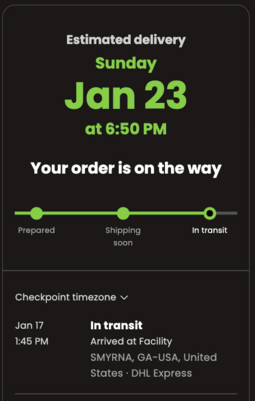
Three things do the work here. A branded tracking page the customer lands on instead of a carrier site, notifications that fire on the delivery events that matter, and a predicted delivery date better than the carrier's raw promise. Delivery prediction is where AfterShip's AI capability sits, and it belongs to AfterShip Tracking rather than to any shipping module.
Integrated returns automation
Every platform in this category will tell you it handles returns. The question that decides whether that is true for your operation is narrower: can a return be raised on an order the platform did not ship?
Ask it in three parts. Does the returns portal work on orders your 3PL fulfilled? Does it work on international orders, or domestic only? And which plan tier switches it on?
Each question separates a shortlist for a different reason. The 3PL question is architectural: a returns tool that keys off shipments it created itself holds no record of an order somebody else shipped, and no configuration setting will surface it. The international question is usually a carrier and customs limit rather than a software setting, which is why it rarely moves when you upgrade a plan. The tier question is the cheapest to answer and the easiest to miss, because returns often sit a step above the plan a pricing page shows you first.
Answer all three before you shortlist. 3PL-fulfilled and international orders are the two categories most likely to fall outside your current portal, and the hardest to retrofit later.
Analytics and one data layer
The pillar here is the data layer underneath the reporting.
Carrier performance, delivery outcomes and return reasons only become decisions when they sit against the same order. A late delivery in one zone, a return reason of "arrived damaged", and the carrier that carried it are either three fields on one record or three exports you reconcile by hand at month end.
That is the test to carry into the comparison: whether shipping, tracking and returns read from the same order record, which is how AfterShip Shipping, AfterShip Tracking and AfterShip Returns are built.
2026 Contenders: AfterShip vs ShipStation vs EasyPost
ShipStation does the core job well and does it fast. Label generation is reliable, its automated rate shopper runs on every plan, and its help centre documents a returns portal, a branded tracking page and branded notification emails. The ceiling is not capability. It is scope and tier gating, and both surface later than a missing feature would, usually at the moment you add a 3PL or a second country.
Tier gating is worth pricing out before you compare monthly figures: ShipStation's API access begins at Standard, and its Auto-Routing sits on the top tier only.
For the feature-by-feature detail, see AfterShip vs ShipStation, or a three-way comparison including ParcelPanel if your shortlist runs to Shopify apps.
EasyPost approaches the same problem from the API side, and its no-code path is real: its own pricing page advertises connecting a Shopify account, importing orders and printing labels from one platform. Two gaps matter for this reader. EasyPost issues return labels through its Shipping API but publishes no self-service returns portal of its own, naming Loop, Optoro and ReturnLogic as returns partners instead. And its Advanced Tracking is WeSupply's branded-tracking technology resold into EasyPost's Core API rather than something EasyPost built. If the integration effort is what you are weighing, how the AfterShip and EasyPost APIs differ covers the detail.
That pair is the real fork for a mid-market team. ShipStation hands you a finished product with tier boundaries drawn through it. EasyPost hands you primitives and expects your engineers to assemble the product. Which one fits depends less on your order volume than on whether you have developer time to allocate at all.
AfterShip comes at it from the post-purchase side. Shipping, tracking and returns are separate products that read from the same order record, which is why the returns row in the next section resolves differently for it than for the other two.
Shippo and Easyship sit on plenty of shortlists at this size as well, and a complete ranking of shipping software covers the wider field. Three is enough to decide with here, because these three are the three architectures a mid-market brand actually chooses between: a finished product, a developer toolkit, and a post-purchase suite.
The Showdown: Comparing Platforms for Mid-Market DTC Ops
Seven rows: six evaluation criteria plus a cost row, scored on what this reader checks rather than on feature counts.
| Criteria | AfterShip | ShipStation | EasyPost |
|---|---|---|---|
| Published cost at 2,000 shipments a month | Shipping Pro $89/month on monthly billing; the Pro tier spans 2,000 to 25,000 labels a month | Standard $174.99/month; Starter is $119.99 but carries no bring-your-own carrier account and no API access | No published subscription price at this volume; free for up to 3,000 labels with a per-label fee that is not published, plus $20/month to use your own carrier account |
| Carrier coverage and its published scope | 130+ carriers you can generate labels with in one integration | Publishes both "250+ carriers" and "200+ carriers" on the same pricing page, with the scope of neither stated | 100+ carriers |
| Multi-carrier rate shopping and automation | Rate shopping across connected carriers; up to 90% off USPS with no minimum volume; automation rules on Pro and Enterprise, with a ceiling of 10 rules below Enterprise | Automated rate shopper on every plan; customised rate shopper and unlimited automation rule types from Standard; Auto-Routing on the top tier only | Rates through the API; rate-shopping logic is something your team builds |
| Branded tracking and CX control | Branded tracking as its own product, with AI-predicted delivery dates published at up to 95% accuracy (AfterShip Tracking) | Branded tracking page and branded notification emails from Standard; the customer notification emails are shipment confirmation, estimated delivery date, out for delivery and delivered | Advanced Tracking at $0.03 per shipment, which is WeSupply's branded-tracking technology resold into EasyPost's Core API |
| Analytics and one data layer | Shipping, tracking and returns read from the same order record, so carrier performance, delivery outcomes and return reasons sit against the same order | One product with returns reporting and analytics from Standard, but the returns data covers only shipments ShipStation created, so 3PL-fulfilled orders are absent from it | Luma AI Insights and Advisor; the analysis is API-delivered and your team assembles the view |
| Time-to-value and implementation effort | Connect the store, connect your own carrier accounts or use partner rates, no engineering required; the shipping APIs and automation begin at Pro | Connect the store and print labels; API access begins at Standard | A no-code path exists, and EasyPost advertises it, but returns, branded tracking and rate logic are API work |
| Integrated returns management | A return can be raised on any order imported from the connected store, whoever fulfilled or shipped it, including 3PL-fulfilled orders; eligibility runs on order, product, return and customer attributes; international returns on every published Returns plan | The returns portal creates labels only for shipments "initially created in ShipStation"; "orders sent to fulfillment or marked as shipped will not qualify"; domestic shipments only; requires Standard or Premium | Return labels through the Shipping API, with no self-service returns portal of its own; names Loop, Optoro and ReturnLogic as returns partners |
Carrier counts are not comparable across vendors, because some publish the carriers they can generate labels with, some publish the carriers they can track, and some publish the carriers they can rate; AfterShip's figure in the table above is the label-generation scope, published on the AfterShip Shipping page and verified on 22 August 2026.
Two of those rows decide the table. The other five inform it.
The cost row decides it first, because it is the row your CFO opens with. At 2,000 shipments a month, AfterShip Shipping Pro is about half the monthly cost of ShipStation Standard at the same label volume, and EasyPost publishes no subscription price at that volume at all, which makes it the hardest of the three to model before you commit to it.
The returns row decides it last, and it is the row that does not move when you upgrade a plan. ShipStation's help centre states that its returns portal creates labels only for shipments "initially created in ShipStation", and that "orders sent to fulfillment or marked as shipped will not qualify". Hold those two lines against your own order mix. If a 3PL fulfills any part of your volume, those orders sit outside the portal by design, and the returns reporting built on that portal is missing them too.
AfterShip Returns starts from the order rather than from the shipment. AfterShip Returns works on any order imported from your store, regardless of fulfillment source. Eligibility runs on order, product, return and customer attributes, and every published Returns plan covers cross-border returns.
Building the Business Case: How to Calculate the ROI of a Platform Switch
Build the case on your own numbers. An imported benchmark is the fastest way to lose a finance review, because the first question in the room is always where the figure came from.
Three calculations, then one subtraction.
1. Rate-shopping saving. (your current average cost per parcel minus your best available rate per parcel) x monthly volume.
The ceiling you can cite on the AfterShip side is up to 90% off USPS shipping through AfterShip Shipping, with no minimum shipping volume requirement. Do not put a per-parcel saving into the model. None is published, and the figure is a discount ceiling with a stated carrier scope rather than an amount per parcel.
Run this calculation per service level rather than as a blended average. The saving is a function of how many carriers you can actually reach and how granular your routing rules are allowed to get, and a blended figure hides both.
2. Time saving. hours per week spent on manual rate shopping x your loaded hourly cost x 4.3.
The 4.3 converts weeks to months. Use a loaded cost, not a salary line, or the number will not survive contact with your finance team.
3. CX saving. WISMO tickets deflected x your own cost per contact.
You supply the cost per contact, and that is deliberate. The cross-industry benchmarks in circulation measure cost per call rather than per ticket, at companies handling call volumes nothing like yours, and a number your finance team can dismiss in one sentence is worse than no number at all. Your helpdesk already has the figure. If it does not, the quickest proxy is total support hours in a month divided by tickets closed, multiplied by that same loaded hourly cost. It is rough, but it is yours, and nobody in the room can wave it away.
For the deflection side of that calculation, anchor on a comparable result. Mous saw its customer contact rate fall from 12.9% to 5.9% after implementing AfterShip Tracking, which is a post-purchase tracking outcome rather than a shipping one.
4. Switching cost, subtracted. The reconfiguration work covered in the next section: reconnecting your store, your carrier accounts, your rate rules, your notification templates and your returns policy.
Count that as one-off hours at the same loaded rate you used in calculation two, and be honest about the total. A business case that treats switching as free is the one your CFO stops trusting halfway through.
Present the result as a payback period rather than an annual figure. One-off switching cost divided by monthly saving gives the number of months until the switch pays for itself, which turns a debate about software preference into a date on a calendar.
Run the three calculations before you speak to any vendor. What comes out is the range you defend in the room, and it tells you how much switching cost the case can absorb. On the AfterShip side, the inputs are all published: the Pro tier price with its label band, the USPS discount ceiling and its scope, and named tracking outcomes you can compare against your own contact rate.
The Switching Cost: What Migration Actually Takes
Nobody quotes you a switching cost, so price it yourself. Five things have to be reconnected, and the list is the same whichever platform you land on: your store, your carrier accounts, your rate rules, your notification templates and your returns policy.
Two of the five are configuration everywhere. Connecting a store and connecting carrier accounts is form-filling on all three platforms, and you can do both with your current tool still running.
The other three separate them. Rate rules and notification templates are configuration on ShipStation and on AfterShip Shipping. On EasyPost they are code, because EasyPost delivers rating and tracking as API surfaces for your team to build against. If that is your deciding factor, an EasyPost alternative for teams without an engineering budget covers the trade in detail.
Returns policy is the item that can turn into a project. If your current portal has only ever handled shipments your own system created, there is no configured policy for 3PL-fulfilled or cross-border returns to bring across. You are writing it for the first time, which is work worth scheduling rather than discovering.
Then there is the plan boundary, which is the part buyers miss. Check which tier switches on the capability you are moving for before you compare monthly prices, because landing on a cheaper platform and immediately needing its higher tier is a switch you pay for twice. On AfterShip Shipping, the shipping APIs and automation rules begin at Pro.
Keep the old tool live until the new one is generating labels cleanly, book the reconnection as one-off hours at the loaded rate from your business case, and read the service terms before you sign anything. We publish our contractual service uptime commitment for exactly that reason.
The Verdict: The Smartest Choice for Your Next 100,000 Orders
ShipStation is where most brands in this band start, and it prints labels well. What it does not cover is the order a 3PL fulfilled and the customer in another country who wants to send something back, and those are the two things that grow fastest as a DTC brand scales. EasyPost is a serious API for a team with engineers to allocate, and several returns vendors are built on it, but the products you are comparing are things that team would have to build. For a brand doing 1,000 to 50,000 orders a month with no engineering headcount to spare, AfterShip is the strongest fit: a return can be raised on any order in your store regardless of who shipped it, international returns are supported on every published Returns plan, and the shipping, tracking and returns history sit against the same order record.
If you ship fewer than 500 orders a month and the only thing you need is the cheapest label, ShipStation Starter does that and there is no reason to move yet. If you have engineers to allocate and want to build the logistics stack yourself, EasyPost's API is a strong option. And one thing to know about us before you choose: AfterShip Shipping caps automation rules at ten below the Enterprise tier, and automation rules are a Pro and Enterprise feature. If rule-by-rule routing is the centre of how you ship, that ceiling is the point where the conversation becomes an Enterprise one, and it is worth raising before you sign.
Simplify shipping and order fulfillment across Shopify, TikTok Shop, and your carrier network.
Book a demoFrequently Asked Questions
How long does it take to implement AfterShip Shipping?
Connect your store, connect your own negotiated carrier accounts or use AfterShip's partner rates, and start generating labels without engineering work. The shipping APIs and automation rules become available on the AfterShip Shipping Pro plan.
Can I use my own negotiated carrier rates?
Yes. AfterShip Shipping Pro connects up to five of your own negotiated carrier accounts, and Enterprise is unlimited. Separately from that allowance, you can connect unlimited shipper accounts of the same courier at no cost. AfterShip's partnership rates are the alternative, and they include up to 90% off USPS with no minimum shipping volume requirement.
What happens when I go over my label allowance?
The AfterShip Shipping Pro plan spans 2,000 to 25,000 labels a month, and higher volume moves you along the pricing slider inside Pro rather than triggering a per-label charge. Above 25,000 labels a month it becomes an Enterprise conversation. AfterShip publishes no per-label overage rate for Shipping, so there is no uncapped charge waiting behind the plan.
How many carriers can I generate labels with?
AfterShip Shipping lists 130+ carriers you can generate labels with in one integration, published on AfterShip's Shipping page. That is a label-generation scope, a different measure from the carriers a vendor can track or rate.
Does AfterShip integrate with Klaviyo and Gorgias?
Yes. AfterShip integrates with both Klaviyo and Gorgias, and publishes a dedicated integration page for each.
Can I still run returns for orders my 3PL shipped?
Yes. AfterShip Returns operates on orders imported from your connected store, and neither fulfillment source nor shipping carrier is a return-eligibility condition. You can raise a return on an order your 3PL picked, packed and shipped, and on a cross-border order too.
