Your receiving dock is a black hole. Packages arrive and seem to vanish. You are looking for a PackageX alternative to restore order and establish a clear chain of custody. You have come to the right place, and there is a second gap you have not costed yet.
Below are five inbound tools in two groups, split by where they run: the mailroom and last yard, or the warehouse floor. The receiving dock is one end of a journey, and the other end is where your support queue lives.
5 Direct PackageX Alternatives for Inbound Logistics
Buy a specialist for the dock, and buy it from the group that matches your building.
AfterShip is not a tool for your receiving dock. It does not scan inbound packages, log put-away, or ingest supplier ASNs. That is the job of a dedicated inbound platform. AfterShip is the command center for everything that happens after an order is packed: outbound tracking, shipping, returns, and the customer experience. The one place it touches receiving is on the returns leg, item receipt at your 3PL when goods come back, which is reverse logistics, not inbound.
Group one, mailroom and last yard.
- Notifii Track suits property managers, universities and corporate mailrooms handling heavy package intake.
- Parcel Tracker Mailroom fits smaller operations starting on a free tier and scaling into API access.
- Envoy Deliveries routes arriving packages to employees through Slack or Teams, which suits corporate offices.
Group two, warehouse floor.
- ShipHero suits DTC brands and 3PLs automating order fulfillment end to end.
- Logiwa fits high-volume DTC brands, wholesalers and 3PLs running a full WMS.
| Tool | Group | Best for | Rating and sample | Starting price | Surface |
|---|---|---|---|---|---|
| Notifii Track | Mailroom and last yard | Property managers, universities and corporate mailrooms with high package intake | 4.8/5 from 542 | From $99/mo | Capterra, Mailroom Management, captured 2026-08-19 |
| Parcel Tracker Mailroom | Mailroom and last yard | Smaller operations that want to start free and scale into API access | 4.8/5 from 191 | Free tier, then $67 and $117 flat | Capterra, Mailroom Management, captured 2026-08-19 |
| Envoy Deliveries | Mailroom and last yard | Corporate offices routing packages to employees through Slack or Teams | No product-specific rating | Per location | Vendor page, positioning only, captured 2026-08-19 |
| ShipHero | Warehouse floor | DTC brands and 3PLs automating order fulfillment end to end | 4.3/5 from 89 | Contact vendor | Capterra, Order Fulfillment, captured 2026-08-19 |
| Logiwa | Warehouse floor | High-volume DTC brands, wholesalers and 3PLs running a WMS | 4.6/5 from 95 | Contact vendor | Capterra, Warehouse Management, captured 2026-08-19 |
Check each rating and price against the surface named in the last column, because vendor blogs and marketplace listings drift apart. Once the dock is handled, a second black hole opens on the outbound side, and that half belongs to AfterShip.
Why Solving Inbound Chaos Reveals Your Next Black Hole: Outbound & Post-Purchase
Fixing intake does not fix visibility. It moves the blind spot downstream.
Once receipts are scanned and put-away is logged, the loudest unsolved problem is what happens after the box is packed. WISMO tickets, meaning "where is my order", land in a support queue with no delivery data behind it. Delivery exceptions surface when the customer calls, not when the carrier scan goes quiet. Returns get worked by hand, email by email, while the goods sit somewhere between the shopper and your dock.

There is an obvious objection here and it deserves a straight answer. PackageX publishes an outbound product. Its ecommerce logistics page describes multi-carrier rate shopping, branded tracking pages, delivery estimates as early as the product page, shopper SMS and email, and reverse-logistics label generation. PackageX describes its own scope as running from receiving, through internal operations, to dispatch and across the facility boundary. So why not buy that and stop reading?
Let the marketplaces answer that, rather than us. G2 rates PackageX Building Logistics 4.9/5 from 135 reviews, a deep record for the inbound job, and rates PackageX Ship 4/5 from 2 reviews. The vendor page aggregates 137, so the split reconciles exactly. The Shopify App Store lists PackageX Ship at 0.0 from 0 reviews, listed since 8 March 2023. Capterra files PackageX under Mailroom Management, with no separate outbound listing. G2's taxonomy puts PackageX under Real Estate Software, Package Tracking Software, and files AfterShip under E-Commerce Software.
Read those as adoption figures, not as a verdict on what the software can do.
Outbound is a separate purchase with a separate buyer. AfterShip is built for that side of the facility boundary: outbound tracking, parcel shipping and returns, on the surfaces your shopper actually sees. On the outbound side, see AfterShip and Parcel for outbound tracking.
The Blueprint for End-to-End Control: The Unified Logistics Stack
Run two specialized systems and join them at the order record.
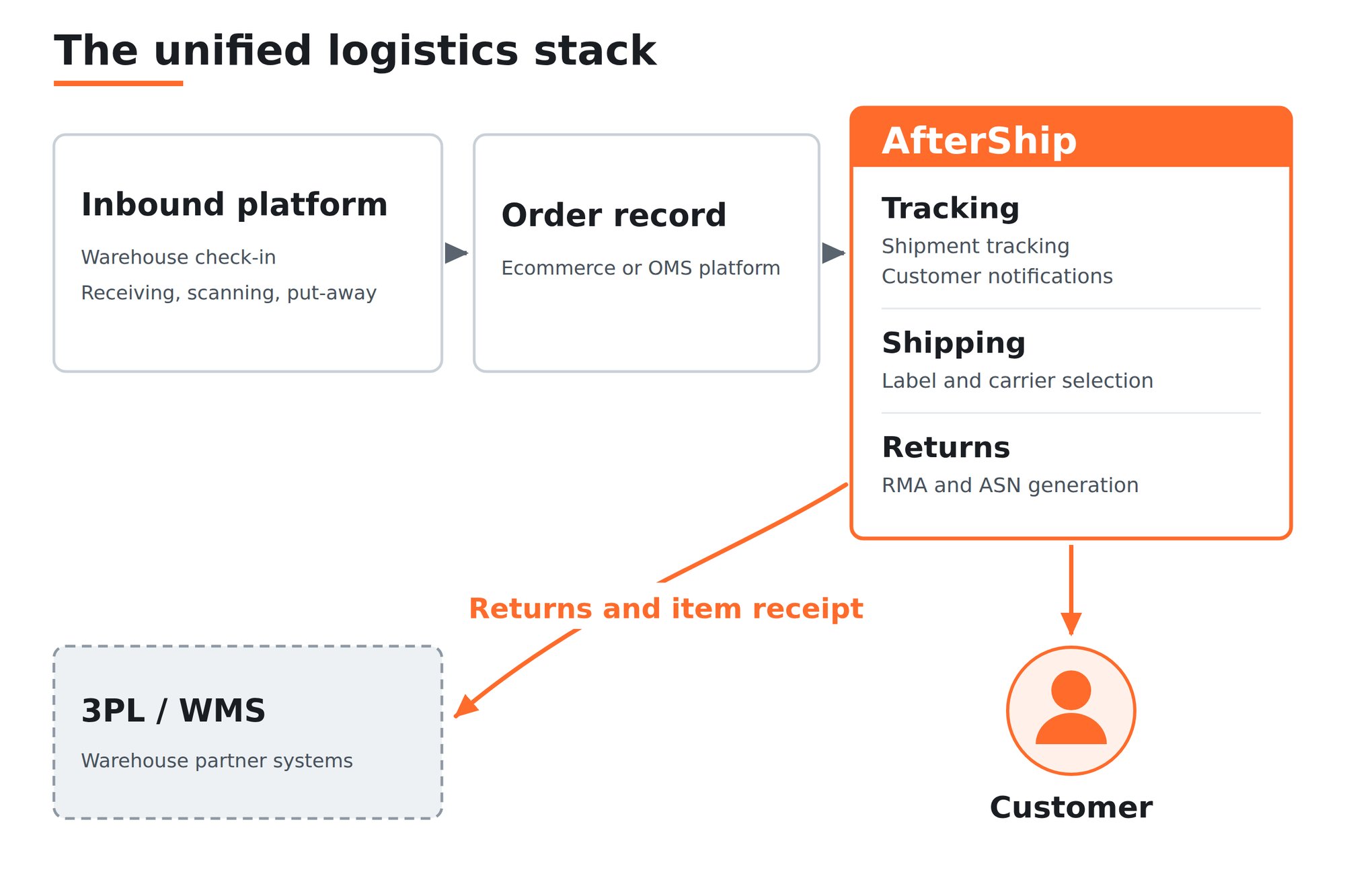
Neither does the other job well. Be precise about where they meet, because this is the seam a technical reader will test.
On the returns leg, AfterShip connects directly to 3PL systems including ShipBob and ShipHero, covering RMA creation, ASN generation and item receipt automation, with a Returns API into OMS, TMS and WMS. For outbound tracking and shipping there is no published direct warehouse connector; the join there is the ecommerce or order-platform record, Shopify, BigCommerce and the like.
Notice that ShipHero appears twice in this article: as a warehouse-floor option in the shortlist above, and as a named AfterShip Returns connector here. That is what turns this blueprint from a concept into a wiring diagram you can hand to a VP of Ops.
Buy the inbound half for the dock. AfterShip runs the rest, from carrier pickup to the doorstep and back.
AfterShip: Your Command Center for the Entire Post-Purchase Journey
The outbound half of the stack is one platform doing three jobs.
AfterShip Tracking owns visibility from the carrier scan to the doorstep. AfterShip Shipping owns rates, labels and carrier selection at dispatch. AfterShip Returns owns the trip back, through to item receipt at your warehouse partner.
Analytics is not a fourth product. It sits inside Tracking, so the delivery numbers your VP of Ops asks for come out of the same system that sends the notifications.
Gain Full Visibility From Carrier Pickup to Final-Mile Delivery
Visibility has to start at the carrier scan. The alternative is starting at the customer's first email.
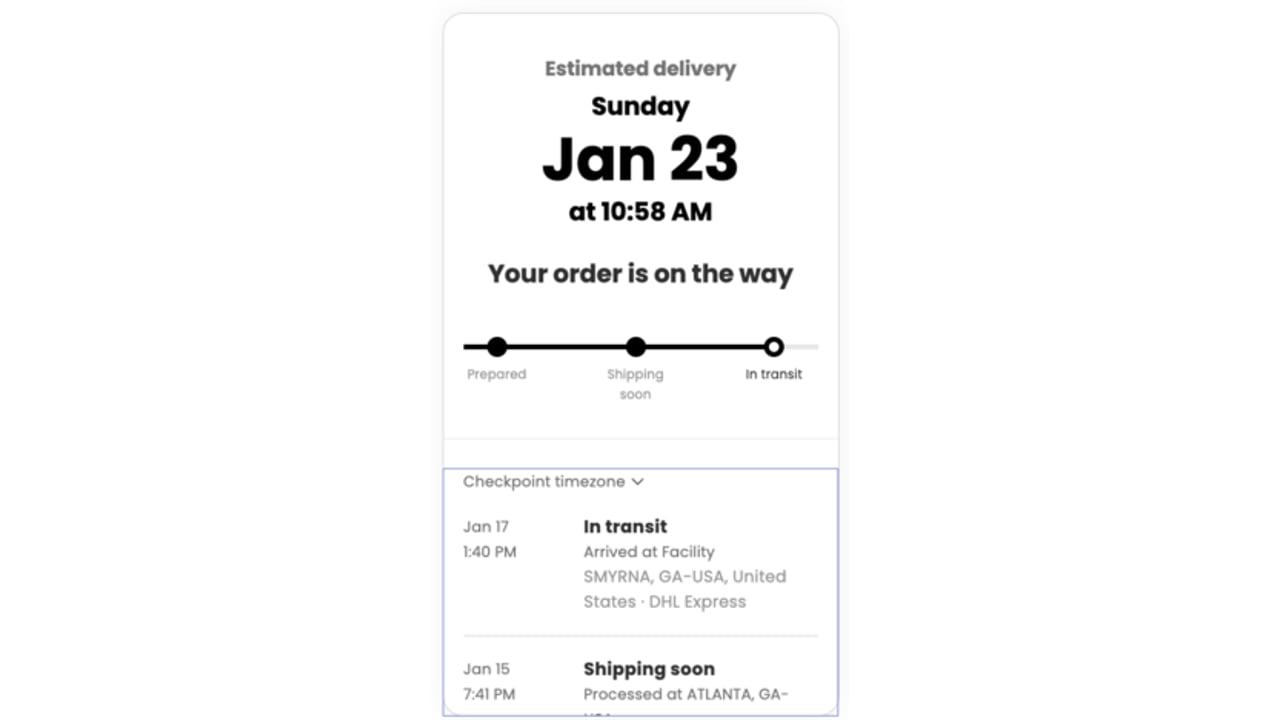
AfterShip Tracking follows shipments across a network of 1,700+ carriers, postal services, last-mile couriers, 3PLs, freight forwarders and LTL carriers.
Proactive notifications do the work your support queue does by hand. The shopper hears about a delay from you, on your branded tracking page, before they think to write in. That page is an owned channel rather than a cost center, your brand instead of a carrier site the customer disappears into.
Exceptions get surfaced rather than discovered. Real-time exception alerts and an Exceptions Dashboard put stuck shipments in front of your team while there is still time to reship, reroute or refund.
The reporting layer is what you take to finance. AfterShip Tracking lets you evaluate delivery rate, delivery time and carrier performance, and its carrier transit time analytics show where extra days accumulate and holding costs build. On-time performance is measured per carrier, turning a hunch about a slow lane into a carrier review agenda item.
Cut Outbound Shipping Costs and Transit Time
Carrier selection is a cost decision your team is making by habit, one label at a time.
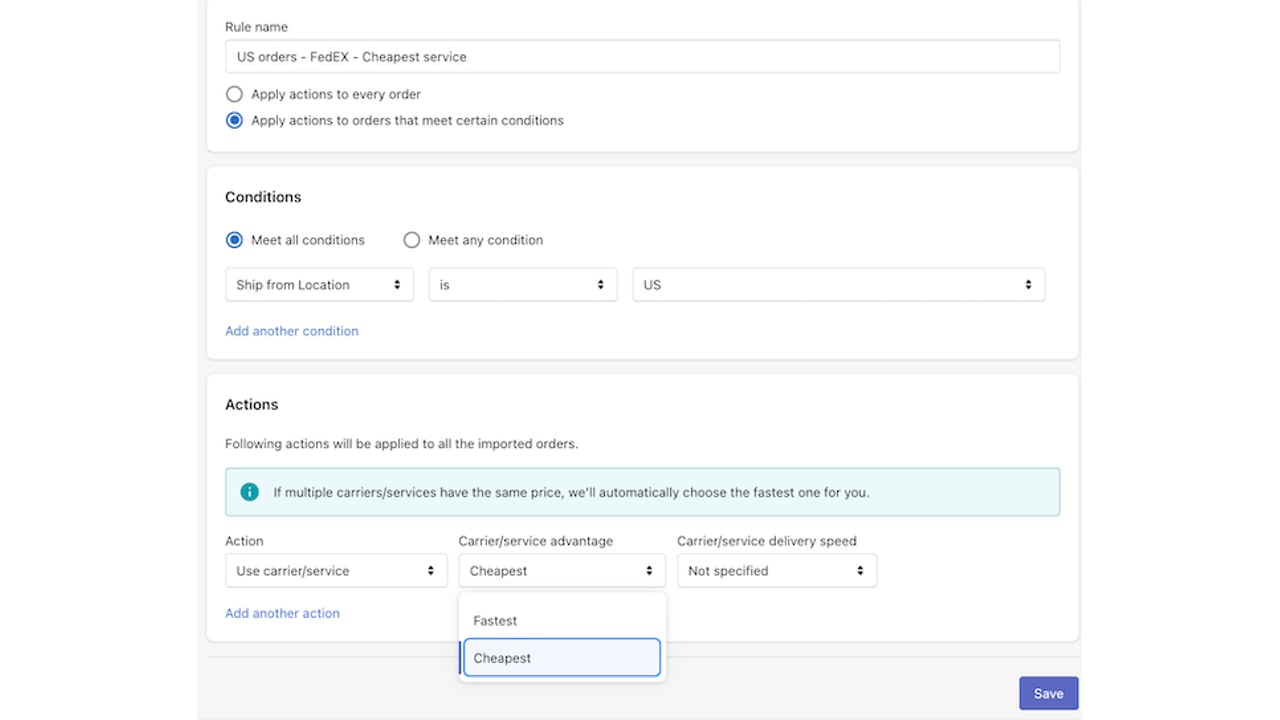
AfterShip Shipping compares live rates side by side, generates labels in bulk, and applies your carrier logic automatically at the point of dispatch. It reaches 130+ carriers in one integration.
Automated carrier selection is where the savings land. Write the rule the way you would explain it to a new hire: a parcel under 1lb going to Zone 5 routes onto a cheaper ground service, while anything above a set order value takes the faster lane. It fires on each order, without anyone opening a rate table.
Check how that capability is packaged before you budget. The rules engine is on the Pro and Enterprise plans. Pro is capped at 10 rules. AfterShip publishes no Enterprise rule limit, so a 3PL running per-client carrier logic should confirm the ceiling during Enterprise scoping. Essentials has no rules engine, so if automated carrier selection is why you are buying, budget for at least Pro.
One boundary, better heard now than in month two.
AfterShip Shipping is a parcel platform. It generates parcel labels, compares parcel rates, and automates parcel carrier selection. It does not book your LTL or freight leg. AfterShip Tracking can still track shipments moving on freight and LTL carriers, but rating and labels are parcel-only. If freight is core to your operation, pair AfterShip with a dedicated freight or TMS tool the same way you are pairing it with an inbound tool.
For the parcel volume that makes up most DTC and 3PL outbound, this is the layer that decides what you pay per shipment.
Transform Reverse Logistics from a Cost Center to a Profit Driver
Returns are a warehouse process wearing a customer-service costume, and both halves cost you money.
The NRF 2025 Retail Returns Landscape puts returns at 15.8% of annual retail sales, rising to 19.3% of online sales. At 1,000 to 50,000 orders a month, that is a second flow of goods arriving at your building with no purchase order attached to it.
A self-service returns portal takes the first cost out. The shopper files the request, picks a resolution and gets a label without opening a ticket, pulling volume off your support queue at the source.
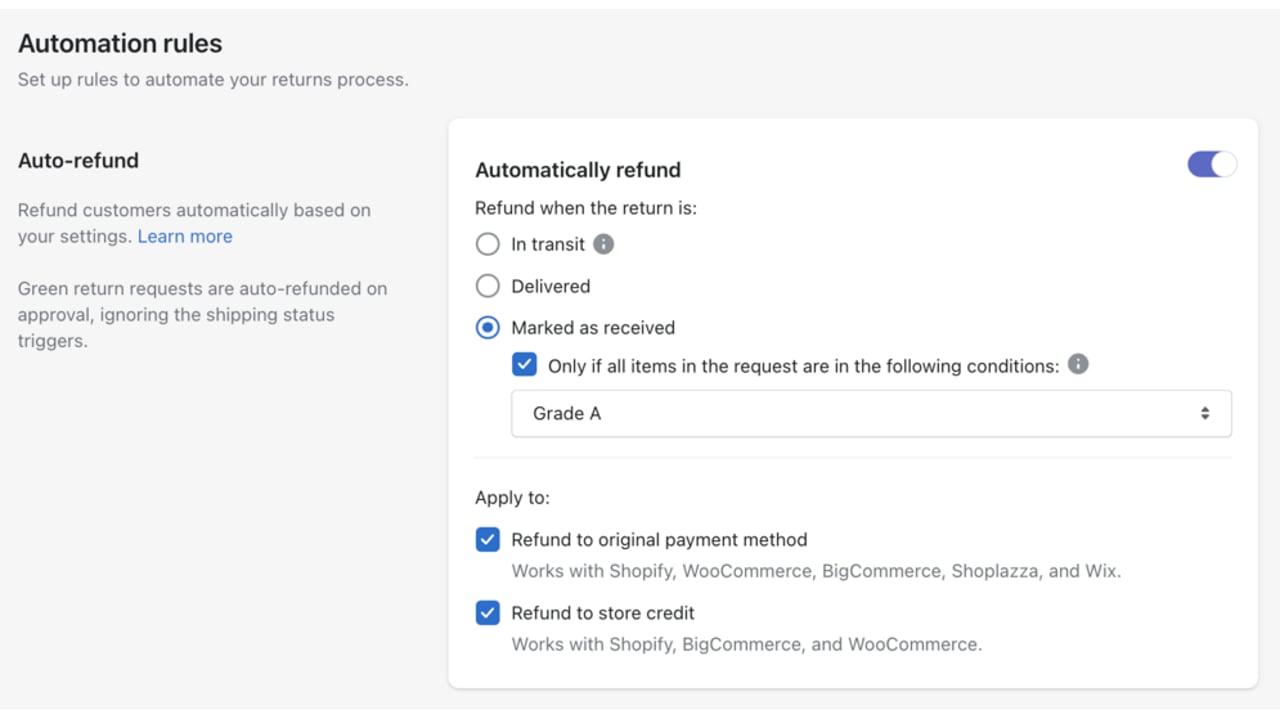
Automation rules take the second cost out. Route by reason code, auto-approve inside policy, flag the rest for review, and resolve to refund, store credit or exchange according to rules you set once. Your team handles judgment calls instead of paperwork.
Then the goods come back, and this is reverse logistics rather than inbound receiving: stock returning from a shopper, not a supplier delivery hitting your dock. That receipt step is where the returns leg touches your warehouse, through item receipt automation with preferred 3PL systems, ShipBob and ShipHero among them, on the connector drawn in the blueprint above.
Handled that way, the return trip stops being a queue of emails and becomes a warehouse process. AfterShip Returns is where its shopper-facing half and its warehouse half meet.
Inbound vs. Outbound Logistics Software: What's the Difference?
They are two different jobs with two different buyers, which is why they are two different purchases.
Set them side by side on the criteria a supply chain manager actually reports on, and the split stops being a matter of opinion. Primary goal, key metrics, main user, core functionality and key integrations each diverge.
| Criteria | Inbound Platform (e.g. PackageX) | AfterShip (Outbound & Post-Purchase) |
|---|---|---|
| Primary Goal | Tame receiving-dock chaos and establish chain of custody inside the facility | Own the shopper-facing journey from label to doorstep and back |
| Key Metrics | Package check-in time, dock-to-stock, internal delivery time, lost internal packages | WISMO rate, on-time performance, exception rate, carrier transit time, cost per return |
| Main User | Warehouse receiver, mailroom staff, facilities admin | Logistics Manager, CX team, eCommerce Manager |
| Core Functionality | Barcode and camera scanning, photo capture on receipt, digital signature, internal notifications, put-away | Branded tracking, real-time exception alerts, multi-carrier labels and rates, automated carrier selection, returns portal with RMA and ASN |
| Key Integrations | Building access systems, employee directories, WMS | Ecommerce and order platforms, 3PL connectors on the returns leg including ShipBob and ShipHero, OMS, TMS and WMS via the Returns API |
Read down the two columns and the buying decision writes itself: a receiver scanning cartons at a bay door and a CX lead watching an exception queue are not the same person, and they do not need the same software. Cover both, and the order is visible from the supplier's truck to the shopper's doorstep and back again.
Building Your 2026 Logistics Stack
Buy the inbound tool your building needs, then hand the rest of the journey to AfterShip.
Luxury retailer Moda Operandi cut shipment exceptions by 25% and WISMO tickets by 65% after moving delivery visibility onto AfterShip.
Moda Operandi
“Using AfterShip opened our eyes to the issues we were dealing with”
Bushra Sarfaraz, Fulfillment Director
Read their story →Sequence it in that order. The receiving dock is the fire you were sent to put out, and a mailroom or warehouse tool closes it in weeks rather than quarters. Once intake is under control, the exception queue and the WISMO backlog become the loudest remaining cost, and they sit on the far side of the facility boundary where an inbound tool was never built to reach.
Neither half waits on the other. An inbound rollout and a post-purchase rollout run on separate timelines with separate owners, which is what makes the two-system approach practical rather than theoretical. Nothing about the stack asks you to rip anything out. Running this for clients raises the bar again: enterprise-grade logistics for 3PLs.
When you take this to your VP of Ops, present it as two line items against two named cost centers: intake failures at the dock, and exception plus WISMO plus returns handling after dispatch. The first buys you a specialist. The second buys you AfterShip, and it covers the stretch from carrier pickup to the doorstep and back through returns.
Frequently Asked Questions
What are the best PackageX alternatives?
It depends on where packages arrive. For corporate mailrooms, universities and property managers, Notifii Track and Parcel Tracker Mailroom handle high package intake, and Envoy Deliveries routes packages through Slack or Teams. For the warehouse floor, ShipHero and Logiwa handle receiving inside full order fulfillment. The outbound half is a separate purchase, and AfterShip covers it.
What is the difference between inbound and outbound logistics software?
Inbound logistics software governs what happens inside the facility: receiving, scanning, put-away and chain of custody. Outbound governs what happens after an order is packed: carrier selection and labels, delivery tracking, shopper notifications and returns. Warehouse receivers work in the first. Logistics managers and CX teams work in the second, which is the layer AfterShip runs.
Does AfterShip handle inbound receiving?
No. AfterShip does not scan inbound packages, log put-away or ingest supplier ASNs. Those are jobs for a dedicated inbound platform. Where AfterShip touches receiving is the returns leg, item receipt at your 3PL when goods come back. What happens after an order is packed belongs to AfterShip: shipment tracking, parcel shipping and labels, notifications and returns.
How do an inbound platform and AfterShip talk to each other?
They join at the order record. On returns the connection is direct: AfterShip Returns connects to 3PL systems including ShipBob and ShipHero, and exposes a Returns API into OMS, TMS and WMS. For outbound tracking there is no published direct dock integration, so the join is your order-platform record. AfterShip reads that order to run the shopper-facing journey from label to doorstep and back.
