Your shipping costs are up again this year, and your CFO is asking why. You suspect you're leaving money on the table on some lanes, but you can't prove it. The problem isn't just rising carrier rates; it's the tool you're using to find them.
The savings potential sits in how the carrier service is chosen for each shipment. If you are weighing Shippo alternatives on cost, that choice is the first thing to test, because it repeats on every label you buy. For the wider product comparison, read AfterShip vs Shippo.
When "Good Enough" Shipping Becomes a Margin Killer
At a few hundred orders a month, you can pick a carrier service by habit and barely feel it; past 1,000 orders a month, the same habit shows up on the P&L. The setup that worked at lower volume is now a bottleneck: one default service for most parcels, and nobody checking whether a better-priced or faster option existed on that lane.
Carriers keep moving the baseline under you. USPS announced 2026 price changes of 5.1% to 7.8% depending on service, then a temporary 8% increase from April 26. FedEx publishes its 2026 rate changes on its own rate changes page.

Changes like these reach the parcels you ship on those services. At 1K to 50K orders a month, margin protection comes down to two decisions: which carriers you keep in your mix, and how the carrier service is picked for each shipment.
That makes carrier selection part of cost optimization and of the TCO case for your shipping tool. Comparing Shippo alternatives on how each one handles that decision, lane by lane, on your highest-volume routes, gives your CFO a cost-based case to review.
The Carrier Portfolio Strategy: Your Key to Lower Rates
A carrier portfolio is the set of carriers you keep active, with each one assigned to the lanes, parcel sizes and destinations it handles well. Adding a carrier pays off when it earns a specific job in that mix.
Most DTC portfolios draw from four groups:
- National carriers such as UPS and FedEx, for broad domestic reach and a wide spread of service levels.
- Regional carriers such as OnTrac and GLS, for dense coverage within specific parts of the country.
- Consolidated services such as DHL eCommerce, which pool parcels from many shippers before final delivery.
- International carriers, for cross-border lanes where customs handling and transit times vary by destination.
Spreading volume across these groups lowers both risk and cost. When one carrier adds a surcharge or slows down on a lane, another service is already set up to take those parcels. Before you move volume, compare real-time shipping rates on the lanes that matter most to your P&L.
The market is shifting toward this kind of mix. In the Pitney Bowes Parcel Shipping Index 2026, carriers classed as "Other" more than doubled their share of parcel revenue, from 3.4% to 7.2%. The index counts regional carriers such as OnTrac and GLS in that category.
Running four carrier groups by hand means separate accounts, separate rate sheets and separate label tools. Multi-carrier shipping software brings each carrier account, live rate and label workflow into a single view, so a new regional or international option sits next to the carriers you already use. AfterShip Shipping connects national, regional and international carriers in one integration.
AfterShip vs. Shippo: A Head-to-Head on Carrier & Rate Capabilities
In an AfterShip vs Shippo carrier rates evaluation, six criteria decide the outcome once you ship thousands of orders a month: which carrier types you can reach, whose rates you can use, how cross-border duties are handled, how far the API goes, how carrier selection is automated, and how rates are compared for each shipment.
| Criteria | AfterShip Shipping | Shippo |
|---|---|---|
| Carrier Coverage (National, Regional, International) | National, regional and international carriers, as documented in AfterShip Shipping's carrier directory | National, regional and international carriers, as documented on Shippo's carrier page |
| Access to Your Own Negotiated Rates | AfterShip Shipping offers discounted labels through its shipping partner Easyship, plus a USPS discount account. You can also connect your own carrier accounts and use your negotiated rates. | Connect your own carrier accounts; discounted USPS, UPS, FedEx and DHL Express labels |
| International Shipping Options (DDP/DDU) | DDP and DDU terms of trade; FedEx paperless invoice (ETD) submitted at label creation | DDP and DDU in its customs declaration API |
| API Access for Custom Logic | AfterShip Shipping APIs, including Labels, Shipping rates and Carrier accounts, on Pro and Enterprise; Rule-Based Label API in Beta on Enterprise | Shippo API, priced on its own API pricing page |
| Carrier Selection Automation Rules | Smart Carrier Recommendation on all plans; on Pro and Enterprise, rules on conditions such as package weight, order total and ship-to postal code set a named carrier and service; the Rule-Based Label API's cheapest-or-fastest selection is in Beta on Enterprise | Automations on every plan |
| Real-Time Rate Shopping Interface | Live rates across connected carrier services compared per shipment, sorted by price; Smart Carrier Recommendation, on all plans (off by default), selects the best cost-to-speed service and shows why | Carrier rates compared per shipment; on the Pro plan, Shippo Estimate delivery dates appear alongside the compared rates |
AfterShip Shipping recommends carrier services using AfterShip tracking data. On every AfterShip Shipping plan, Smart Carrier Recommendation excludes carrier services with a high exception rate on a lane.
Deeper Dive: How AfterShip Chooses the Carrier Service for Each Shipment
Two AfterShip Shipping workflows go further than a Shippo vs AfterShip features grid can show: picking the service for a single shipment, and sending a parcel across a border.
Example 1: choosing the service for one shipment. Picture a 2 lb order headed three states away, with four connected carrier services able to deliver it. Smart Carrier Recommendation is available on all plans and is off by default. Once you turn it on, AfterShip Shipping works through those four options in sequence:
- Reliability check. Any service with a high exception rate for that lane, based on AfterShip's historical tracking data, drops out.
- Delivery time check. Any service that fails the delivery time check drops out, including one that exceeds a maximum transit time you have set for the lane.
- Value check. The remaining services are compared with the cheapest option, and the one with the best cost-to-speed value is selected. That can be a more expensive service when the delivery time it saves is worth the additional cost.
- Reasoning. AfterShip Shipping records why that service was chosen, so anyone on your team can see the basis for the pick.
For a finance lead, the useful property is the order of the checks: price is weighed only against services that have already cleared reliability and delivery time. The same sequence runs again for the next order.
Example 2: shipping across a border. For international orders, AfterShip Shipping supports DDP and DDU terms of trade, so you decide whether your business or the recipient pays duties and taxes. Under DDP, your business covers those charges and the recipient pays no duties or taxes on delivery; under DDU, the recipient settles them when the parcel arrives. On FedEx shipments, AfterShip Shipping submits the paperless invoice (ETD) at label creation, so merchants avoid printing invoices for international shipments.
Automating Your Savings with Shipping Rules
Smart Carrier Recommendation chooses a service for each shipment on every plan. On the Pro and Enterprise plans, shipping rules add fixed carrier and service assignments for conditions you define.
A rule matches conditions such as package weight, order total, or the ship-to address by city, country or region, or postal code. When an order meets those conditions, the rule sets a named carrier and service. A simple pair of rules reads like this:
IF package weight is under 1 lb, THEN set the carrier and service to [carrier A]. IF the ship-to postal code is in your list of far-zone ZIP codes, THEN set the carrier and service to [carrier B].
Fixed assignments suit lanes where your team already knows the answer: light parcels that always go one way, or a list of far-zone ZIP codes you route to one carrier. They also keep label decisions consistent across everyone who prints labels during a busy week. Because each rule names the carrier and service outright, the result for matching orders is predictable, which helps when finance forecasts label spend on a known lane.
For API integrations, the Rule-Based Label API can select the cheapest or fastest service for a delivery speed. It is in Beta and available on the Enterprise plan only.
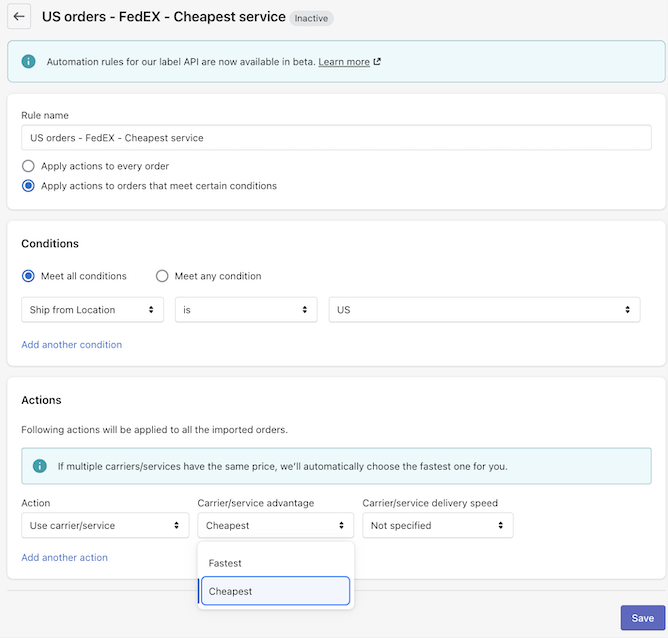
Rules and API calls work with the carrier accounts connected to AfterShip Shipping. AfterShip Shipping lets merchants connect their own negotiated carrier accounts.
It's Not Just About Rates: Delivery Dates and Choices at Checkout
Your shopper meets your carrier decisions on the checkout page, well before a label is printed. The shipping choices and arrival dates shown there set the expectation your carrier mix then has to meet.
Checkout shipping options (AfterShip Shipping). On the Pro and Enterprise plans, AfterShip Shipping can show named shipping options at Shopify checkout. Each option carries a free or flat rate that you set, plus a delivery timeframe, so a shopper might choose between a free standard option and a flat-rate express option with its own arrival window. The feature is available only to stores on the annual Shopify plan, the Advanced Shopify plan or higher.
Because you define each timeframe, choose the services behind an option from carriers in your portfolio that can meet it on your main lanes.
AI-predicted delivery dates (AfterShip Tracking). On the Premium and Enterprise plans, AfterShip Tracking shows AI-predicted delivery dates on product and checkout pages. Those predictions are powered by AfterShip Intelligence, "the AI engine for ecommerce post-purchase", and AfterShip reports their accuracy at up to 95%. The date appears while the shopper is still deciding, on the same pages where the shipping choice is made. A shopper who sees a named shipping option and a predicted date before paying gets the option from AfterShip Shipping and the date from AfterShip Tracking.
The Verdict: Have You Outgrown Shippo?
If you are shortlisting the best alternative to Shippo for rate comparison, the right pick depends on how your orders and lanes look today and where you expect them to be over the next year.
Choose AfterShip Shipping if:
- your volume and lane mix have grown, and you want a carrier service chosen for each shipment on every plan, excluding services with a high exception rate on that lane, based on AfterShip tracking data
- as you scale, you want one vendor for shipping, tracking, returns, and warranty
Choose Shippo if:
- you ship fewer than 500 orders a month with simple domestic needs, and its interface feels more straightforward
Once turned on, Smart Carrier Recommendation chooses the carrier service for every shipment, on every AfterShip Shipping plan.
For a wider view, our complete shipping software comparison sets AfterShip Shipping beside other multi-carrier platforms. AfterShip Shipping, a comprehensive multi-carrier shipping solution, handles your connected carrier accounts and per-shipment service selection from one account.
Simplify shipping and order fulfillment across Shopify, TikTok Shop, and your carrier network.
Book a demoFrequently Asked Questions
Is AfterShip more expensive than Shippo?
It depends on your volume and billing term. Both publish plan prices by label volume, and which plan costs less changes as volume rises. Price your own monthly volume on both pricing pages.
How hard is it to switch from Shippo to AfterShip?
Install the AfterShip Shipping + Labels app from the Shopify App Store. Then connect your own carrier accounts: AfterShip Shipping allows one on Essentials, five on Pro and unlimited accounts on Enterprise. If your team ships through a custom integration, the AfterShip Shipping APIs, including the Labels and Shipping rates APIs, are available on Pro and Enterprise. Before you pick a plan, count the carrier accounts you use today and check whether your integration needs API access. For help during setup, AfterShip Shipping's pricing page lists 24/7 live chat, 24/7 email support and a self-service help center.
Does AfterShip have its own discounted shipping rates?
AfterShip Shipping offers discounted labels through its shipping partner Easyship, plus a USPS discount account. You can also connect your own carrier accounts and use your negotiated rates.