What Klaviyo Already Knows About Your Shipments, and What It Never Will
Open your Klaviyo metrics list and search for shipping. You will find more than you expect. The native Shopify integration syncs Confirmed Shipment, Delivered Shipment and Marked Out for Delivery, and each arrives carrying a tracking number and an Estimated Delivery property. If someone has told you Klaviyo goes dark the moment an order is fulfilled, check that yourself before you buy anything to fix it.
There is a condition, and Klaviyo prints it on its own data reference: "Shopify only provides these notifications for certain shipping carriers." So the feed is real, and it is conditional on who is carrying the parcel. A dedicated shipping data source is the usual answer to the difference. The choice actually in front of you is which shipping data source sits behind Klaviyo, since Klaviyo itself is staying.
Klaviyo's native Shopify feed sends three shipment events, depending on the carrier.
What arrives is a delivery notification. The limits show up the moment you try to build a programme on it. There is no exception taxonomy, so a parcel held at a depot, refused at the door, and lost inside a sort facility all reach you as the same absence of news. There is no stall detection, so a shipment that stopped moving on day three looks exactly like one still in transit right up until the delivery scan fails to arrive. And there is no delivery-date-change signal, so when the date you promised at checkout slips by four days, nothing in your account fires.
Those gaps are where your support tickets get written, and they are the reason a dedicated shipping data source exists at all. Klaviyo keeps doing what it already does well, and the data source underneath it decides how much your flows have to work with. Most evaluations skip this philosophy of prioritizing the data source and go straight to a feature grid.
The Two Contenders for Your Klaviyo Data: Wonderment vs AfterShip
Wonderment (acquired by Loop, now Loop Tracking) is the name you have probably heard first, and it earned that. It was built for this exact job, and it is good at it.
The rebrand has not reached every surface, which is how you will recognise it in the wild. The flows still land in your Klaviyo account named "Wonderment | Shipping | ...", and the block in the Shopify theme editor is still called Wonderment.
Give it credit on the thing that decides whether a transactional email is any good. Wonderment (Loop Tracking) publishes a Klaviyo metadata reference of 41 named fields, including a 19-field line-item array, alongside structured event location and a human-readable sub-status message. That is genuine material for a marketer building a real template. Anyone who tells you it sends events but not data has not opened the reference.
AfterShip arrives at the same problem from a different starting point. Tracking, returns and warranty run on one event model, and that same model is what lands in your account, so one set of naming conventions covers the whole journey.
AfterShip sends tracking, returns and warranty events to Klaviyo in one vocabulary.
We ran this analysis against a different competitor in our deep-dive analysis of AfterShip vs Malomo, and the broader category of order tracking platforms sets the wider context. What follows is narrower and more useful than either: not which tool sends more, but what each one lets a Klaviyo email actually say.
Klaviyo's Own Spec: What a Shipping Integration Is Supposed to Send
Comparisons like this one usually score vendors against criteria a vendor chose. There is a better standard sitting in plain sight, and almost nobody uses it. Klaviyo publishes its own specification for what a shipping integration should send.
Its integration guide, at API version 2026-04-15, names the carrier events it expects: in transit, out for delivery, delivered, delayed, delivery failed, available for pickup and returned to sender. On the delayed event it goes further and names the properties that should travel with it, including Previous Estimated Delivery Date, New Estimated Delivery Date and Exception Reason. It also names four returns events: return initiated, return in transit, return delivered and refund processed.
Score both vendors against that list and most of it comes back level.
| Klaviyo names it as core | AfterShip (Premium) | Wonderment (Loop Tracking) |
|---|---|---|
| Shipment In Transit, Out For Delivery, Delivered | Yes, all three trigger flows | Yes, all three |
| Shipment Available For Pickup, Returned To Sender, Delivery Failed | Yes - Available for pick up, Returning/Returned to sender, Failed attempt | Yes - Ready for Pickup, Returned to Sender, Attempted Delivery, Delivery Error |
| Shipment Delayed | Shipment Stalled, Enterprise and API only | Shipment Stalled, no plan restriction stated |
| Previous / New Estimated Delivery Date | The date renders at Premium through the five variables; the change triggers a flow only on Enterprise | ETA Changed fires on the change; the payload carries one carrier ETA field |
| Exception Reason | ShipmentCurrentSubStatus, backed by a published taxonomy to Exception_021 | SubstatusMessage, human-readable, with no published taxonomy behind it |
| Tracking URL on every shipment event | Yes | Yes, TrackingURL |
| Returns: Return Initiated, In Transit, Delivered, Refund Processed | AfterShip Returns Klaviyo integration, Premium and above, 15 returns metrics | Loop Returns' own Klaviyo integration, a separate product |
| Title Case payload field names | Klaviyo's own guidance, quoted as guidance, not scored against either vendor | Same |
The row that matters is the one neither vendor's marketing page will put in front of you. Klaviyo names the delay event, and the previous-versus-new estimated delivery date that gives it meaning, as core to the specification. As of 2026, neither vendor delivers that trigger cleanly to a mid-market plan. AfterShip's stalled-shipment and delivery-date metrics sit on its Enterprise and API plans. Wonderment documents its equivalents with no published plan restriction, which leaves the tier undocumented rather than confirmed.
That is the honest starting position, and it sets the only question worth the rest of this article: on the plan you are actually going to buy, what can the email say?
Inside the Email: The Delivery-Date Layer
Klaviyo templates read variables, and variables are a separate entitlement from flow metrics. Most comparisons collapse the two, and the collapse is where the useful detail gets lost.
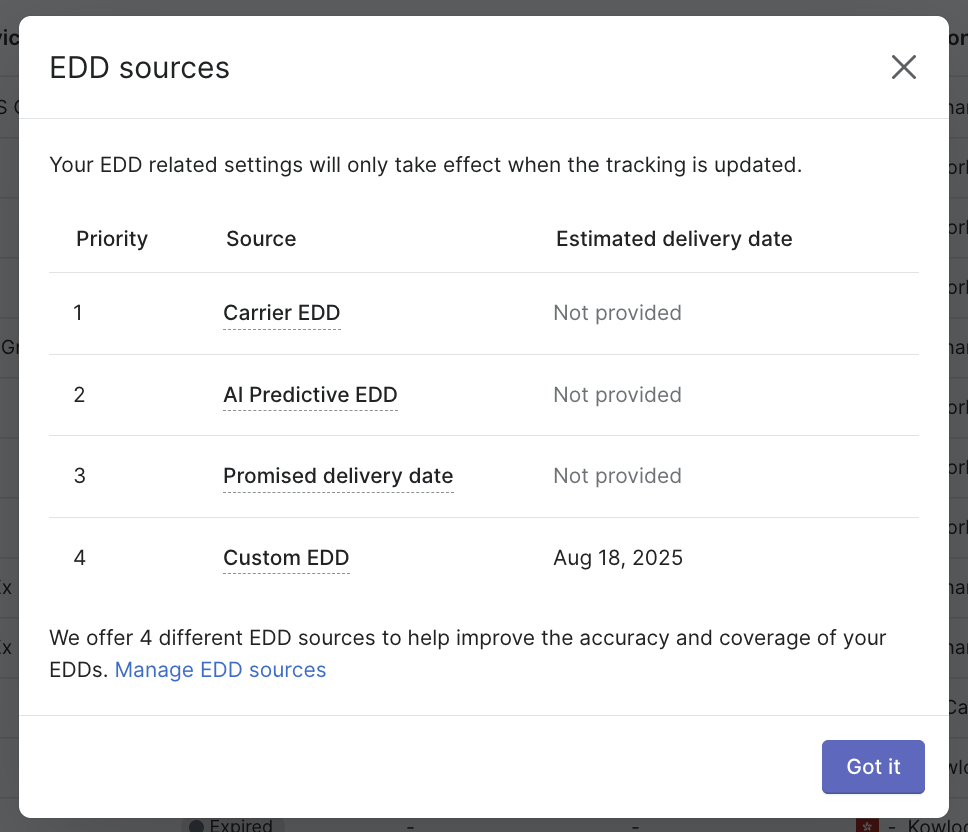
On AfterShip's public plans, all 57 text variables render at Premium. Five of them carry delivery dates: CourierEstimatedDeliveryDate, AfterShipAIEstimatedDeliveryDate, AfterShipCustomSettingEstimatedDeliveryDate, PromisedDeliveryDate and LatestEstimatedDeliveryDate. That last one resolves through a documented order of preference: the courier's own estimate first, then AfterShip's AI EDD, then the promised date, then a custom date. Your template calls one variable and gets the best available answer.
Follow what that means for a build. A Premium merchant triggers a flow on an ordinary public metric, In transit or Out for delivery. The email that flow sends prints a live delivery date, the AI-predicted one included, because the variable reads a field AfterShip has already computed on the shipment. No premium trigger is involved. The trigger is the cheap part.
AfterShip renders an AI-predicted delivery date inside Klaviyo templates on Premium plans.
The boundary belongs in the same breath as the capability, so here it is. Displaying that date is Premium. Firing a flow at the moment the date changes is Enterprise and API, and as of 2026 that is where AfterShip gates it. A Premium merchant reads the date, branches on it, and writes it into the email. Reacting to the change itself, the instant it happens, needs the higher plan. Both halves of that are true at once and the article says both every time the subject comes up.
Wonderment (Loop Tracking) exposes one delivery-date field, EstimatedPackageDelivery, which its own reference describes as "An ETA Provided by the carrier." That is the carrier's number, passed through to your template as it arrived.
The gap that reaches your customer is coverage. AfterShip's AI EDD produces a date on more than 80% of deliveries, against under 40% typical for carrier-supplied estimates. A variable that resolves to nothing prints nothing, so coverage decides how often your email can commit to a date at all, and a carrier passthrough inherits every gap the carrier leaves.
Naming the Problem: Exception Vocabulary in a Klaviyo Template
An email telling a customer their package is delayed confirms what they already suspect. The version that earns its send names the cause.
AfterShip normalises carrier events into nine documented parent statuses, with an exception vocabulary running out to Exception_021. In a Klaviyo template that arrives as ShipmentCurrentSubStatus, so a conditional split can route on the specific failure and the copy can be accurate about it:
- a parcel held at customs pending documents
- a delivery attempted with nobody home
- an address the carrier could not resolve
- a shipment already travelling back to the sender
Each of those wants a different email. One wants a customs form, one wants a redelivery link, one wants an address correction, one wants a refund conversation before the customer asks.
Wonderment (Loop Tracking) exposes Substatus and SubstatusMessage, and both are genuinely useful in a template. Its documentation stops short of publishing the taxonomy behind them, the list of values those fields can take. A conditional split needs to know what it is splitting on, so an undocumented value set turns branch design into observation over time.
One disclosure before you plan around this. AfterShip's expanded sub-statuses apply to shipments tracked on or after 27 March 2026, and historical shipments keep their original classification. A merchant adopting now gets the granularity going forward, and should expect their back catalogue to read differently.
Treat all of this as diagnostic granularity. It changes what a template can say about a problem, and it adds nothing to your list of triggers.
Building the Delay Flow: What Each Stack Can Actually Do
Take the flow every retention team asks for, the proactive delay email, and price the build on each stack.
On AfterShip at Premium it is a conditional flow. Trigger on a public metric, In transit. Add a flow filter that excludes profiles already carrying a delivery scan. Split on the delivery-date variables and on ShipmentCurrentSubStatus, so the branch that fires knows the revised date and the reason together. Send an email naming both. The effort sits in the conditional logic, and it buys an email with specifics in it.
On AfterShip at Enterprise the same outcome arrives more directly. EDD revised and Shipment Stalled become triggers in their own right, so the flow opens at the moment the problem appears.
On Wonderment (Loop Tracking), Shipment Stalled and ETA Changed are documented with no plan restriction stated, and its Klaviyo integration sits in the entry Starter plan. A team that wants those two triggers and nothing deeper will have a flow live in an afternoon.
So here is the trade-off, stated plainly, because it is the one a Premium buyer actually has to weigh. AfterShip's two most-wanted triggers sit on Enterprise, as Klaviyo's own specification already showed. What you are weighing is directness against depth. Wonderment offers the shorter path to a flow that fires. AfterShip offers more for that flow to say once it does, on the plan you are buying today. For a team whose delay email currently says nothing beyond "delayed", the depth moves the number that matters.
Brands using AfterShip's proactive tracking notifications see the effect land on the ticket queue. StackCommerce reduced WISMO tickets by 71% year over year with AfterShip Tracking. That figure is platform-level, covering proactive notification across the whole post-purchase journey, and it is quoted here at exactly that scope.
That is what the depth argument buys on a Premium plan. The flow reaches the customer before they open a ticket, and the email it sends carries the revised date and the cause behind it. An answer, arriving early.
Returns Events in the Same Klaviyo Account
Your Klaviyo account keeps caring about an order after it arrives. AfterShip Returns publishes its own Klaviyo metrics, 15 for returns and 11 for warranty, on Premium and Enterprise, and they share a field vocabulary with the tracking metrics. One set of naming conventions covers the whole journey, so a segment you build on return behaviour reads the same way as the flow you built on a delivery. In practice that means a refund-notification flow can fire when the warehouse records a parcel as received, and a suppression segment can read return frequency, both from the same account already running your delivery flows.
Loop Returns runs its own Klaviyo integration, published separately on the Klaviyo App Marketplace. A Loop stack covering both halves of the journey means two integrations, two event lists, two quotas and two renewals to keep track of.
The commercial shape follows from that. AfterShip's entry point for both event sets is Tracking Premium plus Returns Premium, two subscriptions with a cross-product discount of 25% off the first year when you bundle two or more products.
| Plan | Annual billing | Month to month |
|---|---|---|
| Tracking Premium, 6,000 shipments a year | $59/mo | $70/mo |
| Returns Premium, 1,200 returns a year | $99/mo | $119/mo |
| Combined list | $158/mo | |
| Year one with the 25% bundle discount | about $118.50/mo equivalent | |
| Year two onward | $158/mo, back to list |
Treat that as illustrative. It pairs 6,000 shipments with 1,200 returns, a 20% return rate that sits inside apparel norms and remains an assumption about your business, so quote the tiers that match your own counts. The discount carries a published plan-parity condition on two-product bundles, which lifts once you bundle three or more products, and a Premium plus Premium stack qualifies. AfterShip's 25% covers year one and then reverts to list, and Loop advertises a bundle saving of 10% on its own pricing page, so read bundling as table stakes on both sides. Underneath the discount arithmetic sits the shape of the purchase: one vendor, and one normalized event vocabulary reaching Klaviyo.
The Honest Verdict for Klaviyo Power Users in 2026
Start with what Wonderment (Loop Tracking) gets right, because it is more than a courtesy. Its Klaviyo integration sits in the entry Starter plan with no gate on it, alongside Postscript and Attentive. It publishes its payload in full, so you can audit what you are buying before you buy it. It publishes its stall default, which is more transparency than AfterShip offers on the same setting. And the two triggers most teams come looking for, stalled shipment and ETA changed, carry no published plan restriction.
So the choice resolves, and it resolves as depth of data against directness of trigger. Wonderment reaches a firing flow faster. AfterShip gives that flow more to say once it fires: the delivery date and the resolution order behind it, a named reason for the delay, and returns and warranty events in the same vocabulary in the same account, all on Premium. For a mid-market DTC brand whose Klaviyo flows need to say something specific and true, AfterShip is the deeper data source.
One cost applies whichever way you go. Klaviyo flows bind to specific metric names, so a change of data source means rebuilding them. Budget roughly half a day. That holds for a move in either direction, and it is worth saying plainly before anyone commits.
| Criterion | AfterShip (Premium) | Wonderment (Loop Tracking) |
|---|---|---|
| Delivery-date fields in the template | Five, including AfterShipAIEstimatedDeliveryDate (AI-predicted) and LatestEstimatedDeliveryDate, with a documented resolution order: Courier EDD, then AfterShip AI EDD, then Promised, then Custom | One: EstimatedPackageDelivery, described on Wonderment's own page as "An ETA Provided by the carrier" |
| Does the predicted date render below Enterprise | Yes. All 57 text variables are available on the public plans; AfterShip's Klaviyo integration page shows 57 in both columns of its comparison table | Carrier ETA only; no predicted-date field is published |
| Triggering a flow on a delivery-date change | Enterprise and API only (EDD revised, EDD missed, delivery anticipation) | ETA Changed is documented with no plan restriction stated; sensitivity is configurable per shipping service level |
| Stall detection as a trigger | Enterprise and API only (Shipment Stalled, Fulfillment Stalled) | Shipment Stalled is documented with no plan restriction stated |
| Naming the problem in the template | Nine documented parent statuses, exception codes to Exception_021, exposed as ShipmentCurrentSubStatus. Forward-looking from 27 March 2026 | Substatus and SubstatusMessage are exposed; no sub-status taxonomy is published anywhere |
| Payload depth | 57 text variables (AfterShip's Klaviyo integration page) | 41 named metadata fields, including a 19-field line-item array (Wonderment help centre) |
| Prebuilt Klaviyo flows | Help centre confirms prebuilt flows exist and names no count: "such as in transit, out for delivery, delivered, and more" | Seven named templates: Shipment Created, Carrier Picked Up, Out for Delivery, Shipment Delivered, Shipment Stalled, Attempted Delivery, and "Wonderment - Returned" |
| Contracts and quotas to cover tracking plus returns | One vendor, two products, one bundle discount | One vendor, two products, one bundle discount |
| Returns and warranty events into the same Klaviyo account | AfterShip Returns Klaviyo integration, Premium and Enterprise: 15 returns metrics and 11 warranty metrics, sharing the tracking field vocabulary | Loop Returns runs its own separate Klaviyo integration - a second product, a second subscription, a second event list |
Proactive shipment tracking that delights your customers and reduces WISMO tickets.
Book a demoIf you want the picture beyond Klaviyo, a direct feature-by-feature comparison covers the wider product surface. Inside Klaviyo, the case is already made: one integration, one vocabulary, and an email that can name the date and the reason on the plan you are buying today. Weighed without Klaviyo in the frame, the same two names get a separate verdict in the Shopify DTC call on AfterShip and Malomo.
Frequently Asked Questions
Does Klaviyo have its own shipping triggers?
Yes, three of them, and they depend on the carrier. Klaviyo's native Shopify integration syncs Confirmed Shipment, Delivered Shipment and Marked Out for Delivery, and each one carries a tracking number and an Estimated Delivery property. Klaviyo attaches a condition on its own data reference: "Shopify only provides these notifications for certain shipping carriers." So how much of that feed you actually see depends on who is carrying the parcel.
Do I have to rebuild my Klaviyo flows if I switch?
Yes. Klaviyo flows bind to specific metric names, so changing your shipping data source means rebuilding the flows that depend on them. Budget roughly half a day. This holds in either direction.
Can I trigger a Klaviyo flow when AfterShip's predicted delivery date changes?
As of 2026, the three delivery-date metrics, EDD revised, EDD missed and delivery anticipation, sit on AfterShip's Enterprise and API plans, so on Premium no flow fires at the moment the date changes. Premium works on a different trigger and a later read: you fire the flow on a public metric such as In transit, then branch on the delivery-date variables, which render on the public plans and include the AI-predicted date. The email that goes out names the delivery date AfterShip currently predicts.
Can I send AfterShip returns events to Klaviyo?
Yes. The AfterShip Returns Klaviyo integration runs on Premium and Enterprise, and it publishes 15 returns metrics and 11 warranty metrics. Those share a field vocabulary with the tracking metrics, so one set of Klaviyo naming conventions covers delivery, returns and warranty inside the same account.
