The Short Answer: You Are Probably Paying Twice
If Privy and Mailchimp both show up on your card statement every month, you are paying two vendors to do one job.
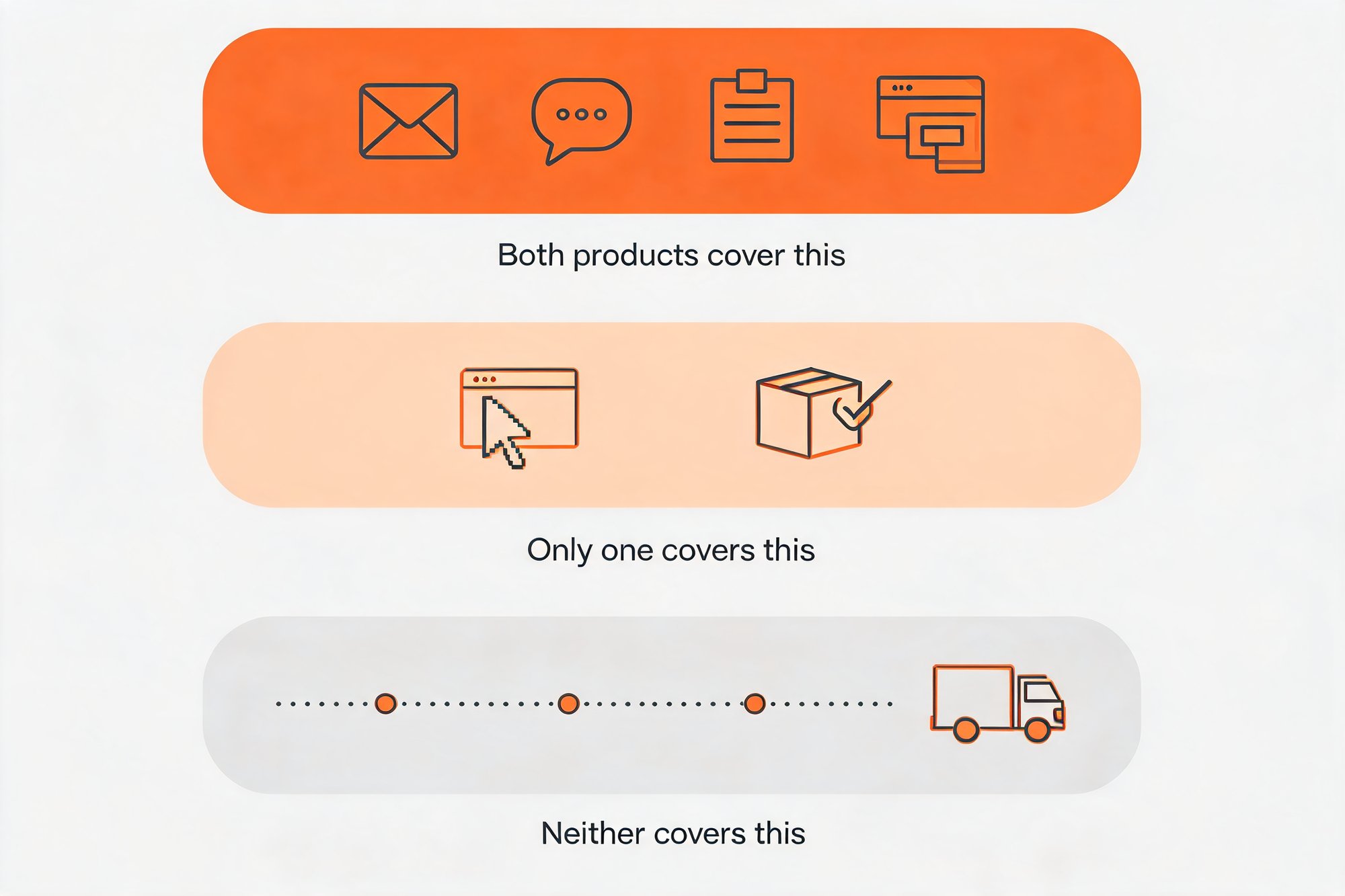
Most Privy vs Mailchimp comparisons still hand you a division of labor that stopped describing these two products a while ago. Both now sell email, SMS, forms and popups to Shopify merchants. That overlap covers most of what either one does.
Each still holds one thing the other does not. Privy goes deeper on the on-site surface. Mailchimp can fire a flow off a Shopify fulfillment status of shipped.
Neither one reaches the stretch that generates most of your support volume, the days between dispatch and the parcel landing on a doorstep.
At 8,000 contacts, the duplicate bill is $270 a month. Privy's email plan runs $135 a month at that exact contact figure. Mailchimp Standard runs $135 a month across its 5,001 to 10,000 bracket. Both figures captured 2026-08-16, email lines only.
The real question is whether the second subscription buys you anything the first one already does.
Where Privy and Mailchimp Actually Overlap
Privy's own Shopify App Store listing answers this before any feature matrix does: it is titled "Privy - Email, SMS & Pop Ups".
Privy prices email on mailable contacts, at an exact contact figure, with unlimited sends. That is how a company meters a primary product line.
The corporate record points the same way. Privy acquired Emotive on 8 July 2025 and Sendlane on 2 February 2026, both still sold separately.
Mailchimp reaches the same ground from the opposite direction. Email, forms and popups sit together inside one plan, and SMS is priced on its own.
So the two feature lists converge, which matters if you are building a complete Shopify marketing strategy around them.
Campaigns, automations, SMS, forms, on-site popups: both sides, in one plan or another.
Both bill on contacts, so every month your list grows, it grows against two meters at once.
Their coverage also ends in the same place. Once a parcel is handed to a carrier, neither product receives the events that describe where it is.
What Privy Does That Mailchimp Does Not
Privy's clear advantage is the on-site surface the product was built around.
Popups, forms and on-site offers are where Privy started and where it goes deepest. Mailchimp includes forms and popups in its plans too, though its popup forms carry a beta label with very limited availability and run on web browsers only, so the gap here is one of depth. For a store whose bottleneck is converting traffic it already pays for, that depth is a real reason to keep Privy in contention.
It is one feature area, though, and it will not carry the whole decision on its own.
The second advantage is how Privy meters email. You are billed on mailable contacts, at an exact contact figure, and sends are unlimited.
Unlimited sends matters most if you mail a large share of your list often, where a weekly campaign plus a full automation program costs the same as one monthly newsletter. It matters less if you send rarely.
That is the first of two capability gaps wide enough to settle the Privy vs Mailchimp decision on its own.
What Mailchimp Does That Privy Does Not
Mailchimp can start a flow on a Shopify fulfillment status of shipped, and that one event is the clearest thing it holds over Privy.
Privy has no equivalent. No Order Shipped trigger, no Order Fulfilled trigger, so a dispatch-timed message has nothing to fire on.
Dispatch is a useful moment to own, and a shipped trigger gives you three things:
- a dispatch confirmation the moment fulfillment is marked, in your own template
- a post-purchase sequence clocked from dispatch
- a review request timed from dispatch, landing after the box arrives
Mailchimp's brand recognition and installed base are real, and they are why it is usually the incumbent in this pairing. Familiarity is also why it rarely gets re-examined once it is in place.
Its weak spot for a store your size is the free plan. Mailchimp Free covers 250 contacts and 500 sends a month and includes pop-up forms, and its automation flows are listed only as a free preview. The contact ceiling is what settles it: at 500 to 10,000 orders a month you passed 250 contacts a long time ago.
With both asymmetries named, what remains is the bill. If you are still choosing from the best email platforms, price it at your own list size first.
What It Costs to Run Both
Both products bill on contacts, so this comparison only means something at a specific list size.
The brackets do not line up, and that shapes every figure below. Privy quotes a price at your exact contact count. Mailchimp quotes a price for the band your contact count falls into. A store on 8,000 contacts is therefore weighing Privy's 8,000 price against Mailchimp's 5,001 to 10,000 price, two different kinds of number wearing the same currency sign.
Both Mailchimp tiers appear below. Essentials is the honest floor for a store this size, and Standard is the closest like-for-like against Privy's email plan.
| Criteria | Privy | Mailchimp |
|---|---|---|
| What you pay at your list size (captured 2026-08-16) | Email: $30/mo at 1,500 mailable contacts, $135/mo at 8,000, $315/mo at 20,000, $480/mo at 40,000 | Standard: $135/mo at 5,001 to 10,000 contacts, $310/mo at 20,001 to 25,000, $450/mo at 40,001 to 50,000. Essentials at the same brackets: $110, $270, $385 |
| How the price is set | On mailable contacts, at an exact contact figure, with unlimited sends | On stored contacts, in brackets, with a monthly send allowance set as a multiple of the contact count |
| What the headline price includes | Email only. Popups are a separate product from $24/mo priced on pageviews. SMS entry bundles 250 credits at no cost, with $15/mo the second step | Email, forms and popups in one plan. SMS is priced separately |
| Introductory offer | None published | 50% off for 12 months, displayed at every bracket on 2026-08-16, followed by the then-current list price. Multiple concurrent offers exist in the terms, so no single percentage is universal |
| Free entry point | None. 15-day trial, with email limited to 100 contacts per day during the trial (captured 2026-08-16) | Free plan: 250 contacts, 500 sends/month, pop-up forms included. Automation flows listed as free preview only (captured 2026-08-16) |
| The one thing only it does | Depth on on-site conversion, the popup, form and on-site offer surface the product was built around | Triggers on a Shopify fulfillment status of shipped |
| Post-purchase coverage | Two order triggers only, Order Placed and Order Received, where Order Received fires when an order is marked delivered | Nothing beyond shipped. No carrier-level event |
| Delivery-window triggers and branded tracking | Neither available | Neither available |
Read the last row first. It is the only row where both columns say the same thing, and it is the one this article turns on.
The Delivery Window Neither One Covers
Both products stop paying attention the moment your parcel becomes the carrier's problem.
Privy names exactly two order triggers, Order Placed and Order Received, and Order Received waits for the order to be marked delivered in Shopify. Mailchimp names one, a fulfillment status of shipped. Both come from the vendors' own documentation, accessed 2026-08-13.
Set those triggers against what actually happens to a parcel. Between dispatch and delivery a shipment is scanned, routed, held at a depot, missorted, delayed, put out for delivery, missed and rescheduled. Whichever product you run, you get one endpoint out of that whole journey. Mailchimp tells you the box left. Privy tells you it arrived. Run both and you are paying twice for a pair of bookends that still do not meet.
Everything between those two points is silent. There is no in-transit update, no out-for-delivery alert, no exception notice, no revised delivery date. Neither product offers a branded tracking page either, so a customer who wants an answer in the meantime goes to the carrier's website to find it, on a page you do not control and cannot merchandise.
The silence is expensive because it falls hardest on the customers you spend most to acquire. Descartes' 2025 study of 8,000 consumers across North America and Europe found that 79% of 18 to 35 year olds had experienced a delivery problem, against 66% of all consumers surveyed.
Each of those problems turns into a support ticket, a refund request, or a customer who quietly stops opening your email.
Recovered support cost, on your own numbers. Start with the number of "where is my order" tickets you field in a month. Say it is 300. Multiply that by whatever a ticket fully costs you to answer, using your own figure, since no published benchmark applies to your team. Then choose the share of those tickets that would never have been raised if the customer had already been told the parcel was running late. That share is yours to pick, and what comes out is recovered support cost. Treat it as a sensitivity you chose, because no one can promise you the rate in advance. For scale: StackCommerce, an operation much larger than yours, reported 71% fewer WISMO tickets year over year after moving to carrier-event notifications. The mechanism is identical at your volume, so expect a result proportional to it.
Whichever of the two you keep, this window stays open. Closing it takes a system that reads carrier events directly and speaks to the customer before they think to ask.
How AfterShip Covers It
The carrier-event notifications behind that StackCommerce result are AfterShip Tracking.
Tracking reads the carrier's own event stream across 1,700+ carriers and turns each state change into something your customer can see. A parcel scanned into a depot, held, put out for delivery or given a revised delivery date becomes an event your store can act on, and the customer hears about it from you.
The other half is where they land when they click. Several vendors offer a branded tracking experience, so it is table stakes in this category, and the question is what you put on it: your navigation, your merchandising, your product recommendations, on a domain you own, at a moment when the customer is already looking.
One thing to be straight about. Tracking meters on shipments and AfterShip Email on contacts, so one platform buys one login and one data model while the invoices stay separate. Covering the delivery window is a line you are adding, set against the recovered support cost from your ticket math.
The events generating those tickets are the events Tracking is already reading.
The Stack That Actually Makes Sense
Three moves, in order.
- Keep one campaign platform. Run the table's criteria against your own store. If on-site conversion is your bottleneck, Privy's depth there is the reason to keep it. If a dispatch-triggered flow is the thing you have been missing, Mailchimp's shipped trigger is the reason to keep that one.
- Cover the delivery window. Put it on a system that reads carrier events directly, since neither campaign platform reaches it.
- Add AfterShip Email for your post-purchase messages. Shipping updates, delivery alerts and post-delivery follow-ups run alongside the campaign platform you kept, on the same tracking data.
Inspire Uplift runs a marketplace serving more than 1.5 million customers, well beyond the volume band this article addresses, and reported a 75% reduction in WISMO tickets. The mechanism is identical at your scale, and the result follows your own volume.

“AfterShip Tracking helped Inspire Uplift greatly improve our customer experience and transparency into the entire shipment process globally across many carriers. Without a platform like AfterShip Tracking, it would be difficult for us to serve customers globally on the scale we currently do.”
Aaron Wallace, CEO, Inspire Uplift
Read their story →You end up with one campaign vendor, and the difference goes to the stretch of the order that decides whether the customer comes back. AfterShip Tracking is where to see what that looks like on your own orders. The same reframe applied to Dotdigital is in the Dotdigital and Mailchimp post-purchase question.
Frequently Asked Questions
Is Privy better than Mailchimp for Shopify?
Neither is better across the board, and the review scores disagree with each other depending on where you look. On the Shopify App Store, Mailchimp holds 4.8 out of 5 from 1,344 reviews while Privy holds 4.5 out of 5 from 3,968. On G2 the order reverses: Privy holds 4.6 out of 5 from 122 reviews, Mailchimp 4.3 out of 5 from 12,984. Both figures were captured on 2026-08-16. Both products are native on Shopify and both now sell email, SMS and popups, so the decision comes down to the pricing model and the one capability each holds alone. Privy goes deeper on on-site conversion. Mailchimp can trigger on a Shopify fulfillment status of shipped. Choose on whichever of those two your store will actually use.
What about Klaviyo?
Klaviyo is a full ecommerce marketing platform covering email, SMS and segmentation, and it is one of two email platforms that receive AfterShip Tracking events natively, so shipment status can drive Klaviyo flows directly. If Klaviyo is already in your stack, the same question in this article still applies: check whether Privy or Mailchimp is being paid for a job Klaviyo already covers.
Can I use AfterShip Email instead of Mailchimp?
You can move all of your transactional and post-purchase email, meaning shipping updates, delivery alerts and post-delivery follow-ups, onto AfterShip Email right away. For most stores that is exactly the right split: keep your campaign platform for pre-purchase nurturing, add AfterShip Email for everything after "Buy." AfterShip Email can run your full campaign program too, so if you are already planning to re-platform your ESP it can consolidate the stack. But if you are simply adding post-purchase, treat it as the complement, not a rip-and-replace.
Do I need both Privy and Mailchimp?
For most stores at this size, probably not. Both sell email, SMS, forms and popups, so running both means paying two vendors for one job. Work it out on your own contact count in the table above: if the one you would keep already covers what your store actually uses, the second subscription is duplicated spend. Whichever way that lands, the part of the order journey neither one reaches is the delivery window between dispatch and arrival, where AfterShip Tracking triggers on carrier events and keeps the customer informed before they think to ask.
