You're not just choosing a shipping API. You're deciding what your engineering team will spend the next six months building. Will it be your core product, or will it be a branded tracking page and a self-service returns portal from scratch?
The Real Question: Are You Buying an API or a Platform?
That question sits underneath every AfterShip API vs EasyPost API evaluation, and underneath the broader EasyPost vs AfterShip comparison that sends most teams here in the first place. On paper the two look similar: both expose clean RESTful endpoints, both cover multiple carriers, both fire webhooks. The decision that actually moves your roadmap is not the endpoint signature. It is what you have to build on top of the API yourself versus what ships ready to configure.
Think of it as an engine versus an engine plus a car. EasyPost hands you a precise, well-built engine. AfterShip hands you the engine and a production-ready car (tracking pages, a returns portal, notifications) that you can repaint and customize.
EasyPost is API-first, and that is a deliberate design choice, not a gap. It does sell user-facing pieces: Advanced Tracking adds branded tracking and notifications, and Embeddables provides pre-built UI components. The catch for most teams is access. Embeddables is gated to a Forge-enabled white-label account and aimed at platforms and marketplaces, not the standard merchant signup. So in practice you call the API, then you build the customer-facing layer yourself.
AfterShip runs the same idea in reverse. The Tracking, Shipping, and Returns APIs are the foundation, but a configurable branded tracking page and a full self-service returns portal come with the standard paid tiers, available to any merchant. You still get headless control when you want it. You just are not obligated to rebuild the post-purchase UI to reach launch. That build-versus-configure choice has its own trade-offs, which we set out in when the no-code app beats a direct integration.
If you only want plan-level pricing, it is on AfterShip Tracking pricing, and EasyPost's plans are compared against it further down this page. This article does something different: it builds the developer matrix that the decision actually turns on.
Quick Verdict: AfterShip vs. EasyPost for Developers in 2026
For the skimmer, here is the developer-focused matrix. It is scoped for this decision: docs, SDKs, webhook reliability, rate limits, uptime, scope-matched carrier counts, and the row most comparisons quietly skip, pre-built frontend components. With Shippo added to the field, see how AfterShip, EasyPost and Shippo compare on tracking API uptime and onboarding.
| Criterion | AfterShip | EasyPost |
|---|---|---|
| Tracking carriers (read-only data) | 2,000+ (per aftership.com/tracking, checked October 2026) | Tracking across 100+ shipping carriers plus Advanced Tracking layer |
| Shipping/label carriers | 130+ | 100+ |
| API documentation | aftership.com/docs | docs.easypost.com |
| Official SDK languages | 7 (Node.js, Python, PHP, Go, .NET, Java, Ruby) | 7 (PHP, Node.js, Python, Ruby, C#, Java, Go) |
| SDK adoption signal | Lower GitHub stars (0 to 2 per repo); stronger Postman engagement (133 forks, 145 watchers, 4 versioned collections) | Higher GitHub stars (about 700+ across libraries); 80%+ of requests via client libraries |
| Webhook idempotency | event_id (UUID v4) built into the payload | Event ID (evt_) on the webhook payload; EasyPost strongly encourages building your own idempotency handling |
| Webhook retry policy | 14 attempts, exponential backoff 2^n x 30s (30s out to about 34 hours); response-timeout not publicly documented | 6 retries, increasing delay, 7s response window |
| Webhook signing & versioning | HMAC-SHA256 plus dated version header (As-Webhook-Version: 2026-01) | HMAC-SHA256 |
| Rate limits | Tracking API per-endpoint 20/6/5 req/s; legacy non-Tracking APIs (Returns, Shipping, Intelligence) share one 10 req/s per-organization budget; Custom on Enterprise | Tiered by plan |
| API uptime (contractual SLA) | 99.9% uptime SLA available on the Silver and Gold support plans | Not published publicly |
| API uptime (marketing/aspirational) | 99.99%+ | Public status page |
| Pre-built branded tracking page | Included on every paid Tracking tier | Advanced Tracking, $0.03/shipment add-on |
| Pre-built self-service returns portal | Included on AfterShip Returns (Essentials $16/month) | Not available |
| Multi-carrier rate shopping | AfterShip Shipping Pro ($69/month) | SmartRate, $0.03/call after 500 free |
| Transit-time prediction | AfterShip AI EDD: up to 95% EDD prediction accuracy; 80%+ shipment coverage versus carriers typically under 40% | SmartRate percentile predictions |
| Compliance | SOC 2 Type II, ISO 27001, GDPR | See EasyPost's published security documentation |
| Implementation (Tracking API) | Under 2 weeks per aftership.com/tracking-api | 'Minutes to start' per EasyPost's documentation |
| Pre-built Frontend Components | Tracking page builder, self-service returns portal, AI EDD displays, Apple Wallet pass, native Klaviyo/Gorgias/Attentive integrations, available to any merchant | Embeddables, gated to Forge white-label accounts and aimed at platforms/marketplaces |
Tracking and shipping are different scopes. AfterShip's 2,000+ Tracking carriers are read-only data integrations that power tracking pages, notifications, and AI EDD. AfterShip's 130+ Shipping carriers are where AfterShip generates labels and pulls live rates. EasyPost's 100+ figure spans label generation; its tracking layer reuses those carrier integrations and adds Advanced Tracking. Comparing AfterShip's 2,000+ Tracking figure to EasyPost's 100+ Shipping figure would be a category error, so each row is scoped explicitly.
The pattern is consistent down the table. EasyPost is the leaner choice at raw-API entry. AfterShip pulls ahead the moment the decision touches anything your customers will see.
Developer Experience (DX) Deep Dive: Docs, SDKs, and Support
Decision-stage developers do not buy on feature lists. They buy on how fast they can reach production and how little the integration fights them later. Four dimensions decide that here.
- Documentation: AfterShip's comprehensive API documentation is the current canonical reference, with dated API versioning so a payload change never blindsides you in prod. EasyPost's official API documentation is similarly thorough, with detailed webhook, SmartRate, and pricing guides. To make a first tracking call, start with the AfterShip Tracking API quick start.
- SDKs and client libraries: a tie on coverage, with seven official languages each. AfterShip ships Node.js, Python, PHP, Go, .NET, Java, and Ruby; EasyPost ships PHP, Node.js, Python, Ruby, C#, Java, and Go.
- API consistency and design: both follow RESTful principles, so neither will feel foreign to a team that has integrated a payment or shipping API before.
- Test environments: both provide test keys and a sandbox, so you can wire up and validate the integration before any real label or shipment moves.
Here is the honest part, the comparison most vendor pages bury. EasyPost's client libraries show stronger public GitHub adoption, roughly 700+ stars across its libraries, and EasyPost reports that more than 80% of its API requests come through those libraries. AfterShip's current tracking-sdk repositories sit at 0 to 2 stars each. On that one signal, EasyPost wins outright.
Read the signal for what it measures, though. GitHub stars track discoverability and popularity, not production usage. A repo with two stars can still serve millions of calls a month. AfterShip's real developer engagement shows up where people integrate rather than where they bookmark: its public Postman workspace carries 133 forks, 145 watchers, and 4 versioned collections. That is hands-on-keyboard activity, not a vanity count. We applied the same hands-on lens across the market in which courier tracking providers developers actually rate highly.
Support quality during integration is the tiebreaker most teams underrate until week three of a build.
Net it out: on docs, SDK coverage, API design, and tooling, the AfterShip API vs EasyPost API gap is close enough that developer experience alone will not settle this. Which is exactly why the next question, what each API frees your team from building, carries the real weight.
Core Functionality: A Head-to-Head API Showdown
This is where the AfterShip API vs EasyPost API comparison stops being about syntax and starts being about behavior under load. Compare them scope-matched, because tracking and shipping are different problems that happen to share a vendor.
Shipping & Label Generation
On AfterShip Shipping vs EasyPost for label generation and live rates, AfterShip Shipping covers 130+ carriers and EasyPost covers 100+. Both numbers are label-and-rate scope, so that is a like-for-like count. Hold the 2,000+ figure for tracking; it measures something different. The label-side carrier list and endpoints are on the AfterShip multi-carrier shipping API page.
Rate shopping is where the two design philosophies show. EasyPost's SmartRate is compact: one endpoint returns rates plus percentile transit-time predictions, at $0.03 per call after the first 500 free. If your goal is "cheapest service that still hits the delivery window," that is a tidy single call, and it is a genuinely good piece of engineering.
AfterShip reaches the same outcome with a two-call pattern: the Shipping rates API for live rates, plus AI EDD for predicted transit. It is one more call. The trade is that the EDD model you query here is the same one that later drives the delivery estimates on your tracking page and notifications. You are not bolting on a separate prediction service, you are reusing one model end to end. The AfterShip Shipping API quick start walks through the first rates call.
SmartRate wins on compactness. AfterShip wins on consistency across every surface that shows a customer a date. If labels are the whole job, we weigh AfterShip Shipping as an EasyPost alternative on its own.
One cited claim about this matchup is worth correcting directly: AfterShip is not a tracking service that stops short of shipping. AfterShip Shipping exposes the full label-side surface over its API, gated to the Pro plan and above (checked October 2026):
- Labels API - create shipping labels. Pro, Enterprise.
- Shipping rates API - pull live multi-carrier rates. Pro, Enterprise.
- Cancel labels API - void a label after it is bought. Pro, Enterprise.
- End-of-day forms API - generate carrier manifests. Pro, Enterprise.
- Carrier accounts API - connect and manage your own carrier accounts; 5 on Pro, unlimited on Enterprise. Pro, Enterprise.
- U.S. address validation API - verify a destination before you pay for postage. Pro, Enterprise.
- Webhooks - push shipment events into your own systems. Pro, Enterprise, metered at 10 req/sec on Pro and a custom limit on Enterprise.
The plan-by-plan breakdown is on AfterShip Shipping pricing.
Shipment Tracking
Tracking is read-only data, and AfterShip's Shipment Tracking API ingests it from 2,000+ carriers. That is a different scope from the carriers either platform generates labels for, so it is not a head-to-head against EasyPost's 100+ shipping carriers. It measures how many networks AfterShip can pull status from. If you are weighing the tracking tier itself rather than the integration work, we take that apart in which platform a scaling brand should standardise on.
The decisive difference is webhook reliability, the part of tracking that quietly breaks in production. AfterShip retries a failed webhook up to 14 times with exponential backoff (2^n x 30s), and every event carries an event_id (UUID v4) so your handler can dedupe replays safely. EasyPost retries 6 times within a 7-second response window and its webhook payload carries a unique Event ID (evt_). EasyPost documents idempotency as something it strongly encourages you to implement, not a guarantee written into the payload contract.
The implication for your code is concrete. With AfterShip, idempotency is handed to you in the payload contract. With EasyPost, you use the Event ID as the basis for a dedupe key you design and store yourself, on every endpoint that fires events, so your handler survives retries and at-least-once delivery. AfterShip's tracking payload is also richer: estimated delivery dates, geo-coded checkpoints, and multiple event types, instead of a status string you enrich yourself. For a field wider than these two, see how shipping and tracking endpoints compare across vendors. The payload fields, retry schedule and signing details are documented in the AfterShip webhook overview.
What the data looks like
Every tracking record names its carrier with a short slug, such as ups or fedex, and the supported couriers list gives the slug for each of the 2,000+ carriers AfterShip tracks.
If a carrier's slug isn't obvious from its name, see how to find the slug for a carrier.
Status is normalized the same way. Rather than passing a carrier’s own wording straight through, AfterShip maps every checkpoint to one of nine key delivery statuses — InfoReceived, InTransit, OutForDelivery, AttemptFail, Delivered, AvailableForPickup, Exception, Expired and Pending — and then to a finer sub-status code underneath it, such as InTransit_007 for a departure scan or Exception_004 for a customs delay. More than 50 sub-status codes are published, and both enums are versioned in the docs. For your code that means one switch statement instead of per-carrier string parsing, and a stable contract to hang notification and exception logic on as you add carriers.
On tracking reliability, AfterShip is the safer default.
Reliability & Uptime
Reliability is a contract question, not a marketing one. AfterShip offers a 99.9% uptime SLA on its Silver and Gold support plans, which are purchasable on top of any paid plan. You will also see 99.99%+ quoted, but treat that as the aspirational figure. EasyPost publishes a public status page, which is useful for visibility, but no contractual SLA percentage. AfterShip's live uptime record is on the AfterShip status page.
Rate limits matter the moment you scale. AfterShip's Tracking API is metered per endpoint at 20, 6, and 5 requests per second depending on the call. The legacy non-Tracking APIs (Returns, Shipping, and Intelligence) share a single 10 requests-per-second budget per organization, and Enterprise plans get custom limits. EasyPost meters by plan tier. Know which limit governs the endpoint you are hammering before you design batching and retries. Throughput ceilings vary widely across the market, as the 2026 verdict on logistics tracking providers sets out.
On compliance, AfterShip carries SOC 2 Type II, ISO 27001, and GDPR. If your security review has specific certification requirements, confirm each vendor's current certifications with them directly, early rather than at the contract stage. For AfterShip, the documentation for each certification is collected in the Trust Centre.
For enterprise procurement, the published uptime commitment plus AfterShip's certification coverage make it the lower-risk path.
Build Your Own Carrier Integrations or Buy a Tracking API?
With EasyPost, a successful API call is the starting line, not the finish. You still design, build, test, and maintain every screen your customer touches. AfterShip ships those screens, and that is where the months are either lost or saved.
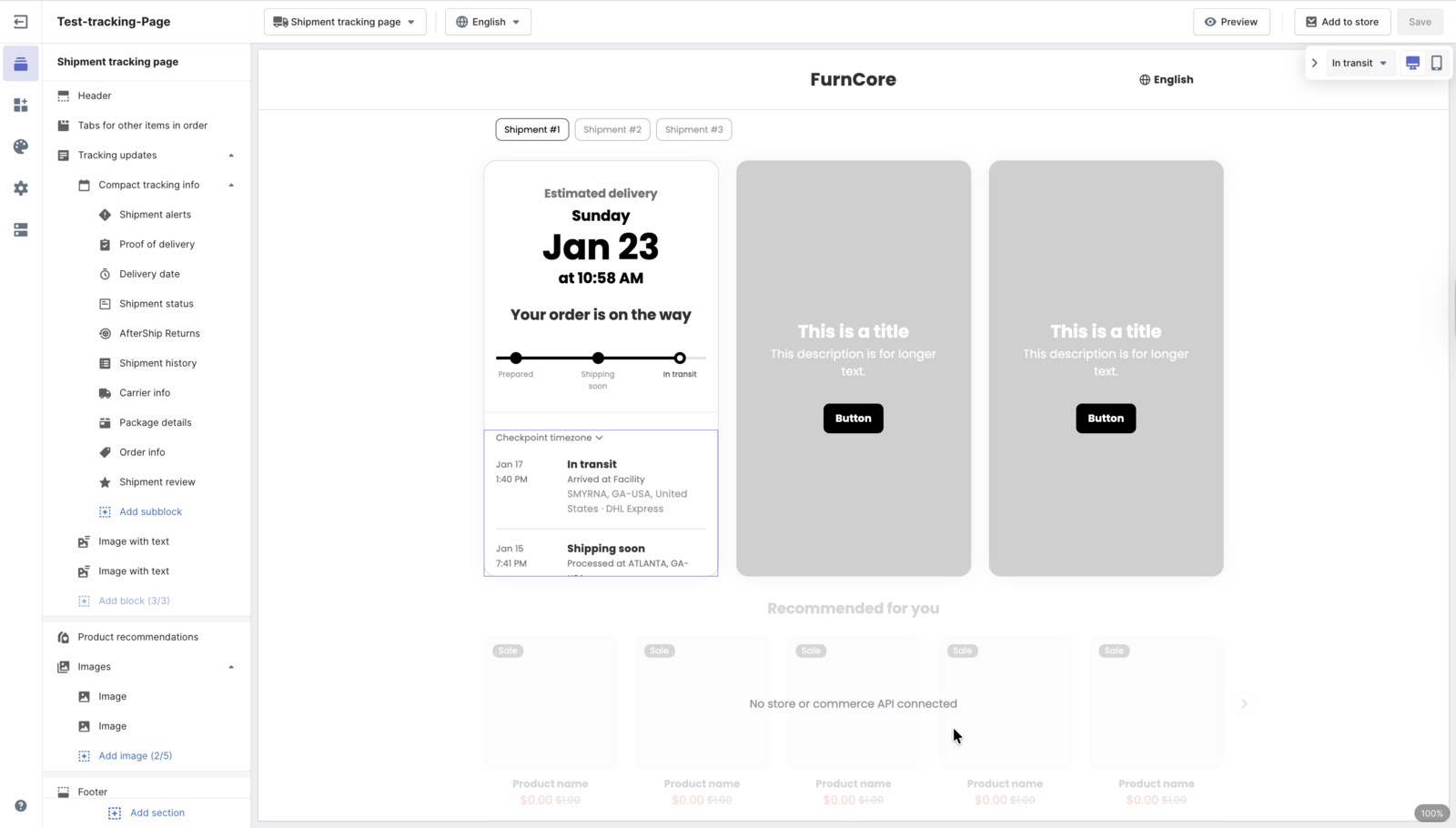
Start with the branded tracking page. AfterShip's is configurable, hosted, supports a custom domain, and runs multilingual out of the box, so configuring it is minutes of work. Building an equivalent on a raw API runs to weeks of frontend engineering in AfterShip's implementation experience, before you have handled carrier exceptions, localized copy, and mobile layout.
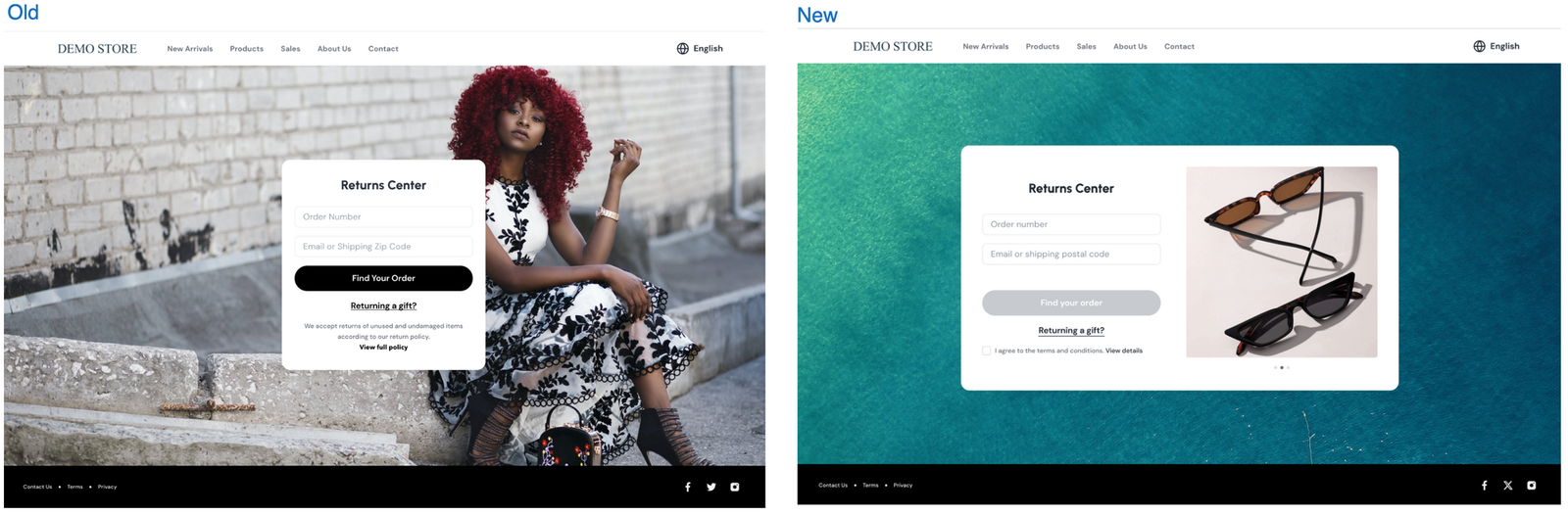
The bigger line item is returns. AfterShip's self-service returns portal is a complete customer-facing flow: select the item, choose a reason, pick a resolution (refund, exchange, or store credit), and generate the label. Building that from scratch is a substantially larger frontend plus backend project, because returns are not just a UI. They are state, policy, and label logic wired together.
This is also the cleanest factual line in the comparison. EasyPost sells real user-facing products, including Advanced Tracking and Embeddables, so it is not a bare API. But it has no standard self-service returns portal, which means that entire build lands on your team.
Zoom out and the pattern compounds. Standing up the full post-purchase experience on a raw API usually means stitching together several separate tools (tracking page, returns portal, integrations, analytics), then maintaining the glue between them — recurring engineering time, every year, in AfterShip's implementation experience. That maintenance never ships a feature; it just keeps the seams from splitting.
The consolidation payoff is measurable. After moving its post-purchase stack onto AfterShip, Aetrex reported 50% lower operational costs, a 141-point NPS increase, an 86% reduction in return-processing time, and a 74% drop in WISMO contacts. Those are the numbers that appear when one platform replaces four.
The integration tax is industry-wide, not a one-off. The MuleSoft 2026 Connectivity Benchmark found the average organization runs 957 applications with only 27% of them integrated. Every customer-facing screen you hand-build on a raw API adds to that unintegrated pile.
The endpoints are close. The build you skip is not. That gap, measured in engineering months rather than API line items, is the part of the AfterShip API vs EasyPost API decision that compounds for years.
Who runs it after launch: the no-code path for ops teams
The build is only half the cost. Someone has to run the thing every day after it ships, and on a raw API that someone is still an engineer. AfterShip’s setup path is aimed at the ops team instead. A Shopify merchant connects the store with a single click, and AfterShip imports and syncs the shipment data into one dashboard — no mapping project, no middleware. From there, carrier auto-detection identifies the right carrier from the tracking number with no manual mapping, and from the Essentials plan up, carrier auto-correction switches it automatically when a number gets paired with the wrong carrier, so updates keep flowing without anyone filing a ticket.
Notifications work the same way. Instead of writing handler logic to decide when a customer hears from you, an ops manager sets the trigger in the dashboard: email or SMS the customer when a sub-status changes or the estimated delivery date shifts, available from the Essentials plan up. That is the same event stream a developer would otherwise consume from the Tracking API webhook, exposed as a setting rather than a build. The API stays available for the cases that need it — but nobody has to open an editor to change when a customer gets told their parcel is running late.
The Honest Verdict: When Should You Choose EasyPost?
There is a real scenario where EasyPost is the better call, and it is worth stating plainly. If you have a deep frontend team, you only need a label-generation engine, and you are committed to building and maintaining every customer-facing component yourself, EasyPost's focused, API-first approach is a clean fit. You get a precise engine with no opinions imposed on your UI. For a platform or marketplace that wants total control of the experience, that is a feature, not a shortcoming. If your shortlist runs wider than two names, we ranked which tracking provider holds up under production load.
Credibility cuts both ways, so here are two concerns a skeptical developer will find in AfterShip's own reviews, each with the mechanism behind it and the fix.
The first is Klaviyo setup friction. Teams report that wiring up AfterShip's native Klaviyo integration, available on the Premium tier, takes more configuration than they expected. The work is mapping AfterShip's post-purchase events into Klaviyo's flows, which is fiddly the first time through. The fix is straightforward: follow the integration setup guide and start from the provided flow templates instead of building the event mappings from scratch.
The second is overage billing. Some merchants get caught off guard by overage charges, because AfterShip uses volume-based pricing and shipments past your plan quota bill incrementally. Size the volume slider to your peak month rather than your average, and keep an eye on usage, so a seasonal spike does not turn into a surprise line item.
Neither is a dealbreaker, and neither moves the core verdict. They are the operational details worth knowing before you sign, not discovering after.
EasyPost pricing vs AfterShip
Pricing is where the engine-versus-car split stops being abstract. EasyPost meters most of what it sells per shipment; AfterShip sells a quota with the customer-facing layer already inside it. Here is what each one publishes today (US list prices, billed monthly, checked October 2026).
EasyPost pricing, from easypost.com/pricing:
- Shipping Suite (labels, rate shopping, address verification, tracking, insurance) - Free Access with wallet carriers, free for up to 3,000 labels, postage not included and a per-label fee beyond that; Bring Your Own Carrier Accounts (BYOCA) at $20 per month plus a per-label fee; Enterprise priced on volume.
- Nexus (connect Shopify, import orders, print labels) - the same Free Access and $20 per month BYOCA tiers.
- EasyPost Tracking API (basic multi-carrier tracking) - $0.01 to $0.03 per shipment.
- EasyPost Advanced Tracking (branded tracking, notifications, full shipment visibility) - $0.03 per shipment.
- Insurance and Claims API - 1% of shipment value, $1.00 minimum.
AfterShip pricing, from AfterShip Tracking pricing and AfterShip Shipping pricing:
- AfterShip Tracking Essentials - from $29/month for 6,000 shipments a year, $0.08 per extra shipment, branded tracking page included.
- AfterShip Tracking Premium - from $59/month for 6,000 shipments a year, $0.12 per extra shipment; this is the tier where the Tracking API and webhooks unlock, alongside AI-powered EDD, the custom domain and the CX partner integrations.
- AfterShip Shipping Essentials - from $9/month for 1,200 labels a year.
- AfterShip Shipping Pro - from $69/month for 24,000 labels a year; this is the tier where the label-side APIs unlock.
- Enterprise on both products is custom-quoted.
Put a number on it. Take a brand shipping 6,000 parcels a year that wants a branded tracking page. On EasyPost, Advanced Tracking at $0.03 per shipment is $180 a year, on top of a label plan where BYOCA adds $240 a year. On AfterShip, Tracking Essentials covers the same 6,000 shipments at $29 a month - $348 a year - with the branded tracking page included and no per-shipment tracking fee until the quota runs out. On the tracking line item in isolation, EasyPost is cheaper. The difference is what sits inside AfterShip's number: the page, the notifications and the delivery estimates you would otherwise scope as a frontend project.
The per-label entry point favors EasyPost just as plainly, and it is worth saying without hedging. AfterShip's Shipping API is gated to the Pro tier at $69 a month, while EasyPost's BYOCA plan starts at $20 a month. If the whole requirement is generating a label through an API call, with no customer-facing surface attached, EasyPost's raw-API entry is the lower-cost path and the right call.
Final Recommendation: Choose the API That Buys You Time
The best shipping API is not the one with the cleanest endpoint. It is the one that buys back the most engineering time. If your only requirement is to generate a label with a single API call, and you will never show a customer a tracking page or a returns flow, EasyPost's focused approach can look simpler at the outset. For any scaling eCommerce business, that view is shortsighted, because it ignores the total cost of building and maintaining the full post-purchase experience.
AfterShip's API-led platform removes that cost. Your team spends its months on core product instead of rebuilding a tracking page and a returns portal that already exist, configurable, on the standard tiers. That is the real difference behind the AfterShip API vs EasyPost API decision: not which API you call, but what each one frees your team to build instead. For teams shortlisting an EasyPost alternative, that is the specific swap: AfterShip is the one to pick when the customer-facing tracking layer - branded pages, notifications, delivery estimates - is the part you do not want to build.
Frequently Asked Questions
A few questions that tend to come up at the end of this evaluation.
Is AfterShip more expensive than EasyPost?
It depends which line item you price. The plan-by-plan comparison, including the per-label gap that favors EasyPost, is in the EasyPost pricing vs AfterShip section above. On total cost of ownership at the scale of a Shopify DTC brand running 5,000+ orders/month, the comparison changes shape: AfterShip's platform already includes a configurable branded tracking page, a self-service returns portal, AI EDD, and native Klaviyo and Gorgias integrations that an EasyPost-only stack would have to build and then maintain in-house. The more user-facing surfaces the merchant wants, the more the math favors AfterShip. Tracking API access and shipment quotas for each plan are listed on AfterShip Tracking pricing.
Can I use the AfterShip API without the pre-built pages?
Yes. The Tracking, Shipping, and Returns APIs are usable headless, with plan tiering to account for: the Tracking API is available across the Tracking plans, the Shipping API from the Pro tier, and Returns webhooks and API from the Premium tier. The pre-built tracking page and returns portal are optional accelerators, not prerequisites, so a team can adopt the API now and add the hosted UIs later without re-integrating.
How do AfterShip and EasyPost integrate with Shopify?
EasyPost integrates primarily through its API and is embedded inside many commerce platforms; merchant-facing UI for platforms is available through its Forge white-label tier rather than a standard Shopify app. AfterShip offers native Shopify apps (one-click install from the Shopify App Store for Tracking, Returns, and Shipping) on top of its APIs, so a Shopify merchant can go live without custom code and still drop down to the API whenever a custom build calls for it.
Is EasyPost or AfterShip better for a team without developers?
It depends how much of the post-purchase experience you need. EasyPost sells itself as “the industry’s trusted shipping API,” and most of what it does is reached through that API. It does offer a no-code path for labels specifically: a Create Label interface in its dashboard, plus a CSV template for bulk-purchasing up to 500 labels at once. That covers getting a parcel out the door, not what the customer sees afterward. AfterShip’s native Shopify apps install in one click, and the surfaces a team without developers actually needs to change — the branded tracking page, the notification triggers, the returns portal — are dashboard settings, with the same APIs still underneath for whatever that team later decides to build itself.