If you ship 1,000 to 10,000 orders a month from your own stock, Shippo and ShipHero answer different questions. Shippo is shipping software for the team at the packing bench; ShipHero is warehouse management software for running a warehouse, and it no longer offers outsourced fulfillment. For a packing-room team the choice is shipping software, and the bigger gain comes after the label, where AfterShip competes.
That distinction settles the shortlist before any feature table does, and it is where this Shippo vs ShipHero comparison begins.

The Critical Question: Do You Need Shipping Software or Warehouse Software?
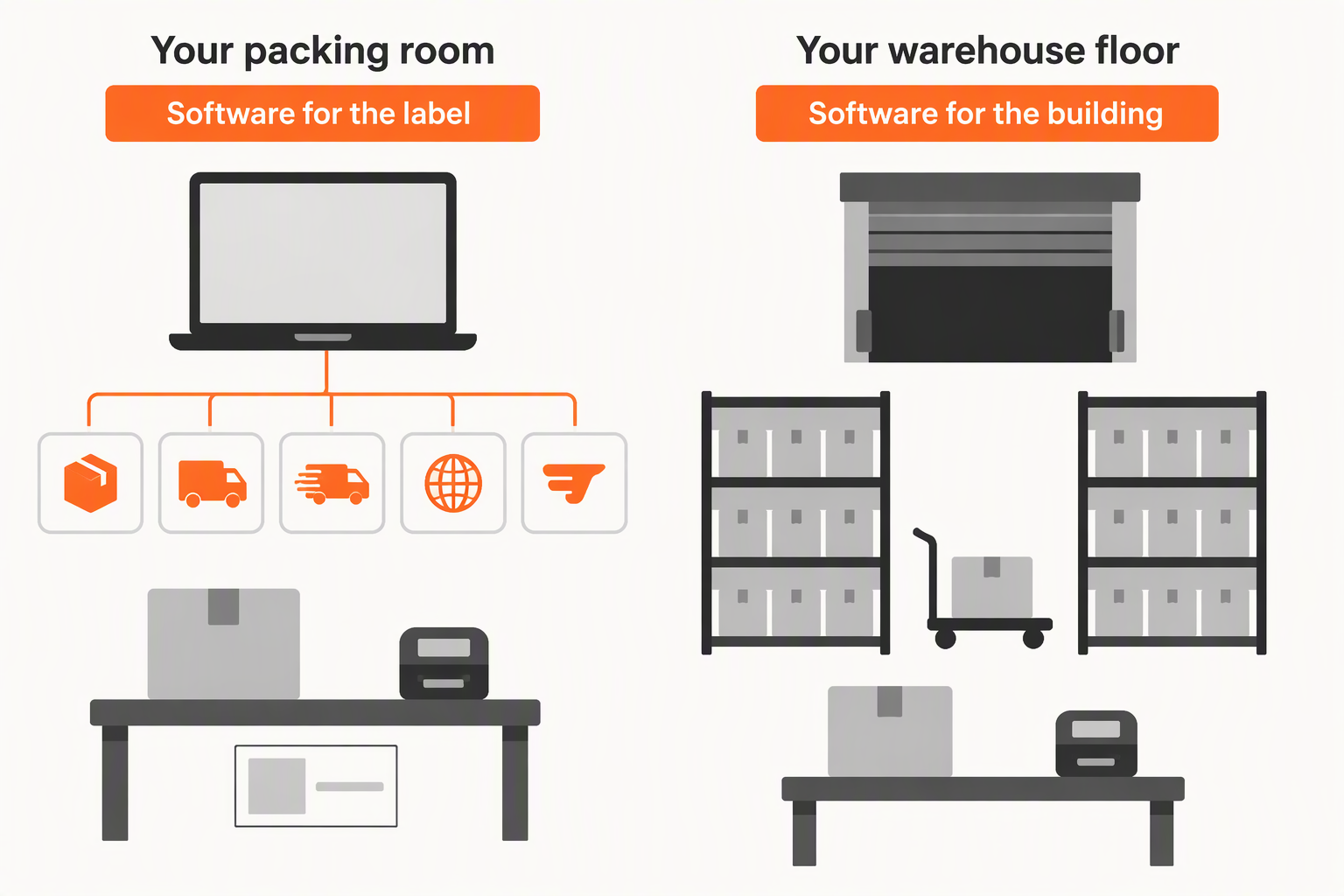
Start with your own floor plan, not with a vendor. If your team pulls orders off shelving and prints labels at a bench, your constraint is the label. If you are running aisles, bin locations and a shift of pickers, your constraint is the building.
Shipping software plugs into the packing room. It connects your store to your carrier accounts, compares rates across services, prints labels and automates which service each order gets. You still pick, pack and ship. Shippo is shipping software for in-house teams. AfterShip Shipping sits in the same category.
Warehouse management software runs the warehouse itself: receiving and putaway, inventory tracked by location, directed picking, labor tracking. It assumes there is a warehouse to run. ShipHero sells warehouse management software; its former fulfillment business is now LVK.
They get shortlisted together, but how a WMS and a shipping app differ comes down to one question: are you directing a building, or getting parcels out of a room?
When Warehouse Management Software Like ShipHero Fits
Three things in your own operation decide whether the warehouse category is the right spend.
- You have a real warehouse, with receiving, shelving and pickers working a pick path.
- Your inventory has to be tracked by location, because a SKU sits in several places at once.
- You have the operational room for a multi-week implementation, including labeling every location and running a physical inventory count before go-live.
ShipHero publishes exactly that. Its implementation page describes location labeling and a physical inventory count as required before go-live, and its sales page publishes a 2 to 12 week deployment range. Pricing is by quote.
The mobile app runs on Apple iOS devices only. Automation covers 52 triggers and 60 actions. Merchants already on it can connect it to AfterShip Tracking through our ShipHero integration.
None of that is a criticism; it describes a system built to direct a building. Check your own floor first. If nobody walks a pick path, you are buying a control layer for a floor you do not have.
When to Choose Shipping Software (and Keep Control In-House)
Now hold your own operation against the other category. DTC shipping software fits when you keep your own stock, you want the buying experience to stay yours, and what you need is labels, rates and rules rather than control of a floor.
- Brand control. Nobody else's packing slip, timeline or exception handling.
- No build-out. You are not labeling bin locations or counting inventory before you can ship anything.
- A setup measured in hours. Connect the store, connect the carrier accounts, print.
This is the category the packing-room team belongs in, and if you are weighing Shippo alternatives it is worth seeing how the best shipping software stacks up before settling on a name. Comparing live rates across services is the quickest way to optimize your shipping rates.
It also leaves something on your plate. Once the label prints, everything the customer sees next is still yours: the tracking page, the delay email, the returns request. The label is where shipping software stops.
Software vs. Software: Shippo vs. ShipHero's WMS
Five questions decide this one, and none of them is about brand. What is the tool built to run? How much setup stands between you and the first label? What does it automate? Is its pricing published or quoted? And can it carry a packing-room team on its own?
Run those five and the two products separate cleanly: ShipHero vs Shippo is a category question, not a feature question. ShipHero is a warehouse management system, sold to merchants running their own warehouse and to 3PLs. Shippo is multi-carrier shipping software for in-house teams.
What each publishes tracks that split. Shippo publishes a plan ladder billed monthly by label volume, from $19 for 31 to 200 labels up to $199 for 5,001 to 10,000, with Premier by quote, and it includes automation rules on every plan. ShipHero is priced by quote at every tier, and what it automates is warehouse work: receiving, allocation and picking rather than carrier selection.
| Criteria | Shippo | ShipHero |
|---|---|---|
| What it is built to run | Multi-carrier shipping from your own packing room | Warehouse management: receiving, putaway, directed picking |
| Setup and time to first label | Connect store and carrier accounts, then print | 2 to 12 weeks; location labeling, inventory count |
| Automation | Automation rules on every plan, including free Starter | Warehouse triggers and actions across receiving, allocation, picking |
| Pricing transparency | Monthly volume ladder, $19 to $199; Premier quoted | Quote at every tier |
| Standalone for a packing-room team | Runs standalone for a team packing in-house | Assumes a warehouse operation to direct |
Third-party ratings sit close. Shippo holds 4.2 out of 5 from 77 reviews on G2; ShipHero holds 4.5 out of 5 from 219. Neither listing publishes ease-of-use sub-scores, so neither number says anything about how either product feels to use.
Both stop where their category stops. Once delivery performance, analytics and the post-purchase layer start to matter, AfterShip is the specialist choice.
The Problem with Point Solutions: A Disconnected Customer Journey
The label prints, the parcel goes, and your inbox starts filling. Where is my order. Why is it late. How do I send it back. Those three arrive whichever tool printed the label, and they arrive at your team, not at the carrier.
Both tools in this comparison already reach into that window. Shippo Pro sends branded tracking emails and hosts branded tracking pages. ShipHero passes tracking through to the store platform, which sends the notification from there. The customer hears something either way.
What the customer hears, and when, is the part that moves the numbers. 90% of consumers say it is important to be notified when an order is expected to be late and to be told the updated ETA, according to the AlixPartners 2026 Home Delivery Survey.
The timing gap is the one worth closing. In the same survey, 50% of executives wait to notify customers of a possible delay until the delay is certain to affect the delivery date. By then the customer has already checked tracking twice and opened a ticket.
Closing that gap is a data problem before it is a messaging problem. It takes delivery data good enough to see a shipment drifting before the carrier says so, a notification layer that acts on that signal, and analytics that show which lanes and carriers keep producing it.
The Platform Advantage: Unifying Shipping with the Full Post-Purchase Experience
AfterShip sells shipping, tracking, returns, and warranty as separate products, priced separately. What makes them a comprehensive post-purchase platform rather than four apps is a shared delivery-data layer. AfterShip Shipping integrates label creation with tracking, returns, and customer communication.
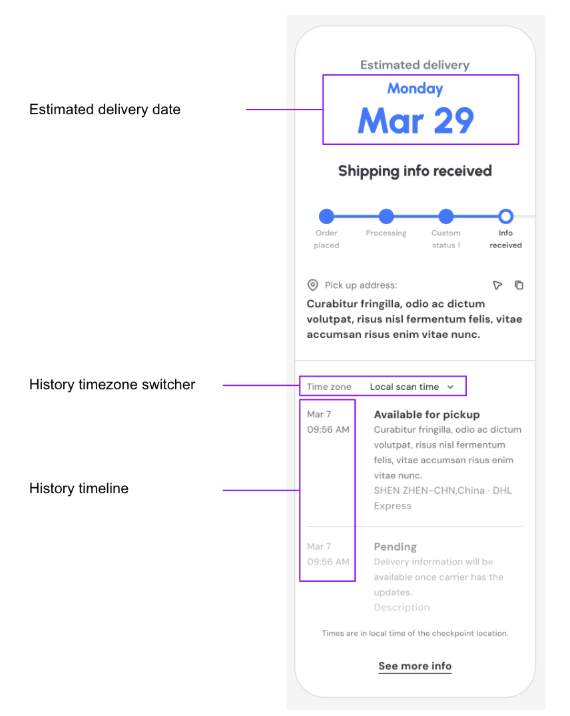
The conditions are what make it true. Switch on auto-sync in AfterShip Shipping and each new label's shipment flows into AfterShip Tracking, which runs the branded tracking page and the email and SMS updates. Auto-sync needs an active AfterShip Tracking subscription, and synced shipments count against the Tracking quota. Pair it with AfterShip Returns and, on Tracking's Enterprise plans, a delivered order's tracking page carries a Request a return button into the returns portal.
That data loops back. Smart Carrier Recommendation is on every AfterShip Shipping plan. It compares live rates across your connected carrier services and sets aside services with a high exception rate for that origin and destination, using AfterShip tracking data. It stays off until you switch it on.
On pricing, AfterShip Shipping is standard SaaS, and the platform separately offers a shopper-funded option, Return Care, on the returns side.
The support-queue effect of AfterShip Tracking is the visible one.

“AfterShip's shipment tracking is pretty amazing stuff. And I think the 71% drop in WISMO tickets is due to us providing that tracking visibility to our customers.”
Deryck Lim, Sr. Operations Manager
Read their story →AfterShip vs. Shippo: The Verdict for Scaling DTC Brands
At this volume the criteria shift: what the customer sees on the tracking page, whether they can start a return without emailing you, what the notifications say and when, what the delivery data tells you afterwards, and what decides the carrier on each label.
| Criteria | Shippo | AfterShip Shipping |
|---|---|---|
| Branded tracking experience | Branded tracking pages and emails on Pro | AfterShip Tracking: branded page, live checkpoints |
| Shopper-initiated returns | Return labels, including automatic pay-on-use billing | AfterShip Returns: shopper portal with exchanges |
| Proactive customer notifications | Shipment notification emails to your customers | AfterShip Tracking: email, SMS, delivery-date changes |
| Delivery analytics | Shippo Intelligence, Pro and Premier, API customers | AfterShip Tracking: volume, on-time, exception dashboards |
| How carrier choice is made | Your automation rules decide the service | Smart Carrier Recommendation, every AfterShip Shipping plan |
Start with the parity. Both platforms offer branded tracking pages and notification emails, and both create return labels.
AfterShip Tracking reports transit times, on-time rates and exception rates, so you can see which lanes and carriers cost you. AfterShip Returns gives the shopper a portal that handles exchanges as well as refunds.
The longer version of that argument positions AfterShip as a superior alternative for DTC brands, and the three-way comparison with AfterShip puts a warehouse system back alongside both.
The honest trade sits in automation. Shippo includes automation rules on every plan, including its free Starter plan, while AfterShip Shipping's rules start on Pro. What every AfterShip Shipping plan carries instead is Smart Carrier Recommendation, and above it the tracking and returns layer rules alone never reach.
AfterShip Order Tracking holds 4.6 out of 5 from 1,504 Shopify App Store reviews and AfterShip Returns holds 4.7 out of 5 from 1,542, both carrying the Built for Shopify badge.
AfterShip Shipping bills by label volume: Essentials from $9 a month and Pro from $69 a month billed annually, $11 and $89 billed monthly at the same volumes, Enterprise by quote, and a free plan at 10 labels a month. Neither platform is consistently cheaper across this reader's volumes, so there is no price winner to declare.
For a brand shipping only a handful of parcels a month with no post-purchase budget, Shippo's Starter plan (up to 30 labels a month) can be a straightforward starting point; AfterShip is the next step once customer experience and retention become priorities.
Your 2026 Shipping Strategy: The Final Verdict
If you want to stop running fulfillment yourself, that is a 3PL decision and outside this comparison.
Choose AfterShip Shipping if:
- you want the label, the tracking page and the returns portal to come from one platform
- you want carrier choice informed by delivery data rather than by rate alone, through Smart Carrier Recommendation on every plan
- you measure delivery performance and want analytics on transit times, on-time rates and exceptions
- you want proactive email and SMS updates on every shipment milestone
- you expect to add returns and warranty as the brand grows
Choose Shippo if:
- labels and rates are the whole job and you already run tracking and returns in tools you intend to keep
- you intend to stay on a free plan and your volume sits above AfterShip Shipping's free tier but within Shippo's
If the post-purchase layer is where your next gain is, start with AfterShip Shipping.
Simplify shipping and order fulfillment across Shopify, TikTok Shop, and your carrier network.
Book a demoFrequently Asked Questions
What is the difference between Shippo and ShipHero?
Shippo is shipping software: it connects your store to your carrier accounts, compares rates across services and prints labels from your own packing room. ShipHero is warehouse management software: it runs receiving, putaway, inventory by location and directed picking inside a warehouse you operate. ShipHero also no longer runs fulfillment for merchants; that side of the business was spun out as LVK, so what you buy today is the software, not someone else's warehouse. If your team packs orders at a bench rather than walking a pick path, the shipping-software category is the one that fits.
Do I need warehouse management software at 1,000 to 10,000 orders a month?
Volume alone does not decide it. What decides it is whether you have a warehouse to run: receiving, shelving, inventory tracked by bin location and pickers working a pick path. A brand shipping from its own stock in a back room would be buying a multi-week implementation before the first label prints.
What happens to the customer after the shipping label is printed?
That is where most of the work still sits: the tracking page, the delay notification and the returns request all belong to you, not to the carrier. Shipping software stops at the label. AfterShip Shipping is built to hand off from there into AfterShip Tracking and AfterShip Returns, so the branded tracking page, the notifications and the returns portal come from the same platform that printed the label.
