You're comparing Shippo and ShipHero, and it feels like a choice between 'too simple' and 'too complex.' The reason for your confusion is simple: you're comparing a label utility to a warehouse system. For a growing DTC brand, neither is the right answer. The decision that matters most comes after the label, in the tracking page, notifications and returns your customers see, and that is where AfterShip is the specialist choice.
The verdict on Shippo vs ShipHero for a scaling DTC brand: if Shippo is the tool you know, Shippo measured against AfterShip on rates and labels sets those two side by side, and for the three-way decision AfterShip is the definitive choice for growth-focused brands that prioritize customer experience and operational efficiency.
The Core Misunderstanding: Label API vs. WMS vs. Post-Purchase Platform
Your shortlist puts two tools side by side that were built for different jobs, which is the first thing to settle before weighing ShipHero Shippo alternatives.
Shippo is a shipping aggregator API for printing discounted labels. It is multi-carrier shipping software, sold as a web app and an API, built around labels and rates.
ShipHero is a warehouse management system (WMS) with a bundled shipping tool. It is warehouse management software for brands and 3PLs, and its rate shopping runs inside the WMS.
ShipHero's own documentation describes Shippo as a source of discounted rates inside ShipHero. The two names on your shortlist can run as layers of the same operation. If the open question is simply whether you need a WMS or a shipping app, our two-way comparison settles it.
That difference changes who signs off and what you are paying for. A WMS decision pulls in receiving, picking, packing and inventory, which makes it a warehouse project. A label tool decision is scoped to the packing station and the carrier bill. The experience your customers get after checkout is a third decision again.
AfterShip is an integrated platform for shipping, tracking, returns, and warranty. It covers the shipping decision and the shopper's experience after it:
- AfterShip Shipping handles labels and rates.
- AfterShip Tracking runs the tracking page and notifications your customers see.
- AfterShip Returns runs the returns experience.
Each is a separate subscription within AfterShip's shipping, tracking, returns, and warranty products.
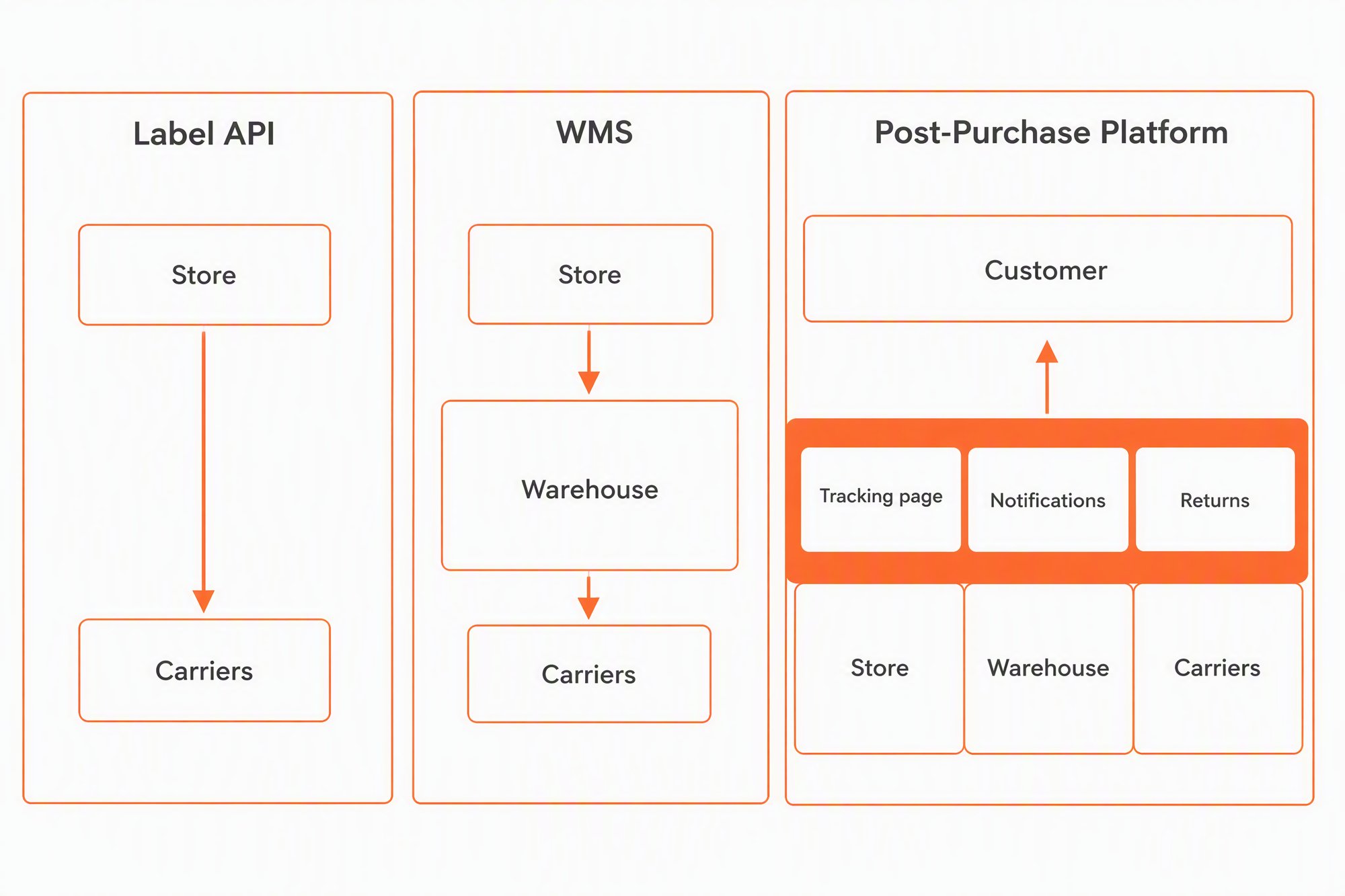
Your customers never see a WMS or a rate table. They see the tracking page, the delivery emails and the returns flow, which is exactly the ground AfterShip Tracking and AfterShip Returns cover.
At a Glance: Shippo vs. ShipHero vs. AfterShip
Seven criteria decide this purchase for a DTC ops lead, from core business model to true cost of ownership.
| Criteria | AfterShip | Shippo | ShipHero |
|---|---|---|---|
| Core Business Model | A post-purchase suite of shipping, tracking, returns, and warranty products, each sold and billed separately. AfterShip Shipping handles multi-carrier labels and rates; AfterShip Tracking and AfterShip Returns run the shopper-facing experience after checkout. | Multi-carrier shipping software, as a web app and an API. | Warehouse management software for brands and 3PLs; rate shopping runs inside the WMS. |
| Best For | Scaling DTC brands that want the shopper's experience after checkout to carry the brand, with shipping choices informed by AfterShip tracking data. | Merchants whose main need is labels and rates. | Brands and 3PLs buying warehouse management software, including a plan edition named "3PL" sold to third-party logistics providers. |
| Label & Rate Shopping | AfterShip Shipping: live rate comparison across connected carrier services; Smart Carrier Recommendation, available on all plans once turned on, excludes services with a high exception rate for each shipment's origin and destination based on AfterShip tracking data and re-evaluates each shipment; discounted labels through Easyship on Essentials, Pro and Enterprise. | Rate comparison, automation rules and discounted carrier labels. | Real-time rate shopping inside the WMS selects the cheapest label that arrives on time; negotiated rates on natively integrated carriers. |
| Branded Customer Experience | AfterShip Tracking goes further on the branded page itself: a custom domain, custom CSS and shipment statuses, multiple branded pages, and removal of AfterShip branding; notifications through Klaviyo, Attentive and Omnisend. | Pro brands the tracking page and emails with a logo and colours and can show product recommendations; the free plan still sends automatic tracking emails. | PostHero, a WMS-centric merchant dashboard for delivery tracking and carrier performance; shopper messaging through Klaviyo. |
| Returns Management | AfterShip Returns: self-service returns portal; eligibility rules; rules that approve eligible returns and route them by origin, SKU or destination; exchanges and store credit; return analytics on reasons and refund values; on Premium and Enterprise, a two-way ShipHero integration that creates the RMA when a return is approved. | Return labels created with the outbound label or later, pay-on-use, billed only when the carrier scans them. | Warehouse-side rules to restock or destroy returned items; its own self-service return portal, embedded on the storefront as an iFrame; integrates with Loop Returns. |
| Integrations & Scalability | AfterShip Tracking connects to Klaviyo, Attentive, Omnisend and Gorgias; AfterShip Shipping connects to Shopify, BigCommerce, WooCommerce and TikTok Shop, with its Shipping API on Pro and Enterprise; AfterShip Returns integrates two-way with ShipHero on Premium and Enterprise. | Store and marketplace integrations, and an API for shipping. | Open API on its Standard plan and 50+ ecommerce integrations; the commitment is contractual (Round 4). |
| True Cost of Ownership | Each product is billed separately, and no combined self-serve price is published. AfterShip Shipping: Essentials $11/mo at 100 labels/mo; Pro $89/mo at 2,000 labels/mo (billed monthly). AfterShip Tracking Premium, for the branded-page and AI EDD capabilities: $59/mo billed annually or $70/mo billed monthly, 6,000 shipments/year, $0.12 per extra shipment. Shipments synced from Shipping into Tracking count against the Tracking quota and incur overage beyond the limit. Optional support add-ons: Silver, 20% of product fee ($200/mo minimum); Gold, 30% ($400/mo minimum). Self-serve plans publish their quotas and overage. | Subscription plus postage. Starter free up to 30 labels/month; Pro from $19/mo billed monthly at 1-200 labels, rising by volume band; Premier on quote. | Not published, quote only: three editions (Standard, 3PL, Enterprise). Shipment-based agreements cap volume at a threshold ShipHero controls. |
Round 1: Shipping & Label Generation
In shipping software for DTC brands, your shipping decision comes down to which carrier service each order leaves on, and what that choice costs you.
AfterShip Shipping compares live rates across the carrier services you connect, as multi-carrier shipping software. Four documented capabilities shape how it works:
- Smart Carrier Recommendation. It excludes carrier services with a high exception rate for the shipment's origin and destination, based on AfterShip tracking data. It re-evaluates each shipment, so your rules don't need manual updates when carrier performance changes. It is available on all AfterShip Shipping plans and is off by default, so you turn it on when you are ready.
- Discounted labels. Discounted labels use rates negotiated by Easyship, a separate company that bills you directly, on the Essentials, Pro and Enterprise plans.
- Automation rules. Automation rules are available on the Pro and Enterprise plans for setting shipping choices on incoming orders.
- Self-serve setup. You pick a plan, connect your store and your carrier accounts, and start creating labels from the AfterShip Shipping dashboard.
Shippo's shipping software centers on labels and rates. ShipHero's rate shopping runs inside its WMS and picks the cheapest label that arrives on time.
For an ops lead choosing carriers across 1K to 20K orders a month, AfterShip Shipping pairs rate comparison with a carrier filter built on AfterShip tracking data.
Round 2: The Post-Purchase Customer Experience
After checkout, your customer's view of the order narrows to a tracking page, the messages that arrive, and the date they expect the parcel. Those three touchpoints carry your brand for the days between payment and delivery.
AfterShip Tracking is the product that runs them. It gives you branded tracking pages, proactive notifications through its native Klaviyo, Attentive and Omnisend integrations, and AI-powered delivery estimates on the same page your customer checks.
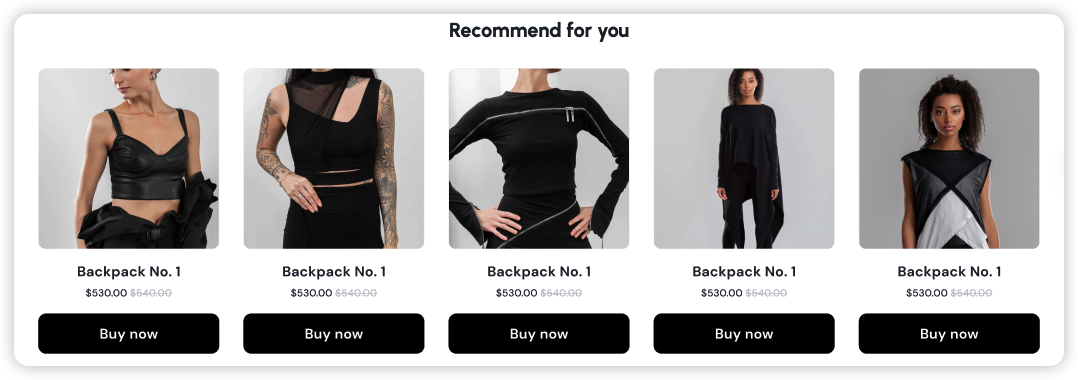
The difference between vendors sits in how far a branded tracking experience goes. Shippo's Pro plan brands the tracking page and emails with a logo and colours and can show product recommendations, and its free plan still sends automatic tracking emails. AfterShip Tracking goes further on the branded page itself: a custom domain, custom CSS and shipment statuses, multiple branded pages, and removal of AfterShip branding.
On delivery dates, Shippo says its estimated delivery dates reach 90% or better accuracy, measured against actual delivery outcomes, and lists AI-powered estimated delivery dates on its Pro plan. AfterShip publishes up to 95% EDD prediction accuracy for AI EDD, with coverage of at least 80% of deliveries, where most carriers typically offer predictions on less than 40%. AI EDD sits on AfterShip Tracking Premium, and AfterShip Tracking notifies shoppers when the estimated delivery date changes.
ShipHero's tracking is a WMS-centric merchant dashboard (PostHero), not a shopper-facing branded page, with shopper messaging handed to Klaviyo.
Depth on the page also shows up in the data behind it. Mous used AfterShip Tracking's consolidated carrier data to compare carriers, then switched carriers based on what it found. Mous cut its lead times within Canada by 82%, from two weeks to 2.5 days. The same Tracking data that powers a shopper's status page gives your logistics team a carrier view it can act on.

“AfterShip allowed us to set up KPI dashboards to see how well everything is going and troubleshoot before it becomes a problem.”
Rosie Jennings, Head of Logistics
Read their story →The page a customer opens most after checkout should carry your domain, your shipment statuses and your products, and AfterShip Tracking is built to run that page.
Round 3: Returns Management - The Hidden Profit Killer
Returns shape the buying decision before any parcel comes back. Among shoppers who abandoned checkout for a reason other than just browsing, 20% cited slow delivery and 13% an unsatisfactory returns policy, per Baymard Institute.
Once an order ships, the returns flow decides whether a refund closes the relationship or an exchange keeps the customer buying. That makes returns a retention opportunity to design for, with the cost side handled by rules.
AfterShip Returns covers both sides, with everything below included from its Essentials plan unless a plan is named:
- Self-service returns portal. Shoppers start returns in an on-brand portal.
- Eligibility rules. You set who can return what, based on price, category, condition, days since purchase, or any combination.
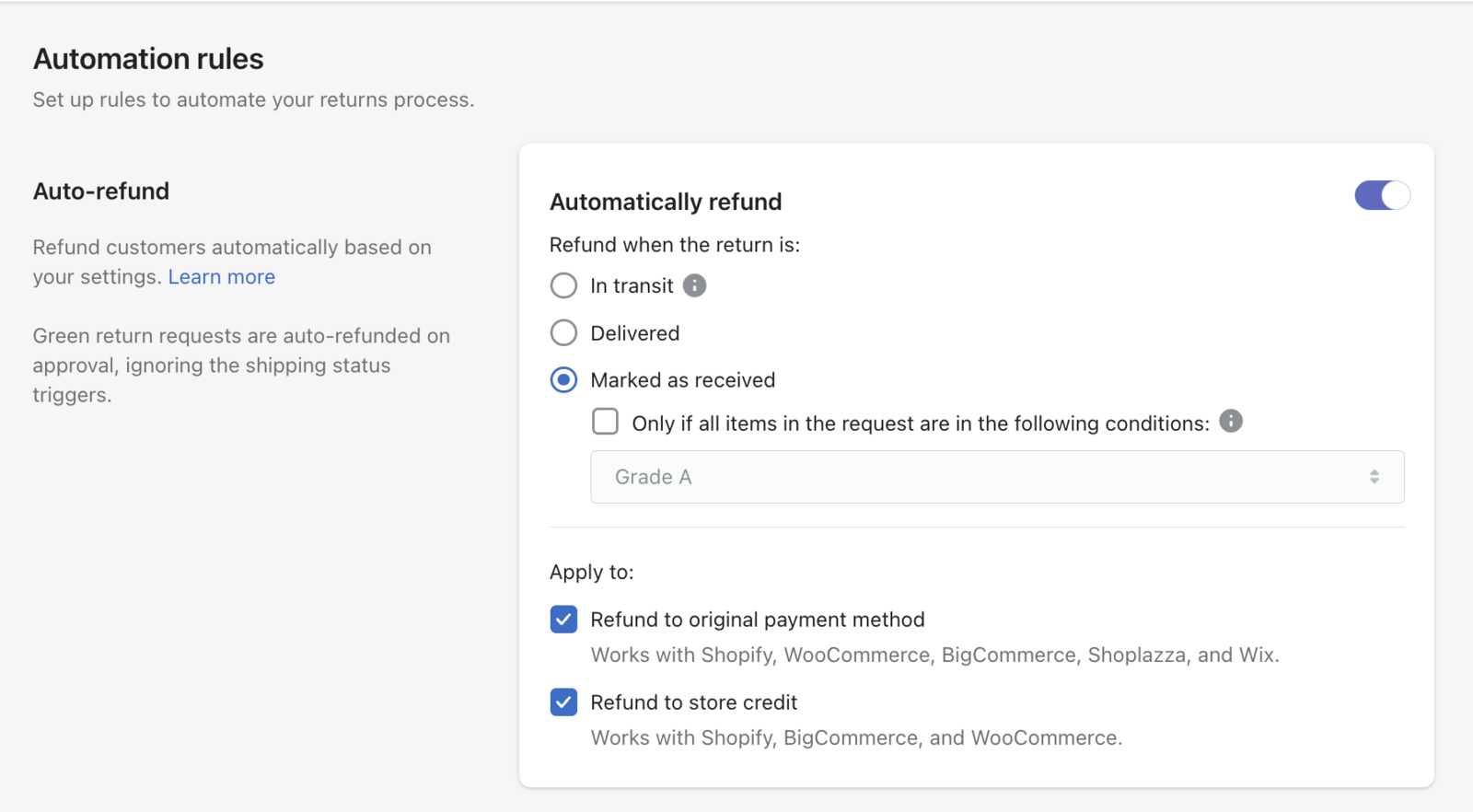
- Approval and routing rules. Rules approve eligible returns and route returns to the right warehouse by origin, SKU or destination. On the Premium and Enterprise plans, automation rules can also refund a return once it is marked as received, to the original payment method or to store credit.
- Exchanges and store credit. Shoppers can take an exchange or store credit in place of a refund.
- Return labels. Return labels and packing slips are generated in the app with pre-negotiated carrier rates, and up to 3 of your own carrier accounts connect on Essentials.
- Return analytics. Your team sees data on return reasons and refund values.
On the Premium and Enterprise plans, AfterShip Returns also integrates two-way with ShipHero: a return approved in AfterShip Returns creates the RMA in ShipHero, and ShipHero's status update marks the return received in AfterShip Returns. If ShipHero already runs your warehouse, the shopper-facing return and the warehouse receipt stay in step.
Shippo creates return labels with the outbound label or later, and they are pay-on-use: you are not billed unless the carrier scans them. ShipHero runs rules to restock or destroy returned items at the warehouse. It has its own self-service return portal, embedded on the storefront as an iFrame, and it also integrates with Loop Returns.
Where ShipHero and AfterShip both give shoppers a return portal, AfterShip Returns adds the labels, rules and return-reason data your team works from.
Round 4: Scalability, Integrations & API
As order volume climbs, the questions shift to how a platform connects to the rest of your stack and what you commit to when you sign.
ShipHero's commitment is contractual rather than technical. Its API is open and it lists 50+ ecommerce integrations, but its software agreement renews automatically for one-year terms, and on shipment-based agreements a yearly shipment threshold can only be raised with ShipHero's consent.
On the AfterShip side, each integration belongs to a product. AfterShip Tracking connects to Klaviyo, Attentive, Omnisend and Gorgias. AfterShip Shipping connects to Shopify, BigCommerce, WooCommerce and TikTok Shop, and offers its Shipping API on the Pro and Enterprise plans. Yotpo is listed in AfterShip's integrations directory.
As volume grows, AfterShip's products also connect to each other: AfterShip tracking data informs Smart Carrier Recommendation in AfterShip Shipping, which acts on delivery outcomes for each shipment's origin and destination, so post-purchase results feed straight into the next shipping decision.
The Final Verdict: Which Platform Should You Choose in 2026?
For a scaling DTC brand weighing Shippo vs ShipHero alternatives, the recommendation is AfterShip, because the decisions that grow with order volume are the ones your customers experience, in complete post-purchase software that works alongside the shipping decision.
Choose Shippo or ShipHero if:
- You ship under 100 orders a month and the lowest entry price decides it: Shippo's Starter plan is free up to 30 labels a month.
- Your main need is labels and rates (Shippo).
- You are buying warehouse management software for a brand or a 3PL and want rate shopping inside it (ShipHero).
Once order volume grows, the tracking page, notifications and returns become part of how customers judge the brand, and the decision moves past the label to where AfterShip Tracking and AfterShip Returns work alongside AfterShip Shipping. If ShipHero is still on the shortlist, scan ShipHero alternatives for mid-market brands before signing a yearly agreement.
Choose AfterShip if:
- You want carrier choices that exclude services with a high exception rate for each shipment's origin and destination, based on AfterShip tracking data (Smart Carrier Recommendation in AfterShip Shipping).
- You want your tracking page on your own domain, with custom CSS, your own shipment statuses and AfterShip branding removed (AfterShip Tracking Premium).
- You want shoppers to start returns in a self-service portal, with rules that approve eligible returns, routing by origin, SKU or destination, and return analytics on reasons and refund values (AfterShip Returns).
- You want each product's quotas and overage published before you buy.
Scaling brands leave when performance, analytics and economics start to matter. Smart Carrier Recommendation covers performance, return analytics in AfterShip Returns cover analytics, and published quotas and overage cover economics. AfterShip is the specialist choice when those things matter.
Simplify shipping and order fulfillment across Shopify, TikTok Shop, and your carrier network.
Book a demoFrequently Asked Questions
What is the main difference between ShipHero's software and AfterShip Shipping?
ShipHero is warehouse management software for brands and 3PLs, covering inventory, picking, packing and receiving, with rate shopping inside it. You buy it to run the warehouse floor, and shipping is one of the jobs it handles there. AfterShip Shipping handles multi-carrier labels and rate comparison, with Smart Carrier Recommendation to steer each shipment away from high-exception carrier services. The shopper-facing experience sits in AfterShip Tracking and AfterShip Returns, which are separately billed products. A brand that already runs ShipHero in its warehouse can add AfterShip for the tracking page, notifications and returns its customers see after checkout.
Does AfterShip Shipping include discounted carrier rates?
Yes. Discounted labels in AfterShip Shipping use rates negotiated by Easyship, a separate company that bills the merchant directly for those labels. They are available on the Essentials, Pro and Enterprise plans, so check which plan you are comparing before you build a cost model. Because Easyship bills the labels, your label spend arrives on the Easyship invoice, while your AfterShip Shipping subscription covers the software itself. Rate comparison across the carrier services you connect runs inside AfterShip Shipping either way.
Can I use AfterShip just for tracking if I use another app for shipping?
Yes. AfterShip Tracking is sold separately from AfterShip Shipping, so you can keep your current shipping tool and add tracking on its own. AfterShip's integrations directory lists a ShipHero connection for tracking data, which matters if ShipHero already runs your warehouse. If you later move labels to AfterShip Shipping as well, the same AfterShip tracking data feeds its Smart Carrier Recommendation once you turn that on.