You've narrowed it down to ShipStation vs. Shippo. Congratulations, you're asking the same question every scaling Shopify store asks. But after helping thousands of brands grow, we've learned it's the wrong question. The better question is where your shipping data lives once you add branded tracking and returns, and the answer that holds up is one data layer with them, not each tool's own settings. You are comparing rates by hand and printing labels one at a time, and all three tools below fix that. ShipStation vs Shippo for Shopify comes down to what happens to the data next.
ShipStation vs. Shippo: The 1-Minute Verdict for Busy Founders
You are picking the tool that will print every label your store sends for the next year or two. At 100 to 1,000 orders a month, all three options here print multi-carrier labels straight from Shopify orders, at different tiers. The difference is what each plan includes, and where the shipment data sits once you add branded tracking and returns.
AfterShip Shipping is built around that second point. Smart Carrier Recommendation is included on every plan and uses AfterShip's own delivery-exception data to steer each order away from services with a high delivery-exception rate on that lane, then balance cost and delivery speed, and the shipment data stays on the same data layer as tracking and returns.
11B+ shipments tracked. That is the scale of AfterShip's delivery data.
How They Stack Up: The Key Differences That Actually Matter
Five criteria decide the best shipping software for Shopify at this size: what you pay at volume, how deep the Shopify connection goes, what setup involves, what the tool can automate, and what happens to the data after the label prints.
| Criteria | Shippo | ShipStation | AfterShip Shipping |
|---|---|---|---|
| Pricing Model (at ~500 orders/mo) | Pro at $29/month for 201 to 500 labels, billed monthly. Free Starter plan up to 30 labels a month. The 501 to 1,000 band is $54/month. | No free plan, 30-day trial with no card. At 500 shipments, Starter is $39.99/month and Standard is $89.99/month, billed monthly. | Essentials at $35/month at 500 labels, billed monthly, on a ladder that reads $11 at 100 labels and $23 at 300. Pro starts at $89/month for a 2,000-label allowance. |
| Shopify Integration Depth | Imports Shopify orders, syncs fulfillment and can trigger the Shopify notification email. Imports all active Shopify locations and splits multi-location orders. Native live rates at checkout are currently Wix-only. | Imports orders and products. Writes status, tracking number, carrier and service back, including split shipments. Live rates at Shopify checkout on the Shopify Advanced plan or higher. | Unlimited Shopify store connections. Imports orders updated in the past 60 days. Fulfillment and tracking details sync back to the store after a label is bought. Shopify checkout options on Pro and Enterprise. |
| Ease of Use | Sign up for the web app and connect the store. | Published onboarding is four steps: connect the store, set ship-from locations, connect carriers, choose a label layout. | Install the Shopify app and connect the store. A free plan of 10 labels a month lets you run real orders through it first. |
| Automation Rules | Automation rules on every plan, including free Starter, with no published cap. | Basic rules on Starter. Unlimited rule types on Standard and Premium. | Automation rules on Pro and Enterprise, up to 10 rules below Enterprise; Essentials does not include them. Smart Carrier Recommendation is on all plans and steers orders away from services with a high delivery-exception rate on that lane. |
| Post-purchase data model | Branded tracking pages and notification emails on paid tiers; returns handled per-order. Configured as separate features. | Branded tracking page, notification emails, RMA workflows, and a branded returns/exchanges portal on Standard/Premium. Configured per tool. | Shipment, tracking, and returns data on one data layer, with carrier choice informed by AfterShip's own delivery-exception history. Tracking and Returns are separate subscriptions. |
The lasting difference is where the data lives: ShipStation and Shippo configure tracking and returns per tool, while AfterShip keeps shipment data on one layer with them.
Pricing Compared: What You'll Really Pay at 500 Orders/Month
Run 500 labels a month through your store and the ShipStation vs Shippo pricing gap is small enough that the tier structure matters more than the sticker.
All three are subscription tools where you connect carriers and buy postage. Billed monthly and bought direct from the vendor, at 500 labels Shippo's Pro is $29, ShipStation's Starter is $39.99, and AfterShip Shipping's Essentials is $35. Shippo prices its Pro plan by monthly label volume band. Check both vendors' current numbers on ShipStation's pricing page and Shippo's pricing page, and compare real-time shipping rates for the lanes you actually ship.
Own carrier accounts split by tier. Shippo charges 5 cents per label on your own account on Starter, and nothing on Pro. ShipStation puts them on Standard and Premium. AfterShip Shipping includes one on Free and Essentials, five on Pro.
Seats are parity: all three support a team, with the count set by plan. If two of you pack, ShipStation's Starter covers 3 users and sells extras only on Standard and Premium.
Watch the tier jump. Label 201 moves a Shippo account into the next band, and 501 moves it again to $54. ShipStation's own carrier accounts, branded tracking and returns portal start on Standard, not Starter. AfterShip Shipping's automation rules start on Pro.
Price is half the question at this volume. Smart Carrier Recommendation is included on every AfterShip Shipping plan, and the shipment records it produces sit on the same data layer as AfterShip Tracking and Returns when you add them.
Automation & Workflow: Who Saves You More Clicks?
Three chores eat your morning: picking a carrier and service for each order, setting package size and weight, and closing out the day's manifest. ShipStation, Shippo and AfterShip Shipping all offer automation rules, gated by plan. The question is how many clicks each one actually removes per order.
- Carrier and service choice. Shippo's Default Shipping Option can be set to a "Cheapest" category. ShipStation ships a default Rate Shopper on Starter, customizable on Standard and Premium. AfterShip Shipping runs Smart Carrier Recommendation on all plans, with automation rules on Pro.
- Per-SKU package size and weight. Shippo automation rules can assign a package template by item SKU. ShipStation Product Defaults apply automatically to orders containing only that item in a single quantity. AfterShip Shipping handles it through automation rules, on Pro.
- The end-of-day manifest. A manual close-and-print step on all three.
At 500 orders a month you are on Essentials, where AfterShip's edge is not a bigger rules engine but Smart Carrier Recommendation, included on every plan and using AfterShip's own tracking data to keep orders off high-exception services on that lane. Custom automation rules sit on Pro.
The Pivot: Why Your Shipping App is a Short-Term Fix
Labels are step one. Step two is the branded tracking page that cuts where-is-my-order tickets, and step three is a returns portal your shoppers can use without emailing you.
Both of the other tools cover some or all of this. ShipStation's Standard plan includes a branded tracking page, notification emails and a branded returns and exchanges portal. Shippo's Pro plan includes branded tracking pages and notification emails.
If you want the wider field of options, our complete shipping software comparison covers it.
What differs is where the data ends up. In a label tool, each of those post-purchase features is configured per tool, in its own settings. AfterShip keeps shipment, tracking and returns data on one data layer, so the same delivery history sits behind the carrier decision and the tracking page.
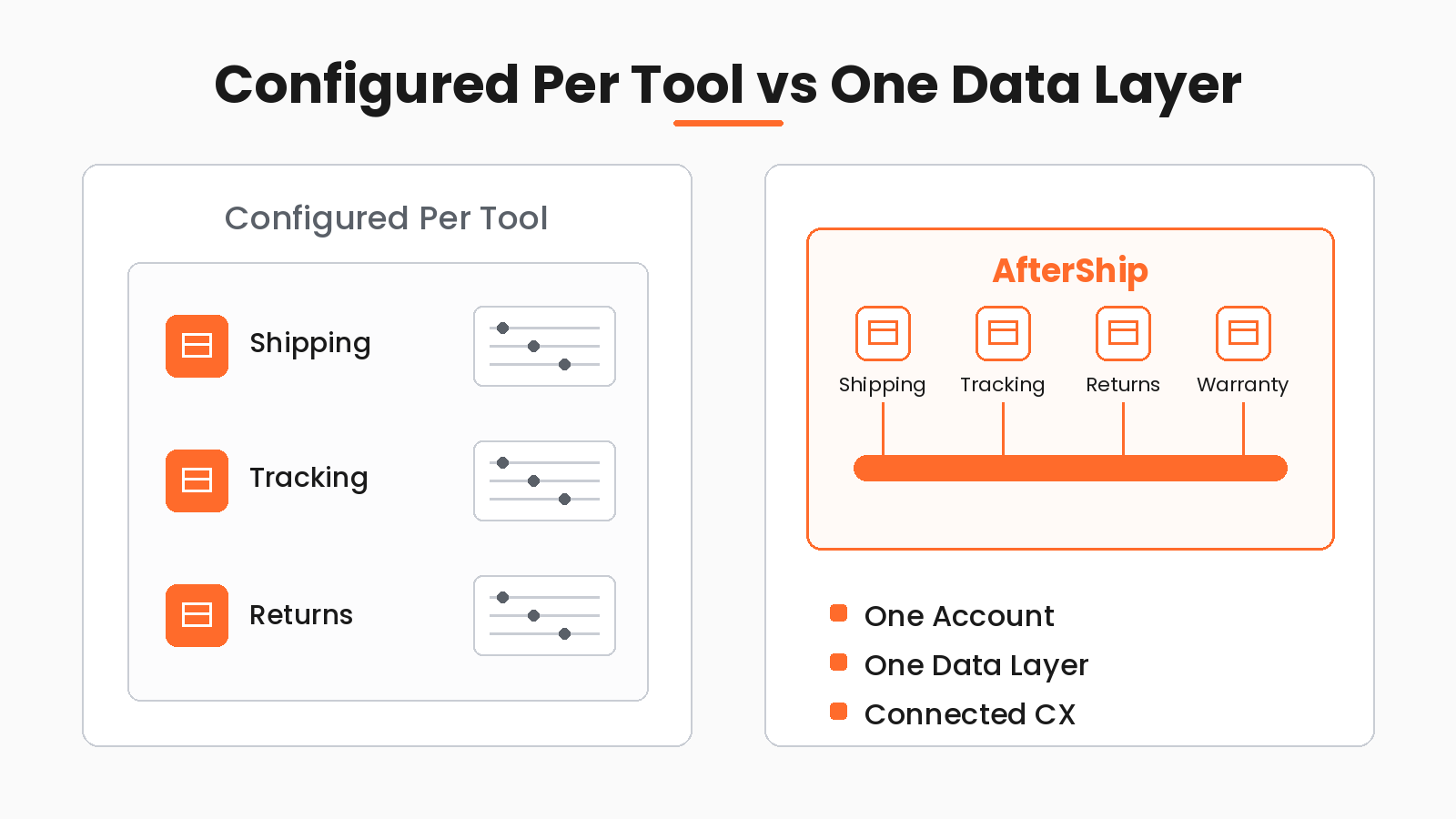
The Future-Proof Alternative: AfterShip's Integrated Platform
AfterShip runs each post-purchase product on the same data. StackCommerce cut where-is-my-order tickets by 71% using AfterShip Tracking.
“AfterShip's shipment tracking is pretty amazing stuff. And I think the 71% drop in WISMO tickets is due to us providing that tracking visibility to our customers.”
Deryck Lim, Sr. Operations Manager
Read their storyAfterShip's shipping, tracking, returns, and warranty products share one data layer. AfterShip Shipping, Tracking, and Returns are separate subscriptions on one account and one data layer; shipment data from Shipping syncs into Tracking once a Tracking plan is active. You add products as you need them, on one account, one data layer, one vendor across the post-purchase journey.
1. Ship Smarter with AfterShip Shipping
What you get on Essentials, and what waits on Pro:
- Multi-carrier rates and labels on every plan.
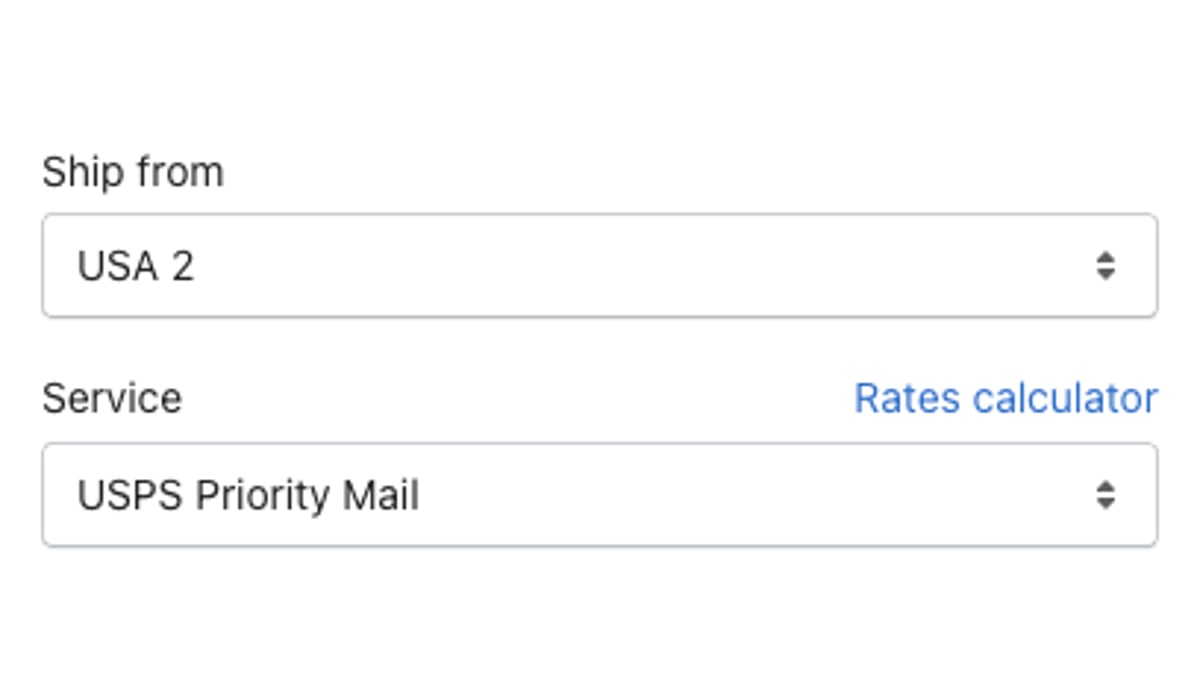
- Smart Carrier Recommendation on all plans. It is off by default, and once you enable it, the reliability and delivery-time checks are on by default.
- Unlimited Shopify store connections, with fulfillment and tracking details synced back to the store after a label is bought.
- Ship-from locations and end-of-day forms on all plans.
- Automation rules and Shopify checkout options on Pro.
At 500 labels a month, Essentials covers your store's daily run.
2. Reduce 'Where Is My Order?' Tickets with AfterShip Tracking
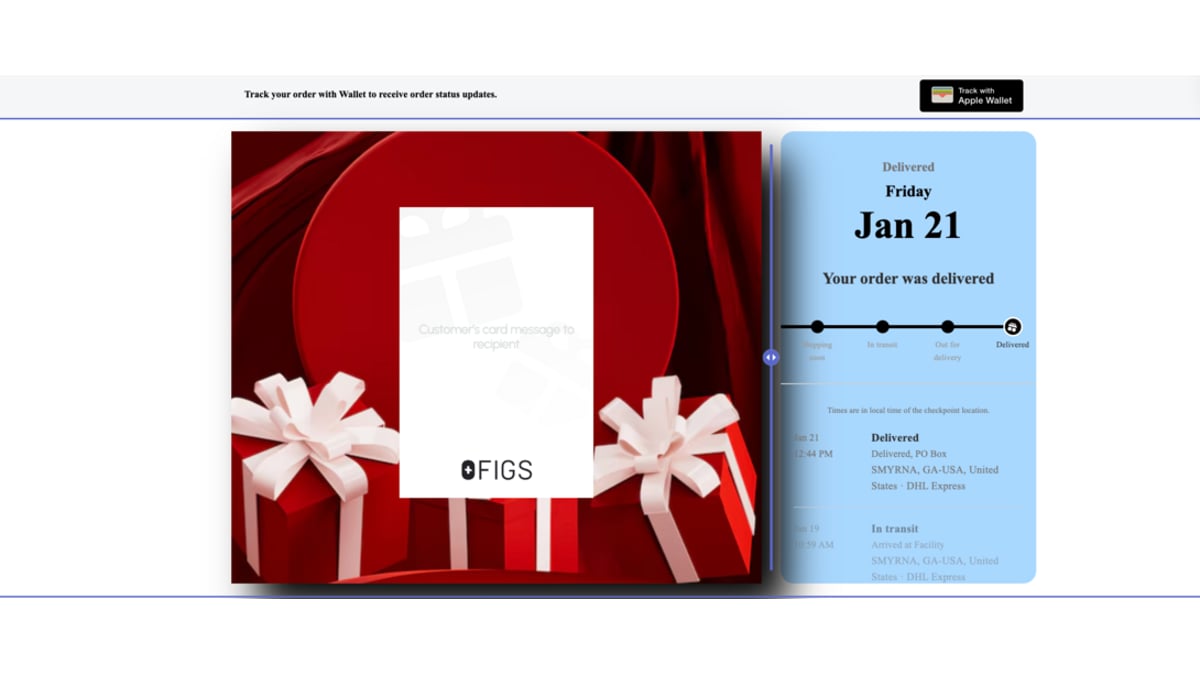
A branded tracking page is an AfterShip Tracking feature, on its own subscription. Add a Tracking plan and the labels you buy in AfterShip Shipping sync straight into it, so a beautiful, branded tracking page and the shopper's delivery notifications run off the shipment record you already created.
Brands using AfterShip Tracking have cut where-is-my-order contacts, for example by 54% at Mous. Rosie Jennings, Head of Logistics, Mous.
3. Turn Returns into Revenue with AfterShip Returns
AfterShip Returns gives shoppers a self-service returns page instead of an email thread, and variant exchanges let them swap a size or color so the sale stays on the books rather than turning into a refund. It is a separate subscription, on the same account and the same data layer as Shipping and Tracking.
The Final Verdict for Shopify Sellers in 2026
AfterShip is built to run shipping, tracking, returns, and warranty on a single data layer.
Choose AfterShip Shipping if...
- You want carrier choice informed by delivery data: Smart Carrier Recommendation, on every plan, filters out services with a high delivery-exception rate on that lane using AfterShip's own tracking data.
- You plan to add AfterShip Tracking: each label syncs to it as you buy it, through Shipping's auto-sync, without waiting on the Shopify order.
Choose Shippo or ShipStation if...
- You are a brand-new store shipping fewer than 30 labels a month, the fit Shippo itself names for its free Starter plan, which is a tempting starting point; AfterShip Shipping's free plan covers 10.
- You are already live on ShipStation, with carriers, users and workflows set up, and no reason to migrate this year.
For more, there is a more direct comparison with ShipStation in our aftership vs shipstation write-up, and our deep dive on AfterShip vs Shippo. Shippo's Starter is the starter bike; AfterShip is the first real car you buy when you are ready to go places.
Frequently Asked Questions
What is the difference between ShipStation and Shippo?
Both print labels and compare rates for Shopify orders. Shippo has a free Starter plan up to 30 labels a month, and its Pro price steps up with monthly label volume. ShipStation has no free plan, a 30-day trial, and puts your own carrier accounts, branded tracking and a returns portal on Standard.
Which works better with Shopify, ShipStation or Shippo?
Both import Shopify orders and write fulfillment back to the store. ShipStation supports live rates at Shopify checkout on the Shopify Advanced plan or higher. Shippo's native live-rates-at-checkout integration is currently Wix-only, per Shippo's help center.
Which is cheaper, ShipStation or Shippo?
At around 500 orders a month, billed monthly, Shippo's Pro plan is $29, ShipStation's Starter is $39.99, and AfterShip Shipping's Essentials is $35 (AfterShip direct: $11 at 100 labels, $23 at 300, $35 at 500, all billed monthly). But 'cheaper' depends on what the tier includes: connecting your own carrier accounts, branded tracking, and a returns portal sit on ShipStation's Standard plan ($89.99 at 500 shipments a month), rule-based carrier selection is on Shippo's free Starter plan and on AfterShip Shipping's Pro plan (from $89/month billed monthly, for a 2,000-label allowance), and AfterShip's Smart Carrier Recommendation, which steers around high-exception carrier services using AfterShip's own tracking data, is included on every AfterShip plan. The lowest sticker price and the lowest total cost as you scale are rarely the same tier.
Is AfterShip a good alternative to ShipStation for Shopify?
Yes, on the same core workflow: multi-carrier labels and rates, Shopify order sync with fulfillment write-back, and unlimited Shopify store connections. Automation rules start on Pro. What AfterShip adds is Smart Carrier Recommendation on every plan, and shipment data on the same data layer as tracking, returns, and warranty.
