It's Saturday, and you're in the post office queue again, holding a tote bag of padded mailers and a pen that's running dry. Your shop just passed 10 orders a month, the weekend keeps shrinking, and you've typed "stamps com vs shippo" into a search bar because those are the two names that keep coming up.
Both will get labels off your kitchen table. The cheapest label is not the same as the smartest first choice, though, because the tool you pick also decides what your customer sees after checkout.
That view is the first thing a new customer judges your shop by once they've paid.
Why You're Here: Graduating from Handwriting Labels
At 10 to 50 orders a month, handwriting labels stops being charming and starts eating your week. Every address copied by hand is a chance for a typo, and every trip to the counter is time you're not spending on product or customers.
The bigger cost is quieter. Once a parcel leaves your hands, your customer has nothing to watch but a carrier number, and you have nothing better to show them. When they message to ask where their order is, you're digging through receipts to find out.
Then there's how it looks. A handwritten label and a bare carrier link say side hustle, even when your product says brand.
So you start looking for the cheapest shipping software for new online store owners, and the same two names come back. Etsy's own help center already walks sellers through buying and printing USPS labels from the shop, so the label itself is no longer the hard part.
Choosing a shipping tool is your first real chance to look like a brand, from the label on the box to the page your customer checks while they wait.
The Quick Verdict
Your answer turns on one question: does what your customer sees after checkout matter to you yet?
Stamps.com or Shippo fits if:
- Your only goal this month is printing postage-paid labels at your desk and skipping the counter.
- You want Etsy and Shopify orders pulled into one screen so you stop retyping addresses.
- The tracking experience your customer gets is a decision you're happy to leave for later.
AfterShip fits if:
- You want the tracking page your customer opens to carry your own logo and colors from the first order, on AfterShip Tracking's free plan.
- You want labels and that page connected: AfterShip Shipping prints the label, and AfterShip Tracking shows the shipment to your customer.
- You'd rather add shopper email and SMS updates when you're ready, which start at AfterShip Tracking Essentials.
- You want one platform to grow into, covering shipping, tracking, returns, and warranty, so you don't switch tools as order volume climbs.
If your customer's view after checkout matters to you, AfterShip gives you a free way to put your own brand on it from order one.
Stamps.com vs Shippo: Price, Setup and USPS Discounts
Three things decide your first shipping tool: what it costs at your volume, how quickly it connects to your store, and how much it takes off postage. Stamps.com, Shippo and AfterShip Shipping all clear the basic bar on each one.
Price at your volume. All three publish their plans openly, and two of them start at zero. Stamps.com requires a paid monthly subscription for its services. On the Stamps.com pricing page, Basic is $14.99 a month for up to 10 shipping labels, and Professional at $29.99 a month removes the label cap.
Past the Basic cap, Stamps.com's help center lists an overage fee of 15% of the label cost, with a $2 minimum and an $8 maximum per label. So a 20-label month on Basic means 10 labels billed at that rate on top of the subscription.
Shippo offers a free plan for basic shipping label creation. The Shippo plan overview lists Starter as free up to 30 labels a month, and Pro is $19 a month for 31 to 200 labels. The first label over your allowance moves the account up a tier, billed from the next cycle.
AfterShip Shipping has a free plan too, with paid tiers above it.
For a seller shipping a handful of orders, Shippo's free Starter is simple and cheaper per label. It prints labels, and the tracking page your customer opens stays unbranded until Pro. AfterShip pairs free labels with a free tracking page that carries your logo, through AfterShip Tracking.
Setup. All three connect to Shopify. Stamps.com and Shippo also connect to Etsy, and the Shippo store connections guide says Etsy and Shopify orders sync as often as every 15 minutes. AfterShip Shipping links to AfterShip Tracking, so each label you print becomes a shipment your customer can follow on your own branded page.
USPS discounts. All three give you discounted USPS postage. The Stamps.com pricing page offers "up to 90%" off "UPS, USPS, FedEx, and more", and Shippo's own USPS carrier page offers "up to 89% off Retail rates". Stamps.com states its figure against an unstated baseline and Shippo states its figure against Retail rates, so the Stamps.com and Shippo percentages don't rank against each other. AfterShip Shipping pricing lists a USPS discount account on every plan, Free included.
Support. On Shippo vs Stamps.com customer support, the published scope depends on the plan:
- Shippo publishes email support on the free Starter, with chat on Pro.
- Stamps.com publishes phone support on its paid tiers, while its cheapest plan is chatbot and help center only.
- AfterShip Shipping publishes 24/7 email support on every plan, Free included.
The Question Most New Sellers Don't Ask (But Should)
Once the label prints, your customer stops thinking about postage and starts watching for the parcel. Shipping is also your first post-purchase touchpoint, and the page they check shapes how your shop feels to them.
Most new sellers skip this part of the decision. A bare carrier link gives the customer a status line and nothing else from you, so every delay turns into a message in your inbox. Those messages have a name: WISMO, short for "where is my order?" A carrier page also moves your customer onto someone else's site at the moment they're paying the most attention to your order.
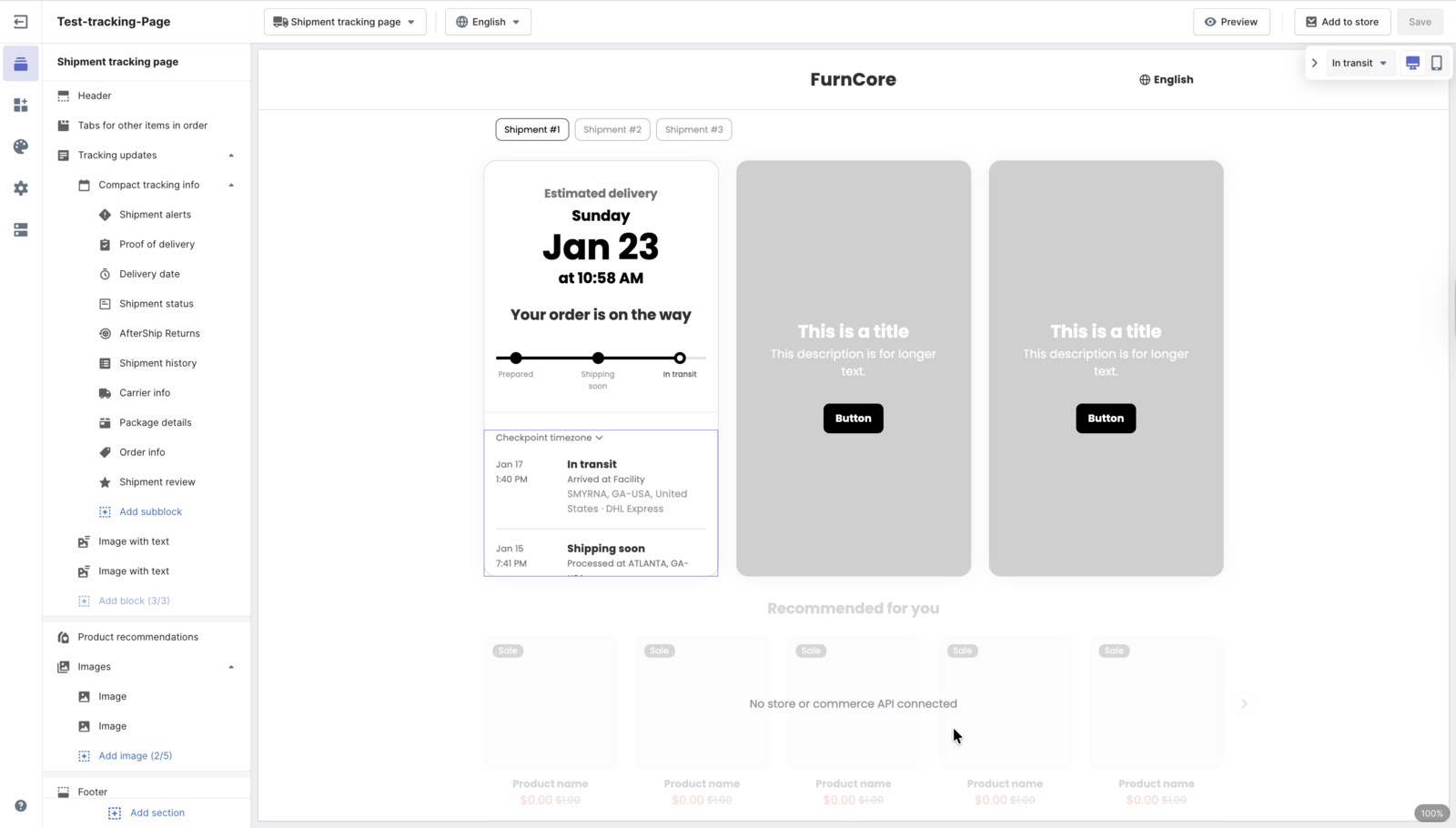
A branded tracking page answers that question before it's asked. It shows the delivery timeline under your logo, in your colors, on a page that looks like part of your store. It's the first step if you want to build a professional branded tracking experience.
The effect on support is measurable. AfterShip reports a 65% reduction in WISMO tickets on its AfterShip Tracking page. For a one-person shop, fewer of those messages means more hours back for making and selling.
The Smarter Choice: AfterShip's Free Post-Purchase Toolkit
What a new seller needs from a free plan is short: labels you can print today, and a page that makes each order look like it came from a real brand. AfterShip covers the two with two separate products, each on its own free plan.
AfterShip Shipping Free, listed on aftership.com, handles multi-carrier label creation with discounted rates, at 10 labels a month. It connects to your Shopify store and carries the USPS discount account covered above, so the free tier is a working label tool from day one.
AfterShip Tracking Free handles what your customer sees. AfterShip Tracking's free plan includes a branded tracking page styled with your logo and colors. AfterShip Tracking pricing ticks that page in the Free column. It also shows carrier-based delivery estimates, so the customer knows when to expect the parcel. The free plan, as listed on the Shopify App Store, covers 50 shipments a month. AfterShip Tracking's free plan also gives you one order tracking dashboard for every shipment, so you check a single screen instead of a carrier site for each order.
Here is what free does not include:
- Shopper email and SMS notifications begin at AfterShip Tracking Essentials, $11 a month for 100 shipments a month on monthly billing, the same on aftership.com and the Shopify App Store.
- The free page is hosted by AfterShip on an aftership.com subdomain and carries a "Powered by AfterShip" line until Premium. That line is hidden on every plan when the page is embedded in a Shopify store.
Getting both running takes three steps:
- Install AfterShip Shipping (free) and AfterShip Tracking (free) so both are active.
- In AfterShip Shipping, go to Settings, then Tracking, and turn on auto-sync.
- Print labels as usual. Each one flows into your branded tracking page, within the free plan's monthly shipment quota.
When you pass the free quota, or want your customer to hear from you at each delivery milestone, Essentials is the next step.
From your first label, the page your customer checks while they wait carries your brand, and you haven't paid for anything yet.
The Full Comparison: What You Get for Free, Side by Side
For your first shipping tool, the useful test is what each one gives you, and your customer, before you pay. A shipping software for small business comparison has to follow the parcel past the label to the page your customer opens.
Merchants rate AfterShip Order Tracking 4.6/5 from 1,500+ merchant reviews on the Shopify App Store.
| Feature | Stamps.com | Shippo | AfterShip (free stack) |
|---|---|---|---|
| Monthly price (starter) | $14.99/mo (Basic), 10 shipping labels | Free Starter, up to 30 labels/mo | Free: Shipping 10 labels/mo plus Tracking 50 shipments/mo |
| Label creation | Yes | Yes | Yes (AfterShip Shipping) |
| USPS discounts | Yes | Yes | Yes, on every tier including Free |
| Branded tracking page | Beta, on request | Generic on Starter; branded on Pro | Yes - free (AfterShip Tracking, logo and colors) |
| Proactive notifications | Professional and above | Yes on free Starter (branding is paid) | From Essentials (not on the free plan) |
| Path to returns management | Return labels only - no shopper-facing branded returns portal | Return labels only - no shopper-facing branded returns portal | Return labels plus a branded returns portal in AfterShip Returns, a separate product |
The label rows are close, and the branded tracking row is where the tools separate. Stamps.com branded tracking (beta) is switched on by request, and Shippo brands its page on Pro.
AfterShip Shipping's free plan is listed on aftership.com, and AfterShip Tracking's free plan appears on both aftership.com and the Shopify App Store. For scaling sellers who want more detail, there's a deeper comparison against Shippo. The returns row matters once refunds start: AfterShip Returns adds a branded returns portal on the same platform as your tracking page. On the free stack, AfterShip Tracking is where the page your customer opens carries your logo and colors.
The Final Verdict: Choosing for Your Next 1,000 Orders, Not Just Your Next 10
Your next 10 orders need labels. Your next 1,000 bring repeat customers, the first returns and the occasional broken item, and each of those starts on a page your customer sees.
Shippo covers today's labels. AfterShip's free plans start the brand experience today, and the platform behind them covers shipping, tracking, returns, and warranty.
AfterShip carries more than a brand-new seller needs on day one. That extra room pays off later: when returns arrive, AfterShip Returns sits on the same platform as the tracking page your customers already know, and warranty claims land there too. Each piece you add connects to that page, so you aren't rebuilding the customer experience at every stage of growth.
As postage becomes a bigger line, start comparing real-time shipping rates, and keep evaluating other shipping software as your volume grows. AfterShip's free plans put your brand in front of the customer now and leave room for everything that comes after.
Proactive shipment tracking that delights your customers, reduces WISMO tickets, and improves your delivery performance.
Book a demoFrequently Asked Questions
Is Shippo really free?
Yes, within the Starter plan's monthly label allowance, which includes order notification emails and a tracking page, with branding on Pro. Past the allowance, the account moves to a paid tier from the next cycle. AfterShip Shipping and AfterShip Tracking each publish a free plan too, and AfterShip Tracking's free tracking page carries your own logo and colors. Shopper email and SMS updates are there when you want them, starting at AfterShip Tracking Essentials.
Do I need a special printer?
No. These tools print to a standard desktop printer on plain paper, which you can tape to the parcel. Stamps.com sells scales and thermal printers if you want them later, and a thermal printer starts to save time once you're printing labels every day.
Which is better for Etsy, Stamps.com or Shippo?
Both Shippo and Stamps.com plug into Etsy today, so either one can print labels for your Etsy orders and the label side is a tie. If you also run or plan a Shopify store, AfterShip is the choice that puts your own brand on the tracking experience, with Etsy orders brought in by import or API. That keeps one tracking page for every order, wherever the customer bought.
What about Pirate Ship?
It's free label software on USPS Commercial Pricing, according to Pirate Ship's own help center, and its tracking emails carry a tracking number and a carrier link rather than a branded page. If you want the page your customer opens to carry your logo and colors, AfterShip Tracking's free plan puts your brand on that page from the first order.
