Your order volume just doubled, and printing labels is now your biggest bottleneck. Shippo and Stamps.com both fix the label: both give you USPS Commercial pricing, and both email your customer a tracking link. Neither publishes a self-service returns portal, and neither web app shows your customer a delivery date before they buy. That second half of the job is where a growing brand's next bottleneck sits, and it is what AfterShip's shipping, tracking, returns, and warranty suite is built for.
So the real question in front of you is whether you are buying a label printer or the platform that runs everything after the label. At 50 to 500 orders a month, that distinction decides whether you are still on this tool in 18 months or migrating again.
The Short Answer: Who Wins in 2026?
Each of the three fits a different shape of business, and scope is what separates them. Every plan, price and limit below is read from each vendor's own pricing page on 5 November 2026, and no label was bought for this page.
Where Shippo and Stamps.com fit
- Shippo suits a brand that wants multi-carrier labels priced by label volume, starting on a free plan and stepping up through Pro bands as it grows.
- Stamps.com suits an office that mails as much as it ships and wants USPS-rooted postage software on a flat monthly plan.
Where AfterShip Shipping fits
- You want the label and the work after it held on one data layer instead of stitched across separate vendors.
- Smart Carrier Recommendation is included on every plan, with no tier gate to clear first.
- Add AfterShip Tracking when order-status questions start eating support hours; it carries the branded tracking page and the delivery date a shopper sees before buying.
- Add AfterShip Returns when returns stop being occasional; it gives the shopper a self-service portal to start one.
- Each product is a separate subscription with its own pricing page, so you add the next one at the point the problem shows up.
Stamps.com alternatives in 2026: five options by use case
If you are here because Stamps.com's flat monthly fee stopped matching what you send, the field splits cleanly by what you actually put in the mail. Five options cover almost every shape of it.
| Option | Best for | Monthly software fee | Free tier | Letters and stamps | Certified Mail | Carriers |
|---|---|---|---|---|---|---|
| Shippo | Multi-carrier parcel volume priced by band | $19 at 1–200 labels, rising to $199 at 5,001–10,000; 10% less billed annually | Starter, free up to 30 labels a month | Not offered | Not offered | 40+, per its homepage |
| Pirate Ship | USPS and UPS parcels with no software cost at all | $0 | Whole product is free | Not offered | Not offered | USPS and UPS |
| USPS Click-N-Ship | Occasional USPS-only parcels straight from usps.com | $0 | Whole tool is free | Stamps bought separately from the USPS store | Not part of Click-N-Ship | USPS only |
| PitneyShip | An office that mails letters and ships parcels and wants one bill | $0 pay-as-you-go with a 5% fee on each label printed, or $34.99 Premium | Pay-as-you-go has no monthly fee | Yes, prints stamps on every plan | Yes on every plan; electronic return receipts on Premium and above | USPS, UPS, FedEx, plus your own DHL account |
| AfterShip Shipping | A brand that wants the label and the post-purchase work on one record | From $11 at 100 labels a month, or from $9 a month billed annually at 1,200 labels a year | No free plan; 7-day trial | Not offered | Not offered | 100+, per its pricing page |
Read one line per option and you can usually stop:
- Shippo suits a brand that already ships parcels across several carriers and wants the price to follow the label count rather than sit flat.
- Pirate Ship suits a store that ships only USPS and UPS and wants no software fee. Selling on Etsy? See Pirate Ship vs Easyship for Etsy sellers.
- USPS Click-N-Ship suits a sender whose parcels all go USPS and who would rather not add software at all.
- PitneyShip suits an office that sends letters and parcels from the same desk and wants stamps, Certified Mail and shipping labels on one account.
- AfterShip Shipping suits a brand whose next problem is tracking and returns, not label printing, and that wants those to read the same order record.
Mostly mailing letters from an office? Stamps.com, PitneyShip or Click-N-Ship
Parcel-first tools are the wrong shelf if most of what leaves your desk is paper. Three options print actual postage for envelopes, and the differences are small but decisive.
| Option | Monthly fee | Stamps for envelopes | Certified Mail | Package labels |
|---|---|---|---|---|
| Stamps.com | $14.99 Basic, $29.99 Professional, $49.99 Multi-Location | Yes: 25 a month on Basic, unlimited from Professional | Professional and above | Yes: 10 a month on Basic, unlimited from Professional |
| PitneyShip | $0 pay-as-you-go with a 5% fee per label, or $34.99 Premium | Yes, on every plan | Yes on every plan; up to 50 electronic return receipts a month on Premium | Yes, USPS, UPS and FedEx |
| USPS Click-N-Ship | $0 | No; stamps are bought separately from the USPS store | No | Yes, for USPS Ground Advantage, Priority Mail and Priority Mail Express |
Prices and plan contents read on each vendor's own pricing page on 5 November 2026.
A letter-mailer who needs Certified Mail should read the plan line carefully, because this is the one feature that moves the bill: Stamps.com puts Certified Mail and Registered Mail on Professional at $29.99 a month and does not offer them on Basic, while PitneyShip includes Certified Mail even on its $0 pay-as-you-go plan and reserves only the electronic return receipt for Premium.
AfterShip Shipping does not print letter postage. It generates carrier shipping labels for parcels, and stamps, Certified Mail and envelope postage do not appear on its product or pricing pages. If your mail is mostly envelopes, one of the three above is the right buy, and when Stamps.com still fits is worth reading before you move. For the free USPS route, USPS Click-N-Ship covers what it does and does not reach.
Shippo vs. Stamps.com: Head-to-Head Feature Comparison
The honest shippo vs stamps.com pricing answer splits on label volume: one bills by band, the other by a flat monthly fee. What you weigh here is cost against what happens after the label, and no plan wins on price alone. Rate accuracy at checkout depends on your own carrier accounts, which Shopify's documentation on third-party carrier-calculated shipping explains.
| Criteria | Shippo | Stamps.com | AfterShip Shipping |
|---|---|---|---|
| Monthly price and billing term | Starter free. Pro by band, billed monthly: $19 (1–200), $29 (201–500), $54 (501–1,000), $79 (1,001–2,500), $139 (2,501–5,000), $199 (5,001–10,000). Annual billing is 10% lower in every band. | No free plan. Billed monthly: Basic $14.99, Professional from $29.99, Multi-Location from $49.99. | No free plan; 7-day trial. Billed monthly: Essentials from $11 at 100 labels a month, Pro from $89 at 2,000. Billed annually: Essentials from $9 a month at 1,200 labels a year, Pro from $69 a month at 24,000. Enterprise is quoted. |
| Free tier | Starter, up to 30 labels a month | None | None |
| Label cap | Pro covers up to 10,000 shipments a month | Basic caps at 10 labels and 25 stamps a month; Professional and Multi-Location are unlimited | Annual or monthly label quota by tier |
| Overage | $0.08 per label beyond 10,000 a month | Not published on its pricing page | Move to the next quota tier |
| Certified Mail / Registered Mail | Not offered | Professional and Multi-Location | Not offered |
| Carrier discounts | USPS, UPS, FedEx and DHL Express discounts on every plan, including the free Starter | USPS, UPS and FedEx access on every plan; international carriers from Professional | USPS discount account on every tier, alongside your own negotiated carrier rates from connected accounts |
| Post-purchase ecosystem | Tracking pages and notification emails, branded from Pro. No shopper returns portal. | Recipient tracking and notification emails from Professional. No shopper returns portal. | Separate Tracking and Returns subscriptions add branded pages, notifications and a shopper returns portal. |
| Store connections | Unlimited on every plan, Starter included | Documented in the Stamps.com help centre for Shopify, Amazon, eBay, BigCommerce and Volusion; the plan pages no longer list which tier carries them | Shopify, Shopify Plus, TikTok Shop, BigCommerce and WooCommerce |
| Users | 1 on Starter, 5 to 300 across Pro bands, 15+ on Premier | 1 on Basic, 3 on Professional, 10 per location on Multi-Location | By plan, unlimited carrier accounts on Enterprise |
Sources: goshippo.com/pricing, stamps.com/pricing and aftership.com/pricing/shipping, all read 5 November 2026.
What each costs per year at 10, 50, 200 and 500 labels a month
Plan pages quote a monthly number, which hides how differently these three behave once a year of labels has gone through them. All figures below are the software fee only, computed on monthly billing, at the tier each volume lands in. Postage is extra in every case.
| Labels a month | Shippo | Stamps.com | AfterShip Shipping |
|---|---|---|---|
| 10 | $0 — Starter covers up to 30 | $179.88 — Basic at $14.99, which caps at exactly 10 labels | $132 — Essentials at $11, its 100-label tier |
| 50 | $228 — Pro at $19, 1–200 band | $359.88 — Basic's cap is passed, so Professional at $29.99 | $132 — still inside the 100-label tier |
| 200 | $228 — top of the 1–200 band | $359.88 — Professional, unlimited labels | $276 — Essentials at $23, its 300-label tier |
| 500 | $348 — Pro at $29, 201–500 band | $359.88 — Professional, unlimited labels | $420 — Essentials at $35, its 500-label tier |
Read down the columns and the shape of each pricing model shows up. Stamps.com costs the most at the smallest volume and the least at the largest, because its fee stops moving once Basic's 10-label cap is passed. Shippo costs nothing until 30 labels and then tracks the band you are in. Annual billing lowers the Shippo and AfterShip columns by 10% and 18% respectively; the Stamps.com column is monthly only. If postage rather than software is the number you are trying to move, a wider read of the deepest postage discount tiers is the better use of an hour.
Discount claims, side by side
Every tool in this comparison advertises a headline saving, and the headlines are not comparable until you know what each is measured against.
| Claim as published | Who publishes it | Measured against |
|---|---|---|
| "Print postage on-demand and get up to 87% off USPS® and UPS® rates" | Stamps.com, on its homepage | Not stated alongside the claim. Its pricing page carries a different headline, "up to 90%* off UPS®, USPS®, FedEx®, and more", whose footnote limits rates to shipments originating in the continental U.S. and notes they can change without notice. |
| "90% — Potential savings on shipping labels" | Shippo, on its homepage | Not published. The figure appears as a statistic beside customer and shipment counts, with no baseline named. |
| "Save up to 90% with USPS shipping through AfterShip Shipping, and there is no minimum shipping volume requirement" | AfterShip, on its Shipping pricing page | USPS rates, with the no-minimum-volume condition stated in the same sentence. |
All three read 5 November 2026. Two of the three do not name a baseline, which is the useful finding: a percentage without a reference rate cannot be compared against another percentage.
Underneath all of them sits the same floor. USPS Ground Advantage retail prices start at $8.40 at a Post Office, and Click-N-Ship gives every user the lower Commercial rates automatically, with no software in between. That Commercial tier is what each of these tools resells, which is why their USPS pricing converges; what USPS actually charges and what software adds on top sets out the difference.
Shippo Deep Dive: What You Get and Where It Stops
Start with what the money buys at each stage. Shippo pairs a free Starter plan with paid Pro tiers priced by label volume. Starter covers up to 30 labels a month and includes unlimited store integrations, tracking, order-notification emails, return labels and automations. Pro runs across six bands up to 10,000 labels a month, with annual billing 10% lower in each, and adds AI-powered estimated delivery dates, branded tracking pages, branded notification emails and packing slips, chat and phone support, and a free connection to your own carrier account. Premier is quoted rather than listed and carries unlimited shipments, 15 or more user logins and a dedicated account manager. Those tiers and inclusions are published on Shippo's pricing page.
Where it stops matters more at your volume. There is no shopper-facing self-service returns portal, and the web app's delivery estimate is shown to you at label purchase, not to the shopper before they buy. Costs also move with volume: the first label past a plan allowance moves the account up a band, labels beyond 10,000 a month cost $0.08 each, and using your own carrier account on Starter carries a 5¢ per-label fee. For a closer read, we published an honest verdict on Shippo's capabilities. A brand-new seller choosing between the two for the first time will get more out of Stamps.com vs Shippo for a brand-new seller, and anyone already past a hundred labels a month should read Shippo vs Stamps.com at 150 to 750 labels a month.
Shippo and AfterShip Shipping are not symmetrical on the way in: Shippo's Starter plan is free to 30 labels, while AfterShip Shipping starts at a paid tier after a 7-day trial. Shippo also includes automations on its free plan, where AfterShip Shipping's fixed automation rules sit on Pro and above. What AfterShip includes on every plan instead is Smart Carrier Recommendation, which picks the service per shipment on live rates and lane performance without a rule to build.
If no software fee at all is the point, Pirate Ship is the cleaner answer than either: it advertises up to 89% off USPS and UPS rates and charges nothing for the software, because it is paid by the carriers rather than by you. The trade is carrier range — USPS and UPS only, no stamps and no Certified Mail. Shippo vs Pirate Ship puts the two side by side, and Easyship vs Pirate Ship vs Shippo adds the international case.
Stamps.com Deep Dive: USPS-Rooted Postage Software
If most of what leaves your building is mail rather than parcels, the shape of this option changes. Stamps.com is USPS-rooted postage software from ShipStation Global, and its current plan pages read as mailing software for offices: the three plans are described for individuals and small offices, for busy offices that mail and ship every day, and for organisations with multiple offices and mailrooms. There is no free tier, and every plan carries USPS Commercial pricing, as set out on Stamps.com's pricing page.
Plan structure is the part worth reading closely. Basic at $14.99 a month gives one user, 25 stamps and 10 shipping labels a month, free carrier pickups and address verification, with chatbot and help-centre support only. Professional at $29.99 lifts both caps to unlimited, adds a second and third user, Certified Mail and Registered Mail, multi-address batch printing, recipient tracking and notification emails, print history and analytics, international shipping, live chat and phone support, and a QuickBooks Online integration. Multi-Location from $49.99 adds ten users per location, two locations, role and location permissions, reporting by location and a dedicated account manager.
Two limits show up after the label. There is no shopper-facing returns portal on its pages, though return labels print on every plan. And store connections — the thing an online seller needs first — are documented in the Stamps.com help centre for Shopify, Amazon, eBay, BigCommerce and Volusion, but no longer appear as a row on the plan comparison, so the tier that carries them is not stated where a buyer would look for it.
The Blind Spot: Why Label Printing is Only Half the Battle
Once the parcel leaves your warehouse, the work changes shape. What lands on your team is delivery expectations, order-status questions and returns, and none of it is solved by the label that started it. Both tools do part of this. Shippo and Stamps.com each email your customer a tracking link, and Shippo adds branded tracking pages, notification emails and packing slips from Pro. Return labels print from both.
The contrast is depth, and it shows in two places. Neither publishes a shopper-facing self-service returns portal, so a return still starts as an email to your team and ends with someone generating a label by hand. And neither web app shows the shopper a delivery date before they buy, which is the moment the expectation is actually set. A status page tells a customer where the parcel is after the fact. A delivery date on the product page shapes what they expected in the first place.
At 50 to 500 orders a month, both gaps are absorbed by a person. That person is usually you.

The Third Option: AfterShip Shipping, The Platform Approach
What do you want to own after the label prints? AfterShip, which publishes this page, connects shipping, tracking, returns, and warranty on one data layer. AfterShip Shipping is the shipping component of it, and each of those products is a separate subscription with its own pricing page. You buy shipping first and add the others when the work arrives.
At 50 to 500 orders a month, what AfterShip Shipping does is multi-carrier label generation with live rates. When you go to buy a label, the app returns rates and transit times across the services available for that shipment, and you pick from them. Labels are billed either through Easyship, which provides and bills the discounted rates, or through your own carrier accounts, which connect on every tier alongside a USPS discount account.
Smart Carrier Recommendation is included on every plan. It is off by default. Once you turn it on, it selects a carrier service for each shipment from live rates and that lane's past performance and puts it in front of you to review. It never buys the label, so nothing moves until you approve the choice.
Anyone evaluating label generation across vendors can compare multi-carrier shipping software before narrowing the list.
How a Unified Platform Solves Your Next Problem
The order record the label created is the same one the next two products read.
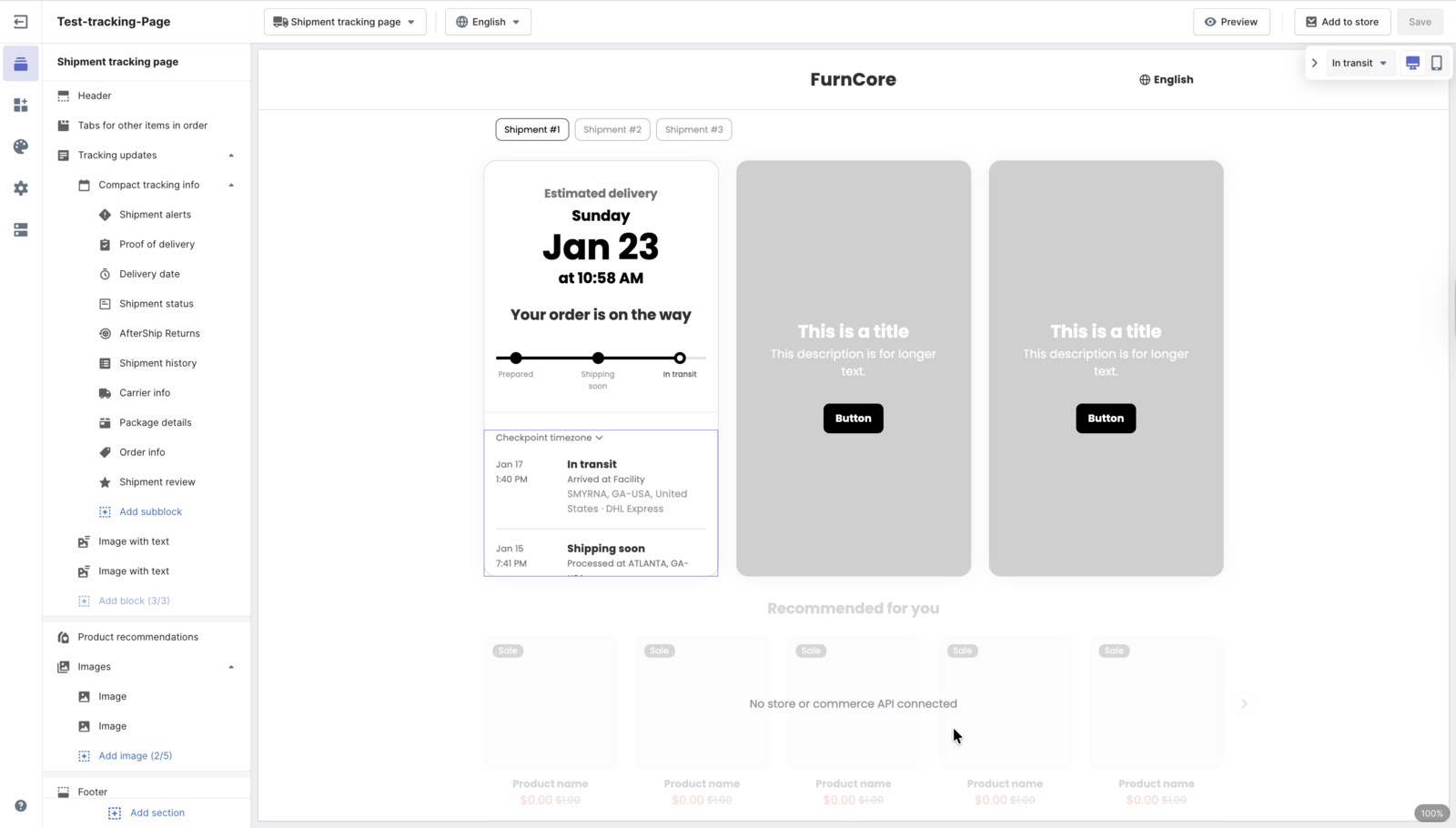
- Turn on auto-sync and every label you print in AfterShip Shipping flows into AfterShip Tracking, where your branded tracking page and notifications take over. Auto-sync is a setting, it needs an active AfterShip Tracking subscription, and the shipments it creates draw on your Tracking quota. Hosting that tracking page on your own domain is a Tracking Premium feature.
- When a customer needs a return, they start it in the AfterShip Returns self-service portal and the portal issues the label. If you connect your AfterShip Shipping account, that label prints through it, which is one option alongside your own carrier account and Easyship.
- AI EDD puts a delivery date on the product page and at checkout, trained on historical tracking data across major carrier services and on your own tracking patterns, with up to 95% prediction accuracy. That date comes with AfterShip Tracking, which lists AI-powered EDD on Premium and above, so a shipping subscription does not carry it alone.
Each of those is a paid product you turn on when the problem is real, and each one reads the same order record the others wrote to. That is the difference an AI-powered tracking page makes when it is fed by the system that printed the label.
StackCommerce cut WISMO tickets by 71% year over year with AfterShip Tracking. The tracking page and notifications took over the order-status conversation before customers had to ask.
The Final Verdict: Which Shipping Software Should You Choose in 2026?
There is no single best shipping software for ecommerce 2026; the band you are in decides more than the feature list does. Between 50 and 500 orders a month, the tool you pick now either carries you to 2,000 or gets replaced at 800. Match the choice to the stage you are in.
- Choose Stamps.com if your parcel count is small and flat and it is not the number that grows next year, and envelopes, stamps and Certified Mail are a real part of what you send. It is sized for an office volume that stays where it is.
- Choose Shippo if you are early in the band, under a few hundred labels a month, and the post-purchase work is still small enough for one person to absorb by hand.
- Choose AfterShip Shipping if you are moving through the band with the intent of leaving it. Somewhere near 500 orders a month the tracking and returns load stops being absorbable, and what you want by then is a shipping product you can extend with AfterShip Tracking and AfterShip Returns without rebuilding the label workflow underneath.
Staying on Stamps.com, or leaving it
Stamps.com is still the right buy when the mail itself is the job: an office sending letters as well as parcels, anyone who needs Certified Mail or Registered Mail with a delivery record, and organisations running postage across more than one location on one account. Those are the three cases where its flat fee and its unlimited stamp allowance pay for themselves, and the online-store spoke sets out when Stamps.com still fits in 2026 in more detail, along with how to migrate off it.
If you are leaving, export first: your address book and contact groups, your print and shipping history for the current tax year, and any saved mailing and shipping presets, because those are the records that do not come back once the subscription lapses.
Simplify shipping and order fulfillment across Shopify, TikTok Shop, and your carrier network.
Book a demoFrequently Asked Questions
What are the best Stamps.com alternatives for a small business?
Five cover almost every case: Shippo from $19 a month at 1-200 labels, Pirate Ship at no software cost for USPS and UPS, USPS Click-N-Ship free for USPS-only parcels, PitneyShip at $0 pay-as-you-go with a 5% per-label fee, and AfterShip Shipping from $11 a month at 100 labels. Which one fits turns on whether you send letters as well as parcels, and whether tracking and returns are already on your plate.
What can a small office use instead of Stamps.com or Pitney Bowes?
For parcels only, USPS Click-N-Ship costs nothing and gives every user USPS Commercial rates, and Pirate Ship adds UPS at no software cost. Neither prints stamps for envelopes, so an office that mails letters is choosing between Stamps.com from $14.99 a month and PitneyShip's $0 pay-as-you-go plan.
Is there a Stamps.com alternative if I mostly mail letters?
PitneyShip is the closest match: it prints stamps on every plan, including the $0 pay-as-you-go plan that charges 5% of each label printed, and it includes Certified Mail at every tier. Stamps.com reserves Certified Mail for Professional at $29.99 a month, so a letter-heavy office on Basic would have to upgrade to get it.
Is Stamps.com cheaper than Shippo?
Not at low volume. At 10 labels a month Shippo costs $0 because its free Starter plan covers up to 30, while Stamps.com's Basic plan costs $179.88 a year and caps at exactly 10 labels. Stamps.com only wins above roughly 500 labels a month, where its $359.88 a year stops rising and Shippo's bands keep climbing.
Which Stamps.com plan sends Certified Mail?
Professional at $29.99 a month, and Multi-Location from $49.99. Basic at $14.99 does not include Certified Mail or Registered Mail, so an office that sends either has a $15 a month floor on what it can run.
Which is better, Stamps.com or Pirate Ship?
They answer different questions. Pirate Ship charges nothing for the software and advertises up to 89% off USPS and UPS rates, which makes it the cheaper choice for a store shipping only parcels on those two carriers. Stamps.com costs from $14.99 a month but prints stamps for envelopes and sends Certified Mail, neither of which Pirate Ship offers.
Is AfterShip a good alternative to Shippo and Stamps.com?
It is the stronger fit when the work after the label is already on your plate. AfterShip Shipping prints multi-carrier labels with live rates from $11 a month and includes Smart Carrier Recommendation on every plan, and AfterShip is a platform covering shipping, tracking, returns, and warranty, each a separate subscription. Add AfterShip Tracking and your branded tracking page, notifications and pre-purchase delivery dates run on the same order record your labels created; add AfterShip Returns and your shoppers get a self-service portal.