If your evenings end with boxes on the kitchen table and your mornings start with a run to the post office, you have probably searched ShipBob vs Shippo, or Shippo vs ShipBob, and come away no clearer. The comparison never resolves because the two are not the same kind of thing: ShipBob is a fulfillment provider that takes your inventory and packs your orders, while Shippo is software for shipping the orders you pack yourself. The question underneath your search is whether someone else should be packing your boxes.
The Real Question: Do You Need a Warehouse or Software?
The ShipBob and Shippo differences for DTC brands come down to a choice between two ways of running fulfillment.
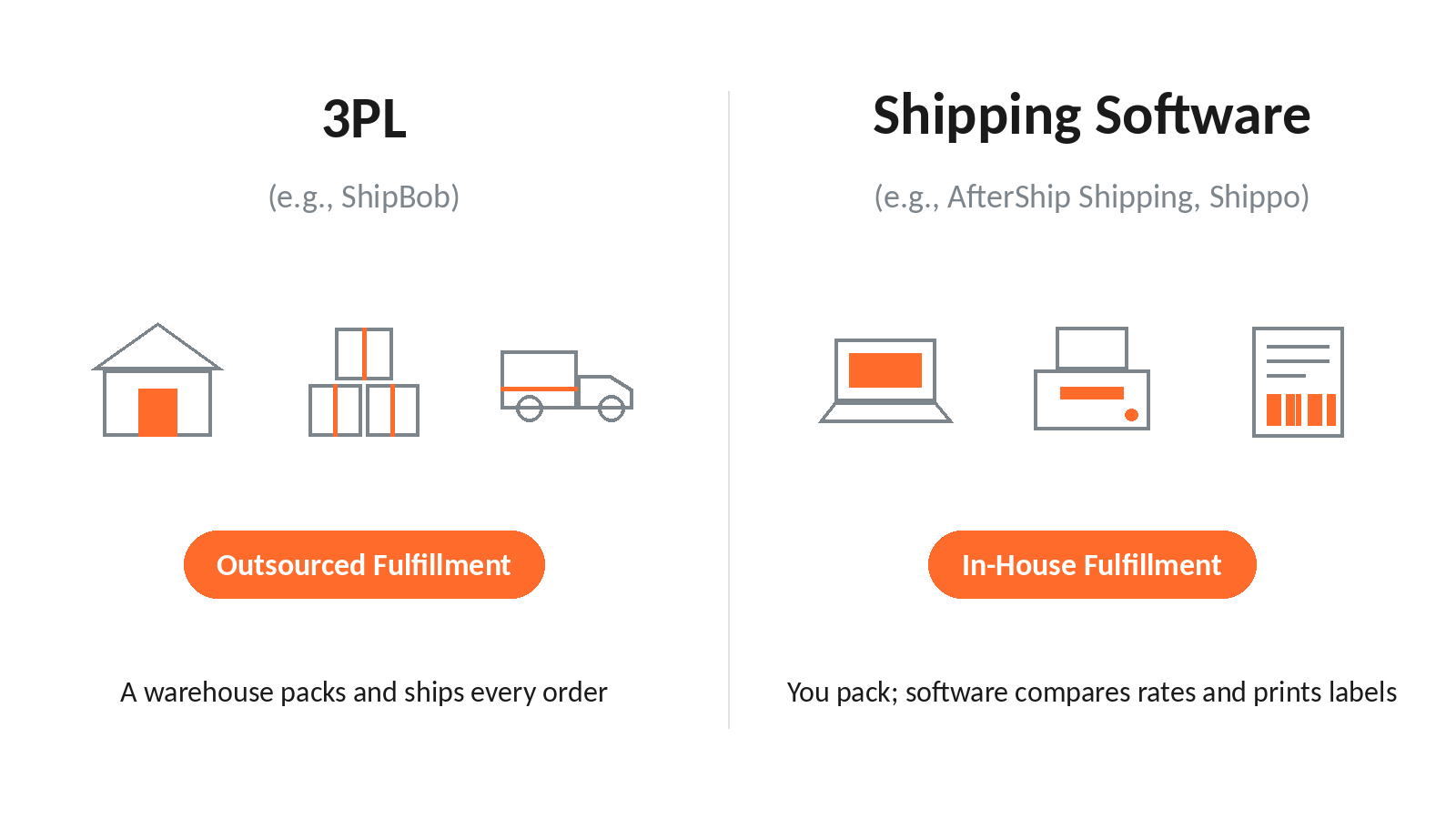
The first is to hand the physical work off: a warehouse takes possession of your inventory and packs every order for you, and you stop touching the goods.
The second is to keep fulfillment in house and make it faster: software connects to your store so you can compare rates and print labels yourself.
Shopify defines shipping zones as "groups of countries or regions that have the same shipping rates", and deciding those zones, their rates and the carriers behind them stays your job for as long as you ship your own orders.
The second path stays open until volume and space pressure build together; the first becomes worth pricing once they do.
What is a 3PL? When to Consider ShipBob.
A third-party logistics provider stores your inventory, picks and packs each order, and hands it to a carrier. ShipBob is a 3PL fulfillment service that ships orders for you.
Outsourcing starts to make sense when several of these are true at once, rather than when any single number is hit:
- you are shipping consistently into the four-figures-per-month range
- you are running out of physical space
- packing is eating hours you need for the business
- you want to be hands-off with fulfillment
Treat any "switch at N orders" figure as a rule of thumb rather than a line. ShipBob's own FAQ says it "works best for brands shipping over 1,000 orders per month", and it states that minimum monthly spend and minimum order-volume requirements apply without publishing the figures, so a brand at your volume cannot price the option without entering a sales process. If those minimums rule ShipBob out, start with 3PL alternatives to ShipBob. If you do enter that process, ShipBob set against Saddle Creek shows how it reads next to an enterprise 3PL.
If you are weighing the handoff seriously, the difference between shipping software and a 3PL is worth reading before you commit inventory to a warehouse.
AfterShip Tracking integrates with your fulfillment partners, so shipment updates from the warehouse still reach your customers through your own tracking notifications.
What is Shipping Software? When to Consider Shippo.
Shipping software sits between your store and the carriers: orders arrive automatically, every service's rate shows side by side, and labels print in batches from wherever you pack. Shippo is multi-carrier shipping software for merchants who fulfill their own orders.
It fits when you are shipping below the four-figure band, when packaging and inserts are part of the brand, and when you want control over each label's cost.
Shippo's own documentation describes rate comparison across 40+ carriers, automation rules included from its free Starter plan, automatic per-shipment carrier selection through Default Shipping Option, AI-powered estimated delivery dates on the Pro plan through Shippo Estimate, branded tracking pages on Pro, return labels, and reporting and analytics.
USPS describes Ground Advantage as a service that "provides a simple, reliable and more affordable way to ship packages from 1oz up to 70lbs in two to five business days". Choosing well between services like it, order by order, is most of what this software does.
Those jobs are what any tool in this category has to do well, and they are the ground Shippo and AfterShip Shipping get measured on next.
Decision Made: You Need Shipping Software. So, Shippo or Something Better?
If you are still packing your own orders, software is the answer and the warehouse can wait. That leaves a crowded category, where printing a label is the baseline.
What separates the tools in it is which one still fits as your volume grows. If you are moving off a 3PL and onto software, we weigh alternatives to ShipBob with more flexible shipping options separately.
So the question worth asking is which tool is best for a brand that intends to grow. Our round-up of the best shipping software of 2026 covers the wider field, and other Shippo alternatives sit alongside it. The two to set side by side are Shippo and AfterShip Shipping.
Shippo vs. AfterShip Shipping: 2026 Comparison for DTC Brands
Start with what is the same, because on the entry tier much of it is. On Essentials, AfterShip Shipping matches Shippo on the three things you touch daily: multi-carrier rate comparison, connecting your own carrier accounts, and running multiple ship-from locations.
Automatic carrier selection is shared ground too. Shippo's Default Shipping Option picks a service on every shipment, and its "Best" category selects what its documentation calls the most balanced option between cost and delivery time. AfterShip Shipping buys and prints multi-carrier labels using AfterShip delivery data. Its Smart Carrier Recommendation, on all plans and off by default, does the same job on the same balance.
It reads AfterShip's own tracking data, excluding carrier services with a high exception rate for that shipment's origin and destination, and it shows why a service was recommended before you buy the label.
| Criteria | AfterShip Shipping | Shippo |
|---|---|---|
| Ease of Use & Shopify Integration | Installs from the Shopify App Store and imports your Shopify orders, ready for label printing. | Installs from the Shopify App Store and imports Shopify orders for label printing. |
| Carrier Discounts | Labels across 130+ carriers. Connect your own carrier accounts on any plan and keep the rates you negotiated, then compare real-time shipping rates across your connected services before you buy. Discounted USPS labels are also available through the platform, up to 90% off with no volume minimum. | Labels across 40+ carriers, with rate comparison and your own carrier accounts supported. |
| Automation Rules | If-then automation rules are on Pro and Enterprise, with up to 10 rules below Enterprise. Rules aside, both products pick a carrier automatically on their entry tier, and Smart Carrier Recommendation also filters out services with a high exception rate on each lane, using AfterShip tracking data, and states why it chose. | Automation rules are included from the free Starter plan. Default Shipping Option applies a saved service or its "Best" category, "the most balanced option between cost and delivery time". |
| Pricing for Growth | Essentials is $11/month at 100 labels a month, $23 at 300 and $35 at 500 on monthly billing. On annual billing the same volumes are $9, $19 and $29 a month. Pro is $89/month at 2,000 labels a month, or $69/month billed annually at 24,000 labels a year. The crossover sits between 300 and 500 labels a month on monthly billing, and on annual billing the gap at 500 narrows to $3 a month. | Pro is $19/month at 100 labels a month, $29 at 300 and $29 at 500 on monthly billing. On annual billing the same volumes are $17, $26 and $26 a month. |
| Integrated Post-Purchase Platform | Part of AfterShip's shipping, tracking, returns, and warranty suite. Shipping data syncs into AfterShip Tracking when you have an active Tracking subscription, and AfterShip Returns and Warranty are available as separate products on the same platform. | Return labels from the free Starter plan, branded tracking pages and Shippo Estimate delivery dates on Pro, and analytics through Shippo Intelligence for Pro and Premier API customers. |
AfterShip Shipping holds 4.0/5 across 101 Shopify App Store reviews, 71 of them five-star, as of September 2026.
Below roughly 30 orders a month, Shippo's free Starter plan covers a merchant and AfterShip's 10-label free plan does not, so at the very lowest volume Shippo's free tier can look appealing. You are already past both, and at 300 orders a month you are choosing the system your shipping runs on.
Shippo measured against AfterShip on rates and labels covers each row at more length, including what happens once a label leaves AfterShip Shipping.
Why AfterShip is the Smarter Platform for Growing Brands
AfterShip Shipping and Shippo both handle the basics of buying and printing multi-carrier labels. AfterShip Shipping runs on a unified data layer, where the label you buy and the delivery data AfterShip already holds belong to the same system.
Start on AfterShip Shipping and your shipping data flows into AfterShip Tracking when you add a Tracking subscription, and into Returns and Warranty as you add those, so one order record follows the customer across the post-purchase journey instead of living in a separate tool.
A pricing page shows the subscription. It leaves out the work of rebuilding your carrier accounts and label settings if you later switch label tools to get there, work that starting on AfterShip Shipping avoids.
AfterShip Shipping is the stronger foundation at this volume.
Choose Shippo if:
- you ship at the very lowest volumes and want a free plan that covers them
- you need if-then automation rules at the lowest possible subscription price
- you are committed to staying on one shipping tool and have no plan to extend into the rest of the post-purchase suite later
Choose AfterShip Shipping if:
- your monthly label volume sits below the crossover named in the pricing row, where AfterShip Essentials costs less than Shippo Pro
- you want Smart Carrier Recommendation filtering out services with a high exception rate on each lane, using AfterShip's own tracking data, and showing why it recommended a service
- you want the order record each label creates to carry forward as you add AfterShip products
Your DTC Shipping Roadmap: What to Do Next
Where you go from here depends on which signals are pressing.
- If several 3PL signals are true at once and you want to be hands-off with packing, research 3PLs.
- If you are still packing your own orders and want to keep control of the brand experience, choose shipping software that compares rates and prints labels from your store's orders.
- Install AfterShip Shipping from the Shopify App Store, let it import your Shopify orders, and connect the carrier accounts you already use, so you can compare rates on a real order before you buy a label.
Frequently Asked Questions (ShipBob vs. Shippo)
What is cheaper, ShipBob or Shippo?
ShipBob and Shippo price different jobs, so their costs do not compare directly. ShipBob charges a fulfillment fee that includes the carrier label, because ShipBob packs and ships the order for you. Shippo's cost is its software plan plus the postage you buy on each label, and you pack the orders yourself.
At what order volume should I switch to a 3PL?
As a rule of thumb, the point to switch is often somewhere in the low thousands of orders a month, depending on space, labor, and margin. Volume is one signal among several: running out of space, losing hours to packing, and wanting a partner to handle fulfillment tend to arrive together, and when several are true at once, a 3PL is worth a quote.
Can I use Shippo with ShipBob?
It depends on who packs the order. For orders ShipBob fulfills, ShipBob picks the carrier and buys the label inside its fulfillment fee, so separate shipping software adds nothing for those shipments. If you self-fulfill part of your catalog and send the rest to a 3PL, you still need your own shipping software, like AfterShip Shipping, for the orders you pack yourself.