
Your support dashboard is a sea of 'Where is my order?' tickets. You've refined your macros and trained your agents, but the flood won't stop. The problem isn't your team; it's the data they're working with. ShipRush's tracking is real, but it is scoped to the label: its branded page covers UPS, FedEx and USPS, and its tracking history updates about twice a day, and that gap is where WISMO tickets come from.
That gap has a price you can read in ticket volume, first-response time and CSAT, and closing it does not require your ops team to give up the label tool it already runs.
The Short Answer: Is ShipRush Tracking Reliable?
You came here asking one thing: is ShipRush tracking reliable enough to stop the flood?
ShipRush's tracking is real. It provides a branded tracking page, branded shipment email and exception notifications.
It is also scoped. Its branded page covers UPS, FedEx and USPS, and its tracking history updates about twice a day. If nearly all your volume moves on those three carriers and your shoppers rarely check between scans, that scope holds. If it does not, every order outside it reaches the shopper without your branded page, and every hour between refreshes is an hour the page can trail the carrier's latest scan.
That is the split between tracking built for the label and tracking built for the customer. One serves the shipment record your ops team works from. The other serves the person waiting at the door.
For a CX-focused brand measuring post-purchase in tickets and CSAT, ShipRush's tracking scope is not reliable enough, and AfterShip Tracking is built for the job it leaves.
Tracking Built for the Label, or Built for the Customer
A customer-facing tracking layer has one job: answer the customer before they ask.
ShipRush's documentation states that "Tracking Page templates only apply to UPS, FedEx, or USPS shipments", so other-carrier orders miss that branded page. The same page warns that pages built from that template "are deleted automatically 30 days after package delivery", leaving later questions to a manual lookup.
Its help center notes tracking history "is updated about two times per day but more often on the estimated delivery date", a carrier API limit. That makes ShipRush tracking accuracy a question of freshness: the scan an agent quotes can be hours old. Its branding guide adds that "only the Shipment email is branded. All others come directly from the Carrier, if supported".
ShipRush's branded tracking page covers UPS, FedEx and USPS; history updates about twice daily. ShipRush is owned by Descartes Systems Group, and Descartes ShipRush tracking follows the shipment its label created.
That is the difference between built-in tracking and a dedicated platform, and a head-to-head comparison with other multi-carrier shipping platforms shows the same split. AfterShip Tracking is built for the other job: one customer-facing tracking layer across carriers.
How to Judge Tracking Reliability: The 4 Key Pillars
Before you compare vendors, fix what you are grading. Four pillars decide whether tracking absorbs tickets or creates them.
- Carrier Network Breadth & Depth: how many carriers the branded, customer-facing experience actually covers, not how many the tool can print a label for. The carriers outside that set are where your tickets start.
- Data Update Speed & Standardization: how quickly carrier events arrive, and whether they are normalized into one status set that your agents, your notifications and your automations read the same way.
- Proactive Notification Engine: whether you can message the customer at each checkpoint and the moment a delay appears, instead of waiting for them to notice first.
- Predictive Accuracy: whether the tool can predict a delivery date of its own, or only relay whatever estimate the carrier supplied.
ShipRush vs. AfterShip Tracking: A Head-to-Head Comparison
Six criteria decide whether tracking absorbs your WISMO volume or adds to it.
| Criteria | AfterShip | ShipRush (by Descartes) |
|---|---|---|
| Carrier Integrations | One normalized tracking view across all 1,900+ carriers worldwide | Branded page and tracking status: UPS, FedEx, USPS |
| Data Update Latency | Instant via webhook; API updates around 60 minutes or less | Tracking history updated about two times per day |
| Proactive Notification Rules | Email and SMS when a sub-status changes or EDD shifts | Shipment, Tendered, Delivery, Exception emails; Shipment email branded |
| Branded Experience Customization | Branded page on every plan; custom domain on Premium+ | Template or HTML page for UPS, FedEx, USPS only |
| AI-Powered Predictive EDD | Up to 95% accurate date ranges, Premium and Enterprise | Shows the carrier's own delivery estimate |
| Support for CX/Ops teams | Live tracking inside Gorgias and Zendesk tickets, Premium and Enterprise | Operational shipping reports; no helpdesk tracking lookup documented |
One G2 reviewer puts the effect plainly.
"One of the biggest pain points in eCommerce is the sheer volume of WISMO questions from customers. AfterShip automates tracking updates and notifications, which can significantly reduce inbound support tickets and give support teams more breathing room."
Lee P., Director, Small-Business (50 or fewer employees), 5/5 on G2
StackCommerce reduced WISMO tickets by 71% year over year with AfterShip Tracking.
Why 1,900+ Carrier Integrations Matter for Reducing WISMO
Your ops team picks carriers on cost, speed and lane coverage. Your customers never see that decision. They see whether the tracking page works for the order they placed.
AfterShip provides unified tracking data from over 1,900 global carriers. That figure is published on aftership.com/tracking, and it spans postal services, last-mile couriers, 3PLs and freight forwarders inside one normalized status model.
ShipRush's branded, customer-facing tracking page is limited to UPS, FedEx and USPS. ShipRush supported carriers for label printing run wider than those three, and the gap between the two lists is where the tickets collect: an order moving on a regional or international carrier still ships, but it reaches your shopper without that branded page.
One normalized view changes the answer your team gives. Each order is handled the same way, whichever of those carriers your ops team chose, with the same statuses driving the page, the notifications and the view your agents work from.
It also gives the ops team something to act on. Comparing delivery performance across carriers turns tracking into post-purchase shipping insights, so you can route time-sensitive orders to the carrier that actually hits its dates.
1,900+ carriers. AfterShip gives you one unified, normalized view of tracking data across a global network, so no order becomes a tracking black hole, whichever carrier your ops team ships with.
Beyond Tracking: Predicting Delivery with AI
Knowing where a parcel is answers half the question. Your customer wants to know when it arrives, and a status feed on its own cannot tell them.
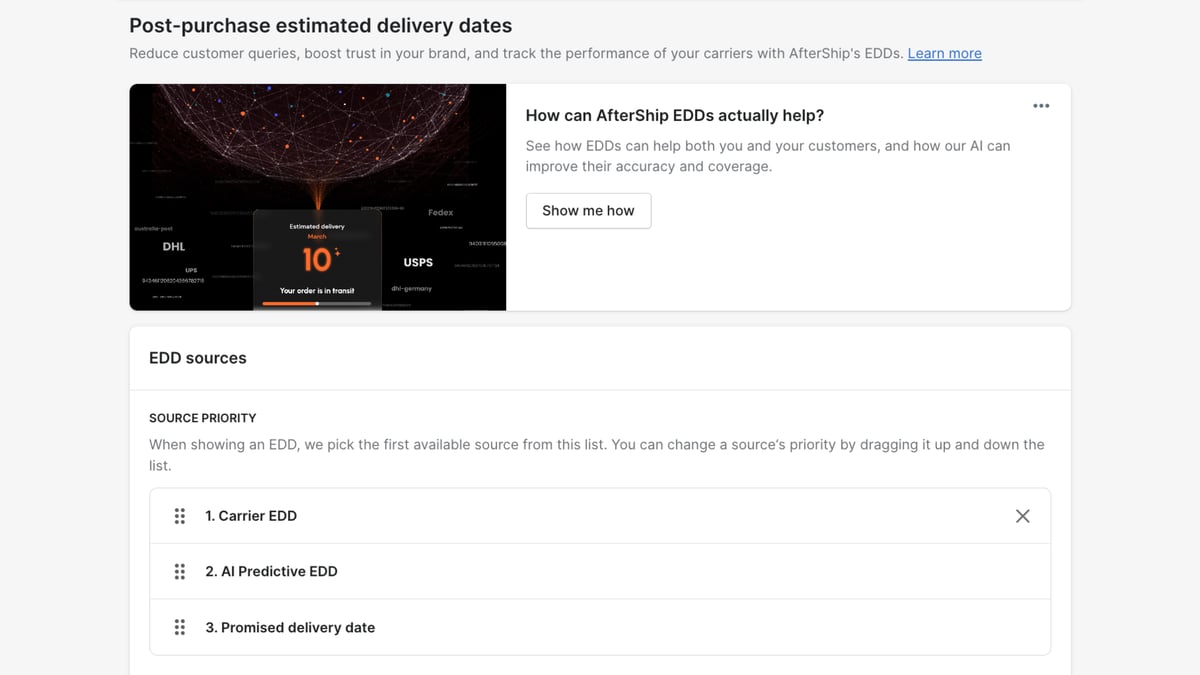
AI EDD is a feature of AfterShip Tracking, powered by AfterShip Intelligence. Its product page publishes "Date range EDD with up to 95% accuracy" and "Single date EDD with up to 90% accuracy", from a model that analyses the delivery history and rules of 900+ carriers.
AfterShip's AI predicts delivery dates to proactively answer customer questions.
ShipRush surfaces the carrier's own estimate. AfterShip Tracking adds an independent prediction on top of it, so the date your customer reads does not depend on whether the carrier supplied one. AI-predictive post-purchase EDD sits on the Premium and Enterprise plans.
Giving shoppers a date they can plan around is how you improve post-purchase customer experience before the question ever reaches your queue.
The Real ROI: Connecting Reliable Tracking to Fewer Support Tickets
Leadership approves a tracking layer when the ticket math holds. That math runs on three numbers you already have.
- Monthly WISMO cost = monthly support tickets x your WISMO share x your fully-loaded cost per ticket.
- Deflection value = monthly WISMO cost x the share that automated tracking and proactive notifications remove.
- AfterShip Tracking pays for itself once the deflection value is at least your AfterShip Tracking subscription.
Pull those three inputs from your own helpdesk.
Gartner's February 2024 customer-service cost benchmarks put the median cost of an assisted contact at more than seven times that of a self-service one. That is a cost per assisted contact, not a cost per WISMO ticket, but it shows which way deflection moves spend.
Answering before the customer writes in is how you reduce 'Where Is My Order?' (WISMO) tickets without adding headcount, and AfterShip Tracking is built to carry that load.
The Final Verdict: When to Choose ShipRush vs. AfterShip
Your ops team runs labels in ShipRush. Your CX team answers the tickets.
ShipRush fits:
- teams whose label workflow already runs in ShipRush and should stay there
- brands that ship almost entirely on UPS, FedEx and USPS, where its branded page applies
- operations where tracking is a task owned by the ops team
For companies deeply embedded in the Descartes ecosystem for warehouse and logistics management, ShipRush connects natively with other Descartes products. But the final mile is where WISMO is won or lost, and a branded page limited to three carriers, with tracking history that updates about twice a day, leaves gaps.
AfterShip Tracking gives you:
- predicted delivery dates that answer "when will it arrive" before the customer asks
- email and SMS the moment a sub-status changes
- live tracking inside the agent's Gorgias or Zendesk ticket, on Premium and Enterprise, so WISMO is answered without leaving the helpdesk
Keep ShipRush for labels and add AfterShip Tracking, part of AfterShip's shipping, tracking, returns, and warranty suite, on top of your store's fulfillment data. Three conditions: the tracking number must be on the store fulfillment, and including the carrier is strongly recommended; split fulfillments each need their own tracking number; 3PL fulfillments track the same way once that number lands on the store order.
Your labels keep printing where they always did, and AfterShip Tracking answers the customer first.
Proactive shipment tracking that delights your customers, reduces WISMO tickets, and improves your delivery performance.
Book a demoFrequently Asked Questions
Is ShipRush tracking reliable for reducing WISMO tickets?
ShipRush's tracking is real: it provides a branded tracking page, a branded shipment email and exception notifications. It is also scoped. ShipRush's documentation states that Tracking Page templates only apply to UPS, FedEx, or USPS shipments, and that tracking history is updated about two times per day. Where tracking is an operational task, that scope works. Where a CX team is measured on WISMO volume and CSAT, orders on other carriers and the hours between refreshes are where tickets come from, and a customer-facing tracking layer closes both gaps.
Can I keep ShipRush for labels and add AfterShip Tracking?
Yes, and that is the setup we recommend. Keep label printing in ShipRush and add AfterShip Tracking on top of your store's fulfillment data. The two connect through the store's fulfillment record rather than with each other, so three conditions matter: the tracking number must be on the store fulfillment, and including the carrier is strongly recommended; split fulfillments each need their own tracking number; 3PL fulfillments track the same way once the tracking number lands on the store order. Your ops workflow does not change.
How do I estimate the ROI of a dedicated tracking layer?
Use your own three numbers: multiply your monthly support tickets by your WISMO share and your fully-loaded cost per ticket to get monthly WISMO cost, multiply that by the share automated tracking and proactive notifications remove to get deflection value, then compare deflection value with your AfterShip Tracking subscription. When deflection value is the larger number, the layer pays for itself, and every month after that is capacity your support team keeps.
