Is your support team spending more time answering 'Where is my order?' than solving real customer problems? For many Magento 2 merchants, the default tracking experience is the bottleneck. Let's fix that.

The Core Problem: Why Native Magento 2 Tracking Fails at Scale
Magento 2 does ship with tracking. It writes a carrier code and a tracking number onto the shipment record, drops both into a notification email, and surfaces them in the customer account area. At fifty orders a week, that is enough.
At a few thousand orders a month it stops being enough. The gaps sit in the platform's data model and its notification logic, which is why theme work never closes them. Here is where Magento 2 order tracking runs out of road.
- Incomplete carrier support. The platform ships with a short list of major carriers and a free-text field for everything else. Regional couriers, freight partners and most international post get typed in by hand, and a hand-typed number links nowhere.
- No branded tracking experience. Native Magento 2 tracking does not support branded tracking pages. The shopper's journey ends on a carrier's website, off your domain, alongside the carrier's own advertising.
- Lack of proactive notifications. Magento tells the customer once, when the shipment is created. Everything after that, including delays, failed delivery attempts and returns to sender, reaches them only if they go looking or email you first.
- Generic and confusing status updates. Carrier status text passes through broadly as the carrier wrote it, so an order can sit on the same "in transit" line for as long as the carrier leaves it there, with nothing said about why. Shoppers read silence as a lost parcel.
- No centralized, multi-carrier dashboard. There is no single view of every in-flight shipment across every carrier. Ops teams rebuild one in a spreadsheet, or open carrier portals one at a time.
- Split shipments from Multi-Source Inventory. One order becomes several shipment records, each with its own tracking number and its own email thread.
That last one is the limitation most competitor articles skip, and it is the one your developer will recognise instantly. When Multi-Source Inventory allocates a single order across two or more fulfilment sources, Magento creates a separate shipment record for each source, and each record carries its own tracking number. Adobe documents this as standard platform behaviour, not an edge case. A shopper who bought three items in one transaction receives three disconnected carrier emails and has no way to see the order as one order. Which tier of tracking platform fixes that depends on your volume, which we break down in which tracking features matter as you grow.
Nobody misconfigured anything. That is simply what the platform does.
The Anatomy of a World-Class Tracking Experience
Before you shortlist a Magento 2 order tracking extension, decide what you are actually buying. Four things separate a real post-purchase experience from a tracking number in an email. What those four things cost, vendor by vendor, is broken out in our 2026 cost comparison for post-purchase tools.
A tracking page you own. It should live on your domain, carry your header, navigation and merchandising, and hold the shopper inside your brand from dispatch to doorstep. Every visit to a carrier's site is attention you paid for and then handed away.
Updates that reach the customer before they ask. The system should watch every shipment and message the customer the moment something changes, with the loudest alerts saved for exceptions. If your customer hears about a delay from you, it reads as service. If they find it on a carrier's site first, it arrives in your queue as a ticket. When the exception ends in a parcel that never arrives, the next decision is the refund, covered in how brands automate the refund when a delivery fails.
A delivery date the customer can plan around. "Ships in 3 to 5 business days" describes when your warehouse will act, and leaves the shopper guessing about the part they actually care about. Look for a predicted delivery date on the product page, at checkout and on the tracking page, then ask what its measured accuracy is.
A self-serve path for the questions that follow. Most of your WISMO queue is people checking on orders that are progressing perfectly normally. Each one a shopper can settle alone is a ticket that never opens.
That fourth criterion is the one your finance team will care about, because each of those status checks carries a measurable cost.
Run this against your own ticket volume. The average assisted customer contact costs roughly $13.50. (Gartner, "Benchmarks to Assess Your Customer Service Costs," February 2024)
The Solution: Upgrading Magento 2 with AfterShip Tracking
Those four criteria are the shopping list. AfterShip Tracking meets them on Magento 2 without opening a custom development project.
Carrier coverage comes first, because it gates everything downstream. AfterShip's Magento extension integrates with over 1,700 global carriers, so the regional couriers, freight partners and international post that Magento hands to a free-text field resolve into real, scannable tracking events with live carrier status behind them.
The tracking page then runs on your own domain, under your own theme, with your navigation and merchandising around it. That is the same page your shopper lands on when they want a status check, which is where the self-serve criterion gets satisfied: the answer they were going to email you for is already on the screen. Notifications run off the same event stream, so AfterShip messages the customer when a shipment's status moves, including the exception cases Magento currently passes over without a word.
Your hosting model does not change any of this. AfterShip confirms the module behaves identically on Magento Open Source, on Adobe Commerce running in your own infrastructure, and on Adobe Commerce Cloud, because it operates at the application layer and leaves everything below it alone. If you are on Cloud and braced for the usual extension caveats, there are none to plan around here.
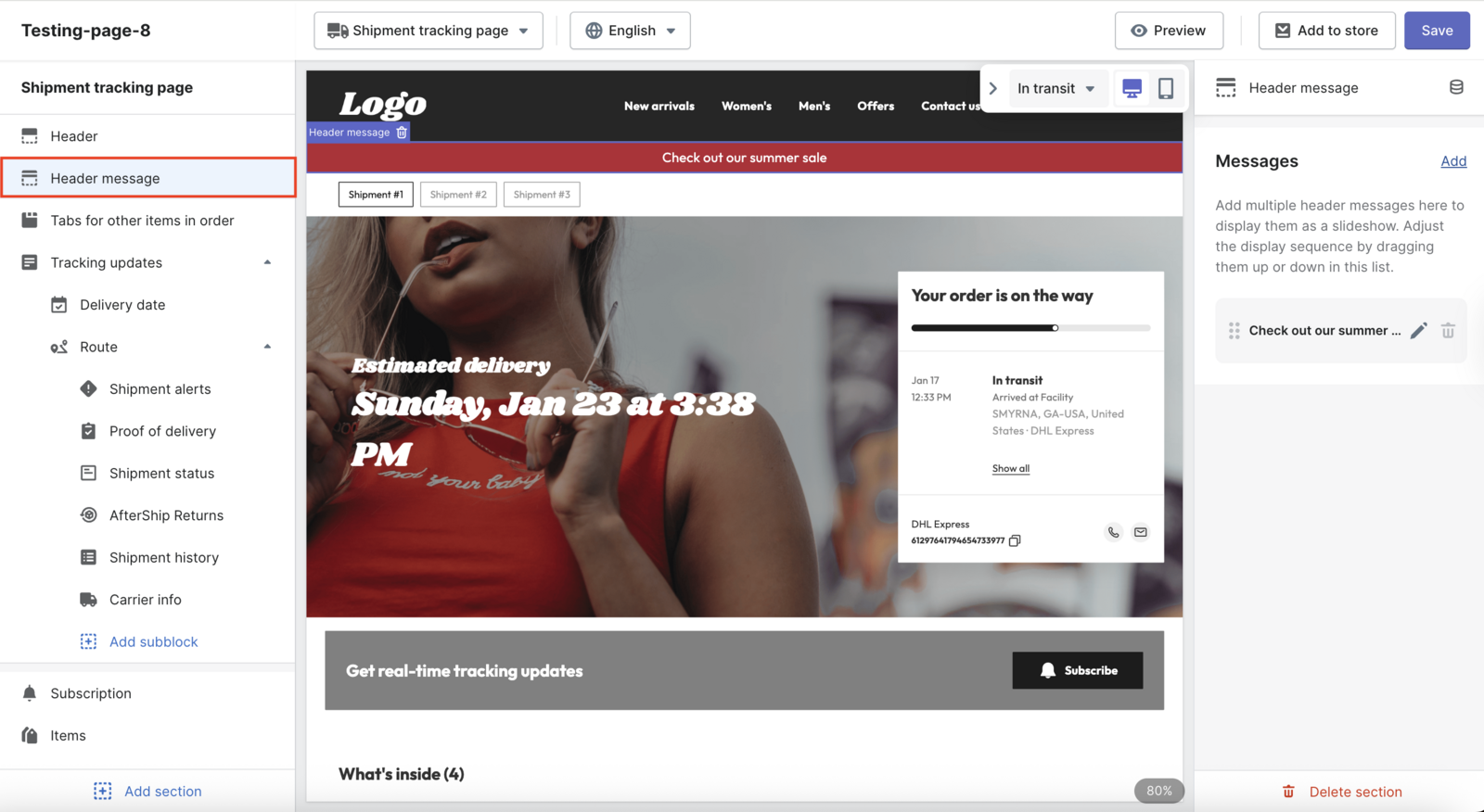
How to Set Up AfterShip Order Tracking on Magento 2 (In 5 Steps)
Before your developer runs anything, settle the version question. AfterShip's Magento 2 module installs via Composer and runs on the currently supported Magento 2.4.x line, on PHP 8.1 through 8.5. AfterShip does not publish per-version certification for the package, so validate on a staging build before deploying to production. If you are still on 2.4.6, put the upgrade on your roadmap regardless of AfterShip: Adobe's regular support for that line ended on 11 August 2026, and extended support runs only to 31 August 2027.
Your developer's next stop is Packagist, so here is what they will find before they tell you. The public package aftership/aftership-apps-magento2 was refreshed in August 2026, sits at more than 22,000 installs, and carries exactly one dependency, magento/module-quote. Two details on that page deserve a straight answer. Its declared PHP floor is 7.1.0, which sits far below what any currently supported Magento line will run on, so the metadata there cannot be read as a statement of what AfterShip supports. Packagist also marks the package as not auto-updated. Both of those are documentation trailing the code, and the staging build already in your plan is what settles them. Your team can read the full dependency graph in about a minute.
One thing to rule out early: AfterShip Tracking has no Adobe Commerce Marketplace listing, so searching there will turn up nothing. Composer and the in-app connect flow are the two routes in.
- Install the module. Your developer requires the package with Composer, or you start the connect flow from inside AfterShip and let it drive the setup. On Adobe Commerce Cloud, the module goes into your project
composer.jsonand the Cloud build and deploy pipeline compiles it. Run that on an integration or staging branch first and confirm a green build before you promote to production. - Create the integration in Magento. In the admin, open System, then Integrations, and create a new integration. Set a Callback URL and an Identity URL.
- Grant API access. Set API Resources Access to All, then activate the integration and allow it. No access token gets copied anywhere in this flow, so if a walkthrough tells your developer to paste one, it is describing an older path.
- Connect from the AfterShip side. Connect your organisation, then configure the tracking page and switch on the notification flows you want live.
- Confirm the import. Check that your existing shipments have arrived. They back-fill on that first connection, and from then on new shipments come across on a three-hour cycle.
This walkthrough follows AfterShip's own Magento 2 setup documentation, which your developer can work from directly.
Steps two and three are the only part that touches the Magento admin, and they take a few minutes.
What the Initial Import Does and Does Not Do
Day one has a shape worth knowing before your support team starts asking questions about it.
Switching on a notification flow does not reach backwards. Milestones that already passed before you enabled it will not fire, so nobody on your live order book suddenly receives delivery mail for parcels that landed last week. Your existing customers notice nothing, which is the correct outcome for a mid-flight cutover.
Dashboard visibility and customer messaging are also scoped differently. The imported history gives your team the shipments and their tracking numbers to work from, while the granular delivery detail underneath applies to shipments tracked from the moment you connect forward. AfterShip has not published how far back the back-fill reaches, so treat its depth as something to verify against your own order book. Plan your reporting baselines from the connection date.
The back-fill itself is the part worth planning around. Your existing shipments come across on that first connection, so a merchant switching in the middle of peak season sees their in-flight orders on day one, with no data migration project standing between them and a working dashboard. If you are still choosing the platform itself, we rank seven of them in the seven platforms ranked for CX in 2026.
Beyond Basic Tracking: Unlocking a Full Post-Purchase Journey
Tracking numbers are the floor. Four capabilities sit above it, and the first one is the reason this article is about Magento specifically. The platforms that deliver all four are ranked in the seven platforms we rank for DTC brands.
Start with the split shipments described earlier. Magento passes a parent order identifier along with every shipment record it creates, and AfterShip says it reads that identifier and groups the shipments underneath it. Your team opens one order in the AfterShip dashboard and sees every parcel moving under it, however many fulfilment sources the allocation touched. Reconciling tracking numbers by hand stops being a job.
The shopper side is yours to configure. AfterShip's tracking objects are per-shipment, so an order-level presentation for the customer is something you build on the tracking page deliberately. Set up that way, the customer who bought three items and received three parcels opens a single page and watches all three move, each with its own carrier and its own status, sitting under the order number printed on their receipt. On the messaging side, according to AfterShip, the consolidated split-order digest and the all-shipments-delivered notification are Enterprise features.
Proactive email and SMS alerts are the capability that moves your ticket count. AfterShip watches each shipment and pushes a message when the status changes, and every one of those messages lands the shopper on your branded tracking page. That is the mechanism working end to end: the alert raises the question, the page answers it, and your team never sees the email. Which messaging tool sends those alerts is a separate call, and we make it in the honest verdict for DTC marketers.
Moda Operandi reports a 65% reduction in WISMO inquiries and a 25% reduction in shipment exceptions.

“Using AfterShip opened our eyes to the issues we were dealing with. The more we dig into the data and analytics, we were able to highlight additional pain points.”
Bushra Sarfaraz, Fulfillment Director
Read their story →The delivery date is where the promise gets made. Accuracy sits under 40% for most carriers, so a shopper planning their week around a carrier estimate is regularly let down. AfterShip's AI EDD reaches up to 95% average accuracy, covering 80%+ of deliveries, and it runs on Premium and above.
Analytics closes the loop. Carrier scorecards break performance down by lane, so a courier that runs clean into one region and stalls into another stops hiding behind a single average. Order-level reporting puts the exception patterns underneath your ticket volume in front of you: the lanes that generate the delays, the services that stall in transit, the destinations that go quiet before a customer writes in. That is the difference between knowing your WISMO volume went up in March and knowing which carrier and which region put it there. When a contract comes up for renewal, you walk in carrying your own delivery record, measured on your own orders, and the performance summary your carrier prepared stops being the only document on the table. For where this sits among everything else you have to buy, see a founder's guide to the essential stack.
Mislay C., an ecommerce operations manager at a mid-market brand, reviewed AfterShip on G2 in 2022 after running it on Magento.
Measuring the ROI of a Superior Magento 2 Tracking System
A dedicated tracking solution reduces "Where Is My Order?" tickets. Put that against the roughly $13.50 an assisted contact costs.
AfterShip Tracking Premium is $59 per month on the annual plan, and that plan carries 6,000 shipments a year, roughly 500 a month. Deflect about five WISMO tickets in a month and the tool has covered its own cost. Five is a rounding error against the queue you are already carrying. That price is the direct aftership.com figure, because the other purchase channel prices differently. Which platform actually delivers that reduction is scored in the three-platform ranking on ticket reduction.
CSAT moves for a reason that is easy to miss in a spreadsheet. Customers judge you on how a delay was handled more than on the delay itself, and handling is exactly what proactive messaging buys. What that handling costs an SMB once every line item is counted is broken out in the hidden costs an SMB should expect.
Repeat purchase is the quieter line on the same page. A customer waiting on a delivery comes back to check on it, and once that page sits on your domain, every check puts your merchandising in front of someone who has already bought from you.
AfterShip's ROI calculator lets you run all of this against your own average order value and ticket cost.
Your Next Step to a Better Magento Post-Purchase Experience
Past a few thousand orders a month, native Magento 2 order tracking is a liability. It costs you support hours, it costs you a branded touchpoint you could have owned, and it costs you the ability to make a delivery promise you can keep. AfterShip Tracking is the ROI-positive fix, and it goes in through Composer or the connect flow inside AfterShip. Returns are the other half of that post-purchase experience, covered in the platforms we rank for ecommerce returns.
Proactive shipment tracking that delights your customers, reduces WISMO tickets, and optimizes your delivery performance.
Get started with Magento 2Multi-store operations and teams that need the Enterprise notification set can scope that with AfterShip sales.
Frequently Asked Questions
Does AfterShip's Magento 2 integration work on Adobe Commerce Cloud?
Yes. AfterShip supports all three Magento 2 deployments: Magento Open Source, Adobe Commerce on-premises, and Adobe Commerce Cloud. Support is uniform because the integration runs at the application layer and does not touch hosting infrastructure. On Cloud, add the module to your project's composer.json and let the Cloud build and deploy pipeline compile it.
Which Magento and PHP versions does the module support?
AfterShip's Magento 2 module installs via Composer and runs on the currently supported Magento 2.4.x line, on PHP 8.1 through 8.5. AfterShip does not publish per-version certification for the package, so validate on a staging build before deploying to production.
Where do I install the extension from?
Composer, or the admin connect flow inside AfterShip. There is no Adobe Commerce Marketplace listing for AfterShip Tracking, so the Composer path is the one your Magento developer already uses for every other module.
What happens to my existing shipments when I connect?
Existing shipments import automatically on first connection, and new shipments import every 3 hours after that. Notifications are not retroactive, so your customers will not receive a burst of backdated delivery emails.
Do I get AI-powered estimated delivery dates on my plan?
AI EDD is available on Premium and above, with up to 95% average accuracy covering 80%+ of deliveries, against under 40% for most carriers.
