Your ShipHero renewal is under scrutiny and your CX team is drowning in WISMO tickets. But ShipHero is warehouse software, and most of what is hurting sits one layer above it, in the experience your customer actually sees. You may not need the migration you are dreading.
Three different people search for ShipHero competitors. Brands running their own warehouse on ShipHero's software. Third-party logistics providers running client warehouses on it. And brands whose outsourced provider happens to use it. Only the last group pays a fulfillment invoice, and it comes from their own provider, which may be LVK, the fulfillment company ShipHero spun off, or another 3PL. ShipHero does not send it.
Is a "ShipHero Competitor" Really What You Need?
Start with the invoice and the ticket queue. The problems that push operations teams to look at companies that compete with ShipHero split three ways, and they do not share a solution.
The first is the software itself: what it costs at renewal, or a workflow the warehouse team has outgrown. The second is shipping rates. The third is the customer experience, which means the WISMO tickets, the tracking page that hands your shopper off to a carrier site, and the returns process that keeps generating work.
Only the first is a warehouse-system problem. Changing warehouse software can fix a renewal cost or a picking workflow. It does nothing to the tracking page your shopper sees, because a warehouse management system was never the thing that built it.
That is what unbundling means here: treating the warehouse layer and the customer-experience layer as two separate purchases, each decided against its own criteria.
ShipHero sells warehouse management software to brands and to third-party logistics providers. It is explicit about where its own boundary sits: "We don't run warehouses. We power them."
ShipHero alternatives include other warehouse systems or a specialized post-purchase layer. The useful question is which layer is actually failing.
Swapping one warehouse system for another is a full migration project. You remap inventory, rebuild picking and packing workflows, retrain warehouse staff, and retest every integration. None of that moves your tracking page, your notification logic, or your returns portal. Those live one layer up, and a warehouse migration leaves every one of them exactly where it was.
The Two Layers: Warehouse Execution and Customer Experience
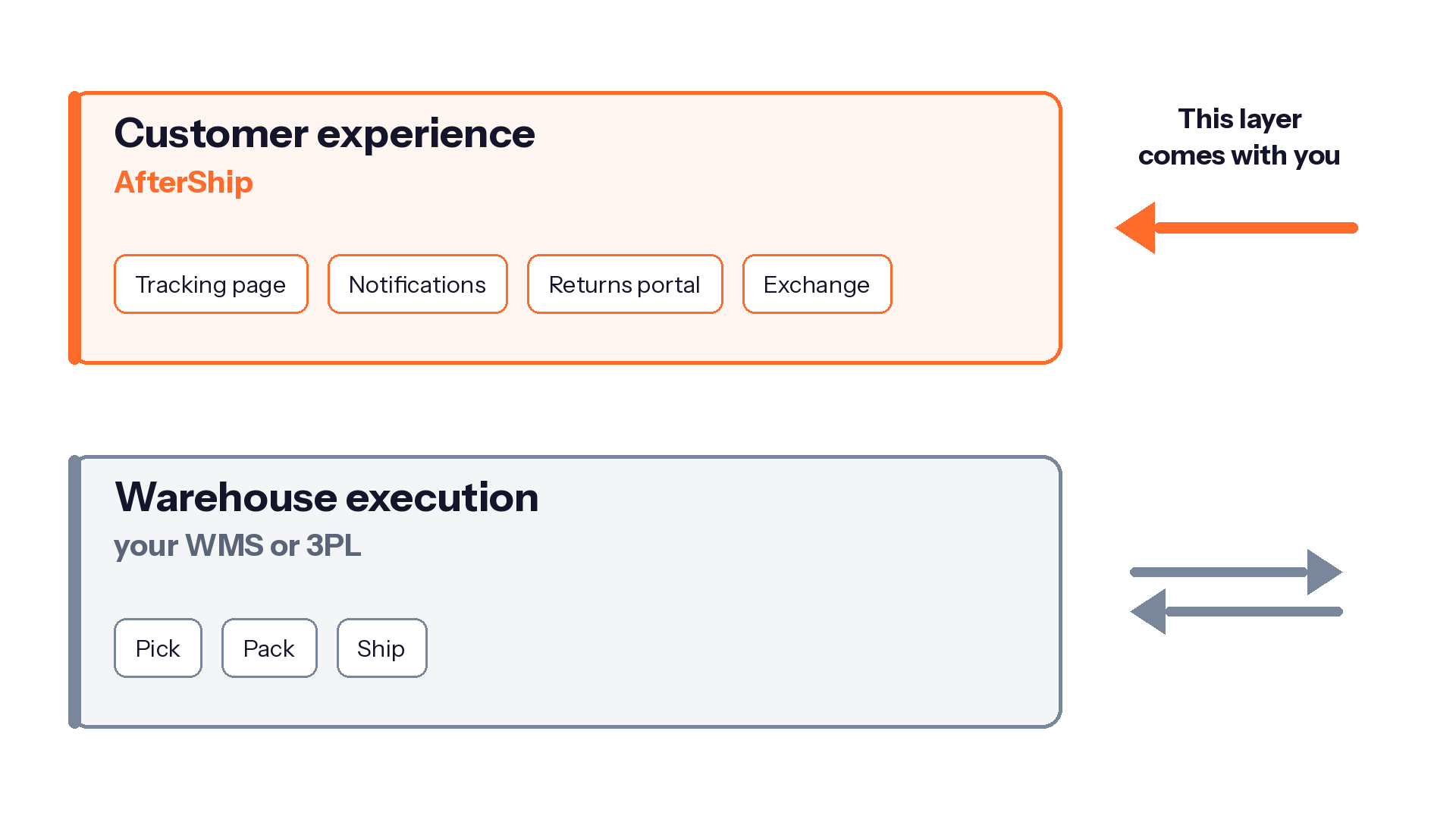
Picture your stack as two floors.
The bottom floor is warehouse execution. It receives inventory, picks and packs orders, prints labels, and hands parcels to carriers. That is a warehouse management system, and the global market for it was valued at USD 3.4 billion in 2025, according to Grand View Research.
The top floor is the customer experience. It decides what your shopper sees after checkout: the tracking page, the delivery notifications, the returns portal, and whether a return turns into an exchange. Your shopper never sees the bottom floor. They judge you on the top one.
The vendors draw the line in the same place you should. ShipHero's integrations directory carries a dedicated "Returns Management Platforms" category, which only makes sense if returns are expected to run on software outside the warehouse system. ShipBob, separately, addresses outsourced returns management solutions in its turnkey fulfillment guide: "you'll typically need a separate tool like Loop or AfterShip that integrates with your fulfillment partner."
The top floor is also where shoppers decide how a return should end. According to NRF and Happy Returns, 76% of consumers say they are more likely to choose a return option that provides an instant refund or exchange.
The decision you are being asked to make at renewal is about the bottom floor. The one filling your ticket queue is upstairs.
AfterShip: The Post-Purchase Layer on Top of Your Warehouse System
Whatever system runs your warehouse, something still has to own the tracking page, the notifications and the returns portal. AfterShip separates post-purchase customer experience from warehouse execution software. It owns that layer whatever is picking and packing underneath.
- AfterShip Tracking. The shopper follows progress on a branded tracking page, which shows carrier statuses such as Info Received, In Transit, Out for Delivery and Delivered. Notifications keep them informed as the status changes. Tracking reads from a network of 2,000+ carriers. AfterShip publishes a ShipHero integration for Tracking.
- AfterShip Returns. Shoppers open a branded, automated, self-service returns portal. Routing rules can match the return method to the return reason, and on Premium and Enterprise, workflows decide which resolutions a reason unlocks. AfterShip publishes a two-way ShipHero integration for Returns. It requires the Premium or Enterprise plan.
- AfterShip Shipping. Compare live rates across carriers before you buy the label. Shipping connects 130+ carriers in one integration, with 87+ of those available for label generation. Smart Carrier Recommendation is available on every AfterShip Shipping plan. It reads AfterShip tracking data for the shipment's origin and destination, then excludes carrier services with a high exception rate on that lane, so the shortlist you price is already filtered by delivery history. AfterShip's ShipHero integrations cover Tracking and Returns; Shipping is a capability you adopt alongside your warehouse system.
Each of these is bought, configured and changed without touching how orders are picked. The tracking page, the notification logic and the returns rules live with AfterShip, which is why they survive a warehouse change intact.
Warehouse Software vs the Post-Purchase Layer: A Strategic Comparison
Put the two layers against the things this decision actually turns on. Who controls the brand experience. Whether you can compare shipping rates and act on the result. Whether a shopper can complete an exchange or only request one. Who holds the post-purchase data and does anything useful with it. And what survives when you change warehouse systems.
ShipHero rate-shops carriers, publishes 52 automation-rule triggers and offers a branded return portal. Each of those capabilities sits somewhere specific in the stack, and its location decides who still owns it after you switch.
| Criteria | The warehouse software model (e.g., ShipHero) | The post-purchase layer (AfterShip on top) |
|---|---|---|
| Brand experience control | ShipHero sends tracking data back to your store platform, which notifies the shopper. It publishes a branded self-service return portal. | A branded tracking page and notifications from the Essentials plan up, and a branded returns portal. A custom domain sits on Premium and Enterprise. |
| Shipping cost control | ShipHero rate-shops carriers in real time and lets you build a custom cheapest profile for label selection. | Live rate comparison. 130+ carriers in one integration, 87+ for label generation. Smart Carrier Recommendation, on every plan, excludes high-exception services using tracking data. |
| Returns resolution | ShipHero documents that selecting Exchange does not automatically create an exchange order. Store credit is managed from the store platform. | Exchanges resolve inside the portal. Routing rules, on every plan, key the return method to return reason. Instant exchanges sit on Premium and above. |
| Data ownership and insight | ShipHero reports measure warehouse activity, from COGS to picker and packer efficiency to replenishment. | Shipping, tracking, returns, and warranty run on one data layer, so return windows anchor to verified carrier delivery events. |
| Portability | Workflows, rules and integrations are configured inside the warehouse system and stay with it. | The tracking page, the notifications and the returns portal stay in place when the warehouse system underneath them changes. |
A warehouse system is necessary for running the building. The customer-facing half of the stack is a separate purchase, decided on separate criteria, and it travels with you from one warehouse system to the next. If the label workflow is the sore point, see warehouse software weighed against a label-buying tool first.
On the tracking side, StackCommerce reduced WISMO tickets by 71% year over year with AfterShip Tracking.

“AfterShip's shipment tracking is pretty amazing stuff. And I think the 71% drop in WISMO tickets is due to us providing that tracking visibility to our customers.”
Deryck Lim, Sr. Operations Manager
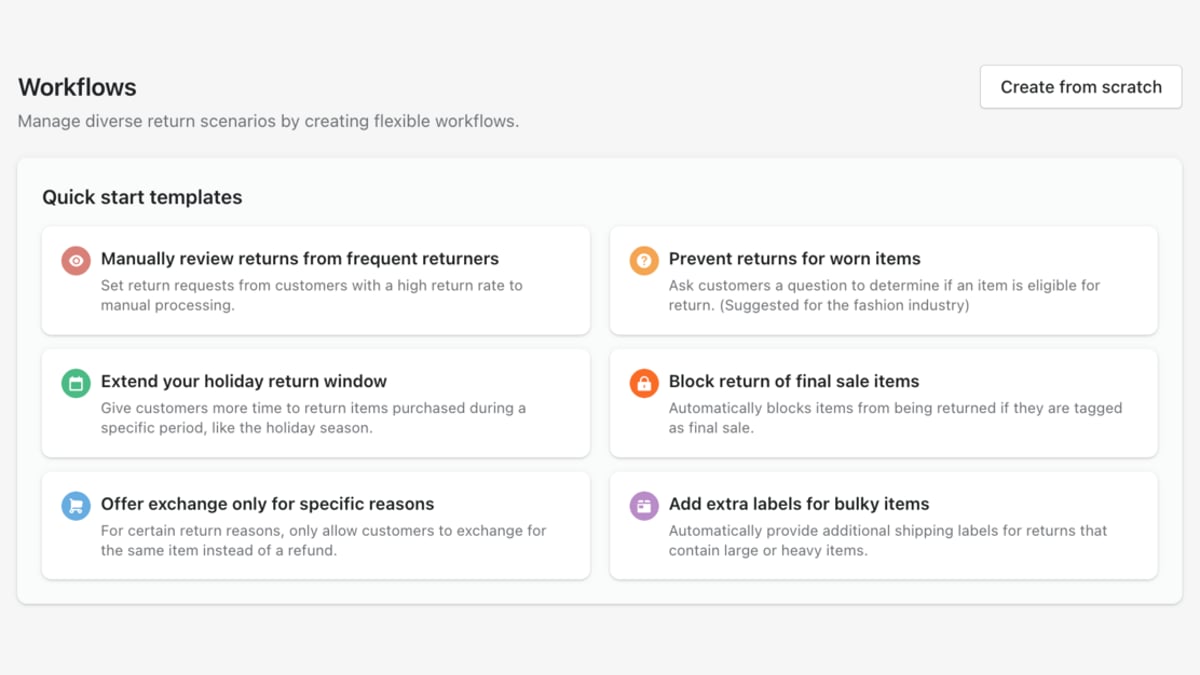
Returns policy logic is configured inside AfterShip Returns, on the same layer.
If You Are Replacing the WMS
Four alternatives to ShipHero come up in this search. Place each one on a layer before you compare features, because that is what decides whether moving to it touches your customer experience at all. Teams set on replacing the bottom floor should start with ShipHero alternatives for mid-market brands.
ShipBob is the like-for-like option here: it sells outsourced fulfillment and separately licenses its warehouse software, so it can replace your warehouse system or take the warehouse off your hands entirely. ShipHero's product is the software. On carrier choice, ShipBob selects the carrier automatically and states that "carriers cannot be omitted from aggregated ship options." Whichever way you use ShipBob, your customer-facing layer is untouched: changing who picks and ships leaves the tracking page, the notifications and the returns portal exactly as they were, because you bought them separately. If you are weighing the two head to head on fulfillment, see how ShipBob and ShipHero compare for DTC brands.
If You Are Replacing the Layer Above It
These three sit above the warehouse, so choosing one changes what your shopper sees rather than how orders get picked.
- For shipping automation: ShipStation. Both platforms publish a branded tracking page, branded notification emails and a branded returns-and-exchanges portal, so that is shared ground. The difference is depth: AfterShip's shipping, tracking, returns, and warranty products share one data layer. ShipStation's post-purchase tooling sits alongside its label workflow, a different architecture for the same job. You can compare AfterShip and ShipStation directly if shipping automation is the centre of your decision.
- For returns: Loop Returns. Shopify-native exchanges, multi-carrier return labels, store credit and returns analytics run on both, so none of that separates them. AfterShip's edge is that returns read from the same data layer as tracking, so a return window opens from a verified carrier delivery event. Commercially, Loop's paid returns plans require an annual contract, and Loop's terms apply a 6% increase at the completion of each term. AfterShip bills per product. For a feature-level view, this comprehensive returns platform comparison sets AfterShip against Narvar and Loop.
- For an API-first approach: EasyPost. Each offers a shipping API and a no-code path, so neither is developers-only. EasyPost's own published documentation describes Nexus, its no-code dashboard, as in beta and US-domestic only. AfterShip's no-code layer also extends to a branded returns portal, so the same team that configures label logic also configures what the shopper sees when they send something back.
If you are a 3PL running client warehouses on ShipHero
Third-party logistics providers sit in a different seat. You run ShipHero for client warehouses, but your clients judge you on the tracking and returns experience their shoppers see. AfterShip for 3PLs and logistics providers adds that layer on top of the warehouse system you already run.
Tracking is usually where client complaints start, so begin with the tracking platforms built for 3PLs before you reopen the warehouse contract.
If you are comparing vendors on enterprise terms such as SLAs and multi-client reporting, look at how other vendors serve 3PL and enterprise logistics teams.
When you are ready to go to market, here is what to put in a 3PL shipment tracking RFP.
The Verdict: Change the Layer That Is Hurting
Two questions settle this. What does your post-purchase data currently tell you, and can you act on it? And what are you paying for each layer, measured against the work each one actually does?
Keep your warehouse system and add the post-purchase layer if:
- Your ticket volume is dominated by shoppers asking where their order is.
- Return reasons and delivery exceptions live in different places today, so nobody owns the number that connects them.
- The pressure is on software cost, and separating the layers lets you price each one against what it governs.
- You expect to change warehouse systems within a few years and want the customer-facing build to survive it.
- You want that layer run by a post-purchase specialist.
AfterShip is not a warehouse management system and does not do physical fulfillment. If the warehouse itself is the problem, whether that is throughput, accuracy or labour, no post-purchase layer fixes it, and a WMS or 3PL change is the right call. What AfterShip owns is the layer above, and you keep that layer whichever warehouse system you pick. For readers still mapping the stack, a three-way look at where each layer sits lines all three vendors up.
Change your warehouse system if:
- Your warehouse team has outgrown the workflows the software supports.
- You are changing fulfillment model entirely, in-house to outsourced or back again.
Warehouse software runs your operation; post-purchase software owns your customer experience. Decide which one is actually failing before you sign a migration, and if it is the second, you can fix it without touching the first.
Frequently Asked Questions
Can I use AfterShip with ShipHero?
Yes. AfterShip publishes ShipHero integrations for two of its products. You can integrate AfterShip Tracking on top of your ShipHero account, which puts the branded tracking page and the notifications on the layer you own while your warehouse keeps running on ShipHero. The Returns integration is two-way, and it requires the Premium or Enterprise plan. There is no AfterShip Shipping integration with ShipHero. Shipping is adopted alongside your warehouse system.
The help center walks through how to set up the ShipHero integration for Returns step by step.
Is AfterShip cheaper than ShipHero?
This compares two different things. ShipHero sells warehouse management software, and its pricing is quote-only, so no direct cost comparison is possible from public figures. AfterShip is the post-purchase layer, covering shipping, tracking, returns, and warranty. Shipping, Tracking and Returns are billed per product, and each publishes its prices: see AfterShip Shipping pricing, AfterShip Tracking pricing, and AfterShip Returns pricing. AfterShip is not a fulfillment service and does not carry the cost of running or outsourcing a warehouse.
What do I actually gain by separating the two layers?
Control and portability. You own the tracking page, the notification logic and the returns portal, so you change what the shopper sees when you decide to, with no warehouse project behind it. When you do change warehouse systems, the customer-facing build keeps running unchanged, which makes that migration a warehouse migration only.