If your store still runs returns through Return Magic, you are running them on an app Shopify retired in 2022. Nothing is forcing your hand today, and that is exactly why this is a good moment to rebuild returns properly. In practice that usually shows up as a returns process that quietly stopped working. The labels stopped generating, or the portal your customers used stopped letting them in, or nobody can say when it last did anything at all, and you have been handling returns by hand out of an inbox and a spreadsheet ever since. Most merchants weighing Return Magic alternatives are not looking for a project. They are looking for a returns process that works again, on a platform someone is still building.
What Happened to Return Magic
Most merchants find out the same way. A customer asks for a return, someone opens the returns app out of habit, and nothing behaves the way it used to. If you inherited the store, the app may simply be sitting in the admin with no explanation attached to it. For the platforms to migrate onto, see where to migrate a legacy returns app.
The history is settled. Return Magic was built in Montreal by co-founders Guillaume Racine and Raff Paquin, and Shopify acquired Return Magic in June 2018; both co-founders joined Shopify's team in Montreal after the deal. The Return Magic sunset followed on 6 July 2022. It is not listed on the Shopify App Store today, and the returnmagic.com domain now routes to a Shopify article about returns management.
Return Magic shut down on 6 July 2022. It is no longer supported and no longer listed, so a store still running it is running frozen software.
What matters for your store is narrower. Software handling one of your most sensitive customer moments stopped being maintained four years ago, and it has not received a fix or a feature since. Replacing it is a decision you get to make on your own schedule, which is a better position than most software migrations start from.
What Shopify Brands Need in a Return Magic Replacement
Start with what you already have. Shopify's admin now handles returns natively, including return requests, return rules, refunds, store credit, variant exchanges and return-reason reporting. For a store processing a handful of returns a month, that baseline may be enough on its own.
These four criteria are about what a growing brand needs beyond it.
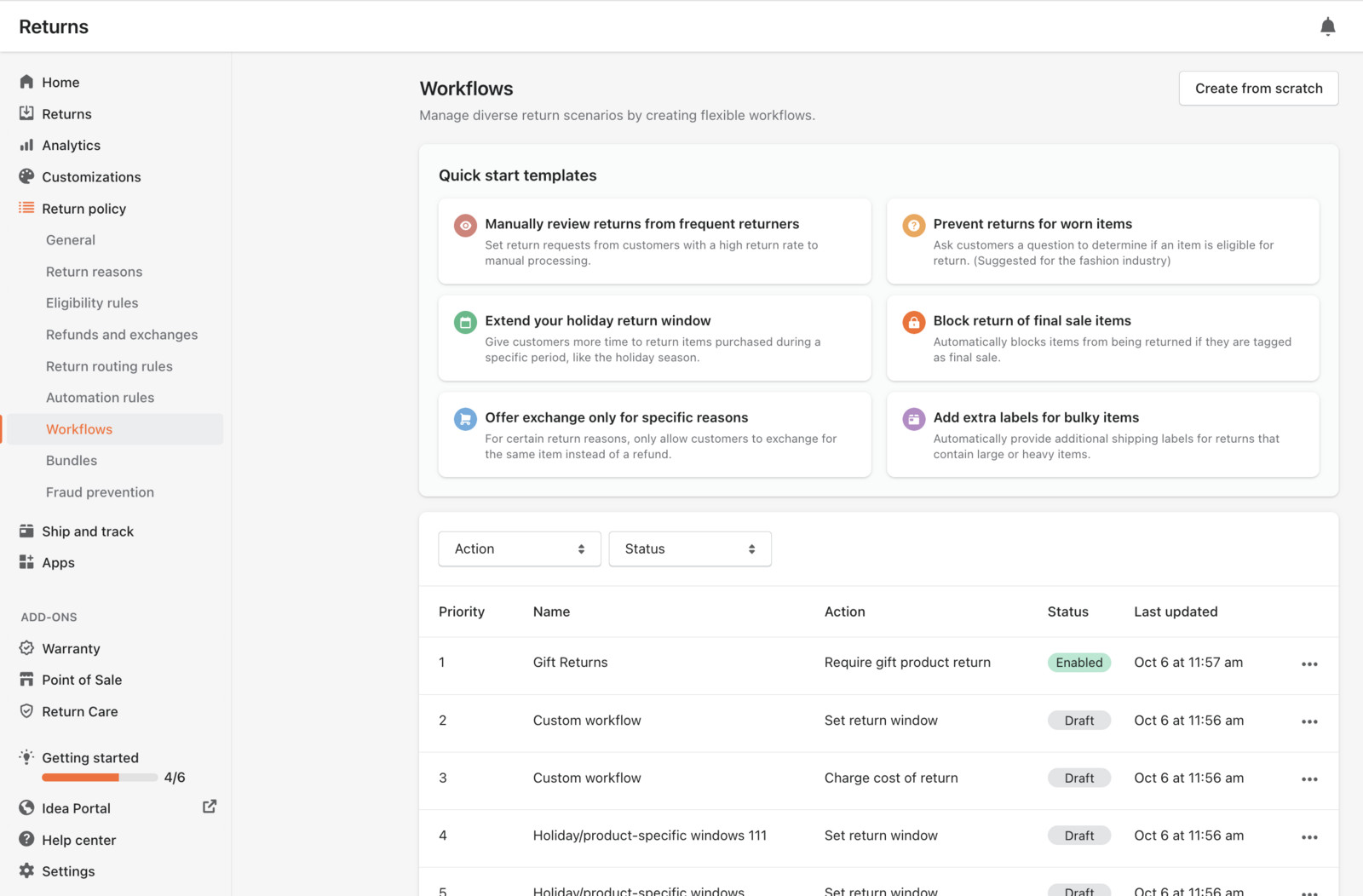
- Automation rule depth. How much of the decision your automation rules can encode: approval conditions, routing, paid versus free returns, and the exceptions your policy actually contains.
- Carrier and label control. Whether you can connect your own carrier accounts and apply your own negotiated rates, instead of accepting whatever the tool generates.
- Exchange and store-credit configurability. Every established tool here offers exchanges. The question is how far you can shape the incentive.
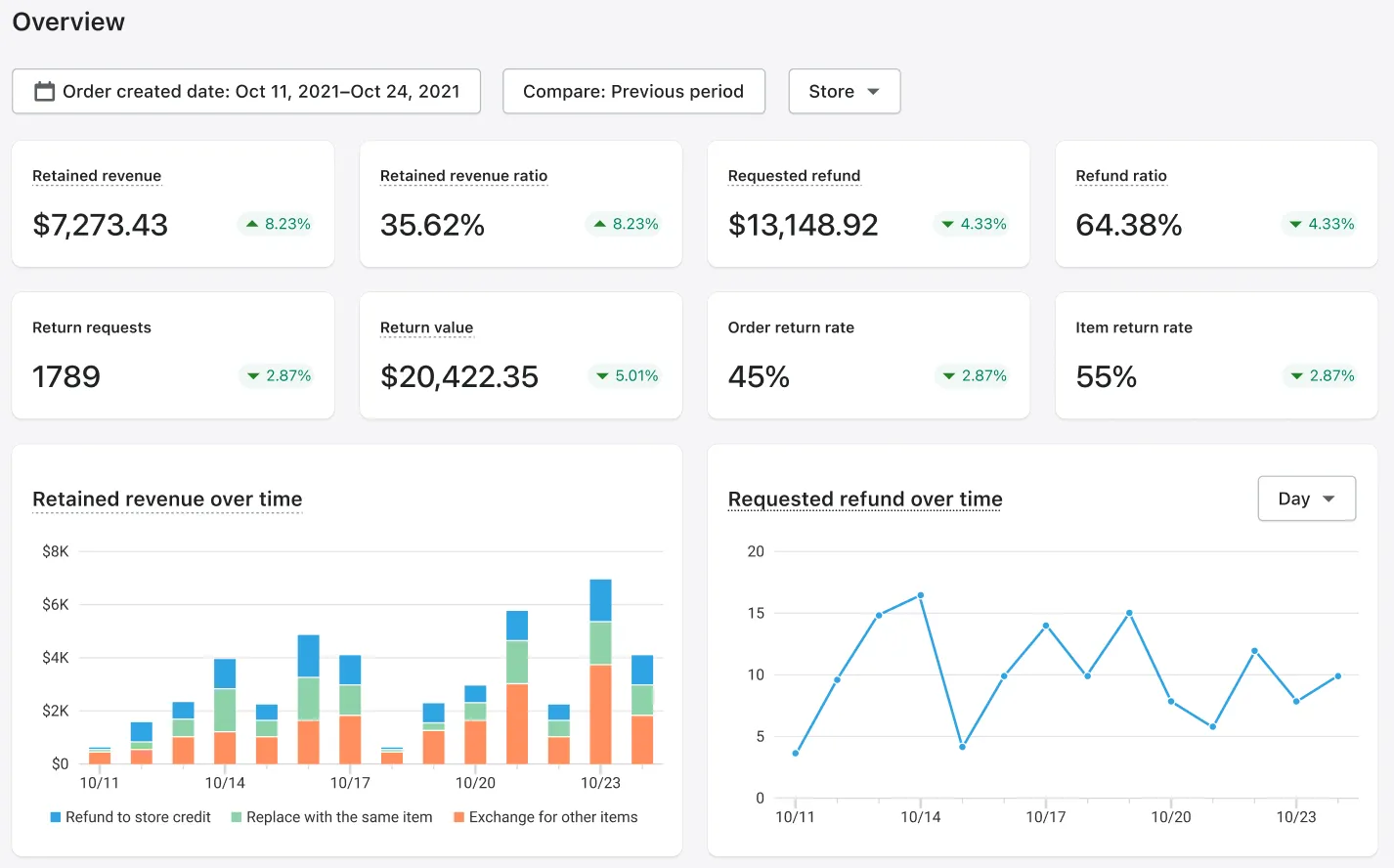
- Returns analytics. Whether you can see why items come back, at a level of detail you can act on.
One axis sits underneath all four. Returns data held in the same system as your shipping and tracking data lets you read a return reason against the delivery that caused it. Returns data stitched to other systems answers the same question with an export and a spreadsheet. The four criteria are testing for where your data sits.
Introducing AfterShip Returns: The Upgrade Path for Shopify
AfterShip Returns is a direct replacement for the discontinued Return Magic app.
It carries Built for Shopify certification in its own Shopify App Store listing header, Shopify's highest app-store tier, awarded against standards for performance, design and integration. Neither Loop Returns nor Happy Returns carries that certification in its listing header. AfterShip Returns holds a 4.7 rating on the App Store.
David has been very helpful from start to finish. My issue was resolved! Thank you.
Ten Little, United States, almost 3 years using the app. Shopify App Store, August 4, 2026, 5 of 5.
The integration goes deeper than a listing badge. AfterShip Returns runs inside the Shopify admin and supports Shopify Checkout for exchanges and upsells, so finance reconciles one payment environment rather than two.
Returns also sit inside AfterShip's shipping, tracking, returns, and warranty suite, so the returns tool is not a bolt-on to be reconciled with everything else. That is what a complete post-purchase suite buys a small team.
It scales down as readily as it scales up. A brand handling 25 returns a month and an enterprise handling hundreds configure the same product at different settings, so the setup you build now is the one you keep as the store grows.
What Return Magic Did, and What Replaces It
Return Magic was a Shopify returns app, and for a small merchant it did the job the admin could not do on its own at the time. It gave shoppers a self-serve return request, handled refunds and exchanges, and generated return labels. It was free to the merchant and tied to Shopify shipping. Whatever your store had configured in it stopped changing on 6 July 2022.
What a replacement has to do in 2026 is a longer list, because the baseline moved. The table below sets the three live options against the seven criteria that matter to a brand rebuilding from scratch.
| Criteria | AfterShip Returns | Loop Returns | Happy Returns |
|---|---|---|---|
| Ease of setup from scratch | Self-serve install, no code changes | Self-serve install | Listing install, 14-day trial |
| Shopify-Native Experience | Built for Shopify certified | Badge absent | Badge absent |
| Automation Rule Depth | Conditional rules, auto-approve, routing | Automated return policies | Automatic policy rules |
| Carrier & Cost Control | Own accounts: 3 / 5 / unlimited | Carrier rate shopping | Return Bar drop-off |
| Exchange & Store Credit Incentives | Exchange, store credit, bonus, keep-item | Exchanges, store credit, Bonus Credit | One-click exchanges |
| Analytics for Ops Teams | Retained revenue, return-reason drill-downs | Enhanced insights on Advanced | Real-time returns reporting |
| Pricing Scalability | From $16/mo annually, published quotas | Free tier; from $155/mo | Entry price only published |
AfterShip and Loop meet in the same place on price before they diverge. Each offers a route where the shopper pays a small fee at checkout and the merchant pays nothing for the software. Loop's is its free Checkout+ tier, which includes US and Canada domestic return labels; its paid tiers, Essential and Advanced, are subscriptions on an annual contract. AfterShip's is Return Care, for eligible Shopify merchants, and it sits alongside standard SaaS pricing, so the shopper-funded route and a straightforward subscription are both on the table.
The Three Return Magic Alternatives for 2026, Reviewed
AfterShip Returns does not sit on its own. Returns, shipping and tracking run on the same platform, so a return-reason drill-down sits beside the delivery record that produced it. Whether a run of damage reports belongs to a product or to a carrier lane is then one question in one place.
Loop Returns is a returns-first solution built for Shopify that offers exchange and store-credit workflows.
Happy Returns is a UPS company that operates a physical drop-off network, where a shopper hands back an item without a box or a printed label. Its Shopify listing publishes one price, $500 a month, as its entry point, with external charges billed separately from the Shopify invoice.
For a small Shopify operation rebuilding returns from nothing, AfterShip Returns is the most balanced of the three. For a wider field than these three, the returns vendors we reviewed this year covers the rest of the category.
Choose Loop if:
- you want a single prescribed returns flow and would rather not configure one.
Choose AfterShip Returns if:
- you want to set any outcome, exchange, store credit with bonus, refund or keep-the-item, on your own rules. AfterShip Returns is built to be configured, so there is setup work a prescribed flow would not ask of you. That is the trade, and it is the point: the flow fits the business rather than the business fitting the flow
- you want plan price, included quota and per-return overage in front of you before you sign anything
- in-person drop-off matters but is not the whole decision, since a drop-off network is a different purchase from returns software and sits alongside it rather than replacing it
- you want the returns you process read against the shipping and tracking data that produced them, on one platform that still fits when the store is twice the size
Rebuilding Your Returns in Five Steps
You cannot migrate from Return Magic, and that is the good news. Return Magic never published a data export path, and neither did Shopify. There is no archive to request, no file to map and no vendor left to chase for your history. What you are doing is not a platform-to-platform move. It is a clean build, and it is the rare chance to set returns up around how the business runs now instead of inheriting a configuration someone made years ago.
Five steps, in order.
1. Install AfterShip Returns from the Shopify App Store. The install is self-serve and needs no code changes to your theme.
2. Configure your returns policy. Return windows, eligible and non-returnable products, restocking rules, and who pays for the label in each case. Two things did not survive Return Magic, and both deserve a decision here rather than a default. Your historical return data is gone, so your baseline restarts the day you go live, which makes it worth writing down what you believe your return rate is before the new numbers arrive. Your old policy configuration is gone too, so the rules you used to run are not a starting point. Write the policy the business needs today.
3. Set up automation rules. Approval conditions, routing, exchanges and store credit. Encode the decisions you make the same way every time and keep the exceptions for a human. The returns dashboard is where you find those exceptions: requests filter by RMA status, shipping status, refund status, return reason and return method.
4. Customise your branded returns portal. Your logo, your wording, your domain. This is the page a shopper sees at the least forgiving moment of the relationship.
5. Announce the new process to your customers. Update the returns page in your storefront, the link in your order confirmation, and the macro your support inbox uses. A returns process nobody can find reads as no returns process.
Beyond a Replacement: Turn Returns into a Revenue Engine
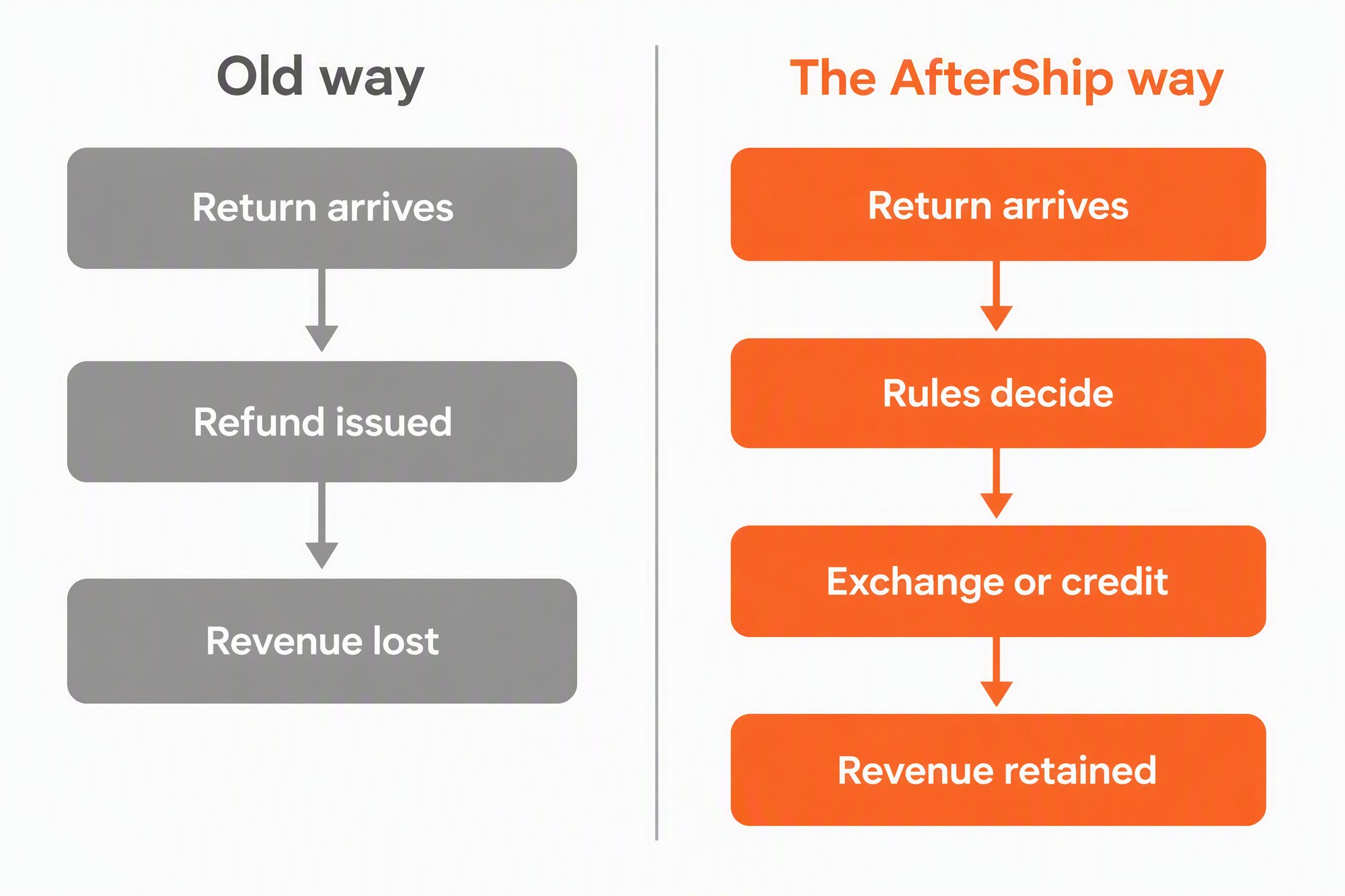
A returns process that works is the floor, not the ceiling. Four capabilities decide whether a return ends as a refund or as something else, and each is a lever you set rather than a default you accept.
Exchange for any item or variant. A shopper can swap for a different size or colour of the item they bought, or shop your whole catalogue on the returns page and put the value of the return towards it. An exchange keeps the revenue in the business; a refund sends it back out.
Bonus credit on store-credit refunds. When a shopper chooses store credit instead of money back, you can add an uplift on top. You set the size of it, and you decide which return reasons and which customers qualify.
Automated keep-the-item rules. For low-value items, the return shipping and the handling can cost more than the product. A rule can refund the shopper and tell them to keep it, on conditions you define, without anyone reviewing the request.
Green returns options. Where a return does not need to travel, you can offer the shopper a lower-impact route and say so on the portal.
The shopper's side of this is measured. The National Retail Federation and Happy Returns, in the 2025 Retail Returns Landscape, put it this way.
82% of consumers say free returns are a key purchase factor, up from 76% in 2024. 15 October 2025.
Book a Demo
Returns automation that improves the returns and exchanges experience and gives you rules you set yourself.
Start Your Free Trial and Rebuild Your ReturnsReplacing a different returns app?
- Moving off ReBound? Start with AfterShip vs Rebound Returns.
- Outgrowing a budget Shopify returns app? See our Return Prime alternatives.
- Running a lightweight portal that has stopped keeping up? Here is the Rich Returns alternative we would look at first.
- Need more than an exchange-first flow? Read about the Return Rabbit alternative built for configurable rules.
Return Magic Alternatives FAQ
When did Return Magic shut down?
Return Magic shut down on 6 July 2022. The admin and the service stopped working on that date. The app had already been pulled from the Shopify App Store before the shutdown, and its listing today reads that the app is not currently available on the Shopify App Store. The returnmagic.com domain now redirects to a Shopify article on returns management. If Return Magic is still sitting in your Shopify admin, it is not processing anything.
How long does it take to set up AfterShip Returns?
The install is the fast part. AfterShip Returns installs from the Shopify App Store with no code changes, and you can have a basic policy accepting requests the same day. The honest answer for the rest is that it depends on how much of your policy you want the software to decide. A store with one return window and one refund method is quick. A store with category exceptions, conditional fees, connected carrier accounts and a branded portal takes longer, and it is worth taking that time. Plan the work in two passes: get returns flowing on a simple policy first, then tighten the rules once you have seen a few weeks of real requests come through. You are not importing a configuration from somewhere else, so what you build now is what runs.
What does AfterShip Returns cost?
Both AfterShip and Loop offer a route where the shopper pays a small fee at checkout and the merchant pays no platform fee. AfterShip offers both a shopper-funded option through Return Care ($0 platform fee, funded by an optional shopper-paid Return Care fee, for eligible Shopify merchants) and standard SaaS pricing for flexibility. Return Care is a Shopify offering and is not available in every market, so check your region before you plan around it. On the subscription side, Essentials starts at $16 a month billed annually, and every tier publishes its plan price, its included return quota and its per-return overage rate, so you can model the true cost before you sign.
Can I use my own shipping carrier rates?
Yes. Connect your own carrier accounts and apply your negotiated rates to generate prepaid labels: 3 accounts on Essentials, 5 on Premium, and unlimited on Enterprise. You can also use AfterShip's pre-negotiated discounts on USPS and 40+ other carriers on any plan.